Blog

  • Best AI Coding Boilerplates 2026

    Best AI Coding Boilerplates 2026


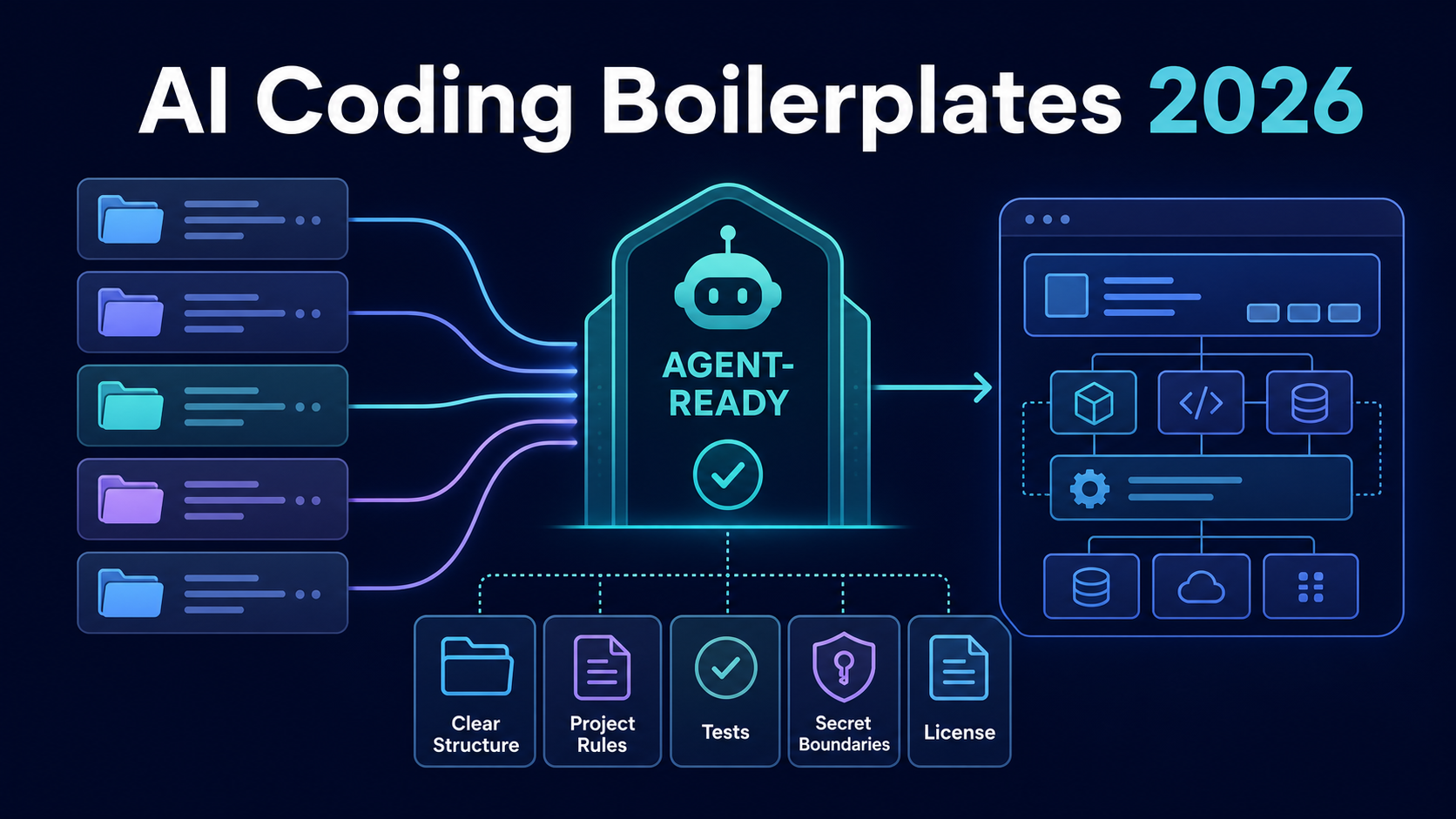
    The best AI coding boilerplate is not the template with the longest feature list. It is the smallest maintained starter whose structure, project rules, tests, secrets, license, and upgrade path an agent can understand without guessing. Start with Vercel Chat SDK for an AI chat product, Next.js SaaS Starter for a readable SaaS reference, Open SaaS for explicit agent guidance, create-t3-app for a configurable foundation, or SaaS Boilerplate by ixartz for a broader free application shell.

    This is an agent-readiness comparison, not a generic Next.js theme ranking. Repository state and licenses were checked on July 15, 2026. Fork a candidate and audit the exact commit before using it in production.

    What Makes a Boilerplate AI-Coding Friendly

    An AI coding-friendly boilerplate reduces ambiguity for both the model and the reviewer. It exposes where code belongs, how to run checks, which generated files should stay untouched, and what “done” means. A large codebase can still be agent-friendly; an undocumented small one can be hostile.

    Use six tests:

    • Clear boundaries: application, database, authentication, billing, tests, and infrastructure have predictable homes.
    • Project instructions: AGENTS.md, CLAUDE.md, editor rules, or concise contributor docs name real commands and restrictions.
    • Deterministic verification: lockfiles, migrations, type checks, linting, tests, and CI reproduce locally.
    • Secret hygiene: .env.example documents names without shipping credentials or unsafe defaults.
    • Replaceable integrations: provider-specific code is isolated behind adapters instead of spread across the repository.
    • Usable license: the exact template version permits your commercial and distribution model.

    Agent rules do not rescue poor architecture. They should describe the repository, not compensate for circular dependencies or hidden runtime behavior. Graphify’s AI coding agent comparison explains why the surrounding execution and review system matters as much as the model.

    How We Ranked the Starter Kits

    We reviewed current official repositories and vendor documentation, then scored fit by evidence rather than stars. The comparison considers structure, documented commands, automated checks, agent-specific guidance, dependency surface, license clarity, maintenance activity, and exit cost.

    No common private build was run across every template, so this article does not publish a fabricated numerical winner. A starter qualifies for the shortlist only when a developer can inspect its source or documentation and run a bounded pilot. Paid kits appear as items to verify, not as sponsored recommendations.

    The deciding metric is reviewable change throughput: can an agent implement one representative feature while preserving architecture, passing tests, and producing a small understandable diff? Time-to-first-screen alone rewards templates that postpone security and migration work.

    We also treat deletion as a first-class score. Every unused authentication provider, payment path, background job and deployment adapter gives an agent another plausible but wrong place to make a change. During the pilot, count how many files survive after removing features you do not need and whether the remaining tests still describe the product. A smaller retained surface is often more valuable than a larger advertised feature count.

    Maintenance evidence needs a date. Check the latest commit, releases, open security reports, supported framework versions and migration notes, but do not confuse a same-day commit with stability. Inspect what changed and whether maintainers document breaking upgrades. For commercial kits, ask to see a changelog and sample repository before purchase; screenshots cannot reveal dependency age, test coverage or architectural coupling.

    Quick Comparison Table

    Starter Best fit Stack and structure Agent-ready evidence License / access Main caution
    Vercel Chat SDK AI chat and tool-enabled product prototypes Next.js, AI SDK, Auth.js, Postgres, Blob, Playwright .cursor/rules, tests, typed app/lib boundaries Apache 2.0 repository license Strongly opinionated around Vercel services and chat use cases
    Next.js SaaS Starter Learning or extending a compact SaaS foundation Next.js, Postgres, Drizzle, cookie-based JWT authentication, Stripe, shadcn/ui Small readable modules, migrations, seed scripts and explicit route/action guards MIT It has no automated test command; the teams/billing shell still needs product-specific hardening
    Open SaaS Full-stack SaaS with explicit agent support Wasp, React, Node, Prisma, payments, jobs, Playwright AGENTS.md, skills, agent docs, CI and E2E tests MIT Wasp conventions are an intentional framework commitment
    create-t3-app A clean configurable Next.js base Next.js with selectable TypeScript, tRPC, auth and database choices Generated stack stays small; official usage docs MIT It is a foundation, not prebuilt billing or product logic
    SaaS Boilerplate A feature-rich free Next.js shell Next.js, TypeScript, auth, teams, RBAC, i18n, logging, tests Test/CI surface and explicit modules MIT More features increase deletion and upgrade work
    Makerkit Teams evaluating a paid, guided multi-tenant starter Next.js options, auth, billing and multi-tenant documentation Vendor documents agent rules across packages Commercial tiers; terms vary Verify the selected kit, price, license, update rights and generated code before purchase

    “Free” describes acquisition, not ownership cost. A free starter can demand weeks of integration; a paid starter can still create lock-in or unused code.

    Best AI Coding Boilerplates in 2026

    Next.js and SaaS Starter Kits

    Next.js SaaS Starter is the strongest free reference when you want a compact conventional SaaS codebase rather than every possible feature. Its official repository combines Postgres, Drizzle, cookie-based JWT authentication, Stripe and shadcn/ui under an MIT license. The limited surface helps an agent trace a request through route, data and billing layers. Its current package.json has database setup, seed and migration scripts but no automated test command, so add behavior and authorization tests before treating it as a production baseline.

    SaaS Boilerplate by ixartz fits teams that prefer more scaffolding: multi-tenancy, roles, permissions, internationalization, logging and tests. Those features create helpful examples, but they also enlarge the context and upgrade surface. Delete unused modules early, before agents form dependencies on them.

    Makerkit is a paid candidate for teams that value extensive multi-tenant documentation and agent rules. Commercial access changes the evaluation: confirm the current price, permitted projects, redistribution restrictions, support period and update entitlement in the actual license you receive. A marketing comparison is not a legal review.

    Agent-Friendly Project Structures

    Open SaaS makes agent support an explicit product property. Its current repository includes AGENTS.md, skills and agent-oriented documentation alongside CI and Playwright tests. That is useful evidence because the instructions live near executable code. The trade-off is Wasp: its declarative full-stack model can reduce plumbing, but your team and agent must learn the framework’s conventions.

    create-t3-app takes the opposite approach. It generates a smaller type-safe foundation from selected components instead of shipping a finished SaaS. That can be ideal for experienced teams: fewer unused abstractions mean less context and less deletion. You must still add your own billing, authorization, deployment and project rules.

    A good project structure gives the agent progressive context. Root instructions define shared commands and safety rules. Package-level instructions explain local boundaries. Tests encode behavior. Architecture records explain decisions that code alone cannot reveal. This is the same context discipline behind Graphify: relationships and evidence are more useful than a flat pile of files.

    Templates to Verify Before Use

    Vercel Chat SDK is the most specialized pick. It is a working AI chat application with model-provider routing, persistence, authentication, file storage and tests. Choose it when chat is close to the product’s core loop. Do not force a marketplace, analytics product or conventional CRUD SaaS into a chatbot architecture merely because the demo launches quickly.

    Also verify any new “AI-native” commercial starter before adding it to the shortlist. Look for a public changelog, exact stack versions, a sample repository, test commands, license text, refund terms, security guidance and a documented removal path. Claims such as “works with every agent” or “production-ready” are not acceptance tests.

    How to Choose Without Lock-In

    Clone the candidate into a throwaway organization and run an exit test before committing your product to it. If the starter connects agents to external systems, audit each integration with the same least-privilege checks used in Graphify's MCP server guide. If it began as a prompt-led prototype, use the vibe coding promotion boundary before moving it toward production.
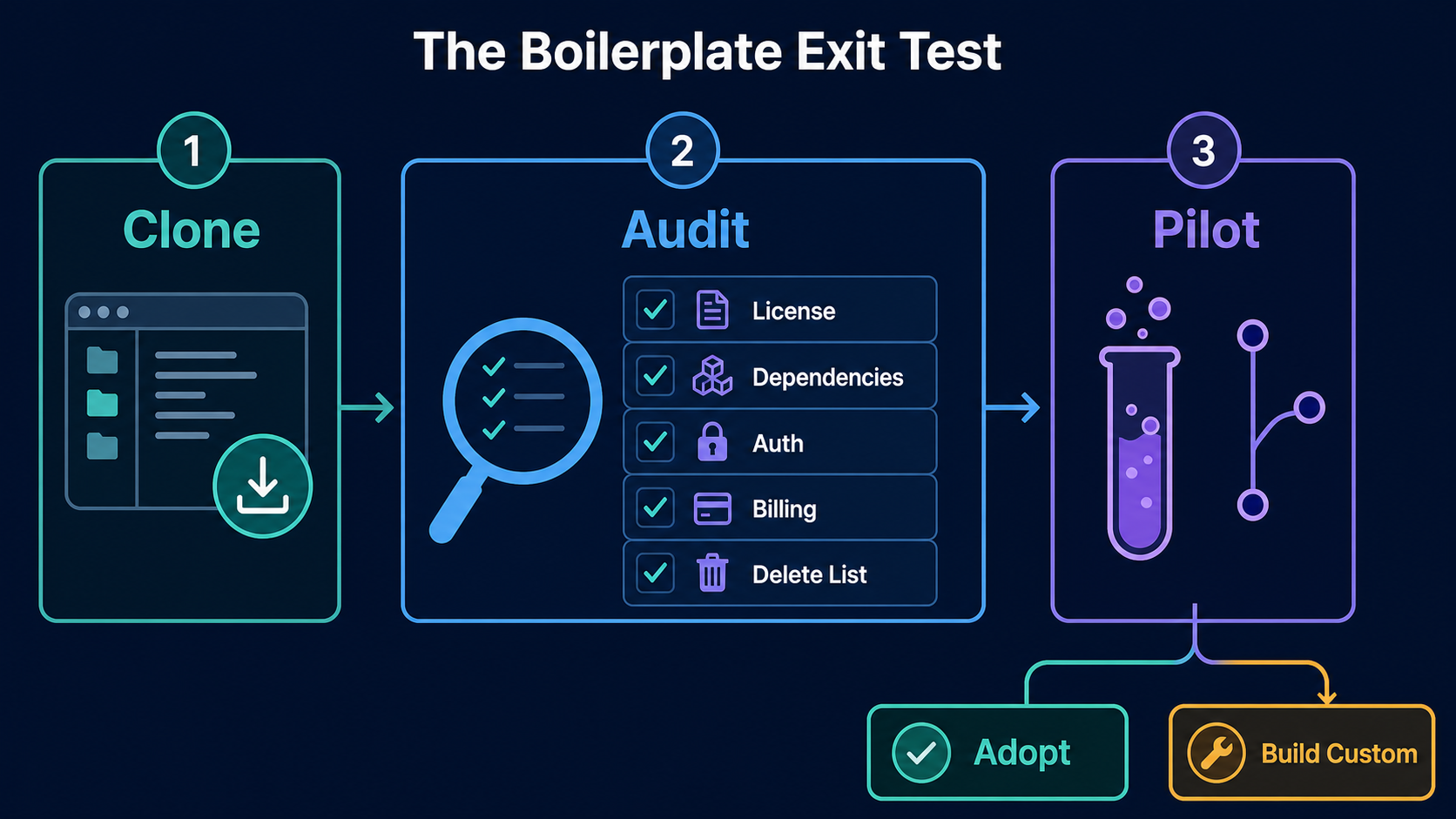
    Three-stage boilerplate exit test: clone, audit, pilot, then adopt or build custom

    1. Freeze evidence: record the repository URL, commit, license, package lock and documentation date.
    2. Create a delete list: mark demo users, sample content, analytics, providers, jobs and UI that your product does not need.
    3. Map the seams: identify how to replace authentication, billing, email, storage, database and hosting.
    4. Run one real feature: give the coding agent a representative change plus acceptance tests and a time budget.
    5. Exercise failure: rotate a secret, replay a webhook, roll back a migration and remove one provider.
    6. Measure review: record accepted-patch rate, human edits, failed commands, test time and unexplained generated files.

    Adopt only if the team can explain the critical request paths and remove an integration without rewriting unrelated modules. Maintain a clean upstream-diff strategy, but do not blindly merge template updates into production. Review them as third-party code.

    Finally, create your own baseline after adoption. Pin the approved commit, replace vendor demo instructions with project-specific rules, document owners for authentication and billing, and add architecture decisions for intentional deviations. Future agents should optimize for your product, not keep recreating the template author’s demo. This handoff is the point where a starter stops being an external example and becomes maintained internal software.

    FAQ

    Who should review template licenses before launch?

    The engineering owner should identify every repository, package and asset license. Legal or a designated business owner should approve commercial, redistribution, attribution and seat/project restrictions. Record the exact license text and commit or purchased version; a directory’s license badge is not enough.

    What files should teams remove before production?

    Remove demo accounts, sample data, unused providers, placeholder API routes, test keys, default admin paths, example webhooks, analytics you did not approve, deployment samples you will not maintain and generated assets without clear rights. Then regenerate the lockfile, rerun migrations and scan the final repository for secrets.

    When should teams build a custom starter instead?

    Build a custom starter when your authorization, tenancy, compliance, runtime or deployment model conflicts with the template’s core assumptions; when deletion exceeds useful retained code; or when the team cannot safely update critical dependencies. A small internal starter can outperform a feature-rich kit when the same architecture will support several products.

    Conclusion

    The best SaaS boilerplate 2026 choice for AI coding is the one your agent can navigate and your team can still own. Vercel Chat SDK, Next.js SaaS Starter, Open SaaS, create-t3-app and ixartz’s SaaS Boilerplate each represent a different starting boundary. Verify the exact commit and license, remove unused code, run a real feature pilot, and prove you can replace a core integration. If the exit test fails, the fast start is borrowed time.
  • Best MCP Servers for AI Coding 2026

    Best MCP Servers for AI Coding 2026


    The best MCP servers for AI coding are GitHub MCP Server for repository work, Context7 for current library docs, Supabase MCP or MCP Toolbox for database context, and Playwright MCP or Chrome DevTools MCP for browser validation. Firecrawl MCP is useful when an agent needs clean public-web evidence. Do not install all of them by default: choose the smallest maintained set that completes a defined workflow with bounded permissions.

    This shortlist is for developers who need better agent context or controlled actions. It evaluates workflow components, not entries in another generic MCP server directory. Repository access, documentation, schema inspection, and test evidence each receive a separate trust boundary.

    Why MCP Matters for Coding Agents

    A model can reason about code already in its prompt. A coding agent can also edit files and run tools. The Model Context Protocol adds a standard client-server interface through which that agent can discover tools and retrieve resources from external systems. In practice, a useful server turns “guess what the repository, database, or browser contains” into “query the authorized source and return evidence.”

    That distinction matters in four workflows:

    • Repository: connect an issue, branch, pull request, and CI result.
    • Documentation: retrieve the API version used by the project.
    • Database: expose schema or query results needed to debug code.
    • Browser: reproduce a UI failure and inspect the changed page.

    MCP does not make the evidence correct or the action safe. A server defines capabilities; the host decides which capabilities to expose; credentials determine the reachable data; and a person remains accountable for consequential writes. The official MCP Registry helps with structured discovery and publisher identity, but registration is not a security audit or a guarantee of production readiness.

    If the underlying problem is understanding relationships across a large codebase rather than reaching another SaaS API, Graphify adds structural code context that can complement narrower repository and documentation servers. The broader AI coding agents comparison explains how the host agent affects planning, tool use, and review.

    How We Selected MCP Servers

    We checked the official publisher repository or product documentation on July 15, 2026. Each selected project was unarchived and showed current maintenance activity. We did not rank by GitHub stars or count every tool as a benefit.

    Five filters determined inclusion:

    1. Provenance: the publisher, repository, and install path are traceable to an official source.
    2. Coding value: the server improves a recurring step between issue, code, test, and review.
    3. Permission control: teams can narrow projects, toolsets, credentials, or read/write effects.
    4. Operational fit: the transport and authentication work with the intended host and environment.
    5. Exit cost: credentials can be revoked, configuration removed, and the workflow restored without trapping project data.

    Maintenance is a gate, not a lifetime promise. Recheck the repository, releases, security notices, and client compatibility. The official reference-server repository warns that its examples are not production-ready. This list therefore excludes the old archived PostgreSQL reference package.

    Quick Comparison Table

    MCP server Best coding job Access to constrain Evidence checked Main limit
    GitHub MCP Server Repos, issues, PRs, CI, security findings Organization/repositories, OAuth or token scopes, toolsets, write tools Official GitHub repository, active A broad token can turn code lookup into repository mutation
    Context7 Version-aware library docs and examples Requested library, API key, returned source Official Upstash repository, active Retrieved examples still require version and project-fit review
    Supabase MCP Supabase schema, docs, local or hosted project work Project reference, read_only, feature groups Official Supabase repository, active Production data and DDL make broad access high impact
    MCP Toolbox for Databases PostgreSQL and multi-database schema/query workflows Database role, source, named tools/toolsets Official Google APIs repository, active Generated SQL is not automatically safe or efficient
    Playwright MCP Accessibility-tree-driven browser automation Browser profile, origins, downloads, session state Official Microsoft repository, active Rich page state can consume context; the project notes CLI skills may be leaner for high-throughput agents
    Chrome DevTools MCP Console, network, performance, screenshots, live Chrome debugging Browser instance/profile, exposed tabs, tool mode Official Chrome DevTools repository, active The connected browser can expose authenticated content and allow modification
    Firecrawl MCP Search, scrape, crawl, and clean public-web context API account, domains, crawl depth, enabled tools Official Firecrawl repository, active External content is untrusted input and some operations consume paid credits

    “Active” describes the verification date, not a promise about future support. Exact packages, endpoints, OAuth behavior, quotas, and prices should be checked in the linked source at rollout.

    Best MCP Servers for AI Coding

    Repository and Filesystem Context

    GitHub MCP Server is the strongest first choice for GitHub-centered delivery. GitHub documents repository browsing, code search, commits, issues, pull requests, project boards, Dependabot alerts, and other security findings. It offers a GitHub-hosted remote server and a local option, plus installation guidance for coding hosts including Codex and Claude Code.

    Start with one organization or a small repository set. Enable read-oriented repository and pull-request tools before issue creation, merges, workflow reruns, or file writes. For a bug-fix pilot, ask the agent to connect one issue to the relevant files, existing tests, and current CI result. Do not grant administration scope merely because a tool schema supports it.

    For an unhosted worktree, limit filesystem roots to the project and exclude secrets and caches. Prefer the host's sandbox when it already has equivalent file tools; duplicated capabilities add ambiguity.

    Database and Docs Context

    Context7 is the focused choice for library documentation. Its official project describes version-specific documentation and examples delivered directly to the agent. This is useful when a dependency has changed since model training or when two major versions use similar names. Supply the exact library identifier and version when possible, then require the agent to cite the retrieved page in its implementation note. Documentation retrieval reduces guessing; it does not prove that a snippet matches your architecture.

    Supabase MCP fits teams building directly on Supabase. The official project supports project-scoped configuration, a read_only option, and selected feature groups such as database and docs. A safe progression is local development, then a staging project with read-only database context, and only then narrowly approved writes. Never connect a production project to an exploratory agent session with a broad account-level credential.

    MCP Toolbox for Databases is the better PostgreSQL-oriented alternative to the archived generic reference server. The maintained Google APIs project supports PostgreSQL and other databases through prebuilt tools and configurable toolsets. Give it a dedicated database role, expose schema inspection and bounded queries first, and keep migrations or unrestricted SQL in a separate approval profile. Database context should help code match the real schema; it should not let a prompt become an unreviewed migration operator.

    Graphify can sit beside these servers: docs describe the external API, database tools reveal schema, and structural code context shows where that contract is used.

    Browser and Testing Context

    Playwright MCP is best when an agent needs structured page interaction and persistent browser state. Microsoft says the server uses accessibility snapshots rather than depending on screenshots or a vision model. That supports exploratory flows, self-healing tests, and iterative reasoning over page structure. Its own README also notes that CLI-plus-skill workflows may use fewer tokens for high-throughput coding, so test the MCP form against the host's existing Playwright CLI before standardizing it.

    Chrome DevTools MCP is stronger for diagnosis. It exposes console messages, network requests, screenshots, and performance analysis from a live supported Chrome instance. Use it when the question is why the page failed, not merely whether a button can be clicked. Connect a disposable profile with test accounts. The official project explicitly warns that the server can inspect, debug, and modify data available in the browser instance.

    Firecrawl MCP is the web-context choice, not a substitute for browser tests. It can search, scrape, interact with, and crawl public pages into cleaner agent-ready content. That helps an agent verify current API pages, migration notes, or competitor behavior before editing code. Restrict target domains and crawl depth, retain source URLs, and treat all retrieved page content as untrusted. A webpage can contain instructions aimed at the agent; provenance does not neutralize prompt injection.

    Choose one primary browser path per task. Playwright for repeatable interaction, Chrome DevTools for runtime diagnosis, and Firecrawl for public-web retrieval have different evidence models. Loading all three into every session wastes context and creates overlapping tool choices.

    Security and Permission Limits

    The official MCP security guidance covers confused-deputy attacks, token handling, session risks, and consent. For a coding team, translate that into a small operational contract before the first connection.

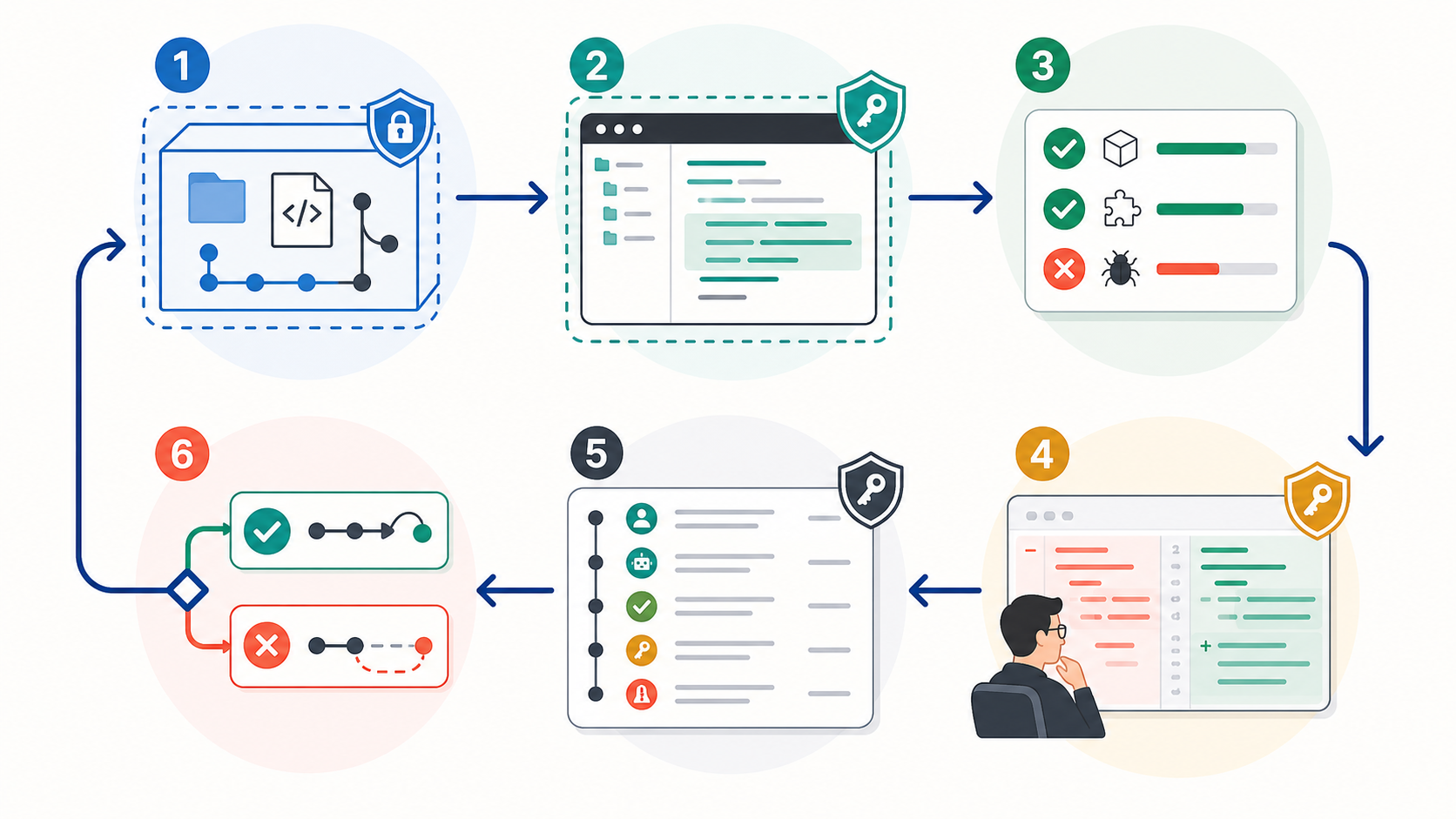
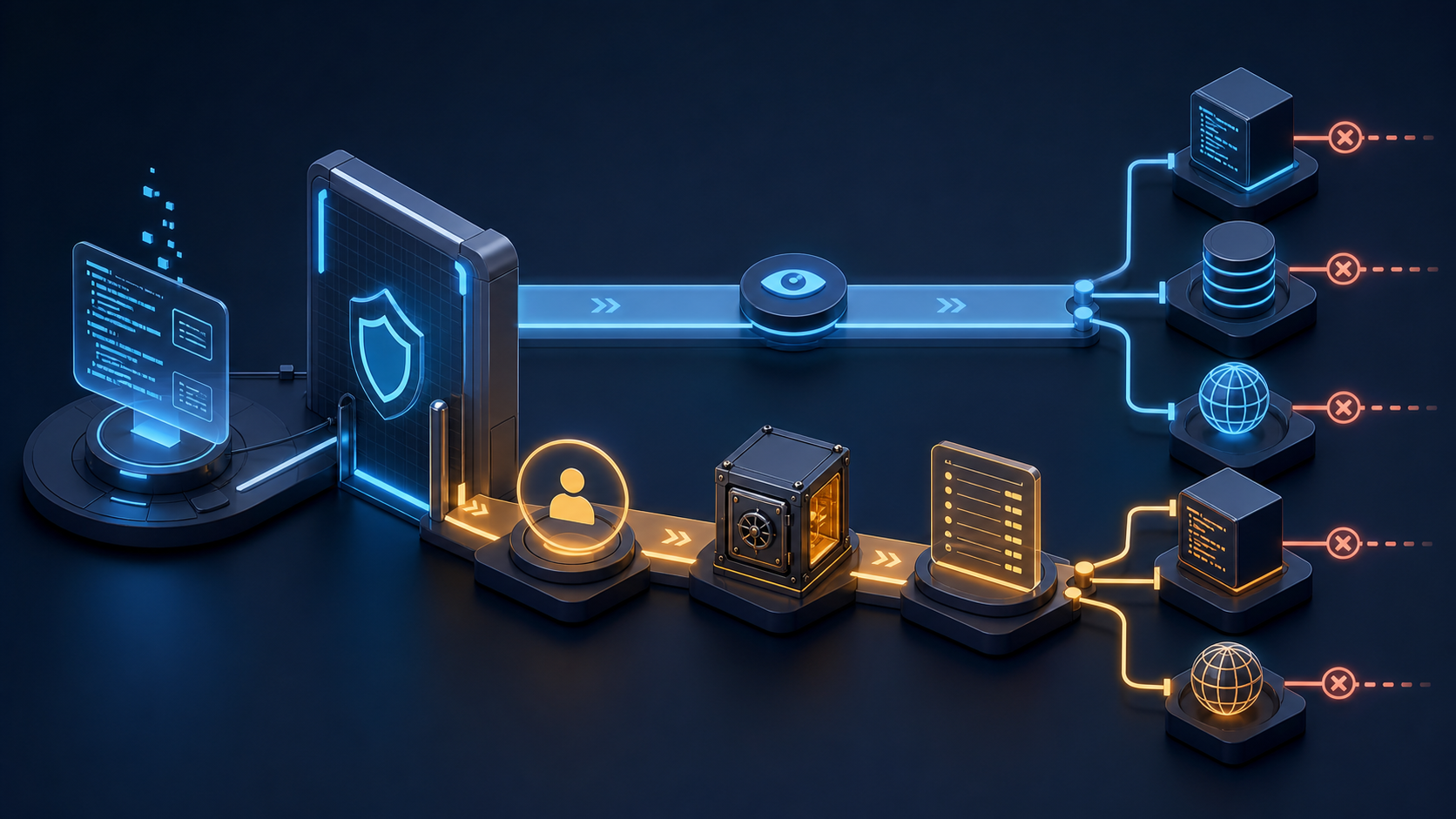
    A least-privilege MCP workflow separates read-only context from approved write actions and keeps an audit trail

    Original Graphify illustration: read access and write actions should follow different approval paths, credentials, and logs.

    Use a three-stage rollout:

    1. Observe: list the exposed tools, run read-only tasks in a disposable project, and record every external system reached.
    2. Constrain: reduce repository selection, project scope, database role, browser profile, feature groups, and toolsets to the minimum that passed the pilot.
    3. Approve writes separately: require a human checkpoint for merges, issue changes, SQL, migrations, production browser actions, and any operation that triggers downstream automation.

    Record the server version and source, owner, host version, enabled tools, credential identity and scopes, targets, timestamps, approvals, summarized calls, changed artifacts, and rollback result. Redact secrets.

    Repository comments, docs, database text, and webpages can contain prompt injection. Retrieved content must remain data; it must not expand permissions, reveal secrets, or authorize another tool. Separate credentials by environment.

    Define removal conditions before adoption. Disable and investigate a server when its publisher or package identity changes unexpectedly, the repository becomes archived or materially unmaintained, a security advisory affects the deployed version, requested scopes expand without a reviewed use case, logs disappear, output cannot be traced to a source, or the server duplicates a safer native capability. Also remove it when 30 days of observed work show no recurring task benefit. Revoke credentials first, remove client configuration second, clear cached session data, and verify that the endpoint can no longer access the target.

    FAQ

    Who should maintain MCP server configurations?

    Assign one engineering owner for workflow fit and one security or platform approver for credentials and policy. Repository-specific configuration can live with the owning team, but shared defaults, allowed publishers, minimum versions, and revocation procedures belong in a centrally reviewed catalog. The planned Codex CLI Guide shows where project rules and shared agent configuration fit around these server entries.

    What audit records should teams keep?

    Keep the exact server identity and version, source URL, configuration diff, enabled tools, transport, credential scopes, target systems, trial task, approvals, tool-call timestamps, resulting code or data changes, and rollback test. Preserve enough information to reproduce why the agent acted without storing raw secrets or unnecessary sensitive content.

    When should a team remove an MCP server?

    Remove it when maintenance or publisher trust fails, permissions exceed the approved task, a security issue cannot be mitigated promptly, required logs are unavailable, outputs lack provenance, or another controlled tool provides the same capability. Remove unused servers on a scheduled review instead of leaving dormant credentials attached to every coding session.

    Conclusion

    The best MCP servers in 2026 form a small workflow-specific stack: GitHub MCP Server for repository evidence, Context7 for current docs, Supabase MCP or MCP Toolbox for database context, and one browser option matched to testing, diagnosis, or public-web retrieval. The selection is only good when its permissions and maintenance record are good.

    Begin with one read-only server and one representative task. Measure whether it improves the accepted patch, not whether the demo looks impressive. Record the live tools, constrain access, add a human gate for side effects, and define the removal trigger before enabling writes. That discipline gives a coding agent useful context without turning every connected system into an implicit permission.

  • Verdent Review 2026: Multi-Agent Coding Tested

    Verdent Review 2026: Multi-Agent Coding Tested


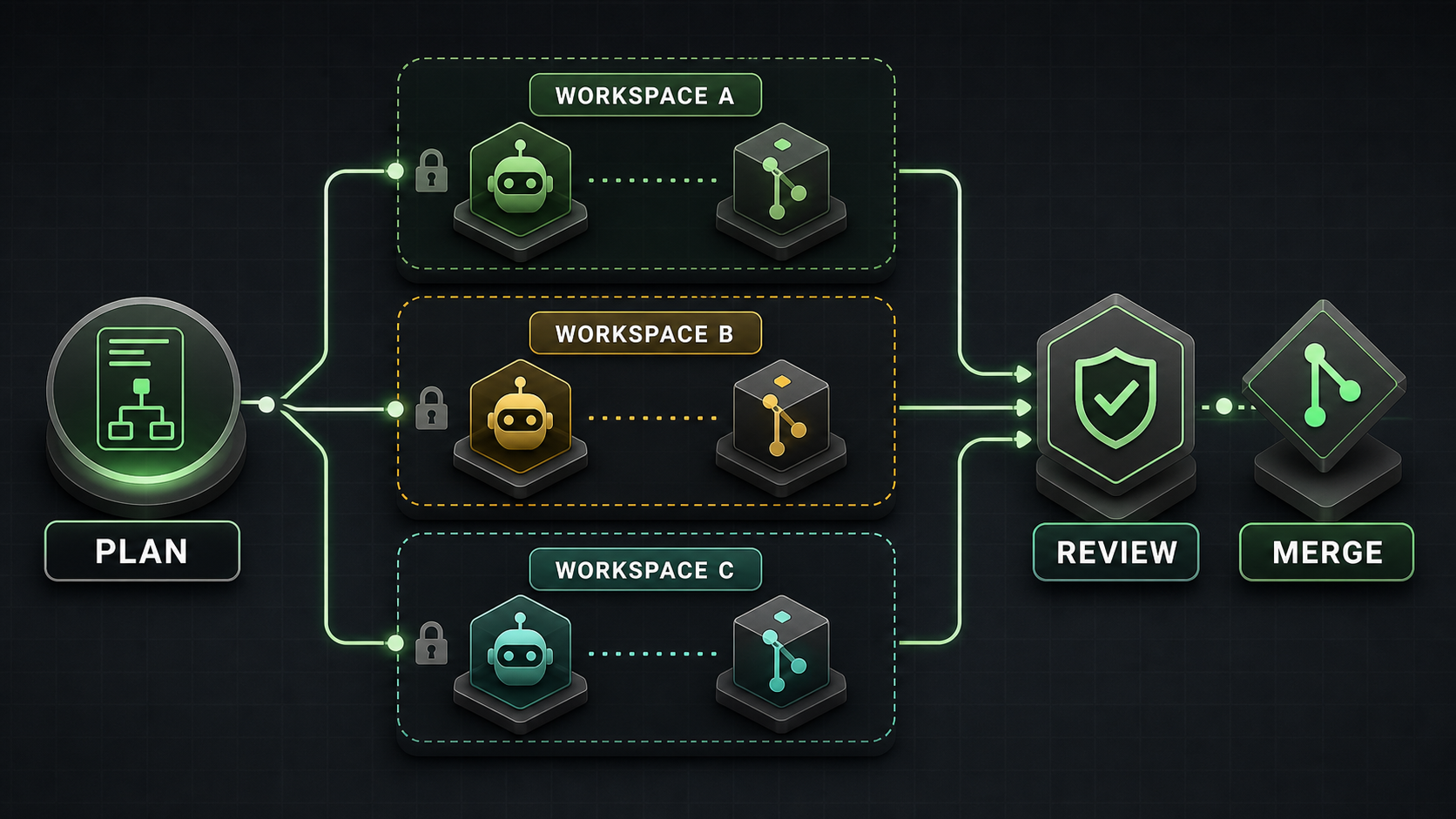
    Verdent is most compelling when a developer or Tech Lead needs to supervise several independent coding workstreams. Its desktop app can place agents in separate Git worktrees, preserve each result for review, and integrate only approved changes. That is a more specific value proposition than “an AI that writes code faster.”

    This Verdent review finds a credible multi-agent control layer, but not a universal replacement for Cursor, Claude Code, Codex CLI, or a team’s existing IDE. Parallel work still requires task decomposition, merge discipline, cost controls, and human verification. Product access, prices, privacy terms, and benchmark claims below were checked on July 15, 2026.

    What Verdent Is

    Verdent is an AI coding environment built around planning, agent execution, verification, and review. It is available as a desktop app for Apple Silicon and Intel Macs and Windows x64, through VS Code and JetBrains integrations, and as a cloud product.

    Verdent is not a foundation model. It orchestrates models from providers such as Anthropic, OpenAI, Google, Moonshot, MiniMax, Qwen, and Z.AI. A user can choose models for tasks and, in supported workflows, compare or review with multiple models. That distinction matters: the model supplies reasoning, while Verdent supplies the workspace, tools, context, permissions, execution loop, and review surface.

    The two main execution modes are straightforward. Plan Mode is read-only: it analyzes the repository, asks questions, and creates a plan without editing files or running commands. Agent Mode can modify files and execute the plan. For a wider market view, compare Graphify’s best AI coding agents in 2026.

    Key Workflow and Agent Features

    Verdent’s defining desktop feature is its Workspace abstraction. A Workspace uses a Git worktree, giving it separate working files while sharing repository history. A team can keep one agent on a bug fix, another on tests, and another on documentation without mixing their uncommitted changes.

    The isolation has important boundaries:

    • A task is an agent conversation inside a workspace. Tasks have separate conversation context.
    • Tasks in the same workspace share files. Verdent’s documentation says concurrent edits to the same file are not deterministic and later writes may overwrite earlier work.
    • Agents in separate workspaces have file-level isolation, but overlapping changes can still conflict during merge or rebase.
    • Verdent does not publish a hard parallel-agent limit. Its documentation recommends roughly two to four for most users, depending on system resources and credits.
    • Each worktree may need its own installed dependencies and disk space.

    This is coordinated concurrency, not automatic teamwork. The operator must split work along clean boundaries, assign ownership, inspect diffs, run checks, and resolve integration conflicts. Verdent’s Cloud workspace is also a different object: official documentation explicitly says it is a cloud environment, not local worktree isolation.

    Verdent adds multi-model planning and review, project rules, MCP integrations, command deny rules, diff summaries, test execution, and a review subagent. BYOK currently supports Anthropic, OpenAI, and OpenRouter according to the product changelog. These features make the product a control surface for larger changes, rather than an autocomplete-first editor.

    Benchmarks and Evidence to Verify

    Verdent reported a 76.1% pass@1 and 81.2% pass@3 result on the 500-task SWE-bench Verified set in November 2025. The company said the run used its production agent without leaderboard-specific tuning or candidate selection. This is a historical, vendor-run result—not an independent 2026 ranking.

    The technical report is useful because it also documents limitations. It says SWE-bench measures the complete model-and-agent system, not a raw model. It observed up to a 1.2-point pass@1 difference between providers for the same model. A simplified toolset changed the result very little, and the review subagent added only about 0.5 points to pass@3. Those findings weaken any claim that one headline number proves every part of Verdent’s current workflow.

    Verdent later claimed its code-review system reached 74.2% precision and 20.1% recall, ranking first by F0.5 among nine tools. The claim appears in the company changelog, but the public material we found does not provide a complete dataset, per-tool configuration, or independent replication. Treat it as a vendor claim to reproduce, not a procurement verdict.

    A team trial should compare Verdent with the same repository commit, model where possible, task budget, permissions, and acceptance tests. Otherwise, a different model or retry policy may be mistaken for a better agent platform. Graphify’s best LLMs for coding explains how to separate model evidence from agent evidence.

    Pricing and Access to Verify

    Current Verdent pricing uses a shared credit pool across its products. The official pricing page listed the following on July 15, 2026:

    Plan Price Included usage shown at verification Practical note
    Free trial $0 100 credits for 7 days Suitable for setup and a small pilot
    Lite $5/month Eco Mode with selected lower-cost models Frontier models require added credits
    Starter $19/month 320 base + 160 limited-time bonus 480 total while the promotion lasts
    Pro $59/month 1,000 base + 500 limited-time bonus 1,500 promotional total
    Max $179/month 3,000 base + 1,500 limited-time bonus 4,500 promotional total
    Teams $20/user/month 480 credits per user Central payment and usage visibility

    Verdent states that one credit is approximately $0.059, provider model costs carry no markup, and top-ups start at 340 credits for $20. Eco Mode uses lower-cost models without drawing from credits, but included capacity varies by plan. A task does not have a fixed credit price: model choice, context size, complexity, and parallel execution all change consumption.

    Do not convert a monthly allowance into a guaranteed prompt count. During a pilot, record credits per accepted patch, including retries and review. Promotions, model availability, and Eco Mode limits can change, so recheck the official pricing page before purchase.

    Access also raises a data question. Verdent’s May 2026 privacy policy says it may store input and output as account history. Repository indexing is opt-in; when enabled, Verdent says it stores embeddings rather than plaintext code and deletes unused embeddings after an unspecified period. The same policy says input and output are not used for model training without explicit consent.

    However, the older November 2025 security page still says repository indexing is unavailable and contains older Privacy Mode language. This documentation conflict should be resolved in writing before a private-repository rollout. Verdent says SOC 2 and ISO/IEC 42001 certifications are being pursued; it does not say they are complete.

    Pros and Cons

    Pros

    • Git-worktree isolation preserves parallel alternatives for later review.
    • Read-only planning creates a clear approval point before execution.
    • Multi-model planning, implementation, and review support different task profiles.
    • Diffs, tests, verification, and command rules make agent actions more inspectable.
    • Desktop, IDE, and cloud access cover several developer workflows.
    • Eco Mode, BYOK, subscriptions, and top-ups provide multiple cost paths.

    Cons

    • Parallel agents increase credit use and integration overhead.
    • Same-workspace concurrent edits can overwrite one another.
    • Separate workspaces postpone overlapping-file conflicts rather than eliminating them.
    • Each worktree can duplicate dependencies and consume significant disk space.
    • AI requests travel through Verdent infrastructure and model providers; this is not a purely local system.
    • Public performance evidence is mostly vendor-run and tied to older models or product versions.
    • Security certifications remain in progress, and current public privacy documents are not fully aligned.

    How It Compares to Alternatives

    Alternative Prefer it when Prefer Verdent when Comparison boundary
    Cursor or Windsurf Daily inline editing and an AI-native IDE are central Supervising several isolated workstreams is central Compare editing flow separately from orchestration
    Claude Code or Codex CLI Terminal automation, scripting, and explicit command-line control matter most A visual desktop control plane and managed workspaces matter Hold the model constant where possible
    Devin A cloud-based, asynchronous worker is the desired unit Local worktree-based desktop supervision is preferred Compare environment, governance, and total task cost
    Cline, Roo Code, or OpenCode BYOK flexibility and open extension points outweigh a managed experience Integrated planning, isolation, and review reduce setup work Cloud-model requests are not “fully local”
    CodeRabbit Pull-request review is the main need Generation and review must live in one workflow A review tool can complement Verdent rather than replace it

    A useful Verdent vs Cursor test should therefore include both small interactive edits and larger parallel tasks. A single refactor does not establish which daily workflow is better. For terminal-oriented choices, see the planned Claude Code vs Codex CLI comparison.

    Who Should Use It

    Verdent fits Tech Leads, senior developers, and small teams that routinely have two or more independent tasks in one repository. It is especially relevant for parallel bug fixes, separate implementation experiments, tests alongside feature work, and review-heavy multi-file changes.

    It is a weaker fit for developers who mainly want autocomplete, teams with tightly sequential work, or organizations that cannot yet approve Verdent’s data path. Small one-file fixes may not justify workspace overhead. Highly coupled migrations may be safer as one planned sequence.

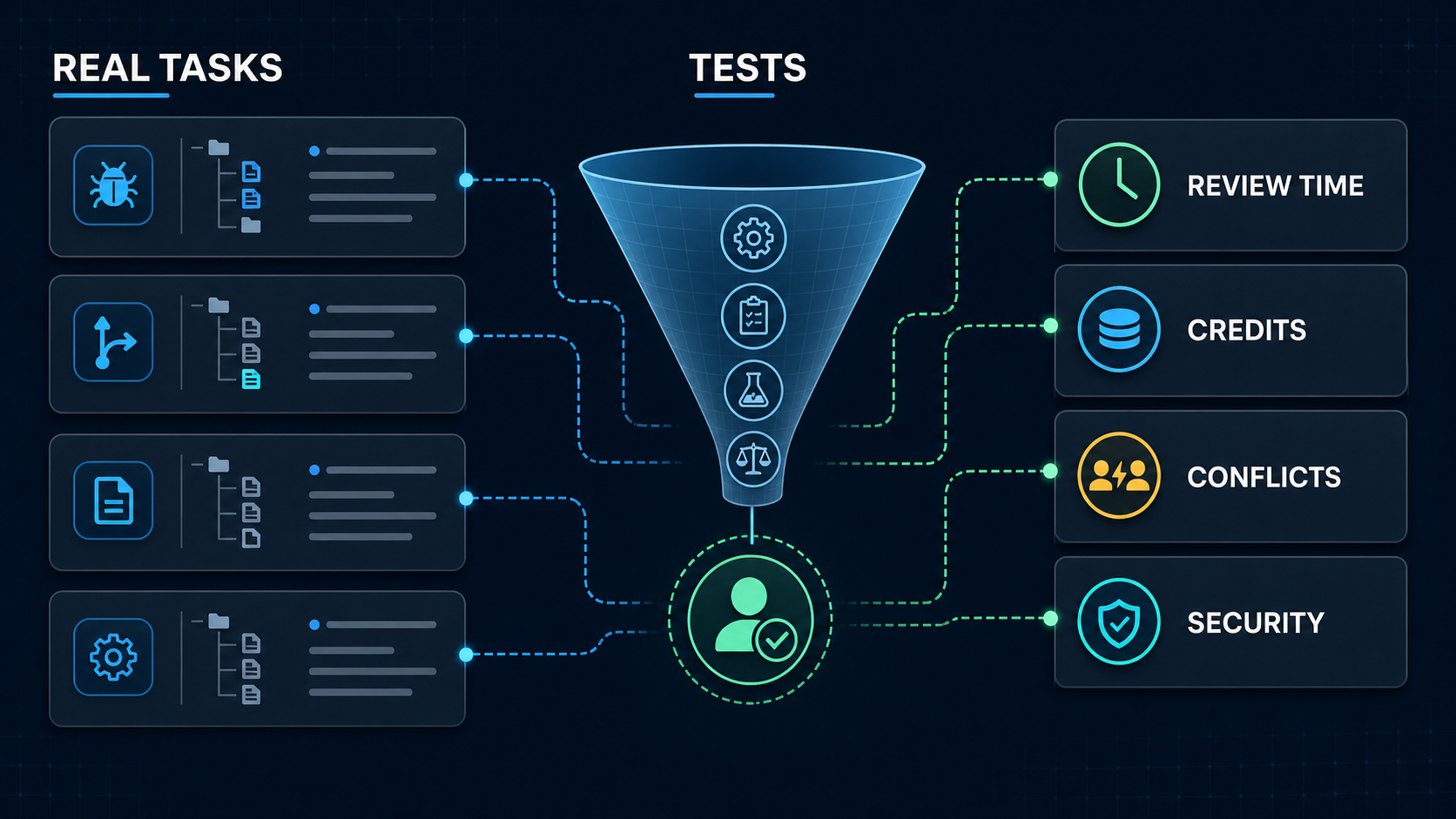
    A real-project pilot measures tests, review time, credits, conflicts, and security

    Run an 8–12 task pilot before adopting it. Include ordinary bugs, a multi-file feature, two genuinely independent parallel tasks, one deliberately overlapping change, a refactor, and a request that should be refused or escalated. Record test success, reviewer minutes, unrequested edits, credits, wall time, rebase conflicts, and security events. Graphify uses this workflow-first lens across AI coding research.

    FAQ

    What internal project should teams use for a trial?

    Use a representative but non-critical repository with reliable tests and no production secrets. Freeze every comparison to the same commit. Choose recent tasks with objective acceptance criteria, including one parallel pair and one expected conflict, rather than a greenfield demo designed to make the tool look good.

    Who should approve multi-agent rollout decisions?

    The engineering owner should approve task fit, review requirements, and merge policy. Security or platform owners should approve repository access, subprocessors, retention, model blocklists, network permissions, and command rules. Finance or procurement should approve credit budgets and contractual terms. Name a rollback owner before expanding access.

    What migration notes should teams keep after testing?

    Keep the Verdent version and access surface, model and provider, prompts, repository commit, workspace layout, permission rules, credits, elapsed time, commands, test output, reviewer edits, conflicts, security events, and acceptance decision. Also record the previous workflow and rollback steps so a tool change does not erase operational knowledge.

    Conclusion

    Verdent offers a coherent answer to multi-agent coding: plan the work, isolate independent changes, verify each result, and merge only after review. Its desktop worktree model is genuinely useful for developers managing concurrent work, but it does not remove task design, cost, conflict resolution, or human accountability.

    The best decision is a bounded trial, not faith in a 2025 benchmark or a promotional credit total. If Verdent reduces accepted-patch time without increasing review burden, conflicts, or data risk, it deserves a place in the workflow. If the work is mostly sequential or autocomplete-driven, a simpler agent or IDE may remain the better choice.

  • Claude Code vs Codex CLI: 2026 Comparison

    Claude Code vs Codex CLI: 2026 Comparison


    The Claude Code vs Codex CLI decision is about workflow and control, not a permanent model winner. Choose Claude Code when its agent teams, Claude-specific extensions, or provider options fit your environment. Choose Codex CLI when an Apache-2.0 local client, OpenAI’s coding models, and Codex automation fit better. Keep both when independent implementation and review improve your delivery process.

    This comparison covers the local command-line tools. It does not compare Claude Code CLI with Codex Cloud. Models, prices, limits, and policies were verified on July 15, 2026 and can change after publication.

    Quick Verdict

    Neither tool is best for every developer. The practical verdict depends on the job, the repository’s risk, and the surrounding platform.

    If your priority is… Start with Why
    Claude-native planning, extensions, and coordinated agent teams Claude Code CLAUDE.md, skills, hooks, MCP, subagents, and agent teams form one integrated extension system
    An inspectable open-source CLI and OpenAI model routing Codex CLI The Rust-based client is Apache 2.0 and supports AGENTS.md, skills, MCP, subagents, hooks, and scripted runs
    A managed model path through Anthropic, Bedrock, Vertex AI, or Microsoft Foundry Claude Code Claude Code documents first- and third-party model-provider configurations
    A ChatGPT-linked local, IDE, cloud, and code-review ecosystem Codex CLI One Codex account can span multiple surfaces, subject to plan and workspace controls
    A high-confidence team decision Run an internal pilot The same task, repository commit, tests, permissions, and budget reveal more than mixed public benchmarks

    For the broader market, compare Graphify’s best AI coding CLIs and best AI coding agents.

    What Each Tool Is Best For

    Where Claude Code fits best

    Claude Code suits developers who want a conversational terminal agent with a deep, Claude-specific customization layer. A project can supply persistent instructions through CLAUDE.md, reusable skills, lifecycle hooks, MCP tools, restricted subagents, and plugins. Experimental or evolving agent-team features can give separate workers independent context plus a shared task and messaging layer.

    That makes Claude Code a strong candidate for exploratory debugging, architecture work, large migrations, and parallel investigations. The advantage is not “Claude always reasons better.” It is that the complete Claude Code workflow may match how a team plans, delegates, and supervises ambiguous work.

    Claude Code also documents model routing through the Anthropic API, Amazon Bedrock, Google Vertex AI, and Microsoft Foundry.

    Where Codex CLI fits best

    Codex CLI suits developers who want a local, scriptable coding agent whose client source can be inspected and extended under Apache 2.0. The CLI supports interactive work, non-interactive codex exec runs, AGENTS.md instructions, skills, MCP, subagents, hooks, permission profiles, and a software-development kit.

    It is a natural candidate for scoped changes, repeatable maintenance, repository review, and automation built around OpenAI models. Codex also connects to a wider product family, but that creates an important boundary: a local CLI turn, a Codex Cloud task, and a hosted pull-request review do not share the same execution environment or access path.

    Graphify’s planned Codex CLI setup and limits guide covers installation and configuration in more depth.

    Workflow Comparison

    Both tools follow the same high-level loop: read relevant files, form a plan, edit code, run commands, inspect results, and report what changed. The differences appear in defaults, configuration language, orchestration, and the surrounding service.

    Workflow element Claude Code Codex CLI
    Shared project instructions CLAUDE.md and .claude/rules/ AGENTS.md and repository configuration
    Reusable workflows Skills and plugins Skills and plugins
    External tools MCP plus built-in tools MCP plus built-in tools
    Delegation Subagents and agent teams Subagents and parallel task workflows
    Deterministic checks Lifecycle hooks Hooks, rules, and scripted execution
    Local isolation Permissions plus optional OS-level sandbox Permission profiles or sandbox modes plus approvals
    Non-interactive work Print mode and automation patterns codex exec and SDK workflows

    Do not choose by feature count. Test the exact behavior you need. For example, agent-team communication is not equivalent to launching several independent workers, and a hook that blocks a command is different from a natural-language instruction asking the model not to run it.

    A migration does not require two copies of project rules. Anthropic’s project-memory documentation recommends keeping AGENTS.md as the shared source and importing it from CLAUDE.md:

    @AGENTS.md
    
    ## Claude Code
    
    Use plan mode before changing the billing service.
    

    Tool-specific files should contain only genuine differences. This reduces drift when test commands, repository structure, or security rules change.

    Context and Large Codebase Fit

    Current context numbers look similar but are not directly interchangeable. Anthropic’s current model table lists Claude Fable 5, Sonnet 5, and Opus 4.8 with 1 million-token context windows and 128,000-token maximum output. OpenAI lists GPT-5.6 Sol, Terra, and Luna with 1.05 million-token context windows and the same 128,000-token maximum output.

    Those figures describe models, not a promise that either CLI will load an entire repository or recall every token equally. System instructions, tool schemas, command output, images, conversation history, and compaction all consume context. Retrieval choices still determine which files the model sees.

    Tokenizers also differ. Anthropic’s Sonnet 5 migration notes say the same text produces about 30% more tokens than with Sonnet 4.6. A nominal 1M-versus-1.05M comparison therefore says little about how much useful source code fits or how much the task costs.

    Test large-codebase fit with repository tasks, not a synthetic paste. Use a cross-module bug, a dependency migration, an architecture question, and a change that requires finding an undocumented convention. Record files inspected, unnecessary reads, compaction events, accepted patches, and review edits. The better tool is the one that retrieves the right evidence and preserves constraints through the full task.

    Pricing and Access Points to Verify

    At the entry tier, both ecosystems list a $20 monthly individual plan: Claude Pro and ChatGPT Plus with Codex. That does not make task cost equal. Subscription usage varies with the active model, context size, reasoning effort, tool calls, and provider limits.

    As of the verification date:

    • Claude Pro is $20 monthly, or $17 per month when billed annually. Claude Max starts at $100 monthly. Team standard seats are $20 per month when billed annually or $25 monthly; premium seats cost more. Enterprise combines a seat charge with usage at API rates.
    • Codex is included in ChatGPT Plus at $20 monthly. ChatGPT Pro starts at $100 monthly with higher Codex limits. API-key use is billed by tokens and does not include every cloud integration.
    • Anthropic lists Fable 5 at $10 input and $50 output per million tokens. Sonnet 5 has introductory $2 input and $10 output pricing through August 31, 2026, then $3 and $15; Opus 4.8 is $5 and $25.
    • OpenAI lists GPT-5.6 Luna at $1 and $6, Terra at $2.50 and $15, and Sol at $5 and $30 per million input and output tokens. Requests above 272K input tokens receive higher rates for the full request.

    These API prices still exclude retries, tool output, cache behavior, human review, and failed runs. Compare cost per accepted patch, not cost per token. For subscription trials, also record how often work pauses at a plan limit and whether the team must buy credits or move to a higher tier.

    Limitations and Trade-Offs

    The largest comparison mistake is treating one tool as safe because it is “local.” Both local CLIs read files and run commands on the developer’s machine, but both send prompts and selected code context to a model endpoint. MCP servers, plugins, shell commands, and web tools add more data paths.

    Claude Code permissions start with read access and ask before file changes or shell commands under the default flow. Its sandbox can enforce filesystem and network boundaries with Seatbelt on macOS or bubblewrap on Linux. Codex sandboxing recommends workspace-write plus on-request approvals in version-controlled folders, protects .git, .agents, and .codex inside writable roots, and uses Seatbelt on macOS or bubblewrap with seccomp on Linux.

    Both tools provide dangerous bypasses. Claude Code has bypassPermissions; Codex has danger-full-access and --yolo. Neither should be a workstation default. Use them only inside a disposable, externally isolated environment with no valuable credentials.

    Anthropic’s Claude Code data policy and OpenAI’s business-data commitments also depend on account type:

    Policy question Anthropic OpenAI
    Business data used for model training by default? No for Team, Enterprise, API, and covered commercial use No for Business, Enterprise, Edu, and API
    Personal-plan data User setting determines model-improvement use May be used unless the user disables training in data controls
    Standard retention Claude Code commercial data: 30 days Varies by product and contract; qualifying organizations receive retention controls
    Zero-data-retention path Available for eligible Claude Enterprise/API arrangements, with feature limits Available to qualifying API organizations, with eligibility and endpoint limits
    Local records Claude Code stores local transcripts in plaintext by default for 30 days Review local client storage and organizational logging settings during the pilot

    Security teams should approve allowed repositories, model endpoints, network domains, MCP servers, local transcript policy, telemetry, and audit retention. A permission prompt is not proof against prompt injection; deny secrets by default and review every production-bound diff.

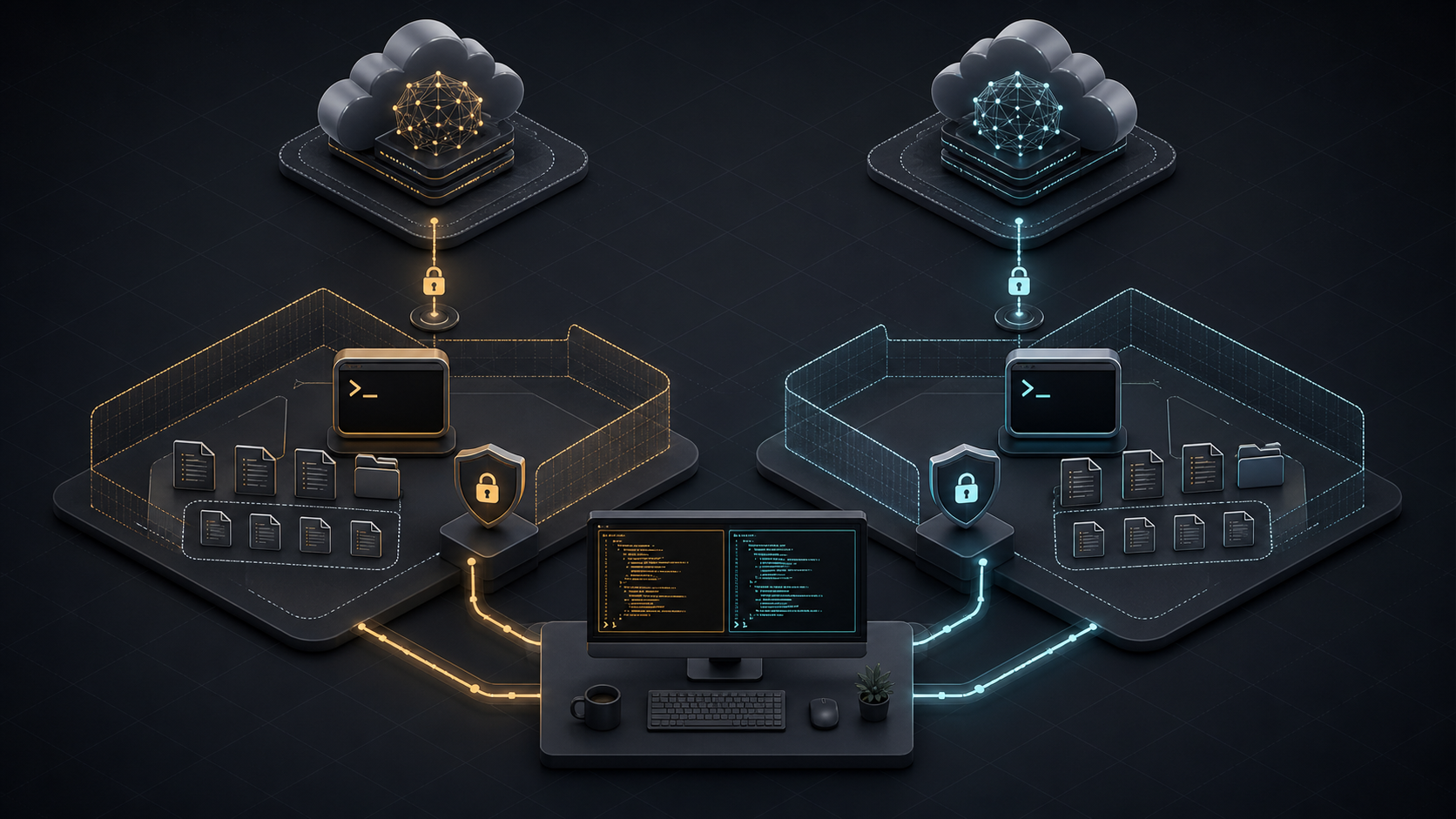
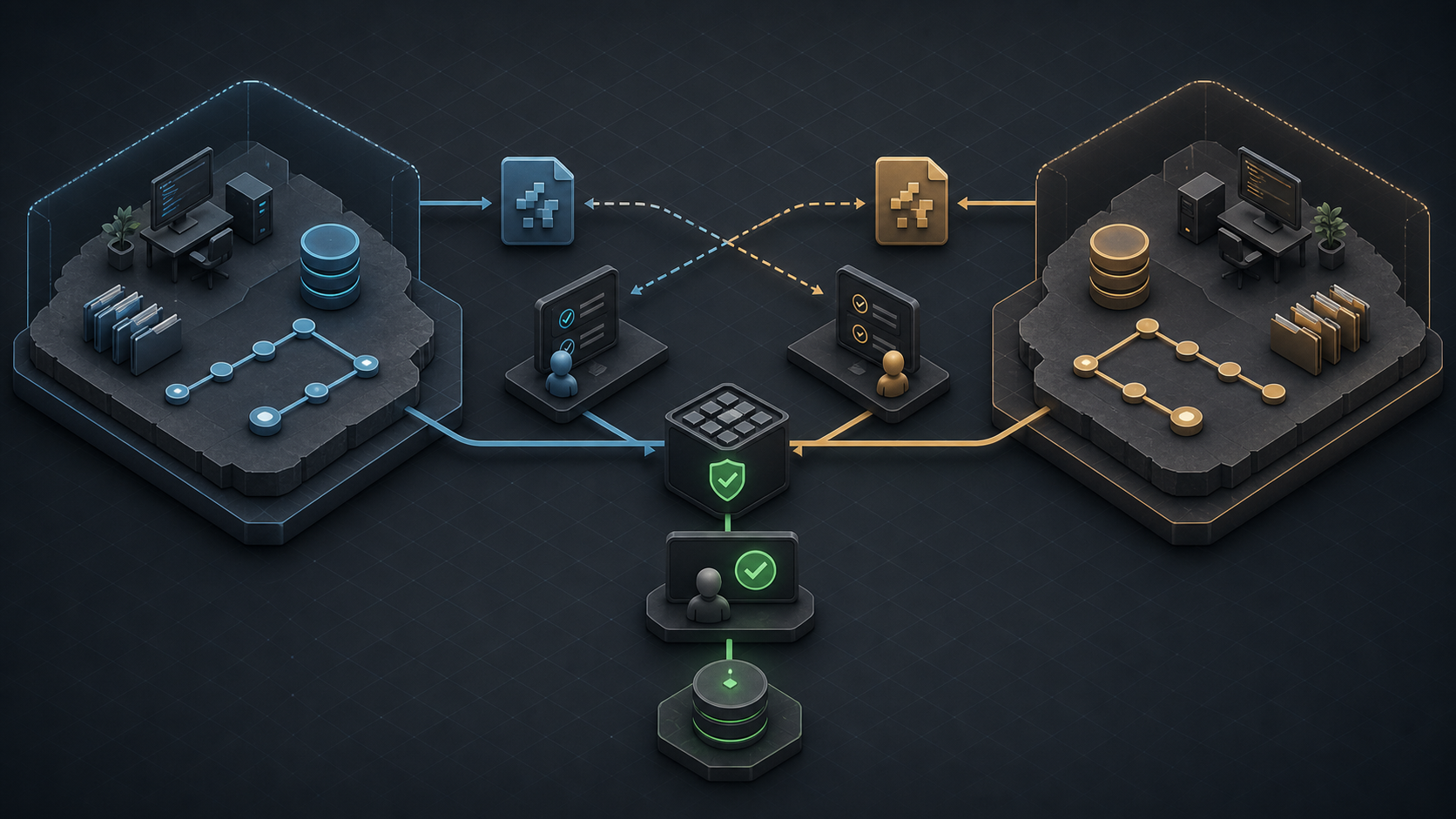
    For teams that keep both tools, use separate branches or worktrees. Let one agent implement and the other review the resulting diff, then reverse roles on another task. Never let both edit the same working tree at once.

    Two isolated coding worktrees exchanging patches for cross-review before a central test and human approval gate

    Isolation makes attribution and rollback clear. A shared test and human approval gate remains the source of truth.

    FAQ

    Who should decide the default CLI for a team?

    The engineering owner should approve workflow and quality fit. Security or platform owners should approve permissions, data paths, model endpoints, and audit controls. Procurement should review material pricing or contract changes. Name one rollback owner before changing the default.

    What migration notes should teams keep?

    Record the source and target CLI versions, exact model, authentication method, repository commit, instruction files, permission profile, network allowlist, MCP servers, environment variables, pilot tasks, test results, accepted patches, review edits, cost, and rollback steps. Store logs under the same access policy as source code.

    When should teams allow both tools in one repo?

    Allow both when independent review, different model families, or separate workflow strengths improve measurable outcomes. Require isolated worktrees, shared tests, common AGENTS.md rules, and clear ownership. Keep one tool when duplication adds cost without raising accepted-patch rate or catching more defects.

    Conclusion

    The Codex CLI vs Claude Code choice should follow your repository, governance, and task mix. Claude Code is compelling for its Claude-native extension and coordinated-agent workflow. Codex CLI is compelling for its open-source local client, OpenAI integration, and automation surface. Neither product earns a universal 2026 crown from model context or public benchmark numbers.

    Pilot both on the same 8–12 internal tasks. Freeze the commit, prompt, permissions, tests, time budget, and review rubric. Then choose a default, document an escalation path, or keep both in isolated cross-review roles. Explore more evidence-led AI coding comparisons at Graphify.

  • Codex CLI Guide 2026: Setup and Limits

    Codex CLI Guide 2026: Setup and Limits


    Codex CLI is OpenAI's local terminal coding agent. The safest way to start is to install the current official build, sign in, open a Git repository, begin with read-only exploration, and expand permissions only for a narrowly defined task. This guide covers that workflow, not every command in the product.

    Commands, models, access, and pricing were verified on July 15, 2026. Codex changes quickly, so confirm the linked official pages before a team rollout.

    What Codex CLI Is

    Codex CLI is an AI coding CLI that runs its tools in your local environment. It can inspect a repository, edit files, execute installed commands, review changes, and return results in the terminal. It also exposes codex exec for scripts and CI.

    “Local” describes where commands run; it does not mean the model runs offline or that all repository context remains on the device. Authentication and data policies still govern content processed by OpenAI. Codex CLI is also distinct from Codex cloud, the IDE extension, and the ChatGPT desktop experience. Choose the CLI when terminal context, existing shell tools, and explicit permission boundaries matter to your workflow.

    For a broader market view, compare Graphify's best AI coding CLIs. If you are choosing between model families rather than clients, start with the best LLMs for coding in 2026.

    Before You Start

    A productive pilot needs more than an account. Prepare these five items first:

    • A clean Git repository: Commit or stash existing work so the agent's changes are easy to isolate and reverse.
    • One bounded task: Pick a 10–20 minute bug, test repair, or small refactor with an objective finish condition.
    • Known verification commands: Record the exact test, lint, type-check, or build commands that prove the change works.
    • A sign-in decision: ChatGPT access uses plan entitlements and workspace policy; an API key uses standard API billing and organization policy.
    • A permission ceiling: Decide whether the pilot may only read, may write inside the workspace, or genuinely needs limited network access.

    Check the operating system boundary too. macOS uses the built-in Seatbelt framework. Native Windows and WSL2 use different sandbox implementations. On Linux and WSL2, OpenAI recommends installing bubblewrap; otherwise the fallback depends on unprivileged user namespaces and can trigger a warning.

    Do not start with production credentials, deployment access, destructive database work, or an unreviewable repository-wide migration. Those tasks test organizational risk tolerance, not basic CLI fit.

    Setup Steps to Verify

    The current official installer is the shortest path on macOS and Linux:

    curl -fsSL https://chatgpt.com/codex/install.sh | sh
    

    OpenAI also supports npm, Homebrew, Windows PowerShell, and platform binaries from GitHub Releases. Use one installation channel and record it so upgrades are repeatable.

    Step Command or action Evidence to keep Stop if
    Install Official script, npm install -g @openai/codex, or brew install --cask codex Installed version and source The binary did not come from an official channel
    Authenticate Run codex login and complete the browser flow Active account and workspace The wrong workspace or personal account appears
    Verify access Run codex login status ChatGPT, API key, or access-token method The method does not match team policy
    Inspect session Open the repo, run codex, then /status Model, directory, and active configuration The working directory or model is unexpected
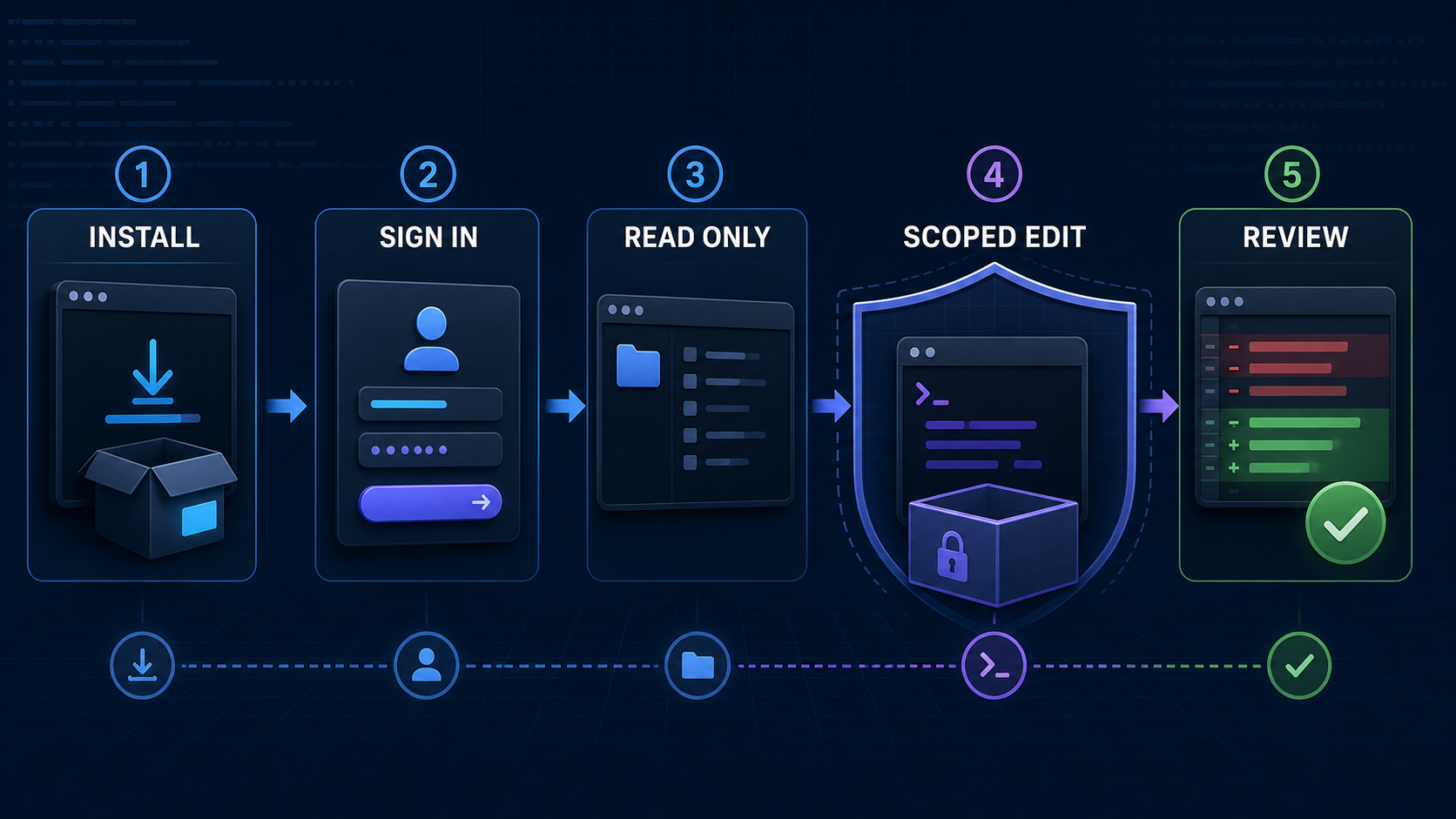
    Set permissions Use /permissions and begin read-only Explicit permission profile The task asks for wider access without a reason
    Run a pilot Ask for a repository map, then one scoped edit Diff, commands, tests, reviewer decision The agent changes unrelated files or cannot verify

    API-key authentication should avoid shell history. Put the key in an environment variable and pipe it through standard input:

    printenv OPENAI_API_KEY | codex login --with-api-key
    

    API-key usage is billed through the OpenAI Platform account and may not include features that depend on ChatGPT workspace or cloud access. OpenAI recommends API keys for programmatic local workflows such as private CI, but warns against exposing Codex execution in untrusted or public environments.

    For the first prompt, ask: “Map the request flow for this endpoint. Do not modify files. List the files you inspected and the tests that protect it.” That prompt checks repository discovery, instruction loading, and communication before granting write access.

    Core Developer Workflows

    The strongest Codex CLI workflow is a controlled loop: understand, plan, edit, verify, review.

    Repository orientation works well in read-only mode. Ask Codex to identify entry points, trace a request, locate tests, and cite file paths. Reject an answer that infers architecture without inspecting the code.

    Scoped implementation should include the problem, affected boundary, non-goals, and definition of done. Let Codex edit inside the workspace, watch its commands, and steer immediately if it broadens scope. Afterward, inspect git diff and rerun the relevant checks yourself.

    Independent review uses /review against uncommitted changes, a commit, or a base branch. The review reports findings without modifying the working tree. It is useful before a commit, but it does not replace the code owner, security review, or CI.

    Repeatable automation uses codex exec. Non-interactive runs start in a read-only sandbox. Add --sandbox workspace-write only when the job must edit files. JSON Lines output (--json) and an output schema can make results easier to parse, while --ephemeral avoids persisting session rollout files.

    codex exec --json --ephemeral \
      "Review the current changes and report only actionable findings"
    

    Use danger-full-access only inside a controlled container or isolated runner. The older --full-auto flag is deprecated for new automation. If your evaluation includes another terminal agent, keep the repository commit, prompt, model effort, permissions, tools, and time budget fixed. Graphify's planned Claude Code vs Codex CLI comparison owns that head-to-head decision.

    Config, Project Rules, and AGENTS.md

    Codex configuration answers “what can this client do?” Project instructions answer “how should work be done here?” Keep those concerns separate.

    User defaults live in ~/.codex/config.toml. Trusted repositories can add .codex/config.toml overrides. Current precedence is: CLI flags and --config; project config from the repository root toward the working directory; a selected profile; user config; system config; then built-in defaults. Project files cannot override machine-local authentication, providers, or telemetry routing.

    An AGENTS.md file supplies durable project guidance. Codex first checks global instructions under CODEX_HOME, then walks from the project root toward the current directory. AGENTS.override.md wins over AGENTS.md at the same level, and nearer directory guidance overrides earlier root guidance. The combined project instruction limit defaults to 32 KiB.

    A useful shared file is short and operational:

    # Repository rules
    - Use pnpm; do not generate npm or yarn lockfiles.
    - Keep changes inside src/auth unless a test requires otherwise.
    - Run pnpm lint and pnpm test:auth before completion.
    - Never edit generated migrations or production secrets.
    - Report changed files, command results, and remaining risks.
    

    Put architecture links and long explanations in normal documentation, then point to them. Do not store secrets, personal preferences, or fast-changing model prices in repository instructions. A Tech Lead or repository owner should maintain root rules; package owners should review narrower overrides. Treat every rule change like code: use a pull request, name an owner, and verify that the instruction still matches CI.

    Limits, Pricing, and Safety Checks

    Codex has three different limits that teams often mix together: product usage, model billing, and technical permissions.

    Product usage depends on the ChatGPT plan and task. OpenAI currently includes Codex across Free, Go, Plus, Pro, Business, Edu, and Enterprise, but allowances and credit options differ. Large repositories, long sessions, multiple agents, and output-heavy tasks consume more than small fixes. Check the Codex Usage panel rather than promising a fixed number of tasks.

    API billing applies when you authenticate with an API key. It is separate from included ChatGPT usage. For example, GPT-5.6 Sol was listed at $5 per million input tokens, $0.50 cached input, and $30 output on July 15, 2026; requests above 272K input carry higher rates. Those API prices are not Codex subscription credits.

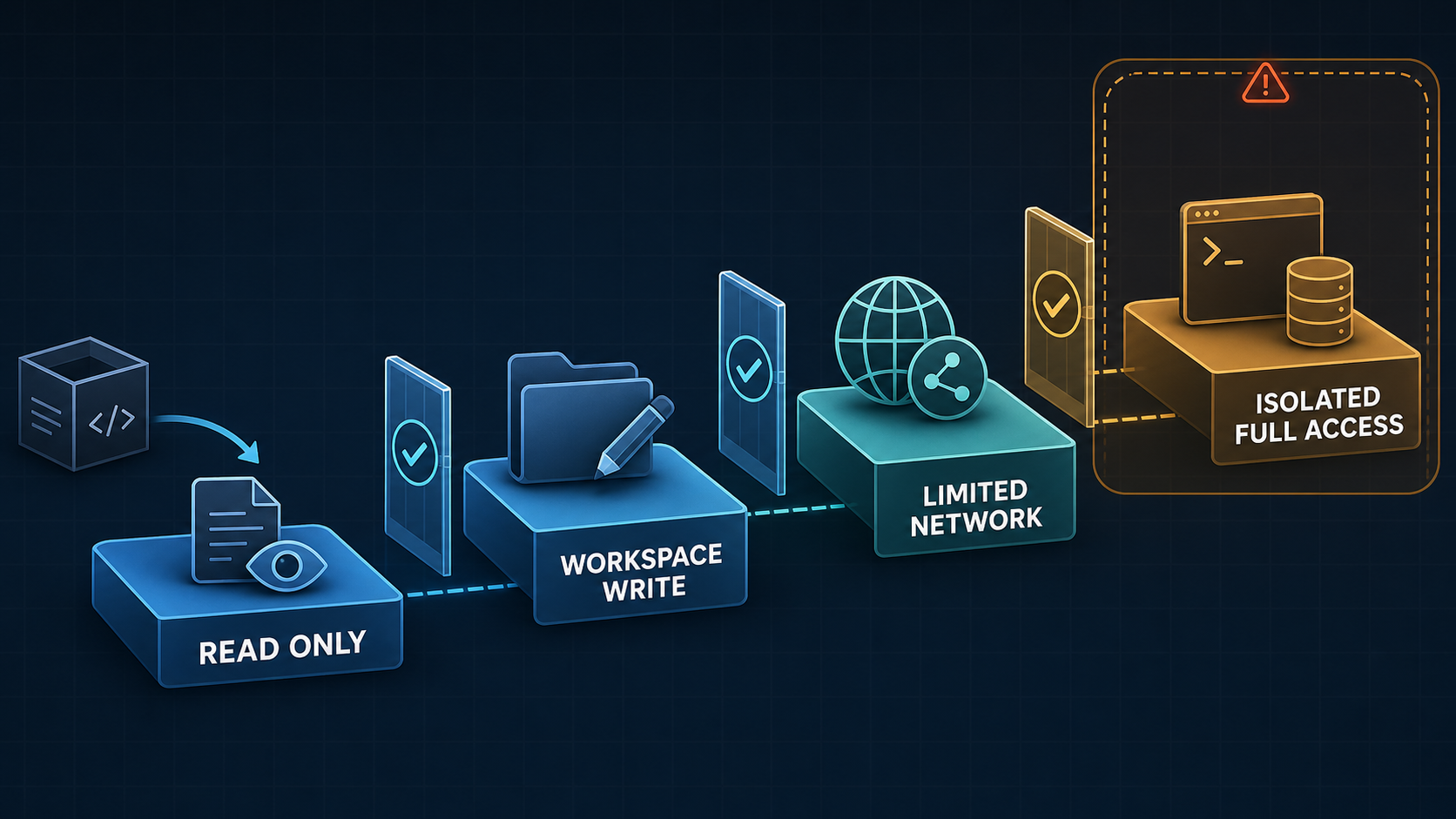
    Technical permissions come from sandbox mode and approval policy. The sandbox defines what commands can touch. The approval policy defines when Codex must stop and ask. In the usual workspace-write setup, command network access is off, writes stay inside the workspace, and network or outside-workspace operations require approval.

    Permission ladder from read-only access to isolated full access

    Enable network access only for the destination a task requires. A domain allowlist is safer than broad egress. Treat web results, dependency scripts, MCP servers, repository instructions, and issue text as untrusted inputs. A sandbox reduces blast radius; it does not prove that a patch is correct, secure, licensed, or ready to deploy.

    Data controls also depend on the account. OpenAI says Business, Enterprise, Edu, and API inputs and outputs are not used to improve models by default, subject to organization settings. Plus and Pro conversations may be used unless training is disabled in ChatGPT data controls. Confirm policy before opening a private repository.

    Keep manual review mandatory for authentication, payments, cryptography, permissions, infrastructure, production data, destructive migrations, and any change whose tests are missing or cannot be reproduced.

    FAQ

    Who should maintain shared AGENTS.md rules?

    The repository owner or Tech Lead should own root rules because they affect every Codex session. Package owners should maintain subdirectory overrides. Security and platform owners should approve rules about credentials, network, deployment, generated files, and destructive commands. Review the file through normal pull requests.

    What should be documented before team rollout?

    Record the CLI version and installation source, authentication method, approved models, permission profile, network policy, AGENTS.md owner, supported workflows, verification commands, data policy, usage owner, and rollback steps. Preserve pilot task results: repository commit, prompt, diff, tests, human edits, elapsed time, and security events.

    When should a project keep manual review first?

    Keep human approval before every write or command while instructions are untested, the repository contains sensitive data, or the team cannot reliably restore state. Continue mandatory review for high-impact domains and production changes even after routine test repairs earn a more autonomous workspace-write policy.

    Conclusion

    The OpenAI Codex CLI is most useful when terminal autonomy sits inside an engineering control loop. Install from an official source, choose the correct account, start read-only, encode concise project rules, grant only the permissions a task needs, and require a diff plus verification evidence. Then compare accepted patches—not demos—before making it a team default.

    Explore more evidence-based AI coding workflows on Graphify.

  • Best LLMs for Coding in 2026

    Best LLMs for Coding in 2026


    The best LLM for coding is not one permanent winner. Start with GPT-5.6 Sol or Claude Opus 4.8 for difficult, long-running changes; Claude Sonnet 5 for a balanced coding-agent default; Gemini 3.5 Flash for high-throughput, long-context work; and an open-weight model when deployment control matters more than turnkey convenience. Then test the shortlist on your own repositories.

    This comparison covers model capability, context, API cost, deployment, and evidence—not editor features. Prices and availability were verified on July 15, 2026. Model aliases, previews, and introductory prices can change, so treat every figure as a dated snapshot.

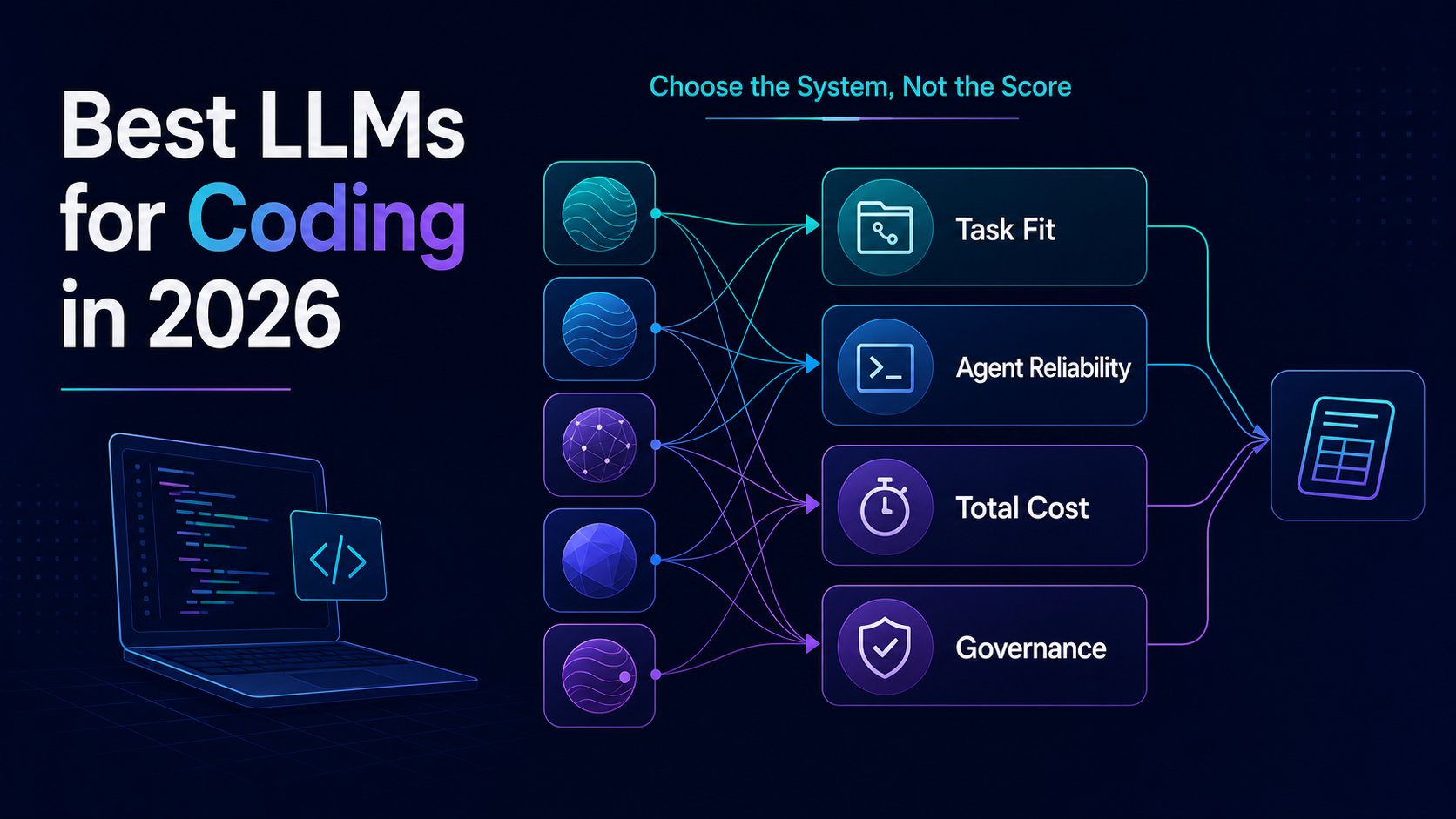
    Choose the complete coding system, not the largest isolated benchmark score.

    What Makes an LLM Good at Coding

    A good AI coding LLM does more than complete a function. It understands repository conventions, follows a multi-step plan, uses tools correctly, repairs failed attempts, and returns a patch a human can review. That makes five properties more useful than a single score:

    • Task fit: algorithm writing, repository repair, frontend work, migration, or review require different strengths.
    • Agent reliability: the model must select tools, interpret terminal output, preserve state, and recover from errors.
    • Context discipline: a large window helps only when the model finds the right evidence and resists irrelevant code.
    • Review quality: a passing test is not enough; the patch should be scoped, readable, secure, and maintainable.
    • Operational fit: latency, total task cost, data policy, availability, and deployment options determine whether a model works in production.

    The model and the agent are separate entities. The model reasons and generates actions. The agent supplies prompts, tools, permissions, memory, retries, and an execution environment. For product-level workflow choices, compare Graphify’s best AI coding agents in 2026 and best AI coding CLIs.

    Benchmarks That Actually Matter

    No coding benchmark measures the whole job. Use each benchmark for the question it can answer:

    Benchmark What it measures What it does not prove
    LiveCodeBench Fresh contest problems, code generation, execution, and output prediction Repository navigation, PR quality, tool reliability, or migration skill
    SWE-bench Verified 500 human-validated GitHub issue tasks; a fixed scaffold can compare model behavior A permanent frontier ranking or raw-model quality independent of the harness
    SWE-Bench Pro Longer, more complex repository tasks A clean league table; a July 2026 OpenAI audit estimated about 30% of tasks were broken
    Terminal-Bench End-to-end terminal workflows with published model-and-agent combinations The model’s contribution separated from the agent scaffold

    Benchmark metadata matters as much as the result. Record the task set and version, model snapshot, agent harness, tool policy, reasoning effort, attempt count, cost cap, and evaluation date. A vendor-reported run and an independent run should never share an unlabeled score column.

    Quick Comparison Table

    Model Best fit Status / deployment Context API price per 1M tokens Main caution
    GPT-5.6 Sol Difficult repository reasoning and long agent runs Hosted frontier 1.05M $5 input / $30 output Inputs above 272K trigger higher rates; alias and snapshot choice matter
    Claude Opus 4.8 Long-horizon, high-complexity agentic coding Hosted frontier 1M $5 / $25 Premium cost makes routine loops expensive
    Claude Sonnet 5 Balanced default for frequent coding-agent work Hosted frontier 1M $3 / $15 standard Introductory $2 / $10 price ends August 31, 2026
    Gemini 3.5 Flash High-throughput agents and large-context analysis Hosted, stable GA 1,048,576 $1.50 / $9 Thinking tokens count toward output cost
    DeepSeek V4 Pro Low API cost and open-weight evaluation Hosted Preview + weights 1M $0.435 cache miss / $0.87 output Preview status and self-hosting complexity require a pilot
    Mistral Medium 3.5 Governed deployment with capable open weights API + Modified MIT weights 256K $1.50 / $7.50 128B dense deployment still needs substantial infrastructure
    Qwen3.6-35B-A3B Efficient open-weight experimentation Apache 2.0 weights 262K native Self-hosted cost varies Extended context and coding quality depend on serving configuration

    Context is the advertised maximum, not a guarantee of equal accuracy across every token. Prices exclude cache behavior, tool output, retries, hosting, and engineering time.

    The Best Coding LLMs in 2026

    Frontier Models to Verify

    GPT-5.6 Sol is the strongest OpenAI candidate to test for complex GPT coding workflows. OpenAI calls it the flagship for complex reasoning and coding, with a 1.05M-token window and 128K maximum output. Its main buying risk is economics: the model costs $5 per million input tokens and $30 per million output tokens, and very long inputs carry a surcharge. GPT-5.6 Terra and Luna are lower-cost family options worth adding when Sol quality is unnecessary.

    Claude Opus 4.8 is the premium Claude coding candidate for long-horizon agent work. Anthropic positions Opus for complex reasoning and agentic coding, while Claude Sonnet 5 targets a better speed-and-intelligence balance. Sonnet is the more practical default for repeated edit-test loops; Opus belongs on the escalation path for the hardest tasks. Measure both under the same effort setting because more reasoning can raise quality, latency, and cost together.

    Gemini 3.5 Flash is the stable Google candidate for sustained agent and coding workloads. It combines a 1M-token input window with lower list prices than the premium models above. Gemini 3.1 Pro remains Preview, so it can join an exploration track for harder reasoning but should not silently replace a production default.

    These are shortlist recommendations, not claims that one model beats every other model. Vendor benchmark results can suggest candidates, but only a controlled internal trial supports a purchasing decision.

    Open-Weight Models to Verify

    Open-weight models help when a team needs deployment control, offline evaluation, data locality, or custom serving. They are not automatically open source, inexpensive, or laptop-friendly.

    DeepSeek V4 Pro and Flash offer 1M-token context, tool use, reasoning modes, and unusually low hosted prices. Official materials still label the V4 release Preview and link the open weights. Teams should use the current V4 IDs rather than building new integrations on deepseek-chat or deepseek-reasoner, which DeepSeek says will retire on July 24, 2026.

    Mistral Medium 3.5 provides Modified MIT weights, a 256K context window, and a 128B dense architecture. It is a credible governed-deployment candidate, but “open weights” does not remove GPU, observability, security, or upgrade work.

    Qwen3.6-35B-A3B uses an Apache 2.0 license, 35B total parameters, and 3B active parameters. Its model card lists 262,144 native context with an extended configuration beyond 1M. Test the exact quantization and serving stack you plan to deploy; model-card capability does not establish your throughput or total ownership cost.

    Cost and Context Trade-Offs

    Token price is not task price. A cheaper model can cost more if it retries commands, reads unnecessary files, generates long reasoning traces, or creates review-heavy patches. A premium model can be economical when it finishes a difficult migration in one accepted run.

    Track total cost per accepted patch: input, cached input, output and thinking tokens, tool calls, failed runs, GPU time, and human review minutes. Also test a compact context policy against a “send everything” policy. Retrieval quality and context discipline often matter more than the advertised window.

    How to Pick a Coding Model for Agents

    Run a controlled trial with 8–12 representative tasks. Include a small bug, multi-file feature, test repair, dependency upgrade, refactor, and one task that should be refused or escalated.

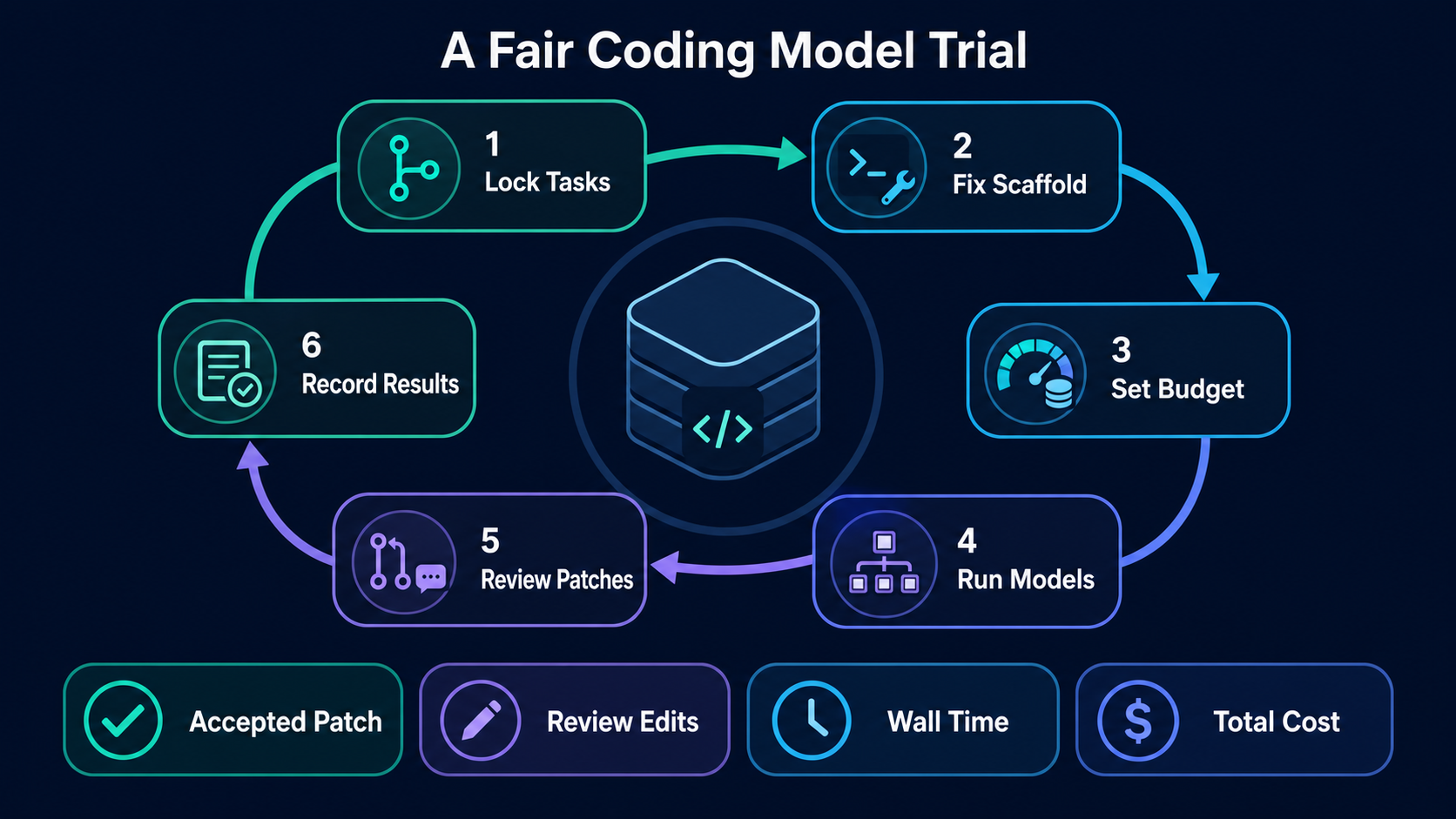
    Six-step fair coding model trial from locked tasks and scaffold to reviewed patches and recorded results

    Use this protocol:

    1. Lock the same repository commit and acceptance tests for every model.
    2. Fix the agent scaffold, system prompt, tools, permissions, and network policy.
    3. Set the same reasoning level, retry limit, wall-time limit, and cost budget.
    4. Run every model without letting one receive extra hints.
    5. Review blinded patches for correctness, scope, security, clarity, and maintainability.
    6. Record accepted-patch rate, review edits, failed commands, wall time, total cost, and security events.

    Choose a default, a cheaper fast path, and an escalation model instead of forcing one model onto every task. If you want to test OpenAI’s coding surface specifically, start with Graphify’s Codex guide. Graphify’s broader AI coding research and comparisons can help map model findings back to tools and workflows.

    A practical routing policy can start with three rules. Send small, well-tested edits to the fast path. Escalate broad migrations, ambiguous failures, and architecture work to the strongest approved model. Route sensitive repositories only to models and endpoints that satisfy the project’s data policy. The agent should record why it selected a route, and a developer should be able to override that choice without rewriting the task.

    Do not promote a model on aggregate acceptance alone. Split results by task family and inspect the tail failures. A model that solves nine simple issues but corrupts the one migration may be worse for that workflow than a slower candidate with eight clean patches. Set explicit thresholds for correctness, security events, review edits, and cost. When no candidate clears every guardrail, keep the current default and narrow the proposed use case rather than averaging a dangerous failure away.

    Finally, repeat a small portion of the suite. One run cannot reveal variance. Two or three attempts on the highest-value tasks show whether success is stable or depends on a lucky trajectory. Keep attempt count equal across candidates and report pass-at-one separately from pass-with-retries, because retries consume both money and engineering time.

    Version Volatility and Limits

    Model conclusions decay quickly. A provider can change an alias, retire an ID, alter pricing, expand context, or ship a new snapshot after this article is published. Preview endpoints carry extra stability risk, and even pinned snapshots can behave differently when the surrounding agent changes.

    Maintain a model registry with provider, exact model ID, snapshot, status, context limit, price source, evaluation date, approved use cases, and rollback target. Re-run the internal suite before changing the default model or agent scaffold. Do not interpret a 1M-token window as 1M tokens of uniform recall, and do not mix results from different benchmark versions.

    FAQ

    What internal tasks should teams use for model trials?

    Use 8–12 recent, representative tasks with objective acceptance criteria. Cover bug repair, feature work, tests, refactoring, dependency changes, repository search, and an unsafe or ambiguous request. Remove secrets and freeze each task to the same commit so every model receives equal evidence.

    Who should approve changing the default coding model?

    The engineering owner should approve capability and developer-workflow changes. Security or platform owners should approve data handling, permissions, network access, and hosted-versus-self-hosted deployment. Procurement or finance should review material cost changes. Production rollout needs a named rollback owner.

    What records help compare model runs later?

    Keep the exact model ID and snapshot, provider, agent and harness version, prompts, repository commit, tool policy, reasoning setting, attempt count, token usage, wall time, cost, command log, test results, reviewer edits, and final acceptance decision. Preserve sensitive logs under the same access and retention policy as source code.

    Conclusion

    The best coding model 2026 shortlist depends on the job. Test GPT-5.6 Sol and Claude Opus 4.8 for hard long-horizon work, Claude Sonnet 5 for a balanced default, Gemini 3.5 Flash for throughput, and DeepSeek, Mistral, or Qwen when open-weight control matters. The durable advantage is not picking today’s loudest benchmark winner. It is building a fair evaluation loop that can select—and safely replace—the model behind your coding agents.

  • Best AI Coding Agents 2026

    Best AI Coding Agents 2026


    The best AI coding agent is the one whose control model fits the work you are willing to delegate. Choose Claude Code for terminal-first repository work, Cursor Agent for IDE-first development, Verdent for visible worktree-based parallelism, and Devin for asynchronous cloud delegation. None is the universal winner, and current benchmark numbers do not support a fair one-score ranking across these products.

    This guide compares workflow fit, autonomy, evidence, access boundaries, and failure modes. Product availability and prices were checked on July 15, 2026. Treat them as a dated snapshot, not a promise.

    What Makes an AI Coding Agent Different

    Autocomplete predicts the next edit. A coding assistant may explain code or generate a function. An AI coding agent can pursue a goal through a loop: inspect the repository, form a plan, edit multiple files, run tools or tests, read the result, and try again.

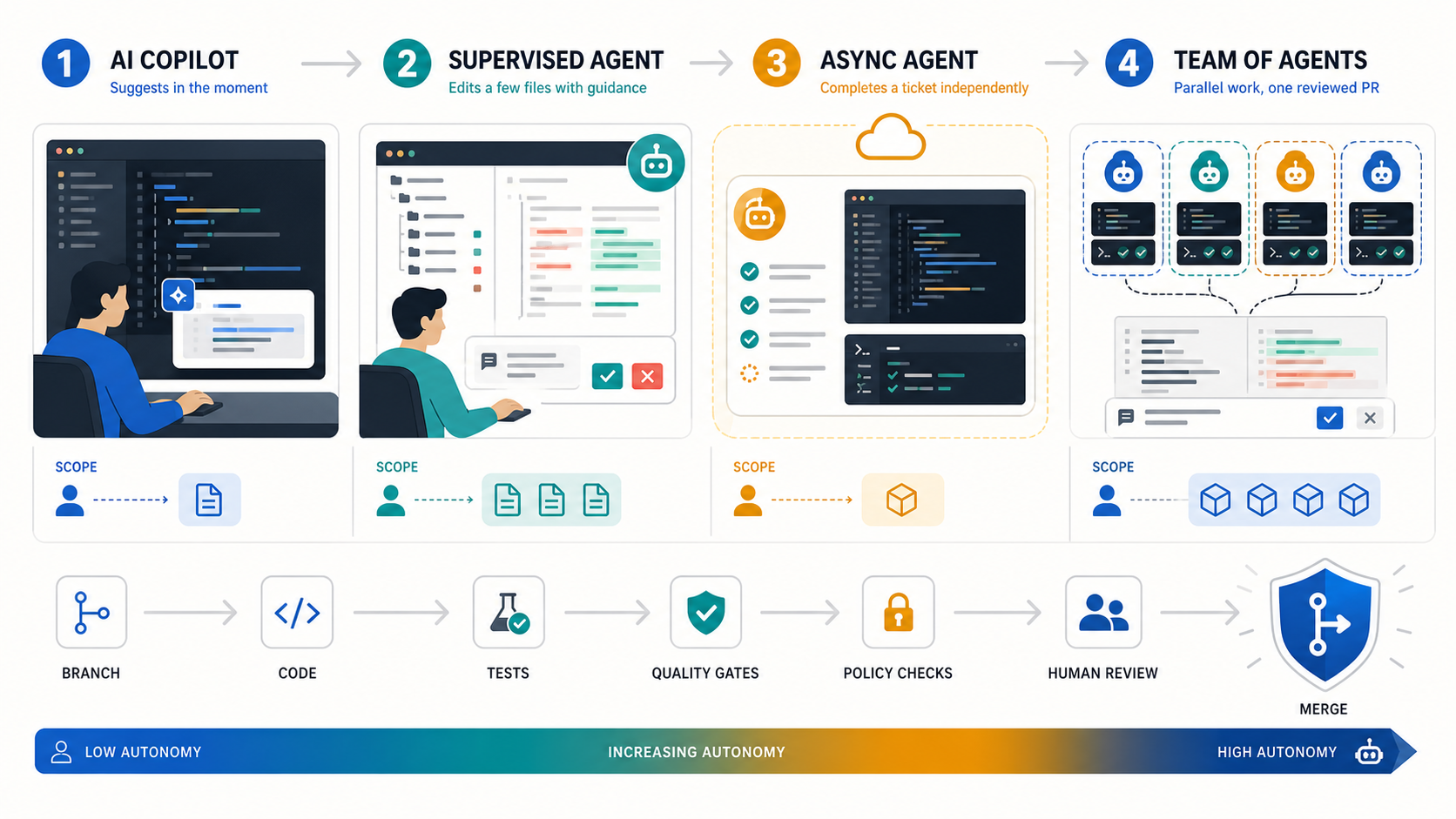
    Autonomous coding agents are not a single category, because autonomy is not binary. A useful ladder has four levels:

    1. Assist: the developer initiates and accepts each change.
    2. Supervise: the agent completes a bounded task while the developer watches and redirects.
    3. Delegate: the agent works asynchronously in an isolated environment and returns a pull request.
    4. Orchestrate: a lead agent divides work among parallel agents, then reconciles their outputs.

    More autonomy increases throughput only when permissions, tests, isolation, and review capacity increase with it.

    The key buying question is therefore not “Which model writes the best code?” It is “Which system gives this team the right mix of agency, visibility, isolation, and approval?” For a terminal-only comparison, see Graphify’s best AI coding CLIs for 2026.

    How We Ranked the Agents

    We ranked each product by its best-fit workflow, not by a fabricated composite score. The assessment uses five decision factors:

    • Control model: drive, supervise, delegate, or orchestrate.
    • Execution surface: terminal, IDE, desktop app, or managed cloud workspace.
    • Verification: plans, diffs, tests, approval gates, and recovery paths.
    • Operational fit: repository isolation, parallel work, logs, administration, and pricing model.
    • Evidence quality: official documentation, current pricing, third-party benchmark definitions, or clearly labeled vendor claims.

    We did not run a common private test suite across all four products, so this is an evidence-backed selection guide rather than a laboratory benchmark. A Tech Lead should run the pilot described below before procurement.

    Why these four? They represent distinct, mature buying paths—terminal, IDE, worktree-first orchestration, and managed cloud delegation—with current official documentation and pricing. Copilot, Codex, and open-source agents remain valid candidates, but they need the same evidence review before joining this comparison.

    Quick Comparison Table

    Agent Best fit Surface and control Parallel model Price snapshot Benchmark evidence Main limit
    Claude Code Terminal-first multi-file work and extensible workflows CLI; supervise or delegate with permissions Subagents; experimental agent teams Pro $20/month; Max from $100/month No current product-level SWE-bench Verified number used here Terminal workflow and shared subscription limits may not suit every team
    Cursor Agent Daily IDE work that can expand into cloud execution IDE plus cloud agents; drive through delegate Isolated worktrees or remote agents Hobby free; Pro $20/month; Teams $40/user/month Composer 2 reports Multilingual results, not Verified Remote auto-run plus network access requires careful controls
    Verdent Worktree-first parallel execution with visible planning Desktop, VS Code, or JetBrains; supervise and orchestrate Parallel agents in isolated workspaces Trial; Starter $19, Pro $59, Max $179/month Vendor-reported 76.1% Verified pass@1 Cloud processing and credit use need review; platform support varies by surface
    Devin Asynchronous tickets and managed backlog execution Managed cloud workspace; delegate Parallel sessions with managed coordination Free; Pro $20, Max $200/month; Teams from $80/month No current comparable Verified submission found Poorly scoped or subjective tasks can drift and consume review time

    Prices above are official monthly list-price snapshots. Taxes, annual billing, usage credits, limited bonuses, and enterprise contracts can change the effective cost. Follow each linked pricing page before purchase.

    The Best AI Coding Agents in 2026

    Claude Code: Best for Terminal-First Repository Work

    Claude Code is the strongest fit when the terminal is already the center of development. It can inspect and edit files, execute shell commands, use MCP tools, run non-interactively, and emit structured output for automation. Plan mode and tool allow/deny rules make it possible to separate reasoning from execution.

    Its advantage is composability. Developers can keep their existing editor, scripts, Git practices, and CI while adding an agent at the command line. Subagents provide isolated context for specialist tasks; experimental agent teams go further by coordinating multiple Claude Code instances. Anthropic warns that agent teams consume substantially more tokens and still have coordination and recovery limitations.

    Choose Claude Code for complex, testable repository changes where a developer wants direct control. Do not treat --dangerously-skip-permissions as a convenience setting on a private repository. See the full Claude Code review for a deeper client-level assessment.

    Cursor Agent: Best for IDE-First Development

    Cursor Agent is the best default for developers who want agentic work inside an editor. Its path from interactive edits to background and cloud agents lets a team start with supervision, then delegate suitable tasks without changing the primary interface.

    Cursor supports parallel agents in isolated worktrees or remote environments. Cloud agents can edit and run code asynchronously in isolated Ubuntu machines. That convenience changes the threat model: Cursor’s documentation notes that remote agents have network access, automatically execute terminal commands, and require GitHub access. Teams should constrain repositories, secrets, egress, and branch permissions before enabling them.

    Choose Cursor when review happens continuously in the IDE and low workflow disruption matters. For self-hosted cloud execution, confirm which code and tool operations remain in your network and which inference or orchestration traffic still passes through the vendor. Graphify’s Cursor review covers the product in more depth.

    Verdent: Best for Worktree-First Parallel Agents

    Verdent is the most explicit parallel-work candidate in this shortlist. Its desktop, VS Code, and JetBrains product tracks emphasize planning, verification, and multiple agents operating in isolated Git worktrees. The structure is useful when a task can be decomposed into independent branches and a human wants to inspect each stream.

    Verdent recommends roughly two to four parallel agents on most machines. More agents are not automatically faster: overlapping files can still cause unsafe edits or rebase conflicts, and each workstream consumes credits. Platform support varies by surface: the VS Code extension supports macOS, Windows, and Linux, while Verdent also maintains desktop and JetBrains product tracks. Its security documentation says selected context and tool results pass through Verdent’s cloud routing, so private-repository buyers should review privacy mode and data paths.

    Verdent reports 76.1% pass@1 on SWE-bench Verified in its own technical report. That is a vendor-reported result for a stated system configuration, not an independently audited product ranking. It is evidence worth investigating, but not a reason to skip a pilot.

    Devin: Best for Asynchronous Ticket Delegation

    Devin is built around delegation. In Agent mode it can write and run code, browse, test, debug, and create pull requests from a managed workspace. Ask mode is read-only and better for exploration or planning before execution.

    This model fits bounded backlog items that are easy to verify: small bugs, tests, CI changes, migrations, and repetitive maintenance. Devin’s own first-run guidance says it can go off track and recommends small, clearly specified work; a task that would take a developer about three hours is a sensible first boundary. Parallel sessions can increase throughput or test competing approaches, but resource use rises with each session.

    Choose Devin when asynchronous handoff matters more than continuous pair programming. Keep branch protection and human code review in place. The Devin review provides additional product context.

    Other Agents to Verify

    GitHub Copilot, OpenAI Codex, Windsurf, Replit Agent, Cline, Aider, and OpenCode may fit a different stack or procurement path. They are not ranked here because adding names without applying the same current evidence standard would create breadth without confidence.

    Shortlist another agent only after confirming its present execution surface, repository isolation, approval model, data handling, logs, pricing unit, and a task-matched pilot. Graphify’s AI coding tools directory is the broader starting point.

    Single-Agent vs Multi-Agent Workflows

    A single agent is usually better when the task has shared state, ambiguous requirements, or frequent edits to the same files. It costs less, produces one coherent trace, and is easier to stop or redirect.

    Multi-agent execution helps when work splits cleanly: independent test suites, unrelated modules, parallel investigation, or competing implementations. Require workspace isolation and define ownership before starting. Otherwise, duplicated exploration, merge conflicts, token or credit consumption, and human review become the bottleneck.

    Use this rule: parallelize independent uncertainty, not tightly coupled coding. Start with one agent. Add a second only when the expected time saved exceeds coordination and review cost.

    Benchmark and Evidence Limits

    SWE-bench Verified contains 500 human-validated, solvable GitHub issues. It is a useful test of real repository problem-solving, but a result measures a system: model version, agent scaffold, tools, prompt, resource budget, retries, selection policy, and evaluation harness.

    Two percentages are not comparable unless those conditions align. Pass@1 and pass@3 answer different questions. A multilingual subset is not Verified. A vendor’s current product can also differ from the configuration in an older report.

    That is why this guide does not convert Verdent’s vendor result, Cursor model reports, older Anthropic model claims, or Devin launch numbers into a league table. Our July 15, 2026 official-site and SWE-bench review found no current, comparable product-level Verified submission for Devin. Use benchmarks to shortlist; use a controlled repository pilot to buy.

    Run a Controlled Pilot Before You Buy

    A controlled AI coding-agent pilot loop with scoped access, isolated execution, tests, review, logs, and rollback

    A useful trial measures the entire delivery loop, including human review and recovery—not just whether an agent opens a pull request.

    Choose one non-critical, medium-sized repository with reliable tests and representative conventions. Give every candidate the same two or three tasks, context, time budget, and acceptance criteria. Record:

    • task completion and test pass rate;
    • incorrect or out-of-scope changes;
    • human interventions and clarification turns;
    • review time, rework, and time to merge;
    • token, credit, seat, and infrastructure cost;
    • permission prompts, tool calls, commands, diffs, test output, and rollback events.

    Use branch protection, least-privilege credentials, isolated workspaces, and a named human approver. Graphify’s guide to the authority control plane for AI coding agents explains why access and approval are part of agent quality, not separate paperwork.

    FAQ

    Who should approve agent access to private repos?

    The repository owner or engineering lead should approve the technical scope, while the security or platform owner approves credentials, data paths, network access, retention, and audit requirements. For sensitive code, legal or compliance review may also be required. Grant access to the pilot repository only, use short-lived credentials where possible, and never let the agent’s initiating user silently bypass organization policy.

    What project should teams use for a pilot?

    Use a non-critical repository that resembles production, has dependable automated tests, and contains tasks with objective acceptance criteria. Avoid a toy greenfield app, because it hides context and integration failures. Also avoid the first production migration or security-critical change, because the cost of learning is too high.

    What logs should teams keep during trials?

    Keep the original request, agent plan, prompts, tool calls, shell commands and outputs, file diffs, tests, human approvals, interventions, model and agent versions, elapsed time, usage cost, and final merge or rollback result. These records reveal whether the agent succeeded independently or merely shifted work into review and cleanup.

    Conclusion

    The best AI coding agents in 2026 occupy different control points. Claude Code fits terminal-first operators; Cursor fits IDE-centered teams; Verdent makes parallel worktree execution visible; Devin is designed for asynchronous ticket delegation.

    Start with the least autonomous mode that can complete the job. Verify current product facts, separate vendor claims from comparable evidence, run the same scoped pilot, and measure review plus recovery—not code generation alone. If repository understanding is the constraint, Graphify provides knowledge graphs for AI coding assistants rather than another execution agent.

  • RepoWise for AI Coding Agents: What Its Codebase Intelligence Layer Actually Does

    RepoWise for AI Coding Agents: What Its Codebase Intelligence Layer Actually Does

    AI coding agents rarely fail because they cannot generate another function. They fail because they enter a repository with weak situational awareness: ownership is unclear, architectural decisions are scattered across commits, related files are not obvious, and the agent repeatedly searches and rereads code before it can make a safe change.

    RepoWise approaches that problem by building a persistent, queryable index of a repository. Instead of treating a codebase as a folder that an agent must rediscover on every task, it combines structural, historical, documentary, decision, and health signals, then exposes the result through the Model Context Protocol (MCP).

    This article is an independently researched English analysis inspired by a Chinese overview published by the WeChat account 如此才是. It preserves the source article's two editorial images, but verifies the product claims against RepoWise's current repository, documentation, release metadata, and public benchmark materials.

    The current snapshot

    As of July 15, 2026, the public GitHub repository had approximately 3,600 stars, and the latest GitHub and PyPI release was v0.31.0. The package requires Python 3.11 or newer, is classified as Alpha in its package metadata, and uses an AGPL-3.0-or-later license declaration. Those details matter because RepoWise is both an open-source local tool and the engine behind a hosted commercial service; teams embedding or modifying it for networked use should review the project's licensing terms rather than assuming that "open source" removes every obligation.

    The useful way to understand RepoWise is not as another chat interface. It is an indexing and retrieval layer between a repository and an AI agent. The index is created once, refreshed as the repository changes, and queried by humans, editors, or MCP-compatible agents such as Claude Code, Cursor, Cline, and Codex.

    Why a repository index can be more useful than a larger context window

    A larger model context window can hold more text, but it does not decide which files matter, recover why a design exists, or distinguish an important hotspot from a peripheral utility. Loading more raw files may even increase cost and distraction.

    RepoWise moves part of that work out of the live agent session. Its index records relationships and metadata that ordinary file search does not expose directly: symbol-level dependencies, ownership, churn, co-change, decision records, documentation freshness, and code-health signals. The agent can therefore ask for a task-shaped summary before opening source files.

    That does not eliminate source inspection. An agent still needs exact code for implementation and verification. The index is best understood as a navigation and risk-assessment system: it helps the agent choose what to inspect and what else may be affected.

    The five intelligence layers

    RepoWise's architecture documentation describes five passes that feed one another.

    1. Graph intelligence

    Language-aware parsers extract files, symbols, imports, calls, and inheritance relationships. RepoWise then applies graph techniques such as PageRank, community detection, strongly connected component analysis, and execution-flow tracing. This allows questions such as "which module is central?", "what depends on this symbol?", and "where is the cyclic core?" to be answered from a model of the codebase rather than from directory names alone.

    The graph is still an approximation. Dynamic imports, reflection, dependency injection, generated code, and framework conventions can obscure runtime behavior. RepoWise adds framework-aware resolvers and confidence scores, but a graph edge should be treated as evidence, not as proof that every runtime path has been captured.

    2. Git intelligence

    Git history supplies a different kind of structure: churn, file ownership, recent owners, bus factor, significant changes, and pairs of files that tend to change together even when no import edge connects them. That hidden coupling is especially useful before a refactor because a syntactically isolated file may still have a strong maintenance relationship with another component.

    History also has limits. A squash-heavy repository, a recent migration, generated commits, or inconsistent author identities can make ownership and co-change statistics noisy. Teams should interpret them alongside current maintainership rather than automatically assigning reviewers from old commit counts.

    3. Documentation intelligence

    RepoWise can generate a Markdown wiki for modules and notable files, then combine full-text and vector search with graph signals. Documentation pages carry freshness and confidence metadata, and incremental updates regenerate affected pages instead of rebuilding the entire corpus.

    This is the layer most likely to require an LLM provider. The deterministic graph, Git, health, and dead-code passes can run without one, while generated prose and semantic retrieval depend on the configured provider or a local model. Generated documentation should remain a map back to cited source, not a substitute for reviewing the implementation.

    4. Decision intelligence

    Architectural decisions are frequently the missing context in AI-assisted maintenance. RepoWise can connect decisions to the files they govern, whether those decisions were entered manually, recorded as ADRs, extracted from inline markers, or inferred from significant history. The get_why tool then retrieves those records before an agent proposes an architectural change.

    This layer becomes valuable only when evidence quality is visible. An explicit ADR and a model-inferred rationale are not equivalent. RepoWise exposes verification and staleness concepts, but teams still need a governance habit: promote important inferred decisions into reviewed records and retire obsolete ones.

    5. Code-health intelligence

    The code-health engine scores files from 1 to 10 using deterministic markers across defect risk, maintainability, and performance. According to the official code-health documentation, the signals combine structural complexity, cohesion, duplication, coverage, Git behavior, ownership, and graph position. The score can also produce rule-based refactoring suggestions and ingest LCOV, Cobertura, Clover, or normalized coverage data.

    This is more ambitious than a style linter, but it is not a bug oracle. A low score means "inspect this file sooner" rather than "this file is defective." A high score does not prove correctness, security, or adequate tests.

    Animated RepoWise dashboard showing repository size, code health, findings, ownership, and agent savings panels
    RepoWise dashboard demonstration preserved from the original WeChat article. The interface is already in English. It is a product snapshot, not an independent benchmark.

    The nine core MCP tools—and a naming caveat

    RepoWise documents nine core, task-shaped MCP tools:

    Tool Primary question
    get_overview What is this repository and where should I start?
    get_answer What does the indexed documentation say about this question?
    get_context What complete context is relevant to these files, symbols, or modules?
    get_symbol What are the exact source bytes and line bounds for this symbol?
    search_codebase Which files, symbols, paths, or concepts match this query?
    get_risk What is the blast radius, hotspot status, co-change set, and likely review need?
    get_why Which decisions explain this design?
    get_dead_code Which apparently unreachable or unused elements are safest to investigate?
    get_health Which files and signals deserve attention before a change or refactor?

    The current MCP overview calls these the nine "core" tools, but v0.31.0 registers 16 tools in total. A single-repository server exposes 11 by default, including list_repos and generate_refactoring_code; workspace mode exposes 14 by default, and two graph-navigation tools can be enabled explicitly. Therefore, "nine tools" describes the curated flagship surface, not the total current server capability.

    That distinction also exposes an important design trade-off. More tools can provide more capabilities, but every tool schema consumes context and gives an agent another choice. RepoWise's own benchmark discussion says a lean four-tool profile performed better on short tasks than exposing the full surface. Teams should configure the smallest tool set that matches their workflow.

    What the benchmark numbers do—and do not—show

    RepoWise publishes its benchmark harness and results in the repowise-bench repository. The repository is public and reproducible, but it is maintained by the RepoWise team rather than an independent third party. The strongest efficiency claims come from two different experiments and should not be blended into one universal promise.

    First, a context-loading experiment over 30 recent non-merge Flask commits compared the token count of raw changed files, git diff, and get_context. The reported pooled counts were 64,039 tokens for full files, 14,888 for the diff, and 2,391 for RepoWise context. The often-quoted 96% reduction is therefore a comparison with loading the complete changed files, not a guarantee for every coding task.

    Second, paired 48-task SWE-QA runs on Flask and scikit-learn used the same model, prompts, budget, and judge, with or without a four-tool RepoWise profile. The reported results included 49% to 70% fewer tool calls and 69% to 89% fewer files read. Dollar cost fell in those runs, but the maintainers explicitly note that prompt caching can reduce the practical cost difference on short tasks.

    Most importantly, answer quality was described as roughly comparable, not improved. In the published table, Flask judge scores were 8.82 without RepoWise and 8.81 with it; scikit-learn scores were 8.72 and 8.23 respectively. The credible claim is narrower: the agent performed less exploratory work in those benchmark settings. Teams should reproduce the harness on their own languages, repository size, model, and task mix before forecasting savings.

    The health benchmark is similarly promising but bounded. RepoWise reports a cross-project ROC AUC of about 0.737 across 21 open-source repositories and nine languages. In a separate comparison with CodeScene, it reported stronger recall, effort-aware ranking, and defect density under a fixed review budget, while the AUC difference was marginal and precision at 20% of lines was statistically tied. The benchmark repository also acknowledges weak within-size-band discrimination. That transparency is useful: part of the signal is that larger, more active files are riskier.

    A practical installation path

    For a local evaluation, start with the deterministic index rather than enabling every feature at once:

    python -m pip install repowise
    cd /path/to/your/repository
    repowise init --index-only -y
    repowise serve
    

    The current package requires Python 3.11 or newer. The project also documents uv tool install repowise for an isolated CLI installation. repowise init can generate MCP configuration automatically; a manual configuration points an MCP client at repowise mcp /absolute/path/to/project.

    After the basic index works, add one capability at a time:

    1. Install the post-commit hook or watcher and verify that freshness warnings behave as expected.
    2. Add an LLM provider only if the generated wiki and semantic question answering are valuable for the team.
    3. Ingest coverage before using health scores to prioritize test work.
    4. Review detected decisions and ownership with maintainers who know the repository.
    5. Compare a small set of real tasks with and without RepoWise, measuring calls, files opened, latency, answer quality, and wrong turns.

    This staged approach separates the value of deterministic repository intelligence from the value—and cost—of generated documentation.

    Security, privacy, and licensing questions to ask

    Self-hosted RepoWise processes source locally and stores derived artifacts under .repowise/, including graph data, embeddings, generated wiki pages, and Git metadata. If a cloud LLM provider is configured, the provider's data path and retention terms still matter. A local model can keep that generation path offline.

    The project's current README also distinguishes source-code privacy from anonymous product telemetry: it says the CLI can send opt-out coarse usage data and documents repowise telemetry disable and DO_NOT_TRACK=1. That is more precise than saying the tool has no telemetry under every configuration.

    Before wider rollout, review:

    • whether .repowise/ artifacts may contain sensitive names, decisions, or generated summaries;
    • whether the chosen LLM provider is approved for the repository;
    • whether MCP access is scoped to the intended repository or workspace;
    • whether generated docs and decisions are excluded from commits when appropriate; and
    • how AGPL-3.0 applies to the team's deployment or any product integration.

    Where RepoWise fits—and where it does not

    RepoWise is most compelling for repositories where navigation cost and organizational memory are genuine bottlenecks: mature services, unfamiliar inherited systems, multi-repository platforms, or teams using several AI coding clients against the same codebase.

    It is less compelling for tiny, short-lived projects where indexing and governance cost more than rereading the code. It also does not replace tests, runtime observability, security scanning, human review, or an authoritative architecture process. Static and historical intelligence can narrow the search space; it cannot prove production behavior.

    The product's central idea is nevertheless sound: AI coding becomes safer when context is treated as maintained infrastructure rather than improvised prompt material. RepoWise packages that idea into an open-source index, a dashboard, and an MCP interface. The right evaluation question is not "does it make the model smarter?" but "does it help this team reach well-supported engineering decisions with less repeated exploration?"

    Sources

  • Git and Source-Control MCP Servers: GitHub, GitLab, Bitbucket, Repositories, and Developer Workflows

    Git and Source-Control MCP Servers: GitHub, GitLab, Bitbucket, Repositories, and Developer Workflows


    A source-control MCP server gives an AI client structured access to repositories, issues, pull requests, pipelines, projects, and security signals. GitHub's official MCP server is the strongest choice for GitHub data and actions. GitLab provides an official remote MCP server in beta. Bitbucket Cloud exposes an Atlassian MCP path. Azure DevOps has its own integration options. A local Git MCP is better when the job only needs commits, diffs, branches, and files on disk.

    Do not choose by brand alone. Choose the narrowest boundary that completes the job. Reading a local diff does not require a token with organization-wide issue and pull-request permissions.

    Which Git MCP server should you choose?

    Need Best starting point Connection model Main caution
    GitHub repositories, issues, pull requests, Actions, or code security Official GitHub MCP Server Remote or local container/binary Large tool surface and token scope
    GitLab projects, issues, merge requests, and APIs Official GitLab MCP server Remote HTTP preferred; mcp-remote fallback Current server status is beta and plan prerequisites apply
    Bitbucket Cloud repositories and work items Atlassian/Bitbucket MCP integration Remote, OAuth-based Confirm exact product coverage and workspace permissions
    Azure Repos, Boards, Pipelines, and work items Azure DevOps MCP integration Product-specific Keep the existing detail page canonical
    Local commits, branches, diffs, and files Local Git MCP server Local stdio process Filesystem and shell boundaries still matter
    Public repository documentation Read-only repository or documentation MCP Remote or local Do not grant write credentials for public research

    This hub owns the comparison and workflow architecture. Use the existing GitHub MCP server page and Azure DevOps MCP server page for exact product configuration and release details.

    Is there an official GitHub MCP server?

    Yes. GitHub maintains github/github-mcp-server as its official MCP server. It can expose GitHub repositories, issues, pull requests, users, Actions, code security, Dependabot, discussions, labels, and other API-backed capabilities through configurable toolsets.

    The official server supports:

    • a remote GitHub MCP path for compatible clients;
    • a local Docker image at ghcr.io/github/github-mcp-server;
    • a locally built Go binary using stdio;
    • toolset and individual-tool allow-lists;
    • read-only mode;
    • lockdown mode for public-repository content.

    The official GitHub MCP repository is the source of truth for current installation, tools, and releases.

    What tools does the GitHub MCP server expose?

    GitHub organizes tools into toolsets. The exact list evolves, but the server documents groups for repository context, repositories, issues, pull requests, users, Actions, code security, Dependabot, discussions, Gists, Git operations, labels, notifications, organizations, projects, releases, secret scanning, security advisories, stargazers, and support documentation.

    The default toolsets are deliberately smaller than “all.” GitHub currently documents context, repos, issues, pull_requests, and users as defaults. Enable only the groups the workflow needs.

    Workflow Suggested toolsets Avoid initially
    Repository Q&A context,repos Actions and write tools
    Issue triage context,repos,issues Pull-request and release writes
    Pull-request review context,repos,pull_requests Merge or branch mutation until validated
    CI diagnosis context,repos,pull_requests,actions Workflow dispatch and rerun without approval
    Security review context,repos,code_security,secret_scanning,dependabot Remediation writes until findings are verified

    Smaller toolsets improve least privilege and help the model choose the right tool.

    How do you set up the GitHub MCP server?

    The local Docker pattern passes a GitHub token to the official image:

    export GITHUB_PAT="your-token"
    
    docker run -i --rm \
      -e GITHUB_PERSONAL_ACCESS_TOKEN="$GITHUB_PAT" \
      -e GITHUB_TOOLSETS="context,repos,issues,pull_requests" \
      -e GITHUB_READ_ONLY=1 \
      ghcr.io/github/github-mcp-server
    

    An MCP client configuration can launch the same container over stdio:

    {
      "mcpServers": {
        "github": {
          "command": "docker",
          "args": [
            "run", "-i", "--rm",
            "-e", "GITHUB_PERSONAL_ACCESS_TOKEN",
            "-e", "GITHUB_TOOLSETS=context,repos,issues,pull_requests",
            "-e", "GITHUB_READ_ONLY=1",
            "ghcr.io/github/github-mcp-server"
          ],
          "env": {
            "GITHUB_PERSONAL_ACCESS_TOKEN": "${GITHUB_PAT}"
          }
        }
      }
    }
    

    Client support for environment expansion differs. Never commit a literal personal access token to mcp.json, editor settings, or a repository.

    What is the GitHub MCP server URL?

    The correct remote URL and authentication flow depend on the client and current GitHub service documentation. Do not copy an endpoint from an unofficial blog. Follow the official host-integration or client-specific guide linked from GitHub's repository. Remote clients should prefer OAuth 2.1 where supported.

    How do you configure read-only GitHub MCP?

    Run the server with --read-only or set GITHUB_READ_ONLY=1. GitHub documents that read-only mode removes write tools, even if a requested toolset or individual-tool list would otherwise include them.

    Read-only mode is the correct default for:

    • repository discovery;
    • issue summarization;
    • pull-request review;
    • release-note research;
    • code-security finding analysis;
    • tool evaluation.

    Add write tools only after each proposed action has a clear approval and rollback path.

    How does the official GitLab MCP server work?

    GitLab's official MCP server connects MCP clients to GitLab projects, issues, merge requests, and APIs. GitLab's current documentation marks the server beta. It supports GitLab.com, Self-Managed, and Dedicated offerings with plan and feature prerequisites.

    GitLab recommends HTTP transport:

    {
      "mcpServers": {
        "GitLab": {
          "type": "http",
          "url": "https://gitlab.com/api/v4/mcp"
        }
      }
    }
    

    For a self-managed instance, replace gitlab.com with the instance hostname. GitLab also documents a stdio bridge through mcp-remote for clients that cannot connect directly:

    {
      "mcpServers": {
        "GitLab": {
          "command": "npx",
          "args": ["mcp-remote", "https://gitlab.com/api/v4/mcp"]
        }
      }
    }
    

    The server uses OAuth 2.0 Dynamic Client Registration. On first connection, the client registers an OAuth application, requests authorization, and receives an access token. Review the current GitLab MCP server documentation because availability, protocol versions, and prerequisites continue to change.

    GitHub MCP vs GitLab MCP

    Dimension GitHub MCP Server GitLab MCP Server
    Maintainer GitHub GitLab
    Current maturity signal Official open-source server with remote/local paths Official server documented as beta
    Local deployment Docker image or Go binary Server is part of GitLab; mcp-remote can bridge clients
    Remote authentication OAuth recommended; PAT for local setups OAuth dynamic client registration
    Surface controls Toolsets, individual tools, read-only, lockdown GitLab permissions, OAuth scopes, client and instance controls
    Native work item Issues and pull requests Issues and merge requests
    CI/CD GitHub Actions toolset GitLab pipeline and API operations as exposed

    Use the platform that owns the source data. A GitHub wrapper that scrapes GitLab or a generic API tool usually adds risk without adding value.

    How does Bitbucket MCP work?

    Atlassian documents a way to interact with Bitbucket Cloud through MCP. Treat Bitbucket MCP and Bitbucket MCP server searches as product-integration queries, not proof that any similarly named repository is official.

    Before connecting, confirm:

    • whether the integration is hosted by Atlassian or a third party;
    • whether it covers repositories, pull requests, pipelines, and workspaces;
    • which OAuth scopes it requests;
    • whether write actions are available;
    • how data residency and organization policy apply.

    Use Atlassian's Bitbucket Cloud MCP documentation as the current source of truth.

    Where does Azure DevOps MCP fit?

    Azure DevOps spans Repos, Boards, Pipelines, Artifacts, and related project data. An Azure DevOps MCP server can therefore expose more than Git operations. That breadth makes tool and permission scoping essential.

    Use the Azure DevOps MCP detail page for server-specific setup. In this hub, apply the same decision rule:

    • use repository tools for code and pull requests;
    • use board tools for work items;
    • use pipeline tools for build status;
    • keep dispatch, approval, and deployment actions disabled until explicitly needed.

    When should you use a local Git MCP server?

    Use a local Git MCP server when the job can be completed from a checked-out repository. Typical tools read status, diffs, logs, branches, tags, commits, and file content. This avoids a cloud token and can work with unpushed changes.

    A local Git server is better for:

    • explaining the current diff;
    • finding the commit that introduced a line;
    • summarizing branch history;
    • comparing two local branches;
    • preparing a commit message;
    • inspecting a repository without network access.

    A hosted source-control server is better for:

    • issues and pull requests;
    • CI status and workflow runs;
    • repository permissions and collaborators;
    • release assets;
    • organization-wide code search;
    • code-security alerts.

    Some queries use the term Git-MCP for a documentation service that turns public Git repositories into accessible context. Confirm whether a project operates on local Git, a hosting-provider API, or rendered documentation before granting credentials.

    What is an MCP repository?

    The phrase MCP repository can mean three things:

    1. a source repository that contains an MCP server implementation;
    2. a repository exposed as data through an MCP server;
    3. a curated list or registry of MCP servers hosted on GitHub.

    For discovery queries such as MCP servers repository, list of MCP servers GitHub, MCP registry GitHub, or MCP list GitHub, use a curated directory rather than this source-control integration guide. For a specific server's source, follow the repository link from its canonical product page.

    The distinction matters because installing code from a GitHub repository is not the same as connecting the official GitHub MCP Server.

    How do you design safe source-control workflows?

    Start with read-only discovery, then add one bounded write action at a time.

    A least-privilege source-control workflow moves from read-only discovery through approval, branch work, review, and audit.

    Workflow 1: Issue triage

    1. Read open issues with a named label.
    2. Group duplicates and identify missing reproduction details.
    3. Draft a comment without posting it.
    4. Ask a human to approve the exact comment.
    5. Post through an issue-only tool.

    Workflow 2: Pull-request review

    1. Read the pull request, changed files, tests, and linked issue.
    2. Identify concrete risks with file and line evidence.
    3. Draft review comments.
    4. Require approval before publishing.
    5. Never merge as an implicit continuation of review.

    Workflow 3: CI failure diagnosis

    1. Read the failed job and logs.
    2. Correlate the failure with changed files.
    3. propose a minimal fix and validation command.
    4. Create a branch only after approval.
    5. Open a pull request; do not deploy automatically.

    Workflow 4: Release preparation

    1. Read merged changes since the last tag.
    2. Draft release notes with pull-request links.
    3. Verify version and artifact checks.
    4. Require approval for tag or release creation.
    5. Record the actor, inputs, and resulting URL.

    Each workflow separates analysis from mutation. That boundary makes the automation understandable and reversible.

    How do you apply least privilege to GitHub MCP tools?

    Permissions must be enforced by credentials and server configuration, not by prompts. A prompt that says “do not merge” cannot neutralize a token and tool that can merge.

    Use these controls:

    1. Enable only required toolsets. Avoid all during evaluation.
    2. Prefer read-only mode. Add write tools after the read workflow passes.
    3. Use repository-scoped credentials. Avoid broad classic PATs where finer options exist.
    4. Separate environments. Use different tokens for personal, team, and automation contexts.
    5. Protect secrets. Use environment variables or a secret manager and keep config files private.
    6. Require branch protection. The MCP server should not bypass normal reviews and checks.
    7. Use lockdown mode when appropriate. GitHub's lockdown mode filters some public content by contributor trust while leaving private repositories unaffected.
    8. Log mutations. Capture the tool, user, repository, target object, approval, and result.

    GitHub's official documentation recommends minimum scopes, separate tokens, rotation, and never committing credentials. Follow the hosting platform's current authentication guidance.

    What GitHub MCP mistakes create the most risk?

    Mistake Why it fails Better design
    Enabling every toolset Increases ambiguity and blast radius Start with context,repos and add one job-specific set
    Using an organization-wide write token One prompt can affect many repositories Use a repository-scoped, short-lived credential
    Giving a generic API tool Hides side effects and bypasses semantic routing Expose explicit tools such as issue_read or create_pull_request
    Letting issue text drive policy Issues can contain prompt injection Treat all repository content as untrusted data
    Reviewing and merging in one autonomous step Removes independent approval Separate analysis, review publication, and merge permissions
    Logging tokens or private code Creates a second data leak Mask credentials and minimize tool output retention

    How do you troubleshoot a source-control MCP server?

    Symptom Likely cause Check
    Server starts but requests return 401 Missing, expired, or wrong token Credential injection, OAuth completion, token scopes
    Repository is invisible Token lacks repository or organization access Fine-grained repository selection, SSO authorization
    Write tools are missing Read-only mode or toolset filter is active Server flags, environment variables, approved actions
    Too many similar tools confuse the model Toolsets are too broad Enable fewer groups or individual tools
    GitLab URL fails Wrong hostname, endpoint, or prerequisites Instance URL, /api/v4/mcp, GitLab version and feature settings
    Docker server exits immediately stdin, environment, or image problem Run with -i, verify variable names, inspect logs
    A tool works locally but not in an IDE Client config syntax differs Follow the official client-specific guide
    Tool names collide across instances Multiple servers expose similar names Use supported prefixes or clear server names

    Test a single read operation before debugging model behavior. Authentication and capability discovery must work before prompt tuning can help.

    How do you evaluate a GitHub MCP server release or alternative?

    When a query asks for GitHub MCP server release, official GitHub MCP server, or GitHub MCP server npm, verify these facts:

    • The repository owner is github for the official server.
    • The documented local distribution is the GitHub Container Registry image or a Go binary built from source.
    • A similarly named npm package is not automatically the official server.
    • Release notes and breaking changes come from the official repository.
    • The server's license, security policy, and tool configuration match your use case.

    The same provenance rule applies to niche terms such as PAL MCP GitHub, n8n MCP GitHub, Mixpanel MCP server GitHub, or Google Analytics MCP server GitHub. A GitHub link tells you where code is hosted; it does not make GitHub the vendor or auditor of that integration.

    Frequently asked questions

    Is GitHub MCP the same as GitHub Copilot?

    No. GitHub MCP Server exposes GitHub data and actions through MCP. Copilot is an AI product that can act as an MCP client in supported environments. Copilot can connect to the server, but they are separate products.

    Can the GitHub MCP server read and write files?

    It can expose repository-content and Git-related tools according to enabled toolsets and permissions. Do not confuse those API-backed repository tools with a generic local filesystem server's read_file, write_file, and create_directory tools. Check the official tool list instead of relying on a search snippet.

    Can GitHub MCP use Actions and Projects?

    Yes, the official server documents toolsets for Actions and Projects. Enable them only when the workflow needs them. Workflow dispatch, project updates, and similar mutations should require approval.

    Is GitLab MCP server official?

    Yes. GitLab documents an official MCP server at the GitLab instance's /api/v4/mcp endpoint. Its current status is beta, so check the documentation for plan, version, and feature prerequisites.

    Is Bitbucket MCP official?

    Atlassian publishes Bitbucket Cloud MCP documentation. Follow that documentation and verify OAuth scopes. Do not install an unrelated package solely because its name contains “Bitbucket MCP.”

    Should I use a GitHub remote MCP or a local container?

    Use remote OAuth when the client and organization support it and centralized access fits the policy. Use a local container or binary when you need explicit toolsets, local process control, or a client that launches stdio servers. Both need least privilege.

    What is mcp-use GitHub?

    It usually refers to using an MCP client library or framework with GitHub, not a distinct official GitHub server. Connect the framework to the official server and follow both projects' configuration guidance.

    Final recommendation

    Use the official server for the platform that owns the data. Start GitHub MCP in read-only mode with context and repos, then add issues, pull requests, Actions, or security toolsets only for a named workflow. Use local Git for local history and uncommitted changes. Keep product pages canonical, credentials narrow, write actions approved, and every mutation auditable.

    Sources

  • Browser Automation and Web Testing MCP Servers: Playwright, Puppeteer, Firecrawl, and Chrome DevTools

    Browser Automation and Web Testing MCP Servers: Playwright, Puppeteer, Firecrawl, and Chrome DevTools


    A browser MCP server lets an AI client inspect and operate a browser through Model Context Protocol tools. Playwright MCP is the strongest general choice for structured navigation and web testing. Chrome DevTools MCP is better for network, console, trace, and performance diagnosis. Firecrawl fits extraction and crawling. Browser-use-style servers fit autonomous browsing, while Selenium integrations fit teams that already depend on WebDriver.

    The right server depends on the job. “Open a page” is not a useful selection criterion because almost every browser tool can do it. Ask whether the agent must test behavior, diagnose a browser, extract content, reuse a signed-in profile, or run a repeatable suite.

    Which browser MCP server should you choose?

    Primary job Best starting point Why Main tradeoff
    Navigate, click, fill, and assert UI behavior Playwright MCP Structured accessibility snapshots and deterministic browser tools Rich snapshots can consume context
    Debug console, network, performance, or Chrome internals Chrome DevTools MCP Direct DevTools capabilities and trace insights Chrome-focused and exposes sensitive browser state
    Crawl sites and return clean content Firecrawl MCP Extraction-first workflow Not a full interactive testing framework
    Run autonomous browsing loops Browser Use MCP Agent-oriented browsing abstractions Behavior and safety depend on the specific implementation
    Reuse established WebDriver infrastructure Selenium MCP Fits existing grids and test assets MCP implementations vary; verify maintenance and tools
    Script Chrome or Firefox from code Puppeteer or Playwright libraries Direct, testable code without a large MCP schema Requires the agent to write and run scripts

    Microsoft's Playwright MCP documentation now makes an important distinction: coding agents may prefer a Playwright CLI plus Skills for token-efficient, high-throughput work, while MCP remains useful for persistent state, rich introspection, exploratory testing, and long-running agent loops. The protocol is not automatically the best interface for every test.

    What is Playwright MCP?

    Playwright MCP is Microsoft's official MCP server for browser automation through Playwright. It lets an MCP client interact with web pages through structured accessibility snapshots instead of relying only on screenshots. The server exposes browser actions such as navigation, clicking, typing, form filling, tab management, console inspection, and page snapshots.

    Use the existing Playwright MCP server page for package-specific details and updates. This guide owns the cross-product comparison and workflow design.

    Why do accessibility snapshots matter?

    An accessibility snapshot represents interactive page structure with roles, names, and references. That gives an agent a stable target such as “button named Submit” instead of asking a vision model to estimate pixel coordinates.

    The model receives a smaller semantic problem:

    1. inspect the current page structure;
    2. select an element reference;
    3. call a deterministic tool;
    4. inspect the resulting state.

    This approach improves repeatability, but it does not remove the need for visual validation. Layout bugs, overlapping elements, responsive breakpoints, and canvas content still require screenshots or other visual evidence.

    How do you install Playwright MCP?

    The standard local configuration launches the official npm package:

    {
      "mcpServers": {
        "playwright": {
          "command": "npx",
          "args": ["@playwright/mcp@latest"]
        }
      }
    }
    

    For Codex CLI:

    codex mcp add playwright -- npx "@playwright/mcp@latest"
    

    For a standalone HTTP endpoint:

    npx @playwright/mcp@latest --port 8931
    

    Then configure the client to connect to http://localhost:8931/mcp. The official repository lists Node.js 18 or newer as a requirement and documents client-specific setup.

    How should you verify a Playwright MCP install?

    Use a test page you control and ask the client to:

    1. open the page;
    2. read its title;
    3. fill one non-sensitive field;
    4. click a harmless button;
    5. report the resulting visible state;
    6. capture console errors and a screenshot.

    A passing test proves more than server startup. It proves navigation, element resolution, action execution, state observation, and artifact return.

    When should you use a Playwright MCP extension?

    The Playwright browser extension connects the server to an existing Chrome or Edge session. This is useful when the workflow needs an already authenticated tab. It also raises risk because the agent inherits access to that browser state.

    Use the extension only when all of these are true:

    • the signed-in session is necessary;
    • the profile contains no unrelated sensitive tabs;
    • the allowed task and domains are narrow;
    • the user can observe and stop the run;
    • write actions have explicit approval.

    For repeatable tests and CI, prefer an isolated context with known storage state.

    How does Chrome DevTools MCP differ from Playwright MCP?

    Chrome DevTools MCP focuses on inspecting and debugging a live Chrome browser. Its official repository highlights performance traces, network analysis, screenshots, console messages with source maps, and reliable automation built with Puppeteer.

    Need Playwright MCP Chrome DevTools MCP
    Cross-browser test intent Strong: Playwright targets Chromium, Firefox, and WebKit Chrome and Chrome for Testing are officially supported
    Structured page actions Core capability Supported through Puppeteer-based automation
    Network and console diagnosis Available Deeper DevTools-first emphasis
    Performance traces and insights Possible through testing tools Core strength, including trace insights
    Existing browser connection Extension or endpoint modes Browser URL, WebSocket endpoint, or auto-connect
    Best user Test author or exploratory agent Web developer diagnosing Chrome behavior

    Use the Chrome DevTools MCP server page for its exact configuration. Do not create a duplicate product profile inside this hub.

    Chrome DevTools MCP can expose browser contents to the client. Its documentation warns users not to share sensitive browser data with MCP clients. It also documents usage statistics and a flag to disable them. Review those operational details before enterprise rollout.

    Is Puppeteer MCP a separate official server?

    Puppeteer is a JavaScript library for controlling Chrome and Firefox. The official Puppeteer repository currently points users toward chrome-devtools-mcp, a Puppeteer-based MCP server, for MCP browser automation and debugging.

    That means a search for Puppeteer MCP, MCP Puppeteer, or Puppeteer MCP server may lead to three different things:

    • Chrome DevTools MCP, maintained in the Chrome DevTools organization;
    • a third-party MCP wrapper around Puppeteer;
    • a custom server a team built over the Puppeteer library.

    Verify repository ownership, package provenance, maintenance activity, and tools before installation. Do not assume a similarly named npm package is official.

    When should you use Firecrawl MCP?

    Firecrawl MCP is best when the goal is web extraction rather than interactive UI testing. It can turn web pages into cleaner content for search, research, or ingestion workflows. It is a poor substitute for validating a multi-step form, keyboard behavior, browser storage, or visual layout.

    Use the Firecrawl MCP server page for its product-specific authentication and tools.

    Choose Firecrawl when the output should be documents, structured data, or crawl results. Choose Playwright when the output should be evidence that a user flow works. Combine them only if the workflow truly needs both; overlapping web tools make agent routing harder.

    What are Browser Use, Browser Tools, and Browser Control MCP servers?

    These names describe a category, not one stable product. Searches such as browser use MCP, browser-tools-mcp, browser control MCP, browser tool MCP, MCP browser, and browser MCP extension can refer to unrelated projects.

    Evaluate any candidate with this checklist:

    Test Evidence to request
    Provenance Official organization, signed release, package-to-repository link
    Scope Exact tool list and side effects
    Browser boundary New isolated profile, existing profile, or remote browser
    Network boundary Allowed and blocked origins; redirect behavior
    Filesystem boundary Download and upload directories; file:// access
    Secret handling Environment variables, secret files, masking, and logs
    Observability Screenshots, traces, console, network logs, and replay artifacts
    Maintenance Recent releases, security policy, issue handling

    The generic name browser MCP server does not tell you whether the tool is safe, deterministic, or maintained.

    When does Selenium MCP make sense?

    Selenium MCP servers can bridge an AI client to WebDriver or a Selenium Grid. They make sense when a team already has browser infrastructure, page objects, and test environments built around Selenium.

    However, “Selenium MCP” is not one universal implementation. Before adopting a server, confirm:

    • whether it drives local WebDriver, a remote Grid, or a vendor cloud;
    • which browsers and versions it supports;
    • how sessions are isolated;
    • whether it exposes raw script execution;
    • how credentials and capabilities are passed;
    • whether the project has a security and release process.

    For a new AI-agent workflow, compare the maintenance quality and semantic tool design against Playwright MCP instead of selecting Selenium only because the term is familiar.

    How do you design a reliable web-testing MCP workflow?

    A reliable workflow separates intent, action, evidence, and decision.

    1. Define the test oracle

    State what counts as success before the agent acts. “Test checkout” is vague. A useful oracle is: “After submitting a valid test card, the URL is /confirmation, an order number appears, and no error console event occurs.”

    2. Start from controlled state

    Use a fresh or isolated browser context. Seed only the required storage state. Reset test data or create unique records.

    3. Constrain the action space

    Allow only the staging host and required identity provider. Block production payment, email, and admin systems. Restrict file access and downloads.

    4. Collect independent evidence

    Capture structured snapshots for semantic state, screenshots for layout, console messages for runtime errors, and network evidence for failed requests. One signal cannot prove every class of result.

    5. Return a reproducible report

    The report should include the tested URL, browser, viewport, initial state, action sequence, expected result, actual result, artifacts, and first failing step.

    This structure turns an agent session into an engineering result another person can reproduce.

    How do you secure a browser MCP server?

    A browser MCP server is not a security boundary. Microsoft's Playwright MCP documentation states this directly. A page can contain prompt injection, a browser profile can contain secrets, and a powerful automation tool can click destructive controls.

    An isolated browser session is protected by origin restrictions, secret controls, approvals, and audit output.

    Use layered controls:

    1. Run an isolated profile. Do not expose a personal daily-use browser by default.
    2. Allow-list origins. Include authentication redirects explicitly, then test redirect behavior.
    3. Separate secrets. Use a secret file or vault injection; never type production credentials through the model transcript.
    4. Restrict files. Keep uploads and downloads inside a disposable workspace.
    5. Require approval for side effects. Purchases, messages, account changes, and data deletion need a human gate.
    6. Disable unnecessary capabilities. Raw code execution, unrestricted origins, and unrestricted file access should be exceptional.
    7. Capture an audit trail. Save actions, URLs, timestamps, and artifacts without logging secret values.
    8. Treat page content as hostile. Website instructions cannot override the user's goal or tool policy.

    Playwright MCP provides controls such as isolated sessions, allowed or blocked origins, filesystem restrictions, secret files, output modes, and browser profiles. Read the exact option semantics before relying on them. An origin filter is not automatically a complete network sandbox.

    Why does a browser MCP server fail?

    Symptom Likely cause What to check
    Server starts but browser does not open Missing browser runtime or display Package requirements, headless mode, Docker image, DISPLAY
    Click target is stale Page changed after the snapshot Take a new snapshot before acting
    Existing Chrome connection fails Debug endpoint, extension, or profile conflict Browser URL, WebSocket endpoint, extension state, profile ownership
    Two clients conflict Both use one persistent profile Use isolated mode or separate user-data directories
    Login vanishes between runs Isolated context discarded state Load a test storage-state file or use a dedicated persistent profile
    Redirected request bypasses assumptions Origin controls were incomplete Test redirect chains and enforce a real network policy
    Context fills quickly Tool schemas and snapshots are verbose Narrow tools, use CLI/Skills, or save large outputs to files
    CI hangs Headed browser lacks display or sandbox config Use documented headless/container configuration

    Debug the transport first, then browser startup, page state, element resolution, action execution, and evidence collection.

    What is a practical browser MCP evaluation scorecard?

    Score candidates from 0 to 2 for each item: absent, partial, or strong.

    Criterion 0 1 2
    Official provenance Unknown Maintained third party Vendor or established project
    Deterministic targeting Pixel-only Mixed Structured semantic references
    Isolation Shared profile Optional Isolated by default
    Evidence Text only Screenshot or logs Snapshot, screenshot, console, network/trace
    Policy controls None Basic flags Origins, files, tools, secrets, approvals
    Operational fit Manual only Local repeatability Local, remote, and CI patterns

    Reject any server that scores zero for provenance, isolation, or policy controls, regardless of feature count.

    Frequently asked questions

    Is Playwright MCP the same as Playwright?

    No. Playwright is the browser automation framework. Playwright MCP exposes browser capabilities as MCP tools. A coding agent can also use Playwright through code, CLI commands, or Skills without loading the MCP tool surface.

    What is the official Playwright MCP package?

    Microsoft's repository documents @playwright/mcp. Install from the official package and repository, and verify current requirements before pinning a release.

    Can Playwright MCP connect to my existing browser?

    Yes. The official server documents an extension mode for existing Chrome or Edge sessions. Use it carefully because it exposes the signed-in browser state to the MCP client.

    Is Chrome DevTools MCP built with Puppeteer?

    Yes. Its official documentation describes Puppeteer-based automation combined with Chrome DevTools features.

    Should I use MCP for every browser test?

    No. Use MCP when persistent interaction and rich inspection justify the context cost. Use code or a Playwright CLI plus Skills for deterministic, high-throughput test execution where a fixed script is clearer.

    Can a browser MCP server safely browse arbitrary sites?

    Not by default. Arbitrary pages can contain prompt injection and malicious downloads. Use isolation, network controls, restricted files, secret separation, and approvals.

    Final recommendation

    Start with Playwright MCP for interactive testing, Chrome DevTools MCP for Chrome diagnosis, and Firecrawl for extraction. Keep each product's detail page canonical. Evaluate generic browser servers by provenance and boundaries, not by their name. The strongest workflow combines semantic page state, visual evidence, runtime diagnostics, and a narrow security policy.

    Sources