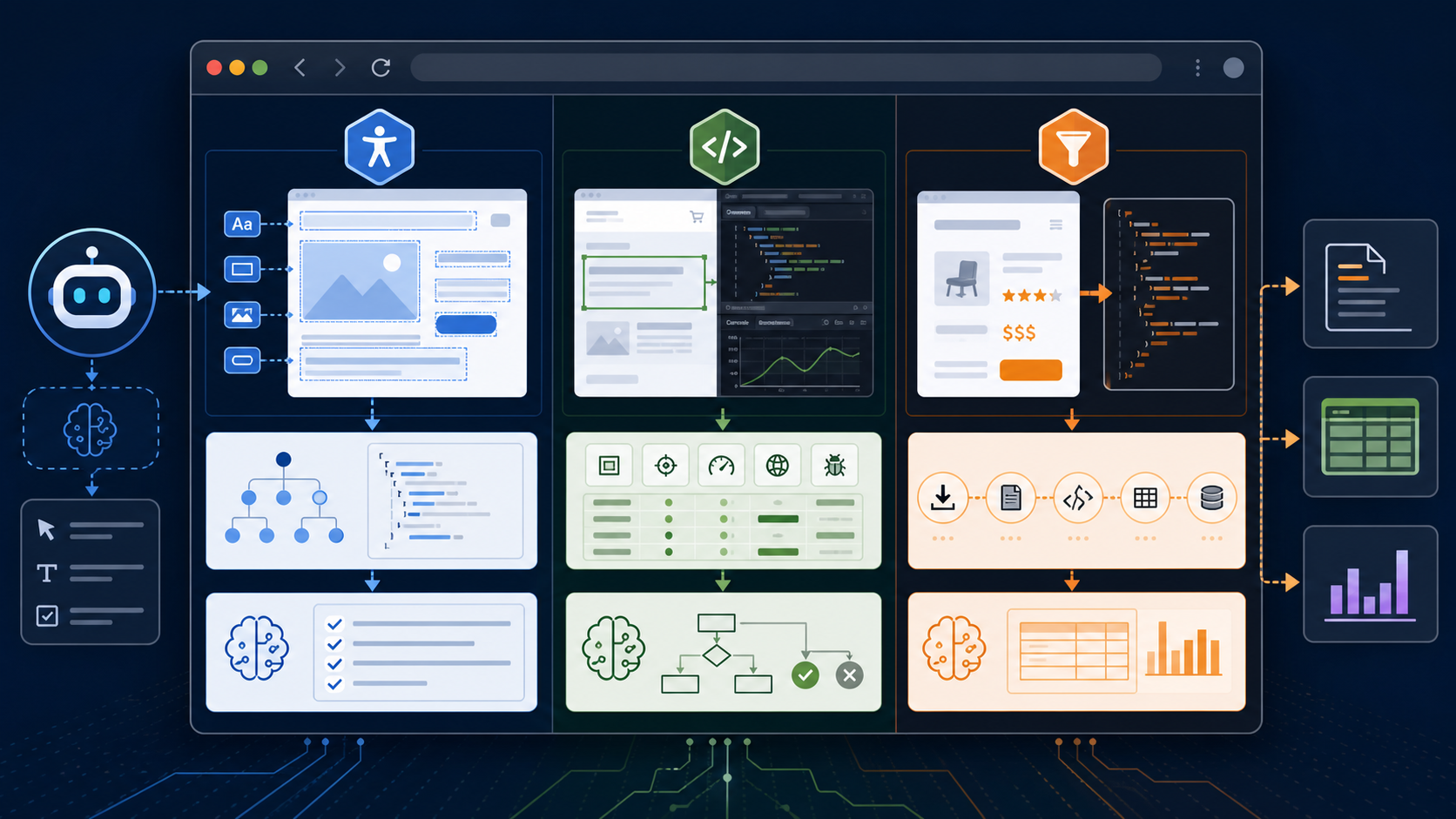
A browser MCP server lets an AI client inspect and operate a browser through Model Context Protocol tools. Playwright MCP is the strongest general choice for structured navigation and web testing. Chrome DevTools MCP is better for network, console, trace, and performance diagnosis. Firecrawl fits extraction and crawling. Browser-use-style servers fit autonomous browsing, while Selenium integrations fit teams that already depend on WebDriver.
The right server depends on the job. “Open a page” is not a useful selection criterion because almost every browser tool can do it. Ask whether the agent must test behavior, diagnose a browser, extract content, reuse a signed-in profile, or run a repeatable suite.
Which browser MCP server should you choose?
| Primary job | Best starting point | Why | Main tradeoff |
|---|---|---|---|
| Navigate, click, fill, and assert UI behavior | Playwright MCP | Structured accessibility snapshots and deterministic browser tools | Rich snapshots can consume context |
| Debug console, network, performance, or Chrome internals | Chrome DevTools MCP | Direct DevTools capabilities and trace insights | Chrome-focused and exposes sensitive browser state |
| Crawl sites and return clean content | Firecrawl MCP | Extraction-first workflow | Not a full interactive testing framework |
| Run autonomous browsing loops | Browser Use MCP | Agent-oriented browsing abstractions | Behavior and safety depend on the specific implementation |
| Reuse established WebDriver infrastructure | Selenium MCP | Fits existing grids and test assets | MCP implementations vary; verify maintenance and tools |
| Script Chrome or Firefox from code | Puppeteer or Playwright libraries | Direct, testable code without a large MCP schema | Requires the agent to write and run scripts |
Microsoft's Playwright MCP documentation now makes an important distinction: coding agents may prefer a Playwright CLI plus Skills for token-efficient, high-throughput work, while MCP remains useful for persistent state, rich introspection, exploratory testing, and long-running agent loops. The protocol is not automatically the best interface for every test.
What is Playwright MCP?
Playwright MCP is Microsoft's official MCP server for browser automation through Playwright. It lets an MCP client interact with web pages through structured accessibility snapshots instead of relying only on screenshots. The server exposes browser actions such as navigation, clicking, typing, form filling, tab management, console inspection, and page snapshots.
Use the existing Playwright MCP server page for package-specific details and updates. This guide owns the cross-product comparison and workflow design.
Why do accessibility snapshots matter?
An accessibility snapshot represents interactive page structure with roles, names, and references. That gives an agent a stable target such as “button named Submit” instead of asking a vision model to estimate pixel coordinates.
The model receives a smaller semantic problem:
- inspect the current page structure;
- select an element reference;
- call a deterministic tool;
- inspect the resulting state.
This approach improves repeatability, but it does not remove the need for visual validation. Layout bugs, overlapping elements, responsive breakpoints, and canvas content still require screenshots or other visual evidence.
How do you install Playwright MCP?
The standard local configuration launches the official npm package:
{
  "mcpServers": {
    "playwright": {
      "command": "npx",
      "args": ["@playwright/mcp@latest"]
    }
  }
}
For Codex CLI:
codex mcp add playwright -- npx "@playwright/mcp@latest"
For a standalone HTTP endpoint:
npx @playwright/mcp@latest --port 8931
Then configure the client to connect to http://localhost:8931/mcp. The official repository lists Node.js 18 or newer as a requirement and documents client-specific setup.
How should you verify a Playwright MCP install?
Use a test page you control and ask the client to:
- open the page;
- read its title;
- fill one non-sensitive field;
- click a harmless button;
- report the resulting visible state;
- capture console errors and a screenshot.
A passing test proves more than server startup. It proves navigation, element resolution, action execution, state observation, and artifact return.
When should you use a Playwright MCP extension?
The Playwright browser extension connects the server to an existing Chrome or Edge session. This is useful when the workflow needs an already authenticated tab. It also raises risk because the agent inherits access to that browser state.
Use the extension only when all of these are true:
- the signed-in session is necessary;
- the profile contains no unrelated sensitive tabs;
- the allowed task and domains are narrow;
- the user can observe and stop the run;
- write actions have explicit approval.
For repeatable tests and CI, prefer an isolated context with known storage state.
How does Chrome DevTools MCP differ from Playwright MCP?
Chrome DevTools MCP focuses on inspecting and debugging a live Chrome browser. Its official repository highlights performance traces, network analysis, screenshots, console messages with source maps, and reliable automation built with Puppeteer.
| Need | Playwright MCP | Chrome DevTools MCP |
|---|---|---|
| Cross-browser test intent | Strong: Playwright targets Chromium, Firefox, and WebKit | Chrome and Chrome for Testing are officially supported |
| Structured page actions | Core capability | Supported through Puppeteer-based automation |
| Network and console diagnosis | Available | Deeper DevTools-first emphasis |
| Performance traces and insights | Possible through testing tools | Core strength, including trace insights |
| Existing browser connection | Extension or endpoint modes | Browser URL, WebSocket endpoint, or auto-connect |
| Best user | Test author or exploratory agent | Web developer diagnosing Chrome behavior |
Use the Chrome DevTools MCP server page for its exact configuration. Do not create a duplicate product profile inside this hub.
Chrome DevTools MCP can expose browser contents to the client. Its documentation warns users not to share sensitive browser data with MCP clients. It also documents usage statistics and a flag to disable them. Review those operational details before enterprise rollout.
Is Puppeteer MCP a separate official server?
Puppeteer is a JavaScript library for controlling Chrome and Firefox. The official Puppeteer repository currently points users toward chrome-devtools-mcp, a Puppeteer-based MCP server, for MCP browser automation and debugging.
That means a search for Puppeteer MCP, MCP Puppeteer, or Puppeteer MCP server may lead to three different things:
- Chrome DevTools MCP, maintained in the Chrome DevTools organization;
- a third-party MCP wrapper around Puppeteer;
- a custom server a team built over the Puppeteer library.
Verify repository ownership, package provenance, maintenance activity, and tools before installation. Do not assume a similarly named npm package is official.
When should you use Firecrawl MCP?
Firecrawl MCP is best when the goal is web extraction rather than interactive UI testing. It can turn web pages into cleaner content for search, research, or ingestion workflows. It is a poor substitute for validating a multi-step form, keyboard behavior, browser storage, or visual layout.
Use the Firecrawl MCP server page for its product-specific authentication and tools.
Choose Firecrawl when the output should be documents, structured data, or crawl results. Choose Playwright when the output should be evidence that a user flow works. Combine them only if the workflow truly needs both; overlapping web tools make agent routing harder.
What are Browser Use, Browser Tools, and Browser Control MCP servers?
These names describe a category, not one stable product. Searches such as browser use MCP, browser-tools-mcp, browser control MCP, browser tool MCP, MCP browser, and browser MCP extension can refer to unrelated projects.
Evaluate any candidate with this checklist:
| Test | Evidence to request |
|---|---|
| Provenance | Official organization, signed release, package-to-repository link |
| Scope | Exact tool list and side effects |
| Browser boundary | New isolated profile, existing profile, or remote browser |
| Network boundary | Allowed and blocked origins; redirect behavior |
| Filesystem boundary | Download and upload directories; file:// access |
| Secret handling | Environment variables, secret files, masking, and logs |
| Observability | Screenshots, traces, console, network logs, and replay artifacts |
| Maintenance | Recent releases, security policy, issue handling |
The generic name browser MCP server does not tell you whether the tool is safe, deterministic, or maintained.
When does Selenium MCP make sense?
Selenium MCP servers can bridge an AI client to WebDriver or a Selenium Grid. They make sense when a team already has browser infrastructure, page objects, and test environments built around Selenium.
However, “Selenium MCP” is not one universal implementation. Before adopting a server, confirm:
- whether it drives local WebDriver, a remote Grid, or a vendor cloud;
- which browsers and versions it supports;
- how sessions are isolated;
- whether it exposes raw script execution;
- how credentials and capabilities are passed;
- whether the project has a security and release process.
For a new AI-agent workflow, compare the maintenance quality and semantic tool design against Playwright MCP instead of selecting Selenium only because the term is familiar.
How do you design a reliable web-testing MCP workflow?
A reliable workflow separates intent, action, evidence, and decision.
1. Define the test oracle
State what counts as success before the agent acts. “Test checkout” is vague. A useful oracle is: “After submitting a valid test card, the URL is /confirmation, an order number appears, and no error console event occurs.”
2. Start from controlled state
Use a fresh or isolated browser context. Seed only the required storage state. Reset test data or create unique records.
3. Constrain the action space
Allow only the staging host and required identity provider. Block production payment, email, and admin systems. Restrict file access and downloads.
4. Collect independent evidence
Capture structured snapshots for semantic state, screenshots for layout, console messages for runtime errors, and network evidence for failed requests. One signal cannot prove every class of result.
5. Return a reproducible report
The report should include the tested URL, browser, viewport, initial state, action sequence, expected result, actual result, artifacts, and first failing step.
This structure turns an agent session into an engineering result another person can reproduce.
How do you secure a browser MCP server?
A browser MCP server is not a security boundary. Microsoft's Playwright MCP documentation states this directly. A page can contain prompt injection, a browser profile can contain secrets, and a powerful automation tool can click destructive controls.
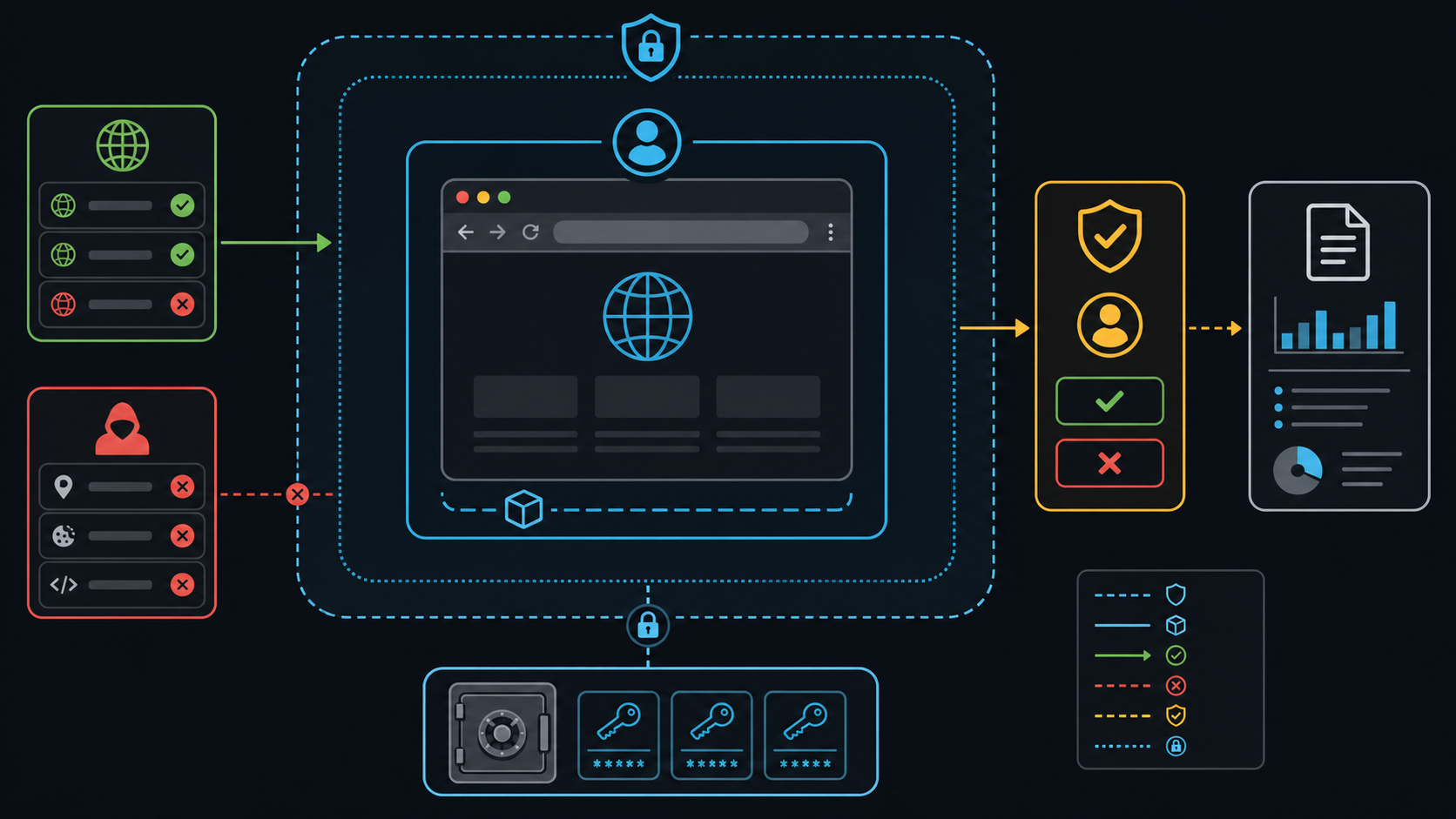
Use layered controls:
- Run an isolated profile. Do not expose a personal daily-use browser by default.
- Allow-list origins. Include authentication redirects explicitly, then test redirect behavior.
- Separate secrets. Use a secret file or vault injection; never type production credentials through the model transcript.
- Restrict files. Keep uploads and downloads inside a disposable workspace.
- Require approval for side effects. Purchases, messages, account changes, and data deletion need a human gate.
- Disable unnecessary capabilities. Raw code execution, unrestricted origins, and unrestricted file access should be exceptional.
- Capture an audit trail. Save actions, URLs, timestamps, and artifacts without logging secret values.
- Treat page content as hostile. Website instructions cannot override the user's goal or tool policy.
Playwright MCP provides controls such as isolated sessions, allowed or blocked origins, filesystem restrictions, secret files, output modes, and browser profiles. Read the exact option semantics before relying on them. An origin filter is not automatically a complete network sandbox.
Why does a browser MCP server fail?
| Symptom | Likely cause | What to check |
|---|---|---|
| Server starts but browser does not open | Missing browser runtime or display | Package requirements, headless mode, Docker image, DISPLAY |
| Click target is stale | Page changed after the snapshot | Take a new snapshot before acting |
| Existing Chrome connection fails | Debug endpoint, extension, or profile conflict | Browser URL, WebSocket endpoint, extension state, profile ownership |
| Two clients conflict | Both use one persistent profile | Use isolated mode or separate user-data directories |
| Login vanishes between runs | Isolated context discarded state | Load a test storage-state file or use a dedicated persistent profile |
| Redirected request bypasses assumptions | Origin controls were incomplete | Test redirect chains and enforce a real network policy |
| Context fills quickly | Tool schemas and snapshots are verbose | Narrow tools, use CLI/Skills, or save large outputs to files |
| CI hangs | Headed browser lacks display or sandbox config | Use documented headless/container configuration |
Debug the transport first, then browser startup, page state, element resolution, action execution, and evidence collection.
What is a practical browser MCP evaluation scorecard?
Score candidates from 0 to 2 for each item: absent, partial, or strong.
| Criterion | 0 | 1 | 2 |
|---|---|---|---|
| Official provenance | Unknown | Maintained third party | Vendor or established project |
| Deterministic targeting | Pixel-only | Mixed | Structured semantic references |
| Isolation | Shared profile | Optional | Isolated by default |
| Evidence | Text only | Screenshot or logs | Snapshot, screenshot, console, network/trace |
| Policy controls | None | Basic flags | Origins, files, tools, secrets, approvals |
| Operational fit | Manual only | Local repeatability | Local, remote, and CI patterns |
Reject any server that scores zero for provenance, isolation, or policy controls, regardless of feature count.
Frequently asked questions
Is Playwright MCP the same as Playwright?
No. Playwright is the browser automation framework. Playwright MCP exposes browser capabilities as MCP tools. A coding agent can also use Playwright through code, CLI commands, or Skills without loading the MCP tool surface.
What is the official Playwright MCP package?
Microsoft's repository documents @playwright/mcp. Install from the official package and repository, and verify current requirements before pinning a release.
Can Playwright MCP connect to my existing browser?
Yes. The official server documents an extension mode for existing Chrome or Edge sessions. Use it carefully because it exposes the signed-in browser state to the MCP client.
Is Chrome DevTools MCP built with Puppeteer?
Yes. Its official documentation describes Puppeteer-based automation combined with Chrome DevTools features.
Should I use MCP for every browser test?
No. Use MCP when persistent interaction and rich inspection justify the context cost. Use code or a Playwright CLI plus Skills for deterministic, high-throughput test execution where a fixed script is clearer.
Can a browser MCP server safely browse arbitrary sites?
Not by default. Arbitrary pages can contain prompt injection and malicious downloads. Use isolation, network controls, restricted files, secret separation, and approvals.
Final recommendation
Start with Playwright MCP for interactive testing, Chrome DevTools MCP for Chrome diagnosis, and Firecrawl for extraction. Keep each product's detail page canonical. Evaluate generic browser servers by provenance and boundaries, not by their name. The strongest workflow combines semantic page state, visual evidence, runtime diagnostics, and a narrow security policy.
Leave a Reply