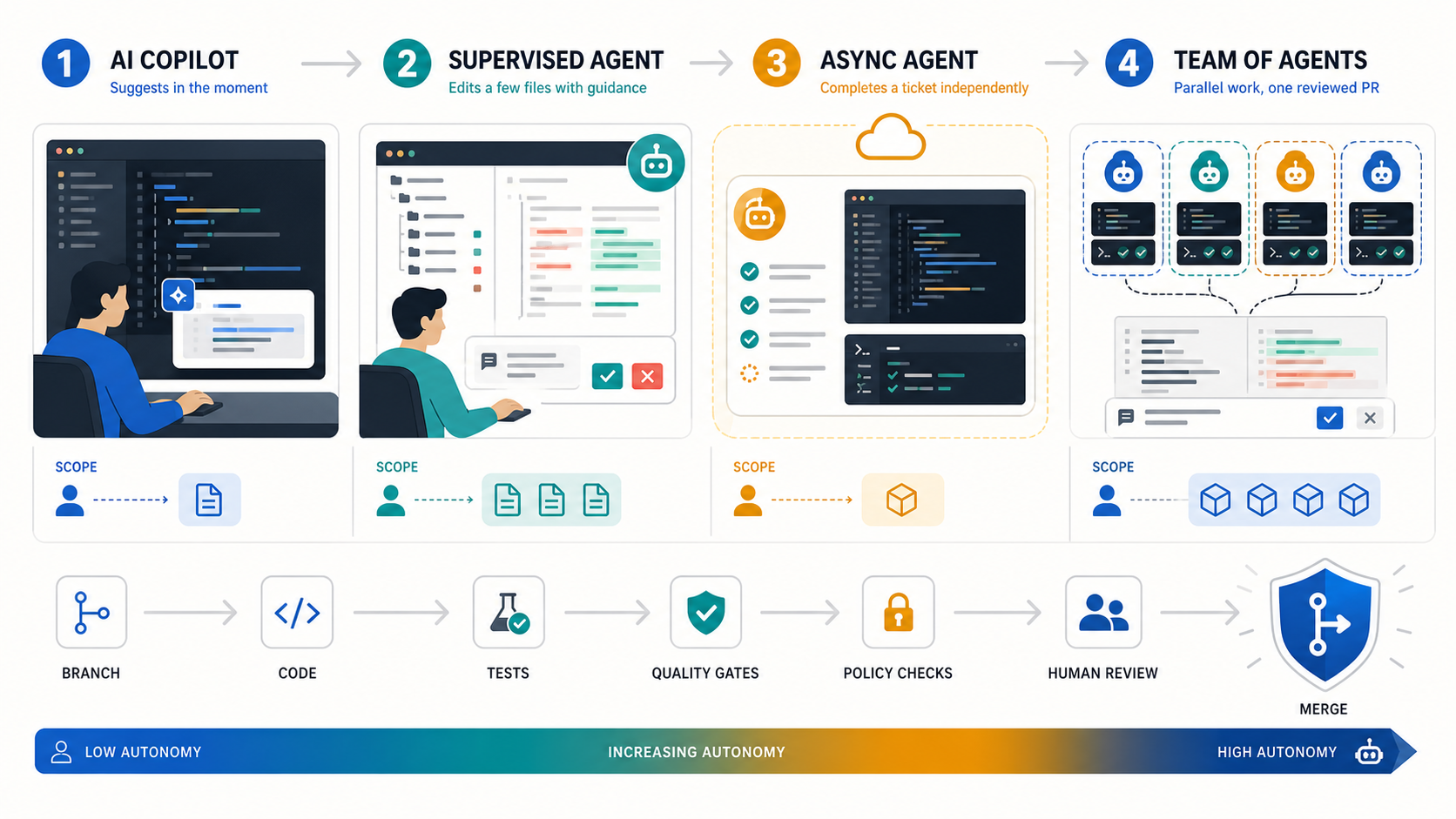
The best AI coding agent is the one whose control model fits the work you are willing to delegate. Choose Claude Code for terminal-first repository work, Cursor Agent for IDE-first development, Verdent for visible worktree-based parallelism, and Devin for asynchronous cloud delegation. None is the universal winner, and current benchmark numbers do not support a fair one-score ranking across these products.
This guide compares workflow fit, autonomy, evidence, access boundaries, and failure modes. Product availability and prices were checked on July 15, 2026. Treat them as a dated snapshot, not a promise.
What Makes an AI Coding Agent Different
Autocomplete predicts the next edit. A coding assistant may explain code or generate a function. An AI coding agent can pursue a goal through a loop: inspect the repository, form a plan, edit multiple files, run tools or tests, read the result, and try again.
Autonomous coding agents are not a single category, because autonomy is not binary. A useful ladder has four levels:
- Assist: the developer initiates and accepts each change.
- Supervise: the agent completes a bounded task while the developer watches and redirects.
- Delegate: the agent works asynchronously in an isolated environment and returns a pull request.
- Orchestrate: a lead agent divides work among parallel agents, then reconciles their outputs.
More autonomy increases throughput only when permissions, tests, isolation, and review capacity increase with it.
The key buying question is therefore not “Which model writes the best code?” It is “Which system gives this team the right mix of agency, visibility, isolation, and approval?” For a terminal-only comparison, see Graphify’s best AI coding CLIs for 2026.
How We Ranked the Agents
We ranked each product by its best-fit workflow, not by a fabricated composite score. The assessment uses five decision factors:
- Control model: drive, supervise, delegate, or orchestrate.
- Execution surface: terminal, IDE, desktop app, or managed cloud workspace.
- Verification: plans, diffs, tests, approval gates, and recovery paths.
- Operational fit: repository isolation, parallel work, logs, administration, and pricing model.
- Evidence quality: official documentation, current pricing, third-party benchmark definitions, or clearly labeled vendor claims.
We did not run a common private test suite across all four products, so this is an evidence-backed selection guide rather than a laboratory benchmark. A Tech Lead should run the pilot described below before procurement.
Why these four? They represent distinct, mature buying paths—terminal, IDE, worktree-first orchestration, and managed cloud delegation—with current official documentation and pricing. Copilot, Codex, and open-source agents remain valid candidates, but they need the same evidence review before joining this comparison.
Quick Comparison Table
| Agent | Best fit | Surface and control | Parallel model | Price snapshot | Benchmark evidence | Main limit |
|---|---|---|---|---|---|---|
| Claude Code | Terminal-first multi-file work and extensible workflows | CLI; supervise or delegate with permissions | Subagents; experimental agent teams | Pro $20/month; Max from $100/month | No current product-level SWE-bench Verified number used here | Terminal workflow and shared subscription limits may not suit every team |
| Cursor Agent | Daily IDE work that can expand into cloud execution | IDE plus cloud agents; drive through delegate | Isolated worktrees or remote agents | Hobby free; Pro $20/month; Teams $40/user/month | Composer 2 reports Multilingual results, not Verified | Remote auto-run plus network access requires careful controls |
| Verdent | Worktree-first parallel execution with visible planning | Desktop, VS Code, or JetBrains; supervise and orchestrate | Parallel agents in isolated workspaces | Trial; Starter $19, Pro $59, Max $179/month | Vendor-reported 76.1% Verified pass@1 | Cloud processing and credit use need review; platform support varies by surface |
| Devin | Asynchronous tickets and managed backlog execution | Managed cloud workspace; delegate | Parallel sessions with managed coordination | Free; Pro $20, Max $200/month; Teams from $80/month | No current comparable Verified submission found | Poorly scoped or subjective tasks can drift and consume review time |
Prices above are official monthly list-price snapshots. Taxes, annual billing, usage credits, limited bonuses, and enterprise contracts can change the effective cost. Follow each linked pricing page before purchase.
The Best AI Coding Agents in 2026
Claude Code: Best for Terminal-First Repository Work
Claude Code is the strongest fit when the terminal is already the center of development. It can inspect and edit files, execute shell commands, use MCP tools, run non-interactively, and emit structured output for automation. Plan mode and tool allow/deny rules make it possible to separate reasoning from execution.
Its advantage is composability. Developers can keep their existing editor, scripts, Git practices, and CI while adding an agent at the command line. Subagents provide isolated context for specialist tasks; experimental agent teams go further by coordinating multiple Claude Code instances. Anthropic warns that agent teams consume substantially more tokens and still have coordination and recovery limitations.
Choose Claude Code for complex, testable repository changes where a developer wants direct control. Do not treat --dangerously-skip-permissions as a convenience setting on a private repository. See the full Claude Code review for a deeper client-level assessment.
Cursor Agent: Best for IDE-First Development
Cursor Agent is the best default for developers who want agentic work inside an editor. Its path from interactive edits to background and cloud agents lets a team start with supervision, then delegate suitable tasks without changing the primary interface.
Cursor supports parallel agents in isolated worktrees or remote environments. Cloud agents can edit and run code asynchronously in isolated Ubuntu machines. That convenience changes the threat model: Cursor’s documentation notes that remote agents have network access, automatically execute terminal commands, and require GitHub access. Teams should constrain repositories, secrets, egress, and branch permissions before enabling them.
Choose Cursor when review happens continuously in the IDE and low workflow disruption matters. For self-hosted cloud execution, confirm which code and tool operations remain in your network and which inference or orchestration traffic still passes through the vendor. Graphify’s Cursor review covers the product in more depth.
Verdent: Best for Worktree-First Parallel Agents
Verdent is the most explicit parallel-work candidate in this shortlist. Its desktop, VS Code, and JetBrains product tracks emphasize planning, verification, and multiple agents operating in isolated Git worktrees. The structure is useful when a task can be decomposed into independent branches and a human wants to inspect each stream.
Verdent recommends roughly two to four parallel agents on most machines. More agents are not automatically faster: overlapping files can still cause unsafe edits or rebase conflicts, and each workstream consumes credits. Platform support varies by surface: the VS Code extension supports macOS, Windows, and Linux, while Verdent also maintains desktop and JetBrains product tracks. Its security documentation says selected context and tool results pass through Verdent’s cloud routing, so private-repository buyers should review privacy mode and data paths.
Verdent reports 76.1% pass@1 on SWE-bench Verified in its own technical report. That is a vendor-reported result for a stated system configuration, not an independently audited product ranking. It is evidence worth investigating, but not a reason to skip a pilot.
Devin: Best for Asynchronous Ticket Delegation
Devin is built around delegation. In Agent mode it can write and run code, browse, test, debug, and create pull requests from a managed workspace. Ask mode is read-only and better for exploration or planning before execution.
This model fits bounded backlog items that are easy to verify: small bugs, tests, CI changes, migrations, and repetitive maintenance. Devin’s own first-run guidance says it can go off track and recommends small, clearly specified work; a task that would take a developer about three hours is a sensible first boundary. Parallel sessions can increase throughput or test competing approaches, but resource use rises with each session.
Choose Devin when asynchronous handoff matters more than continuous pair programming. Keep branch protection and human code review in place. The Devin review provides additional product context.
Other Agents to Verify
GitHub Copilot, OpenAI Codex, Windsurf, Replit Agent, Cline, Aider, and OpenCode may fit a different stack or procurement path. They are not ranked here because adding names without applying the same current evidence standard would create breadth without confidence.
Shortlist another agent only after confirming its present execution surface, repository isolation, approval model, data handling, logs, pricing unit, and a task-matched pilot. Graphify’s AI coding tools directory is the broader starting point.
Single-Agent vs Multi-Agent Workflows
A single agent is usually better when the task has shared state, ambiguous requirements, or frequent edits to the same files. It costs less, produces one coherent trace, and is easier to stop or redirect.
Multi-agent execution helps when work splits cleanly: independent test suites, unrelated modules, parallel investigation, or competing implementations. Require workspace isolation and define ownership before starting. Otherwise, duplicated exploration, merge conflicts, token or credit consumption, and human review become the bottleneck.
Use this rule: parallelize independent uncertainty, not tightly coupled coding. Start with one agent. Add a second only when the expected time saved exceeds coordination and review cost.
Benchmark and Evidence Limits
SWE-bench Verified contains 500 human-validated, solvable GitHub issues. It is a useful test of real repository problem-solving, but a result measures a system: model version, agent scaffold, tools, prompt, resource budget, retries, selection policy, and evaluation harness.
Two percentages are not comparable unless those conditions align. Pass@1 and pass@3 answer different questions. A multilingual subset is not Verified. A vendor’s current product can also differ from the configuration in an older report.
That is why this guide does not convert Verdent’s vendor result, Cursor model reports, older Anthropic model claims, or Devin launch numbers into a league table. Our July 15, 2026 official-site and SWE-bench review found no current, comparable product-level Verified submission for Devin. Use benchmarks to shortlist; use a controlled repository pilot to buy.
Run a Controlled Pilot Before You Buy
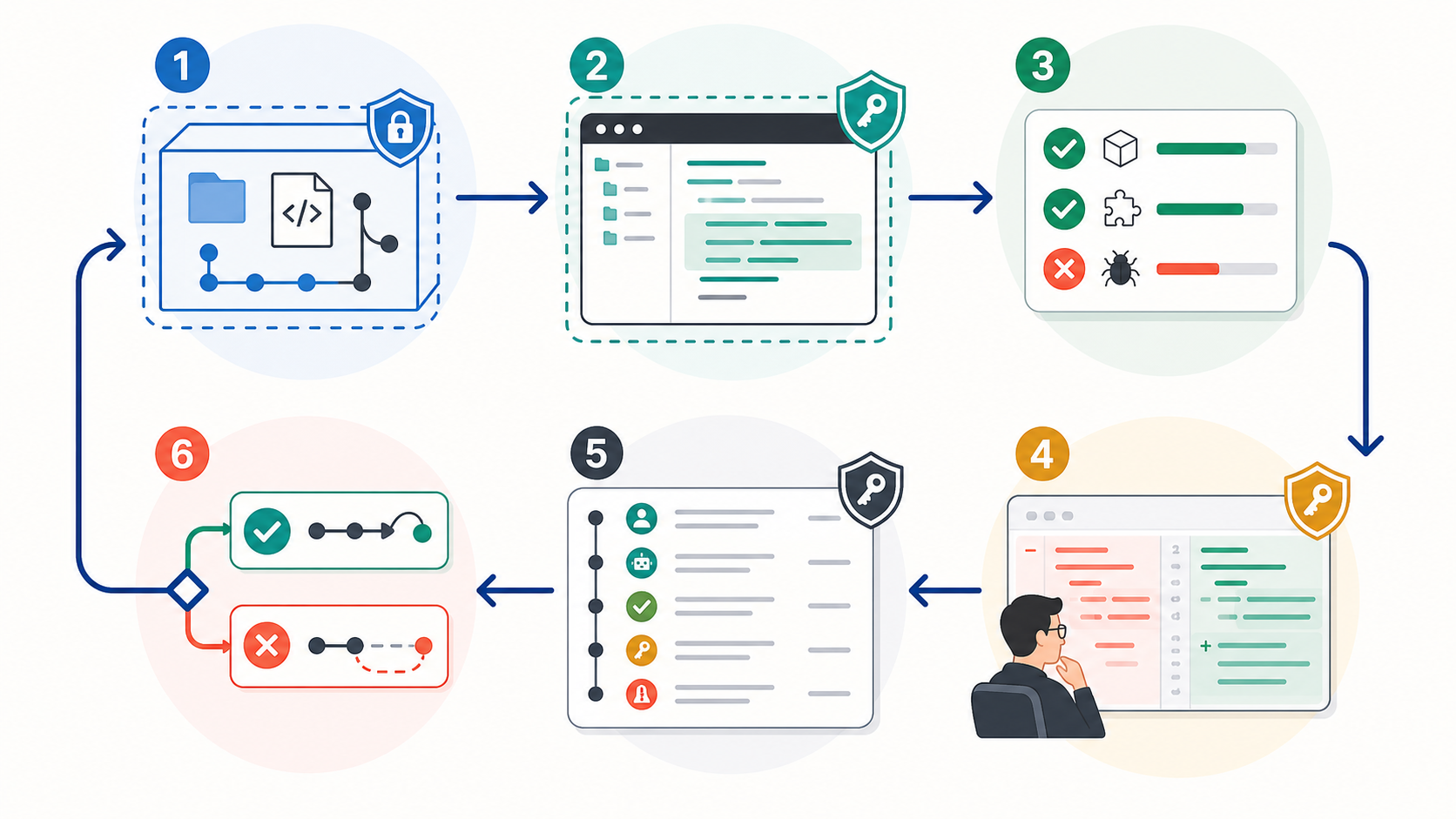
A useful trial measures the entire delivery loop, including human review and recovery—not just whether an agent opens a pull request.
Choose one non-critical, medium-sized repository with reliable tests and representative conventions. Give every candidate the same two or three tasks, context, time budget, and acceptance criteria. Record:
- task completion and test pass rate;
- incorrect or out-of-scope changes;
- human interventions and clarification turns;
- review time, rework, and time to merge;
- token, credit, seat, and infrastructure cost;
- permission prompts, tool calls, commands, diffs, test output, and rollback events.
Use branch protection, least-privilege credentials, isolated workspaces, and a named human approver. Graphify’s guide to the authority control plane for AI coding agents explains why access and approval are part of agent quality, not separate paperwork.
FAQ
Who should approve agent access to private repos?
The repository owner or engineering lead should approve the technical scope, while the security or platform owner approves credentials, data paths, network access, retention, and audit requirements. For sensitive code, legal or compliance review may also be required. Grant access to the pilot repository only, use short-lived credentials where possible, and never let the agent’s initiating user silently bypass organization policy.
What project should teams use for a pilot?
Use a non-critical repository that resembles production, has dependable automated tests, and contains tasks with objective acceptance criteria. Avoid a toy greenfield app, because it hides context and integration failures. Also avoid the first production migration or security-critical change, because the cost of learning is too high.
What logs should teams keep during trials?
Keep the original request, agent plan, prompts, tool calls, shell commands and outputs, file diffs, tests, human approvals, interventions, model and agent versions, elapsed time, usage cost, and final merge or rollback result. These records reveal whether the agent succeeded independently or merely shifted work into review and cleanup.
Conclusion
The best AI coding agents in 2026 occupy different control points. Claude Code fits terminal-first operators; Cursor fits IDE-centered teams; Verdent makes parallel worktree execution visible; Devin is designed for asynchronous ticket delegation.
Start with the least autonomous mode that can complete the job. Verify current product facts, separate vendor claims from comparable evidence, run the same scoped pilot, and measure review plus recovery—not code generation alone. If repository understanding is the constraint, Graphify provides knowledge graphs for AI coding assistants rather than another execution agent.
Leave a Reply