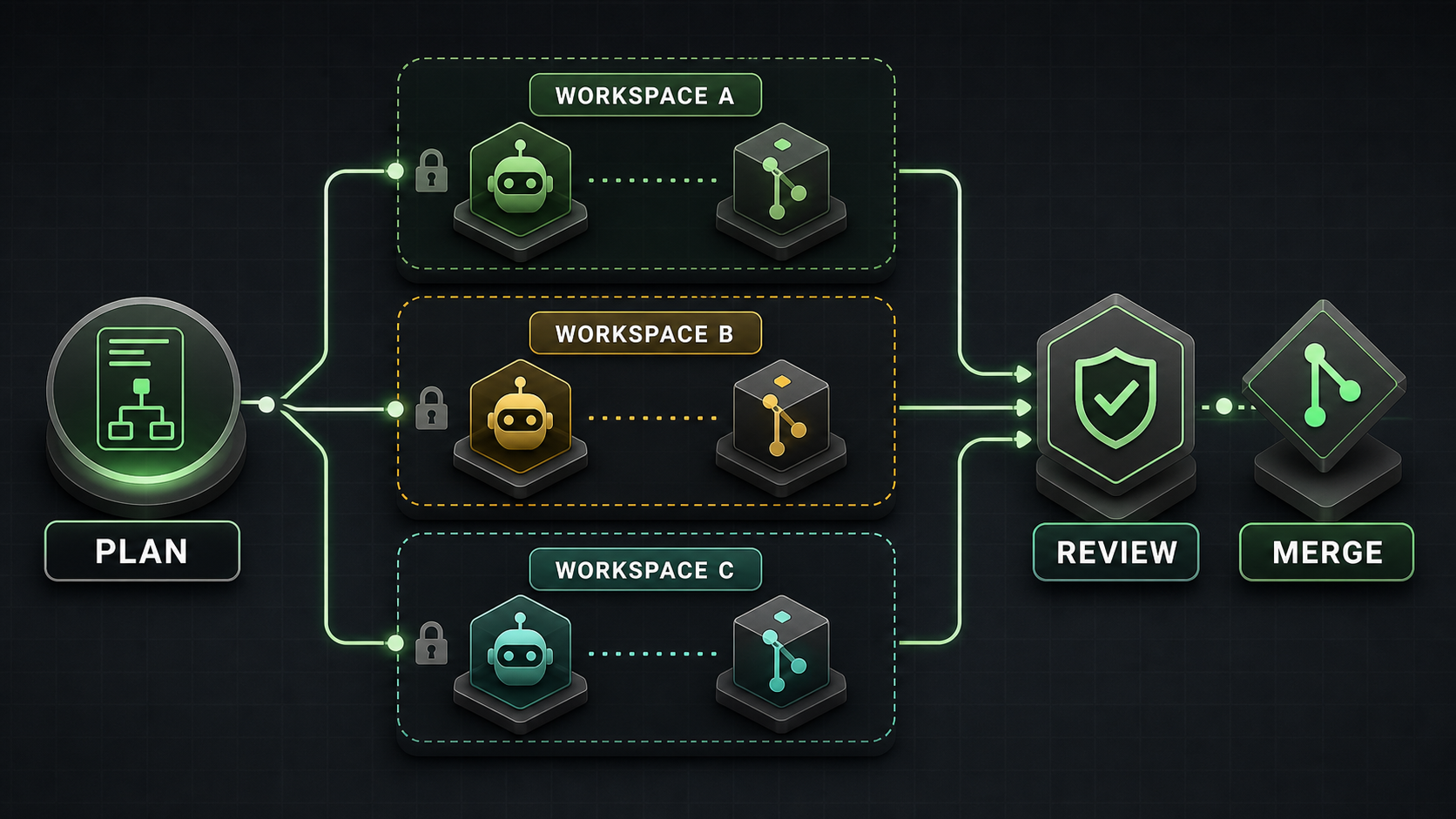
Verdent is most compelling when a developer or Tech Lead needs to supervise several independent coding workstreams. Its desktop app can place agents in separate Git worktrees, preserve each result for review, and integrate only approved changes. That is a more specific value proposition than “an AI that writes code faster.”
This Verdent review finds a credible multi-agent control layer, but not a universal replacement for Cursor, Claude Code, Codex CLI, or a team’s existing IDE. Parallel work still requires task decomposition, merge discipline, cost controls, and human verification. Product access, prices, privacy terms, and benchmark claims below were checked on July 15, 2026.
What Verdent Is
Verdent is an AI coding environment built around planning, agent execution, verification, and review. It is available as a desktop app for Apple Silicon and Intel Macs and Windows x64, through VS Code and JetBrains integrations, and as a cloud product.
Verdent is not a foundation model. It orchestrates models from providers such as Anthropic, OpenAI, Google, Moonshot, MiniMax, Qwen, and Z.AI. A user can choose models for tasks and, in supported workflows, compare or review with multiple models. That distinction matters: the model supplies reasoning, while Verdent supplies the workspace, tools, context, permissions, execution loop, and review surface.
The two main execution modes are straightforward. Plan Mode is read-only: it analyzes the repository, asks questions, and creates a plan without editing files or running commands. Agent Mode can modify files and execute the plan. For a wider market view, compare Graphify’s best AI coding agents in 2026.
Key Workflow and Agent Features
Verdent’s defining desktop feature is its Workspace abstraction. A Workspace uses a Git worktree, giving it separate working files while sharing repository history. A team can keep one agent on a bug fix, another on tests, and another on documentation without mixing their uncommitted changes.
The isolation has important boundaries:
- A task is an agent conversation inside a workspace. Tasks have separate conversation context.
- Tasks in the same workspace share files. Verdent’s documentation says concurrent edits to the same file are not deterministic and later writes may overwrite earlier work.
- Agents in separate workspaces have file-level isolation, but overlapping changes can still conflict during merge or rebase.
- Verdent does not publish a hard parallel-agent limit. Its documentation recommends roughly two to four for most users, depending on system resources and credits.
- Each worktree may need its own installed dependencies and disk space.
This is coordinated concurrency, not automatic teamwork. The operator must split work along clean boundaries, assign ownership, inspect diffs, run checks, and resolve integration conflicts. Verdent’s Cloud workspace is also a different object: official documentation explicitly says it is a cloud environment, not local worktree isolation.
Verdent adds multi-model planning and review, project rules, MCP integrations, command deny rules, diff summaries, test execution, and a review subagent. BYOK currently supports Anthropic, OpenAI, and OpenRouter according to the product changelog. These features make the product a control surface for larger changes, rather than an autocomplete-first editor.
Benchmarks and Evidence to Verify
Verdent reported a 76.1% pass@1 and 81.2% pass@3 result on the 500-task SWE-bench Verified set in November 2025. The company said the run used its production agent without leaderboard-specific tuning or candidate selection. This is a historical, vendor-run result—not an independent 2026 ranking.
The technical report is useful because it also documents limitations. It says SWE-bench measures the complete model-and-agent system, not a raw model. It observed up to a 1.2-point pass@1 difference between providers for the same model. A simplified toolset changed the result very little, and the review subagent added only about 0.5 points to pass@3. Those findings weaken any claim that one headline number proves every part of Verdent’s current workflow.
Verdent later claimed its code-review system reached 74.2% precision and 20.1% recall, ranking first by F0.5 among nine tools. The claim appears in the company changelog, but the public material we found does not provide a complete dataset, per-tool configuration, or independent replication. Treat it as a vendor claim to reproduce, not a procurement verdict.
A team trial should compare Verdent with the same repository commit, model where possible, task budget, permissions, and acceptance tests. Otherwise, a different model or retry policy may be mistaken for a better agent platform. Graphify’s best LLMs for coding explains how to separate model evidence from agent evidence.
Pricing and Access to Verify
Current Verdent pricing uses a shared credit pool across its products. The official pricing page listed the following on July 15, 2026:
| Plan | Price | Included usage shown at verification | Practical note |
|---|---|---|---|
| Free trial | $0 | 100 credits for 7 days | Suitable for setup and a small pilot |
| Lite | $5/month | Eco Mode with selected lower-cost models | Frontier models require added credits |
| Starter | $19/month | 320 base + 160 limited-time bonus | 480 total while the promotion lasts |
| Pro | $59/month | 1,000 base + 500 limited-time bonus | 1,500 promotional total |
| Max | $179/month | 3,000 base + 1,500 limited-time bonus | 4,500 promotional total |
| Teams | $20/user/month | 480 credits per user | Central payment and usage visibility |
Verdent states that one credit is approximately $0.059, provider model costs carry no markup, and top-ups start at 340 credits for $20. Eco Mode uses lower-cost models without drawing from credits, but included capacity varies by plan. A task does not have a fixed credit price: model choice, context size, complexity, and parallel execution all change consumption.
Do not convert a monthly allowance into a guaranteed prompt count. During a pilot, record credits per accepted patch, including retries and review. Promotions, model availability, and Eco Mode limits can change, so recheck the official pricing page before purchase.
Access also raises a data question. Verdent’s May 2026 privacy policy says it may store input and output as account history. Repository indexing is opt-in; when enabled, Verdent says it stores embeddings rather than plaintext code and deletes unused embeddings after an unspecified period. The same policy says input and output are not used for model training without explicit consent.
However, the older November 2025 security page still says repository indexing is unavailable and contains older Privacy Mode language. This documentation conflict should be resolved in writing before a private-repository rollout. Verdent says SOC 2 and ISO/IEC 42001 certifications are being pursued; it does not say they are complete.
Pros and Cons
Pros
- Git-worktree isolation preserves parallel alternatives for later review.
- Read-only planning creates a clear approval point before execution.
- Multi-model planning, implementation, and review support different task profiles.
- Diffs, tests, verification, and command rules make agent actions more inspectable.
- Desktop, IDE, and cloud access cover several developer workflows.
- Eco Mode, BYOK, subscriptions, and top-ups provide multiple cost paths.
Cons
- Parallel agents increase credit use and integration overhead.
- Same-workspace concurrent edits can overwrite one another.
- Separate workspaces postpone overlapping-file conflicts rather than eliminating them.
- Each worktree can duplicate dependencies and consume significant disk space.
- AI requests travel through Verdent infrastructure and model providers; this is not a purely local system.
- Public performance evidence is mostly vendor-run and tied to older models or product versions.
- Security certifications remain in progress, and current public privacy documents are not fully aligned.
How It Compares to Alternatives
| Alternative | Prefer it when | Prefer Verdent when | Comparison boundary |
|---|---|---|---|
| Cursor or Windsurf | Daily inline editing and an AI-native IDE are central | Supervising several isolated workstreams is central | Compare editing flow separately from orchestration |
| Claude Code or Codex CLI | Terminal automation, scripting, and explicit command-line control matter most | A visual desktop control plane and managed workspaces matter | Hold the model constant where possible |
| Devin | A cloud-based, asynchronous worker is the desired unit | Local worktree-based desktop supervision is preferred | Compare environment, governance, and total task cost |
| Cline, Roo Code, or OpenCode | BYOK flexibility and open extension points outweigh a managed experience | Integrated planning, isolation, and review reduce setup work | Cloud-model requests are not “fully local” |
| CodeRabbit | Pull-request review is the main need | Generation and review must live in one workflow | A review tool can complement Verdent rather than replace it |
A useful Verdent vs Cursor test should therefore include both small interactive edits and larger parallel tasks. A single refactor does not establish which daily workflow is better. For terminal-oriented choices, see the planned Claude Code vs Codex CLI comparison.
Who Should Use It
Verdent fits Tech Leads, senior developers, and small teams that routinely have two or more independent tasks in one repository. It is especially relevant for parallel bug fixes, separate implementation experiments, tests alongside feature work, and review-heavy multi-file changes.
It is a weaker fit for developers who mainly want autocomplete, teams with tightly sequential work, or organizations that cannot yet approve Verdent’s data path. Small one-file fixes may not justify workspace overhead. Highly coupled migrations may be safer as one planned sequence.
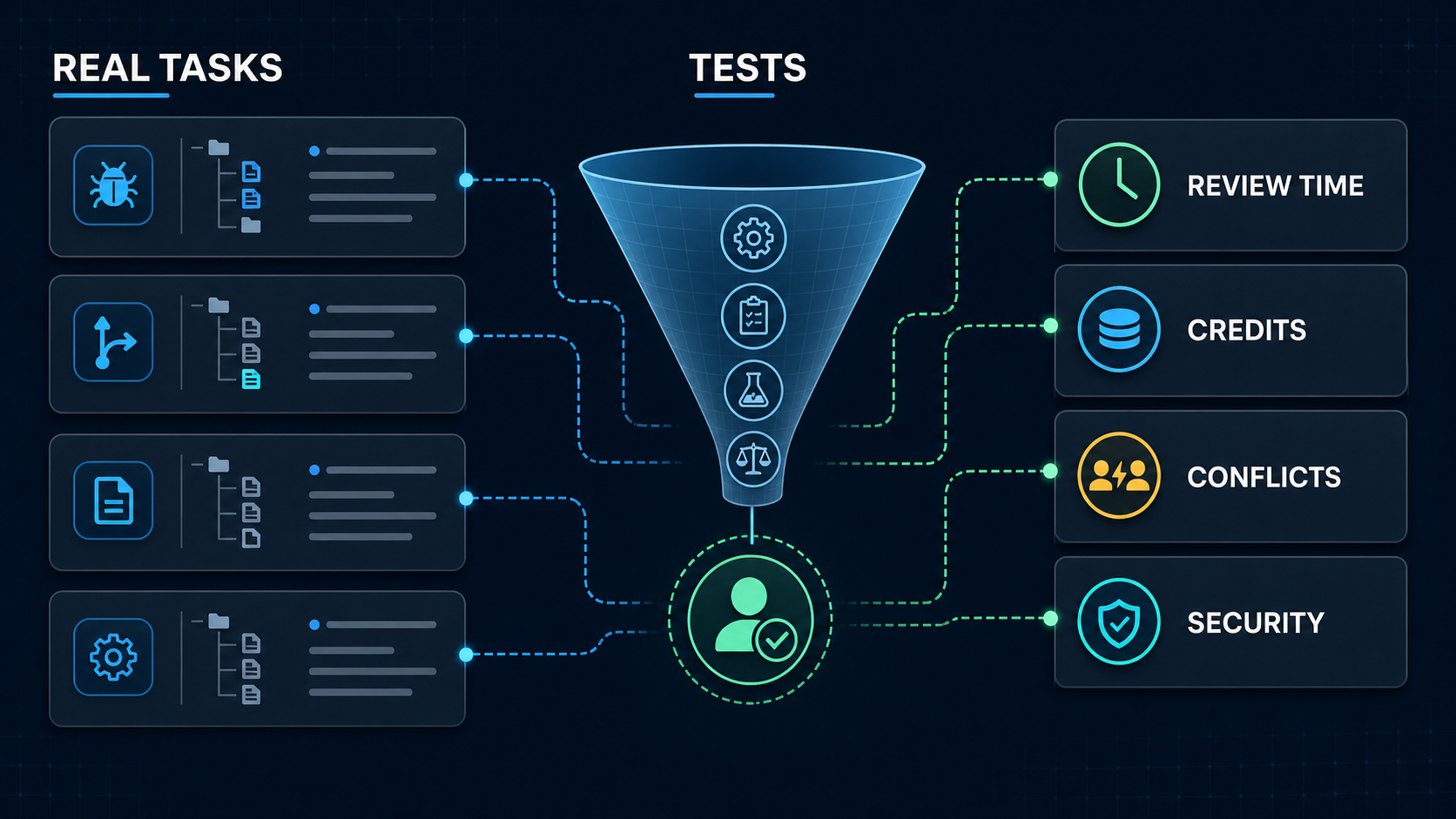
Run an 8–12 task pilot before adopting it. Include ordinary bugs, a multi-file feature, two genuinely independent parallel tasks, one deliberately overlapping change, a refactor, and a request that should be refused or escalated. Record test success, reviewer minutes, unrequested edits, credits, wall time, rebase conflicts, and security events. Graphify uses this workflow-first lens across AI coding research.
FAQ
What internal project should teams use for a trial?
Use a representative but non-critical repository with reliable tests and no production secrets. Freeze every comparison to the same commit. Choose recent tasks with objective acceptance criteria, including one parallel pair and one expected conflict, rather than a greenfield demo designed to make the tool look good.
Who should approve multi-agent rollout decisions?
The engineering owner should approve task fit, review requirements, and merge policy. Security or platform owners should approve repository access, subprocessors, retention, model blocklists, network permissions, and command rules. Finance or procurement should approve credit budgets and contractual terms. Name a rollback owner before expanding access.
What migration notes should teams keep after testing?
Keep the Verdent version and access surface, model and provider, prompts, repository commit, workspace layout, permission rules, credits, elapsed time, commands, test output, reviewer edits, conflicts, security events, and acceptance decision. Also record the previous workflow and rollback steps so a tool change does not erase operational knowledge.
Conclusion
Verdent offers a coherent answer to multi-agent coding: plan the work, isolate independent changes, verify each result, and merge only after review. Its desktop worktree model is genuinely useful for developers managing concurrent work, but it does not remove task design, cost, conflict resolution, or human accountability.
The best decision is a bounded trial, not faith in a 2025 benchmark or a promotional credit total. If Verdent reduces accepted-patch time without increasing review burden, conflicts, or data risk, it deserves a place in the workflow. If the work is mostly sequential or autocomplete-driven, a simpler agent or IDE may remain the better choice.
Leave a Reply