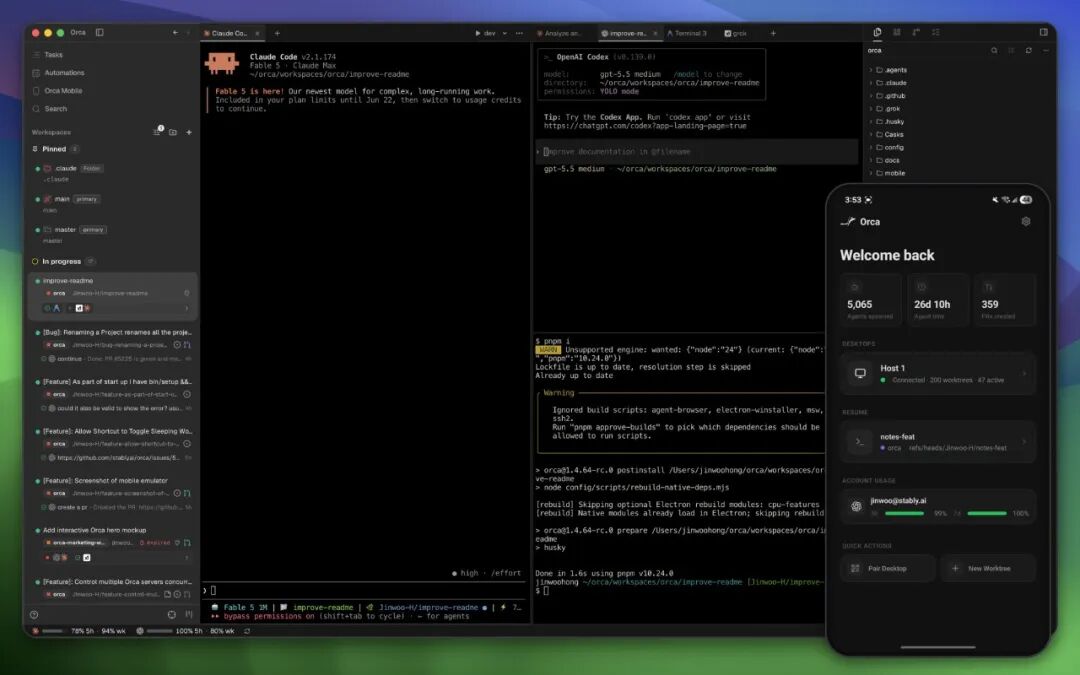
Orca multi-agent coding turns a collection of terminal-based coding assistants into a coordinated desktop workspace. Instead of opening Claude Code, Codex, OpenCode, or another CLI agent in unrelated terminals, Orca gives each task a visible workspace, an isolated Git worktree, file and diff context, and a path for handing work between agents.
That makes Orca more than a launcher. It is an Agent Development Environment—or ADE—designed around the operational problems that appear after a team starts running several coding agents at once: branch isolation, terminal sprawl, review, remote access, task dispatch, and human approval.
The original Chinese tutorial from ITPostman provides an extensive Windows walkthrough. This English guide takes a different approach: it explains the current product model, verifies features against Orca's official repository and documentation, updates version-sensitive setup instructions, and adds the security and workflow limitations that a production team should understand before adopting it.

What Is Orca Multi-Agent Coding?
Orca is an open-source desktop application from Stably AI for running CLI coding agents side by side. Its official repository describes it as an orchestrator for agents such as Claude Code, OpenAI Codex, OpenCode, Pi, Hermes, Grok, Cursor CLI, GitHub Copilot CLI, and many others. The general compatibility rule is simple: if an agent runs interactively in a terminal, Orca can usually host it.
Orca does not replace those agents or bundle their models. You bring your own subscriptions, accounts, and command-line installations. Orca provides the surrounding environment:
- projects and isolated Git worktrees;
- persistent terminal sessions and split panes;
- source files, diffs, annotations, and Git operations;
- GitHub, GitLab, and Linear workflow surfaces;
- an embedded Chromium browser with Design Mode;
- SSH workspaces and port forwarding;
- automation, orchestration, and Computer Use commands;
- a mobile companion for monitoring and steering the desktop app.
As of July 16, 2026, the GitHub repository had about 20.4K stars and used the MIT License. That popularity is notable for a project created only in March 2026, but stars are not evidence of reliability or security. Orca ships frequently, which makes its release notes and current documentation more dependable than screenshots of a particular version.

The Core Idea: One Task, One Worktree, One Agent
The strongest Orca workflow is not simply “run more agents.” It is to create explicit task boundaries.
A Git worktree is a separate working directory connected to the same repository object database. Each worktree can use its own branch, files, agent session, and terminal state. That is more efficient than cloning an entire repository for every task, while still isolating filesystem changes.
For example, a team could create:
ui-shell-claudefor interface and responsive-layout work;split-engine-codexfor business logic and tests;export-opencodefor CSV and Markdown export.
Each agent operates in a different branch and working directory. The main workspace can review their diffs and merge selected work.
Isolation is not absolute. Agents can still collide on shared databases, network ports, caches, external APIs, generated resources, or assumptions about the same interface. Parallel development also creates ordinary merge conflicts when two branches change the same code. The worktree model reduces accidental file overlap; it does not eliminate coordination.

Supported Platforms and Installation
Orca currently provides desktop builds for:
- macOS on Apple Silicon and Intel;
- Windows 10 and 11 on x64;
- Linux through AppImage, with additional release assets such as Debian and RPM packages.
The official download page is the simplest starting point. The GitHub Releases page provides explicit platform files, while macOS users can also install the Homebrew cask:
brew install --cask stablyai/orca/orca
Installing Orca does not automatically install or authenticate every coding agent. Before creating a workflow, verify the CLI tools you intend to use:
claude --version
codex --version
opencode --version
gh --version
Only the relevant commands need to be present. GitHub CLI can be useful for GitHub authentication and operations, but it should not be described as a universal Orca dependency. Linear integration requires a personal API token, which should be scoped and stored carefully.
The onboarding UI can detect installed agents and offers defaults for terminal, theme, notifications, and project setup. Counts such as “32 available agents” are version-dependent. The durable claim is that Orca ships many presets and can run other terminal agents through custom setup.
Parallel Terminals Without Losing Context
Agentic coding creates a new kind of terminal problem. A conventional terminal is organized around processes and tabs, while the user thinks in terms of tasks, branches, agents, reviews, and decisions.
Orca associates terminals with a project and worktree. It supports split panes, persistent scrollback, and multiple sessions inside the same workspace. Its documentation describes the terminal as using xterm.js—the same terminal foundation used by VS Code—with themes and settings that can be imported from Ghostty.
The advantage is contextual persistence. When a user returns to a worktree, the associated terminals and agent history remain connected to the task. This is particularly useful when one agent is waiting for input, another is running tests, and a third is investigating a failure.
More terminals still create cognitive load. A useful operating rule is to assign each worktree one clear objective, define a verification command, and close or archive sessions once the task is complete. Unlimited panes should not become unlimited unfinished work.

Design Mode: Send UI Context to an Agent
Orca's embedded Chromium browser includes Design Mode. A user can select an element on a running page and send structured context to the active agent. According to Orca's documentation, that context can include:
- the selected HTML and nearby DOM;
- computed CSS;
- a cropped screenshot;
- source location when a source map is available;
- a human annotation describing the desired change.
This is more useful than sending only a screenshot because the agent receives both visual evidence and implementation context. A designer or reviewer can point at a spacing problem, label it, and let the agent trace the relevant component and styles.
Design Mode does not remove the need for review. The agent may identify the wrong source file, overgeneralize a local change, or create a layout that works at one viewport and fails elsewhere. Pair visual instructions with responsive checks, accessibility requirements, and regression tests.

GitHub, Linear, Diffs, and Review
Orca includes native workflow surfaces for code review and task systems. Official documentation covers GitHub pull requests, issues, projects and Actions, as well as Linear tasks through a personal API token. The application also exposes Git and diff tools inside each workspace.
One of the more practical features is diff annotation. A reviewer can attach a comment to a changed line and send that feedback back to the agent. The result is a tighter loop:
- the agent makes a change;
- the human reviews the actual diff;
- the human attaches precise feedback;
- the agent revises the branch;
- tests run again before merge.
This is a safer pattern than asking an agent to “fix everything” in an unbounded session. The review artifact stays connected to a branch and a visible patch.
Access scope matters. GitHub, GitLab, and Linear credentials can expose private repositories, issues, customer information, and internal plans. Use the smallest permissions that support the workflow, and avoid pasting long-lived tokens into an agent prompt or terminal history.

SSH Worktrees for Remote Development
Orca can create worktrees on a remote machine over SSH while retaining file editing, Git operations, terminals, agent sessions, reconnection, and port forwarding.
This is useful when the project needs:
- a Linux environment unavailable on the local machine;
- more CPU, RAM, or GPU capacity;
- access to an internal development network;
- a long-running agent session that should survive a laptop interruption.
Official documentation says remote PTYs can remain alive through a relay on the remote host, with a default grace period after the desktop app closes. Orca can also remember an SSH passphrase in memory for a configurable period.
Those conveniences increase the trust boundary. Review remote-host ownership, SSH keys, passphrase retention, port-forward bindings, and the processes left running after disconnection. A forwarded development server should not accidentally bind to a public interface or expose an unauthenticated tool.


Dragging Files and Using the Orca CLI
Files and images can be dragged from the file explorer into an agent session. That is helpful for design references, logs, test fixtures, screenshots, and documents that would be awkward to describe in a prompt.
Treat dragged files as data disclosure. The terminal agent—not Orca alone—may send the attachment or extracted content to its model provider. Provider privacy policies, enterprise controls, and data-retention terms still apply.
Orca also exposes a CLI so agents and scripts can interact with the application. Current documentation includes commands for worktrees, browser interaction, snapshots, orchestration, automation, and Computer Use. The CLI makes Orca programmable, but it also means a coding agent can affect more than the repository if given broad permissions.
Keep command scopes explicit. A task that needs to inspect a page should not automatically receive permission to submit forms, send messages, delete resources, push code, or modify accounts.


Orchestration: Hand Work Between Claude Code and Codex
The original tutorial demonstrates a common pattern: one agent analyzes a task and another implements it. For example, Claude Code may inspect the repository and prepare a plan, then dispatch the implementation to Codex in a dedicated worktree.
Current Orca documentation describes a native orca orchestration command surface with persistent messages, tasks, dispatches, heartbeats, completion signals, decision gates, and a coordinator loop. This is more structured than copying a long prompt between terminal windows.
A safe handoff should include:
- the objective and acceptance criteria;
- verified file paths and current behavior;
- files or modules that must not change;
- required tests and build commands;
- the target worktree and branch;
- permission boundaries;
- the expected completion report.
The receiving agent should independently inspect the repository rather than trusting every assumption in the handoff. The coordinator should verify the resulting diff and tests before merging.
For a deeper comparison of the underlying assistants, see Claude Code vs Codex CLI. The Orca layer coordinates those tools; it does not make their capabilities identical.
Scheduled Automation
Orca can schedule recurring agent tasks by time and workspace. Official documentation covers hourly, daily, weekday, weekly, cron, and RRULE schedules, along with timezone, repository, provider, session-reuse, and fresh-session settings.
Useful jobs include:
- daily test and production-build verification;
- dependency or security-report generation;
- review of commits from the preceding 24 hours;
- repository health summaries;
- non-mutating checks of a staging environment.
Start automations disabled, run them manually, inspect their permissions, and only then enable the schedule. A scheduled agent that can modify code, push branches, access browsers, or use external integrations can repeat a mistake without a human present.
The best default is reporting rather than repair: inspect, test, summarize, and ask for approval before making consequential changes.
Computer Use and Mobile Control Are Different Features
Two Orca capabilities are easy to conflate.
The Mobile Companion lets a phone monitor and steer agents running through the desktop application. It can show terminal scrollback and files, send replies and attachments, review source-control changes, and receive notifications. Orca documentation says the desktop remains the source of truth and that the connection does not rely on a cloud relay. If the desktop app is closed, the mobile connection ends.
Device automation is separate. Orca includes skills and commands for Android environments visible through ADB, including emulators and configured physical Android devices. iOS automation targets Apple Simulator on macOS with Xcode; the cited documentation does not establish equivalent control of a physical iPhone.
Computer Use allows an agent to operate local desktop applications through accessibility trees, screenshots, keyboard input, and visible UI actions. macOS requires Accessibility and Screen Recording permissions, and other operating systems have their own native providers.
These are powerful permissions. Orca's own safety guidance warns against automatically pushing code, submitting forms, sending messages, purchasing, deleting, changing account settings, or exposing secrets without explicit permission. Read the current state before every action, keep personal tabs and accounts out of scope, and require human confirmation for destructive or externally visible operations.
Privacy and Telemetry
Packaged Orca builds collect anonymous product telemetry through PostHog Cloud in the United States. Orca's telemetry documentation says it records application version, platform, lifecycle events, coarse feature use, and agent kind, but not prompts, model output, file content, repository paths, URLs, commit text, usernames, or email addresses.
Users can opt out in Settings or through environment variables such as:
DO_NOT_TRACK=1
ORCA_TELEMETRY_DISABLED=1
That is only one part of the data path. Claude Code, Codex, OpenCode, and other agents have their own providers, privacy terms, authentication, retention, and enterprise settings. Files dragged into a session, terminal prompts, repository content, and Computer Use observations may be processed under those separate terms.
Mobile pairing, SSH access, API tokens, and browser permissions also deserve threat modeling. The application is open source, but open source is not a substitute for reviewing permissions, releases, dependencies, and operational controls.
Where Orca Fits—and Where It Does Not
Orca is a strong fit when a developer or small team:
- regularly uses more than one CLI coding agent;
- needs parallel branches or implementation experiments;
- wants a single place for terminals, files, diffs, and review;
- works across local and remote machines;
- values programmable orchestration and scheduled checks.
It may be unnecessary when the task is a quick one-off command, when a single IDE agent already covers the workflow, or when the team is not prepared to review several concurrent branches. The original author makes a similar practical point: for a temporary filesystem task, the operating system terminal can be faster than creating a full managed workspace.
Orca should also be evaluated carefully in high-compliance environments. Its value comes from connecting agents to repositories, terminals, issue systems, browsers, remote machines, and possibly desktop applications. Every connection improves capability while expanding the security boundary.
Readers comparing the broader market can review multi-agent coding alternatives and the best AI coding agents. The operating lesson is also consistent with how the OpenAI Codex team works: faster agent execution increases the importance of task boundaries, review, and ownership.
A Practical Orca Multi-Agent Coding Workflow
A production-minded first experiment can be small:
- Install Orca from the official download or release page.
- Verify Git and one or two agent CLIs independently.
- Open a non-sensitive repository with reliable tests.
- Create one worktree for a bounded change.
- Give the agent acceptance criteria and explicit prohibited actions.
- Review the diff and annotate problems inside Orca.
- Run tests and the production build.
- Merge manually only after the result is understood.
- Add a second agent or orchestration handoff after the single-agent loop is dependable.
- Enable mobile, SSH, automation, or Computer Use only when the workflow genuinely requires them.
This sequence measures whether the environment improves delivery rather than merely increasing the number of active agents.


Conclusion
Orca multi-agent coding addresses a real transition in software development. Once developers use several coding agents, the limiting problem is no longer opening another terminal. It is defining isolated tasks, tracking active work, handing context between agents, reviewing patches, and controlling what automation is allowed to do.
Orca combines those concerns in an ambitious open-source desktop environment. Its worktrees, persistent terminals, Design Mode, diff annotations, SSH workflow, orchestration CLI, mobile companion, and Computer Use integration can create a productive control plane for agentic development.
The same breadth creates the main caveat. Orca can sit between valuable source code and multiple model providers, remote machines, issue systems, browsers, and local applications. Adopt it progressively, scope credentials and permissions, keep a human responsible for every merged result, and treat the current documentation—not a version-specific screenshot—as the authority for setup.
This article is a substantially rewritten English guide based on ITPostman's original WeChat tutorial, “A Desktop Tool for Running Claude Code, Codex, and Multiple Coding Agents: Orca Guide”, together with the official sources below.
Primary Sources
- Orca GitHub repository
- Orca official website
- Orca downloads
- Orca releases
- Orca mobile documentation
- Orca SSH worktrees
- Orca orchestration CLI
- Orca automation
- Orca Computer Use
- Orca telemetry and privacy
Frequently Asked Questions
Is Orca an AI coding model?
No. Orca is a desktop environment and orchestration layer for CLI agents. Claude Code, Codex, OpenCode, and other tools keep their own models, subscriptions, authentication, and data policies.
Can Orca run Claude Code and Codex at the same time?
Yes. Each can run in its own terminal or worktree, and Orca's orchestration tools can dispatch structured tasks between agents.
Is Orca free and open source?
The desktop repository is published under the MIT License. Users still need any paid subscriptions or API access required by the agents they choose to run.
Does Orca support Windows, macOS, and Linux?
Yes. Current downloads cover macOS on Apple Silicon and Intel, Windows 10/11 x64, and Linux packages including AppImage.
Does Orca control a physical phone?
The Mobile Companion controls and monitors the Orca desktop workflow from a phone. Separate Android tooling can automate ADB-connected emulators or configured devices. Official iOS automation documentation covers Apple Simulator on macOS, not general physical-iPhone control.
What is the biggest risk of using Orca?
Permission sprawl. Orca can connect agents to code, terminals, Git hosts, issue systems, SSH machines, browsers, files, and desktop UI. Use least-privilege credentials and require human confirmation for destructive or externally visible actions.
Leave a Reply