Tag: Claude Code

Guides, reviews, workflows, and best practices for using Claude Code in real software development projects.

  • Orca Multi-Agent Coding: Run Claude Code and Codex Together

    Orca Multi-Agent Coding: Run Claude Code and Codex Together

    Orca multi-agent coding turns a collection of terminal-based coding assistants into a coordinated desktop workspace. Instead of opening Claude Code, Codex, OpenCode, or another CLI agent in unrelated terminals, Orca gives each task a visible workspace, an isolated Git worktree, file and diff context, and a path for handing work between agents.

    That makes Orca more than a launcher. It is an Agent Development Environment—or ADE—designed around the operational problems that appear after a team starts running several coding agents at once: branch isolation, terminal sprawl, review, remote access, task dispatch, and human approval.

    The original Chinese tutorial from ITPostman provides an extensive Windows walkthrough. This English guide takes a different approach: it explains the current product model, verifies features against Orca's official repository and documentation, updates version-sensitive setup instructions, and adds the security and workflow limitations that a production team should understand before adopting it.

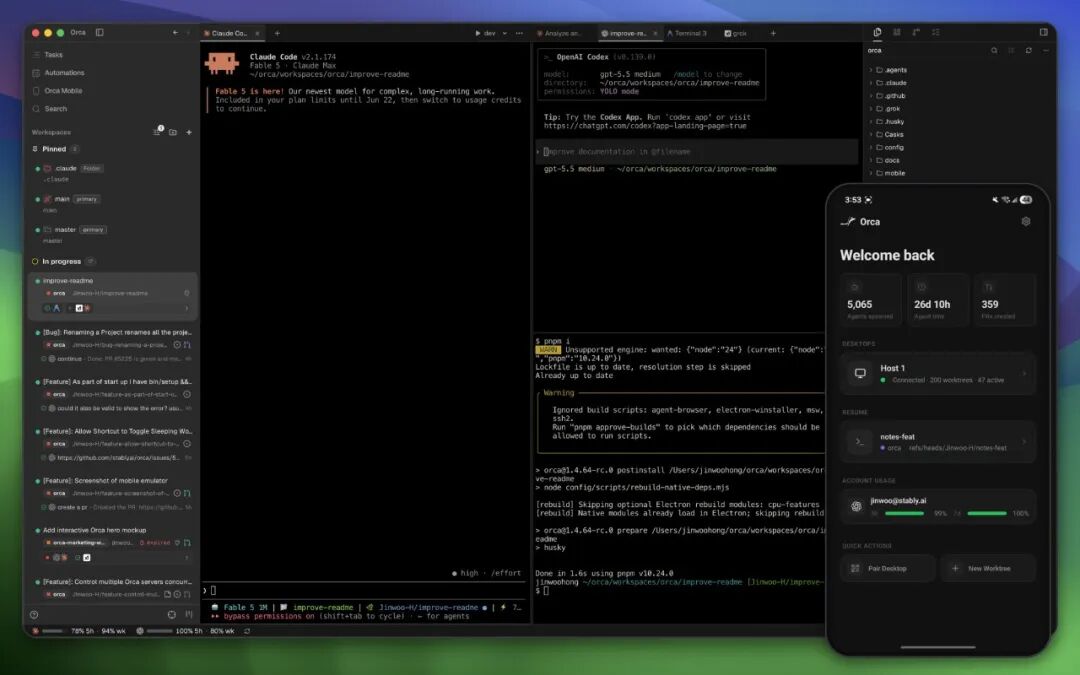
    Orca desktop workspace running several coding-agent terminals alongside a mobile companion
    Orca brings agent terminals, worktrees, project context, and mobile monitoring into one workspace. Source image from the original ITPostman tutorial.

    What Is Orca Multi-Agent Coding?

    Orca is an open-source desktop application from Stably AI for running CLI coding agents side by side. Its official repository describes it as an orchestrator for agents such as Claude Code, OpenAI Codex, OpenCode, Pi, Hermes, Grok, Cursor CLI, GitHub Copilot CLI, and many others. The general compatibility rule is simple: if an agent runs interactively in a terminal, Orca can usually host it.

    Orca does not replace those agents or bundle their models. You bring your own subscriptions, accounts, and command-line installations. Orca provides the surrounding environment:

    • projects and isolated Git worktrees;
    • persistent terminal sessions and split panes;
    • source files, diffs, annotations, and Git operations;
    • GitHub, GitLab, and Linear workflow surfaces;
    • an embedded Chromium browser with Design Mode;
    • SSH workspaces and port forwarding;
    • automation, orchestration, and Computer Use commands;
    • a mobile companion for monitoring and steering the desktop app.

    As of July 16, 2026, the GitHub repository had about 20.4K stars and used the MIT License. That popularity is notable for a project created only in March 2026, but stars are not evidence of reliability or security. Orca ships frequently, which makes its release notes and current documentation more dependable than screenshots of a particular version.

    Orca mobile companion monitoring and steering a desktop coding-agent session
    The Mobile Companion can monitor and steer agents running through the desktop app; it is distinct from emulator and device automation.

    The Core Idea: One Task, One Worktree, One Agent

    The strongest Orca workflow is not simply “run more agents.” It is to create explicit task boundaries.

    A Git worktree is a separate working directory connected to the same repository object database. Each worktree can use its own branch, files, agent session, and terminal state. That is more efficient than cloning an entire repository for every task, while still isolating filesystem changes.

    For example, a team could create:

    • ui-shell-claude for interface and responsive-layout work;
    • split-engine-codex for business logic and tests;
    • export-opencode for CSV and Markdown export.

    Each agent operates in a different branch and working directory. The main workspace can review their diffs and merge selected work.

    Isolation is not absolute. Agents can still collide on shared databases, network ports, caches, external APIs, generated resources, or assumptions about the same interface. Parallel development also creates ordinary merge conflicts when two branches change the same code. The worktree model reduces accidental file overlap; it does not eliminate coordination.

    Orca displaying several parallel Git worktrees for coding agents
    Parallel worktrees let agents explore or implement separate tasks without sharing one mutable working directory.

    Supported Platforms and Installation

    Orca currently provides desktop builds for:

    • macOS on Apple Silicon and Intel;
    • Windows 10 and 11 on x64;
    • Linux through AppImage, with additional release assets such as Debian and RPM packages.

    The official download page is the simplest starting point. The GitHub Releases page provides explicit platform files, while macOS users can also install the Homebrew cask:

    brew install --cask stablyai/orca/orca
    

    Installing Orca does not automatically install or authenticate every coding agent. Before creating a workflow, verify the CLI tools you intend to use:

    claude --version
    codex --version
    opencode --version
    gh --version
    

    Only the relevant commands need to be present. GitHub CLI can be useful for GitHub authentication and operations, but it should not be described as a universal Orca dependency. Linear integration requires a personal API token, which should be scoped and stored carefully.

    The onboarding UI can detect installed agents and offers defaults for terminal, theme, notifications, and project setup. Counts such as “32 available agents” are version-dependent. The durable claim is that Orca ships many presets and can run other terminal agents through custom setup.

    Parallel Terminals Without Losing Context

    Agentic coding creates a new kind of terminal problem. A conventional terminal is organized around processes and tabs, while the user thinks in terms of tasks, branches, agents, reviews, and decisions.

    Orca associates terminals with a project and worktree. It supports split panes, persistent scrollback, and multiple sessions inside the same workspace. Its documentation describes the terminal as using xterm.js—the same terminal foundation used by VS Code—with themes and settings that can be imported from Ghostty.

    The advantage is contextual persistence. When a user returns to a worktree, the associated terminals and agent history remain connected to the task. This is particularly useful when one agent is waiting for input, another is running tests, and a third is investigating a failure.

    More terminals still create cognitive load. A useful operating rule is to assign each worktree one clear objective, define a verification command, and close or archive sessions once the task is complete. Unlimited panes should not become unlimited unfinished work.

    Orca terminal workspace using several resizable split panes
    Split terminals are most effective when every pane belongs to a named task and a defined worktree.

    Design Mode: Send UI Context to an Agent

    Orca's embedded Chromium browser includes Design Mode. A user can select an element on a running page and send structured context to the active agent. According to Orca's documentation, that context can include:

    • the selected HTML and nearby DOM;
    • computed CSS;
    • a cropped screenshot;
    • source location when a source map is available;
    • a human annotation describing the desired change.

    This is more useful than sending only a screenshot because the agent receives both visual evidence and implementation context. A designer or reviewer can point at a spacing problem, label it, and let the agent trace the relevant component and styles.

    Design Mode does not remove the need for review. The agent may identify the wrong source file, overgeneralize a local change, or create a layout that works at one viewport and fails elsewhere. Pair visual instructions with responsive checks, accessibility requirements, and regression tests.

    Orca Design Mode selecting an element in the embedded browser for an agent
    Design Mode packages selected browser context so an agent can act on a specific visible issue.

    GitHub, Linear, Diffs, and Review

    Orca includes native workflow surfaces for code review and task systems. Official documentation covers GitHub pull requests, issues, projects and Actions, as well as Linear tasks through a personal API token. The application also exposes Git and diff tools inside each workspace.

    One of the more practical features is diff annotation. A reviewer can attach a comment to a changed line and send that feedback back to the agent. The result is a tighter loop:

    1. the agent makes a change;
    2. the human reviews the actual diff;
    3. the human attaches precise feedback;
    4. the agent revises the branch;
    5. tests run again before merge.

    This is a safer pattern than asking an agent to “fix everything” in an unbounded session. The review artifact stays connected to a branch and a visible patch.

    Access scope matters. GitHub, GitLab, and Linear credentials can expose private repositories, issues, customer information, and internal plans. Use the smallest permissions that support the workflow, and avoid pasting long-lived tokens into an agent prompt or terminal history.

    Orca browsing GitHub and Linear work items inside the desktop application
    Integrated work items reduce context switching, but their tokens and repository permissions still need deliberate scoping.

    SSH Worktrees for Remote Development

    Orca can create worktrees on a remote machine over SSH while retaining file editing, Git operations, terminals, agent sessions, reconnection, and port forwarding.

    This is useful when the project needs:

    • a Linux environment unavailable on the local machine;
    • more CPU, RAM, or GPU capacity;
    • access to an internal development network;
    • a long-running agent session that should survive a laptop interruption.

    Official documentation says remote PTYs can remain alive through a relay on the remote host, with a default grace period after the desktop app closes. Orca can also remember an SSH passphrase in memory for a configurable period.

    Those conveniences increase the trust boundary. Review remote-host ownership, SSH keys, passphrase retention, port-forward bindings, and the processes left running after disconnection. A forwarded development server should not accidentally bind to a public interface or expose an unauthenticated tool.

    Orca connecting to a remote SSH worktree with terminal and file access
    SSH worktrees extend the same agent workflow to remote development hosts, including reconnect and port-forwarding support.
    Reviewer adding a line comment to an AI-generated code diff in Orca
    Line-level annotations create a concrete human-review loop before agent changes are accepted.

    Dragging Files and Using the Orca CLI

    Files and images can be dragged from the file explorer into an agent session. That is helpful for design references, logs, test fixtures, screenshots, and documents that would be awkward to describe in a prompt.

    Treat dragged files as data disclosure. The terminal agent—not Orca alone—may send the attachment or extracted content to its model provider. Provider privacy policies, enterprise controls, and data-retention terms still apply.

    Orca also exposes a CLI so agents and scripts can interact with the application. Current documentation includes commands for worktrees, browser interaction, snapshots, orchestration, automation, and Computer Use. The CLI makes Orca programmable, but it also means a coding agent can affect more than the repository if given broad permissions.

    Keep command scopes explicit. A task that needs to inspect a page should not automatically receive permission to submit forms, send messages, delete resources, push code, or modify accounts.

    Dragging a file into an Orca coding-agent session
    File drag-and-drop is convenient, but the destination agent’s data policy governs what happens after the content enters its context.
    Orca command-line interface controlling a desktop workflow
    The Orca CLI turns workspace operations into a programmable interface for scripts and agents.

    Orchestration: Hand Work Between Claude Code and Codex

    The original tutorial demonstrates a common pattern: one agent analyzes a task and another implements it. For example, Claude Code may inspect the repository and prepare a plan, then dispatch the implementation to Codex in a dedicated worktree.

    Current Orca documentation describes a native orca orchestration command surface with persistent messages, tasks, dispatches, heartbeats, completion signals, decision gates, and a coordinator loop. This is more structured than copying a long prompt between terminal windows.

    A safe handoff should include:

    • the objective and acceptance criteria;
    • verified file paths and current behavior;
    • files or modules that must not change;
    • required tests and build commands;
    • the target worktree and branch;
    • permission boundaries;
    • the expected completion report.

    The receiving agent should independently inspect the repository rather than trusting every assumption in the handoff. The coordinator should verify the resulting diff and tests before merging.

    For a deeper comparison of the underlying assistants, see Claude Code vs Codex CLI. The Orca layer coordinates those tools; it does not make their capabilities identical.

    Scheduled Automation

    Orca can schedule recurring agent tasks by time and workspace. Official documentation covers hourly, daily, weekday, weekly, cron, and RRULE schedules, along with timezone, repository, provider, session-reuse, and fresh-session settings.

    Useful jobs include:

    • daily test and production-build verification;
    • dependency or security-report generation;
    • review of commits from the preceding 24 hours;
    • repository health summaries;
    • non-mutating checks of a staging environment.

    Start automations disabled, run them manually, inspect their permissions, and only then enable the schedule. A scheduled agent that can modify code, push branches, access browsers, or use external integrations can repeat a mistake without a human present.

    The best default is reporting rather than repair: inspect, test, summarize, and ask for approval before making consequential changes.

    Computer Use and Mobile Control Are Different Features

    Two Orca capabilities are easy to conflate.

    The Mobile Companion lets a phone monitor and steer agents running through the desktop application. It can show terminal scrollback and files, send replies and attachments, review source-control changes, and receive notifications. Orca documentation says the desktop remains the source of truth and that the connection does not rely on a cloud relay. If the desktop app is closed, the mobile connection ends.

    Device automation is separate. Orca includes skills and commands for Android environments visible through ADB, including emulators and configured physical Android devices. iOS automation targets Apple Simulator on macOS with Xcode; the cited documentation does not establish equivalent control of a physical iPhone.

    Computer Use allows an agent to operate local desktop applications through accessibility trees, screenshots, keyboard input, and visible UI actions. macOS requires Accessibility and Screen Recording permissions, and other operating systems have their own native providers.

    These are powerful permissions. Orca's own safety guidance warns against automatically pushing code, submitting forms, sending messages, purchasing, deleting, changing account settings, or exposing secrets without explicit permission. Read the current state before every action, keep personal tabs and accounts out of scope, and require human confirmation for destructive or externally visible operations.

    Privacy and Telemetry

    Packaged Orca builds collect anonymous product telemetry through PostHog Cloud in the United States. Orca's telemetry documentation says it records application version, platform, lifecycle events, coarse feature use, and agent kind, but not prompts, model output, file content, repository paths, URLs, commit text, usernames, or email addresses.

    Users can opt out in Settings or through environment variables such as:

    DO_NOT_TRACK=1
    ORCA_TELEMETRY_DISABLED=1
    

    That is only one part of the data path. Claude Code, Codex, OpenCode, and other agents have their own providers, privacy terms, authentication, retention, and enterprise settings. Files dragged into a session, terminal prompts, repository content, and Computer Use observations may be processed under those separate terms.

    Mobile pairing, SSH access, API tokens, and browser permissions also deserve threat modeling. The application is open source, but open source is not a substitute for reviewing permissions, releases, dependencies, and operational controls.

    Where Orca Fits—and Where It Does Not

    Orca is a strong fit when a developer or small team:

    • regularly uses more than one CLI coding agent;
    • needs parallel branches or implementation experiments;
    • wants a single place for terminals, files, diffs, and review;
    • works across local and remote machines;
    • values programmable orchestration and scheduled checks.

    It may be unnecessary when the task is a quick one-off command, when a single IDE agent already covers the workflow, or when the team is not prepared to review several concurrent branches. The original author makes a similar practical point: for a temporary filesystem task, the operating system terminal can be faster than creating a full managed workspace.

    Orca should also be evaluated carefully in high-compliance environments. Its value comes from connecting agents to repositories, terminals, issue systems, browsers, remote machines, and possibly desktop applications. Every connection improves capability while expanding the security boundary.

    Readers comparing the broader market can review multi-agent coding alternatives and the best AI coding agents. The operating lesson is also consistent with how the OpenAI Codex team works: faster agent execution increases the importance of task boundaries, review, and ownership.

    A Practical Orca Multi-Agent Coding Workflow

    A production-minded first experiment can be small:

    1. Install Orca from the official download or release page.
    2. Verify Git and one or two agent CLIs independently.
    3. Open a non-sensitive repository with reliable tests.
    4. Create one worktree for a bounded change.
    5. Give the agent acceptance criteria and explicit prohibited actions.
    6. Review the diff and annotate problems inside Orca.
    7. Run tests and the production build.
    8. Merge manually only after the result is understood.
    9. Add a second agent or orchestration handoff after the single-agent loop is dependable.
    10. Enable mobile, SSH, automation, or Computer Use only when the workflow genuinely requires them.

    This sequence measures whether the environment improves delivery rather than merely increasing the number of active agents.

    GitHub star history chart showing rapid early growth for the Orca repository
    Orca’s repository grew rapidly after its March 2026 launch. Popularity is a useful adoption signal, but not a substitute for release and security review.
    Orca official website with desktop download controls
    Use the official Orca download page or GitHub Releases rather than relying on a third-party installer mirror.
    Orca GitHub repository showing its open-source skill directories including Computer Use and orchestration
    Orca publishes skills for Computer Use, orchestration, Linear workflows, emulators, and workspace configuration in its open-source repository.

    Conclusion

    Orca multi-agent coding addresses a real transition in software development. Once developers use several coding agents, the limiting problem is no longer opening another terminal. It is defining isolated tasks, tracking active work, handing context between agents, reviewing patches, and controlling what automation is allowed to do.

    Orca combines those concerns in an ambitious open-source desktop environment. Its worktrees, persistent terminals, Design Mode, diff annotations, SSH workflow, orchestration CLI, mobile companion, and Computer Use integration can create a productive control plane for agentic development.

    The same breadth creates the main caveat. Orca can sit between valuable source code and multiple model providers, remote machines, issue systems, browsers, and local applications. Adopt it progressively, scope credentials and permissions, keep a human responsible for every merged result, and treat the current documentation—not a version-specific screenshot—as the authority for setup.

    This article is a substantially rewritten English guide based on ITPostman's original WeChat tutorial, “A Desktop Tool for Running Claude Code, Codex, and Multiple Coding Agents: Orca Guide”, together with the official sources below.

    Primary Sources

    Frequently Asked Questions

    Is Orca an AI coding model?

    No. Orca is a desktop environment and orchestration layer for CLI agents. Claude Code, Codex, OpenCode, and other tools keep their own models, subscriptions, authentication, and data policies.

    Can Orca run Claude Code and Codex at the same time?

    Yes. Each can run in its own terminal or worktree, and Orca's orchestration tools can dispatch structured tasks between agents.

    Is Orca free and open source?

    The desktop repository is published under the MIT License. Users still need any paid subscriptions or API access required by the agents they choose to run.

    Does Orca support Windows, macOS, and Linux?

    Yes. Current downloads cover macOS on Apple Silicon and Intel, Windows 10/11 x64, and Linux packages including AppImage.

    Does Orca control a physical phone?

    The Mobile Companion controls and monitors the Orca desktop workflow from a phone. Separate Android tooling can automate ADB-connected emulators or configured devices. Official iOS automation documentation covers Apple Simulator on macOS, not general physical-iPhone control.

    What is the biggest risk of using Orca?

    Permission sprawl. Orca can connect agents to code, terminals, Git hosts, issue systems, SSH machines, browsers, files, and desktop UI. Use least-privilege credentials and require human confirmation for destructive or externally visible actions.
  • tap’s File-First Protocol for Claude–Codex Collaboration: Architecture, Evidence, and Limits

    tap’s File-First Protocol for Claude–Codex Collaboration: Architecture, Evidence, and Limits

    Running one coding agent as the implementer and another as the reviewer sounds straightforward until the tools live in separate terminals, use different configuration formats, and forget one another’s state. tap addresses that coordination problem with a deliberately modest contract: messages become files, notifications point back to those files, and each agent works in its own Git worktree.

    That design is more interesting than another “AI team” demo because it treats reliability as a software-engineering problem. The protocol does not claim to make Claude, Codex, or Gemini smarter. It tries to make their handoffs durable, inspectable, and recoverable.

    The evidence is promising but bounded. In its June 2026 paper, tap reports 27 days of self-application, 37 agent generations, 209 merged tap-related pull requests, and 717 operational artifacts. Its heterogeneous review pairs recorded at least one defect or requested change more often than homogeneous pairs. Those figures describe one evolving repository and one operational setup; they do not establish that mixed-model review is inherently superior.

    This article explains what tap actually contributes, what its data supports, and what a team should verify before adopting it.

    The core idea: preserve state before sending a signal

    Many agent integrations start with a transport: a socket, message queue, callback, or shared chat service. tap starts with the durable record instead.

    When an agent calls tap_reply, the protocol first writes a Markdown message with YAML metadata into an inbox/ directory. That file is the canonical message. A faster delivery mechanism may then alert the recipient, but the alert is not the source of truth. The receiving agent rereads the file before acting.

    This ordering creates a useful invariant:

    A notification may disappear, but the state needed to recover must already exist.

    If a WebSocket disconnects, an MCP notification is missed, or an agent process restarts, the failure becomes a delay rather than immediate message loss. A replacement agent can inspect the same inbox and operational records without reconstructing the conversation from someone’s terminal scrollback.

    Diagram of tap architecture connecting Claude, Codex, and Gemini through a shared Markdown inbox, operational artifacts, and Git worktrees
    The paper’s architecture: Claude and Codex have real-time notification paths, while the file inbox remains the canonical message store. Gemini’s file-inspection path was experimental in the reported run.

    The architecture has three separable responsibilities:

    1. Durable communication: Markdown plus metadata records the original message.
    2. Low-latency notification: runtime-specific channels tell an agent that new work exists.
    3. Workspace isolation: Git worktrees keep concurrent edits out of one shared working directory.

    Keeping these responsibilities separate is the protocol’s strongest idea. It avoids pretending that delivery, memory, and code isolation are one problem.

    Two delivery tiers, with different guarantees

    tap describes file inspection as Tier 1 and real-time notification as Tier 2.

    Tier 1 provides the evidence trail. An agent or operator can list messages, inspect metadata, retry an unprocessed handoff, and perform a postmortem. This is also the path available to runtimes without a dedicated live adapter.

    Tier 2 reduces waiting. In the paper’s reported configuration, Claude received channel-style MCP notifications and Codex used a delivery program over WebSocket. The notification tells the recipient to inspect the durable record; it does not replace that record.

    This is close to a familiar distributed-systems pattern: store the state transition first, then emit a best-effort signal. But tap should not be mistaken for a transactional message broker. A local filesystem alone does not automatically provide exactly-once processing, global ordering, access control, replication, or safe multi-host consensus. Teams still need to define idempotency, ownership, retention, and recovery procedures.

    Standardize configuration, not every runtime

    Claude, Codex, and other coding agents expose different integration surfaces. The paper’s version of tap handled that mismatch through a common setup procedure: inspect the environment, plan changes, apply runtime-specific configuration, and verify the result. Claude might require .mcp.json; Codex might require config.toml; another client may need a different JSON file.

    The important abstraction is therefore not “one universal agent API.” It is a repeatable configuration lifecycle with per-runtime adapters.

    There is also meaningful version drift between the paper and the software available today. The paper records @hua-labs/tap v0.5.2. As of July 16, 2026, the npm registry lists v0.6.1, and the official repository labels the 0.6 line an “advanced operator preview.” Its public workflow is now dry-run-first:

    npx @hua-labs/tap setup --profile codex-cli --dry-run --json
    npx @hua-labs/tap setup --profile codex-cli --apply --json
    npx @hua-labs/tap doctor --setup --profile codex-cli --json
    

    The current README also says Codex App/Desktop live delivery is experimental and strictly gated by runtime health and route freshness, while Gemini CLI support is legacy/deprecated in that release line. Anyone evaluating tap should follow the installed version’s documentation rather than copying commands from the paper or an older article.

    Git worktrees reduce collisions—but do not merge the work

    Giving multiple autonomous processes write access to one checkout is an invitation to corrupt intermediate state. tap assigns agents separate Git worktrees and separates process IDs, logs, and state by instance identifier.

    That is a sensible reuse of Git’s existing isolation model. An implementer can modify one branch while a reviewer examines another directory without both tools racing over the same index and uncommitted files.

    Worktrees do not eliminate coordination costs. Branches can still diverge, generated files can conflict, migrations can be incompatible, and an agent can commit secrets or destructive changes. A production workflow still needs:

    • explicit branch ownership and merge authority;
    • tests that run against the integration target, not only an agent branch;
    • protected paths and secret scanning;
    • a human or trusted policy gate for merging into the default branch;
    • cleanup rules for stale worktrees and orphaned processes.

    In other words, worktrees isolate the editing surface. They do not decide which changes are correct.

    Files as external operational memory

    The paper groups reviews, findings, retrospectives, and handoffs as operational artifacts. These records let a new agent generation recover decisions after a previous session ends or reaches its context limit.

    This is better understood as external memory than model memory. The system is not preserving a hidden internal state. It is preserving explicit, inspectable artifacts that a later agent can read.

    That distinction has practical benefits. Operators can review why a change was requested, identify repeated failures, and separate a current task from the accumulated narrative of the project. But file-backed memory also needs governance. Without schemas, retention limits, and summarization, the archive can become a second codebase full of stale instructions and contradictory decisions.

    A robust deployment should attach at least four fields to important artifacts: the originating task or commit, authoring agent and runtime, creation time, and current disposition. Superseded decisions should remain traceable but clearly marked as obsolete.

    What the 27-day self-application run demonstrated

    The reported operation is useful because it lasted longer than a staged demo and generated concrete failure records. At commit 563d859c, dated April 15, 2026 in the paper, the project reported:

    • 27 days of operation;
    • 37 agent generations;
    • 209 merged tap-related pull requests;
    • 104 package source files with 26,404 lines of code;
    • 76 test files with 19,406 lines of code;
    • 717 operational artifacts;
    • real-time paths for Claude and Codex, with experimental MCP polling for the generic path.
    Table showing tap’s 27-day operational metrics, including 37 generations, 209 merged pull requests, and 717 artifacts
    Table 1 from the tap paper, reproduced in the source article. It reports the project state at one commit rather than a controlled benchmark.

    These numbers support a narrow but valuable claim: the file-first protocol was used to coordinate real development and review activity over multiple agent turnovers. They do not show how tap compares with alternative orchestration systems on cost, latency, correctness, or operator workload.

    The paper also notes that humans intervened frequently during early message delivery and progress checks. Later direct delivery improved, but major decisions and final approval remained with the operator. That is not a weakness to hide; it is an important description of the actual control boundary.

    Operational failures became protocol changes

    The self-application run surfaced ordinary infrastructure defects: a Windows path-prefix problem that caused a CLI hang, a bridge log path that produced zero-byte logs, and an agent-name collision that misdelivered messages. The reported fixes normalized the working directory, separated logs per instance, and introduced canonical names.

    Table listing tap operational failures and fixes for Windows paths, bridge logs, and name collisions
    Table 2 from the paper. Durable records made these failures diagnosable, but the table is an illustrative sample, not a complete reliability assessment.

    This is a good example of why observability belongs in the protocol. A failed handoff should leave enough evidence to distinguish “the reviewer disagreed,” “the reviewer never received the task,” and “the bridge delivered it to the wrong instance.” Treating all three as an agent-quality problem would lead to the wrong fix.

    The review-rate result is a signal, not a winner’s podium

    Across 375 review and re-review artifacts, heterogeneous model pairs recorded at least one defect or requested change in 183 of 262 artifacts, or 69.8%. Homogeneous pairs did so in 60 of 113 artifacts, or 53.1%.

    Table comparing positive review rates across Codex and Claude author-reviewer pairings
    Table 3 from the paper. “Positive review rate” means the share of review artifacts containing at least one defect or requested change; it is not the percentage of all defects found.

    The distinction in that caption matters. A review with one minor requested change and a review with several critical defects both count as positive. Re-reviews of the same pull request may be counted more than once. The assignment was not randomized, and 245 of the artifacts were Codex reviewing Claude-authored work. Later Codex reviewers often ran headlessly on a separate Linux server, so model identity, reviewer role, time, operating system, and execution environment are entangled.

    The paper itself acknowledges these limitations. It also manually identified 12 security or security-adjacent cases, including six candidates for runtime vulnerabilities, but correctly avoids turning that small set into a quantitative claim about security-review superiority.

    The defensible conclusion is therefore modest: in this operation, mixed model-and-environment review produced a broader pattern of requested changes. A stronger causal test would give the same pull requests to balanced reviewer pairs, randomize assignment, deduplicate re-reviews, grade severity, and measure accepted fixes as well as comments.

    A practical adoption checklist

    Before using tap—or any file-based agent protocol—in a production repository, validate the operating model rather than only the happy-path demo:

    1. Define the canonical record. Specify when a message is considered written, acknowledged, processed, and superseded.
    2. Make handlers idempotent. A recovered or polled message may be observed more than once.
    3. Separate notification health from task state. A green socket does not prove a task was processed; a broken socket does not prove the task was lost.
    4. Protect the shared directory. Agent messages can contain repository context, commands, findings, and potentially secrets. Apply least-privilege filesystem permissions and keep the directory out of unintended publication paths.
    5. Review generated configuration. Use the current release’s dry-run plan, inspect every proposed change, and verify runtime readiness afterward.
    6. Constrain worktrees. Give agents scoped branches and tools, then require tests and an approval gate before integration.
    7. Measure operator load. Count retries, manual routing interventions, stale routes, and recovery time—not only pull requests and review comments.
    8. Plan for version drift. The paper’s v0.5.2 architecture and the current 0.6.x preview are related but not operationally identical.

    The real value is a cleaner human control boundary

    tap’s most credible promise is not autonomous software development. It is reducing the amount of fragile, low-value state copying required to coordinate heterogeneous tools.

    Files provide durable evidence. Notifications reduce latency. Worktrees isolate edits. Operational artifacts let replacement agents inherit explicit context. Humans still decide direction, approve risky changes, and authorize the final merge.

    That division of labor is less dramatic than an “AI engineering team,” but it is much closer to a system that can be inspected and improved. The next step for tap is not a louder autonomy claim. It is broader, controlled validation across repositories, balanced reviewer assignments, and measurable recovery behavior under failure.

    Sources

  • How to Prototype an AI-Assisted 3D Fight Scene with Blender MCP, Fable 5 and Three.js

    How to Prototype an AI-Assisted 3D Fight Scene with Blender MCP, Fable 5 and Three.js

    AI can now shorten the distance between a mood board and a playable-looking 3D scene. It does not remove the hard parts; it changes where they appear. Instead of spending all your time creating every texture, mesh and keyframe by hand, you spend more time checking topology, retargeting motion, controlling draw calls and deciding which generated assets are safe to ship.

    A July 2026 WeChat article by AI for Frontend offers a compact example: generate spell graphics, create a character mesh, extract motion from video, assemble the scene with Blender MCP and Claude, then present it in a Three.js browser experience. The source says a usable demonstration was produced in a day. That is a useful prototype claim, not a production benchmark—the article does not publish its prompts, project files, hardware profile or frame-time measurements.

    The more durable lesson is the shape of the pipeline. Each tool should own a narrow, inspectable artifact, and every handoff should have an acceptance test.

    The pipeline at a glance

    Stage Candidate tool Artifact to keep Acceptance test
    Visual direction GPT Image 2 reference images and transparent effect sheets consistent silhouette, palette and alpha edges
    Geometry and materials TRELLIS.2, Rodin, Blender cleaned mesh, UVs and PBR textures usable topology, scale, normals and material channels
    Agentic editing Blender MCP with Fable 5 or another Claude model Blender scene plus an operation log every change is visible, reversible and saved
    Character motion Mixamo or Video2MotionCapture skeleton, source motion and retargeted clip stable feet, joint limits and correct root motion
    Browser runtime Three.js GLB/GLTF assets, code and compressed textures target-device frame time, memory and loading budget

    That artifact-first framing matters. A model can appear to “build the game,” but the actual system is a chain of lossy transformations. Diagnose the artifact at the boundary, not the model’s explanation of what it thinks it did.

    1. Build a visual grammar before building a character

    OpenAI describes GPT Image 2 as an image generation and editing model that accepts text and image input. In this workflow, its best role is not “make all the art.” It is to establish a controlled visual grammar: a limited palette, repeated motifs, front/side references and effect textures designed for compositing.

    A transparent sheet containing sixteen violet glowing spell icons

    The source’s first generated sheet contains sixteen purple ability emblems on transparency. For a real game, separate the cells, trim transparent margins and pack them into an atlas.

    A pink and violet circular magic sigil on a transparent background

    A single high-contrast magic-circle texture can drive a decal, emissive plane or particle system. Keep the source image, the processed texture and its color-space setting together.

    A blue and orange circular magic sigil with transparent areas

    A second colorway can communicate a different ability state without requiring new geometry.

    Transparent images still need cleanup. Inspect premultiplied alpha, edge halos and empty pixels. For the browser build, resize to the maximum on-screen size, use texture atlases where appropriate, and test GPU-friendly compression. A beautiful 1024-pixel effect that occupies 120 pixels on screen is wasted bandwidth and memory.

    2. Let Blender MCP operate the scene, but keep Blender authoritative

    Blender MCP connects an MCP client to a Blender add-on. Its documented capabilities include inspecting a scene, manipulating objects and materials, executing Blender Python, retrieving external assets and making a Three.js sketch. This makes it a useful control plane, not a replacement for the .blend file.

    Claude Fable 5 is a plausible model for the long tool-using portion of this job. Anthropic says Fable 5 is available in Claude Code, while the source says Claude Sonnet 5 handled later code fixes. The model label is less important than operational discipline:

    1. Save a version before each structural operation.
    2. Ask for one observable change at a time.
    3. Require a viewport render or object summary after the change.
    4. Keep generated Blender Python in version control when possible.
    5. Never assume an agent’s “done” message proves scene correctness.

    Blender showing a glowing magic circle while an English agent transcript appears over the viewport

    The Japanese-localized Blender screenshot shows a magic-circle effect being reviewed after agent-driven changes. The useful pattern is the visual verification loop, not the specific prompt.

    Blender MCP can execute arbitrary Python inside Blender. That power deserves the same caution as any local automation: review unfamiliar scripts, restrict credentials, use trusted asset sources and keep backups. Fast iteration is valuable only when rollback is cheap.

    3. Treat image-to-3D output as a draft asset

    The source uses a ComfyUI wrapper around TRELLIS.2 for base geometry. The TRELLIS.2 project describes a 4-billion-parameter image-to-3D model capable of PBR attributes such as base color, roughness, metallic and opacity. Its headline timing figures were measured on an NVIDIA H100, so they should not be read as consumer-hardware expectations.

    A blue-armored fantasy character beside a gray mesh and a reference render

    The source compares an in-scene armored character with mesh and rendered references. Visual similarity does not establish animation-ready topology.

    Before rigging, inspect the mesh for disconnected parts, self-intersections, thin surfaces, non-manifold areas, inconsistent normals and an impractical polygon count. Then normalize scale and orientation, decide which materials genuinely need separate draw calls, and rebuild UVs if the generated layout is inefficient. A static render can hide problems that become obvious as soon as elbows bend or a cape moves.

    Rodin is another possible asset source, and Blender MCP documents direct Hyper3D Rodin integration. Whichever generator you use, retain its license terms and provenance beside the asset. “Generated” does not automatically mean unrestricted, and motion or body-model dependencies may impose separate conditions.

    4. Motion is a retargeting problem, not a file-import problem

    For standard humanoids, Mixamo remains a convenient baseline. Adobe’s Mixamo FAQ says its auto-rigger and animation library support bipedal humanoids only, and it lists failure cases such as extra limbs, wings, large props, disconnected parts and non-neutral poses. Ornate armor and oversized cloth can therefore break an otherwise simple upload.

    The source’s more experimental route uses ComfyUI-Video2MotionCapture. Its repository labels the project “WIP” and describes a pipeline from video to SMPL motion, rigged FBX export and retargeting to Mixamo-compatible or custom characters. It also calls for roughly 3.5 GB of model downloads and notes separate licensing for underlying SMPL and GVHMR assets.

    A dance video, extracted body motion and retargeted armored character shown side by side

    The motion-capture workflow maps a human performance to a 3D body and then to the armored character. The screenshot demonstrates the concept, not retargeting quality.

    A poster frame from the embedded motion-capture video showing the dancer and two 3D characters

    This preserved poster frame came from the source’s embedded video. It shows a different pose in the same capture-to-retarget sequence.

    Review retargeted clips at half speed. Look for foot sliding, knee inversion, shoulder collapse, hand intersections, scale mismatch and root-motion drift. Fight animation also needs gameplay edits: anticipation, contact, recovery, cancel windows and hit timing. A captured dance can provide movement vocabulary, but it does not automatically become a readable attack.

    5. Optimize the handoff to Three.js

    Export a GLB/GLTF test asset early, before the Blender scene becomes elaborate. The official Three.js GLTFLoader documentation is the stable reference for loading these assets. Keep a small automated scene that loads every current export and reports missing textures, animation names and bounding dimensions.

    The browser build needs budgets that the source article does not provide. At minimum, measure:

    • compressed download size and first-interaction time;
    • triangles, materials, draw calls and texture memory;
    • CPU animation cost and GPU frame time on the weakest target device;
    • the cost of transparent particles and overlapping emissive effects;
    • fallback behavior when WebGL capability or memory is limited.

    The source links a live effect-verification demo, which was reachable during review. Its existence shows the pipeline can produce a browser artifact; it does not by itself prove maintainability, asset rights or stable performance across devices.

    An English-localized browser fight-scene prototype with a character casting a spell above a glowing circle

    The source’s final embedded-video poster shows the prototype’s combat HUD and spell effect. Japanese text at the bottom reports the character using a thunderbolt ability.

    What a one-day prototype can—and cannot—prove

    A day is enough to answer a narrow question: can these assets, this motion and this effect language coexist in a browser scene? It is not enough to establish a production pipeline. The next milestone should be a vertical slice with one character, one enemy, one attack and one target device, all passing explicit budgets.

    That slice should preserve provenance, reproduce exports from saved inputs, survive a clean checkout, and hold frame time under stress. If it does, the AI-assisted workflow has become more than a demo. It has become an engineering system that can be improved.

    Sources

  • Claude Dynamic Workflows on Codex: What This Community Project Actually Does

    Claude Dynamic Workflows on Codex: What This Community Project Actually Does

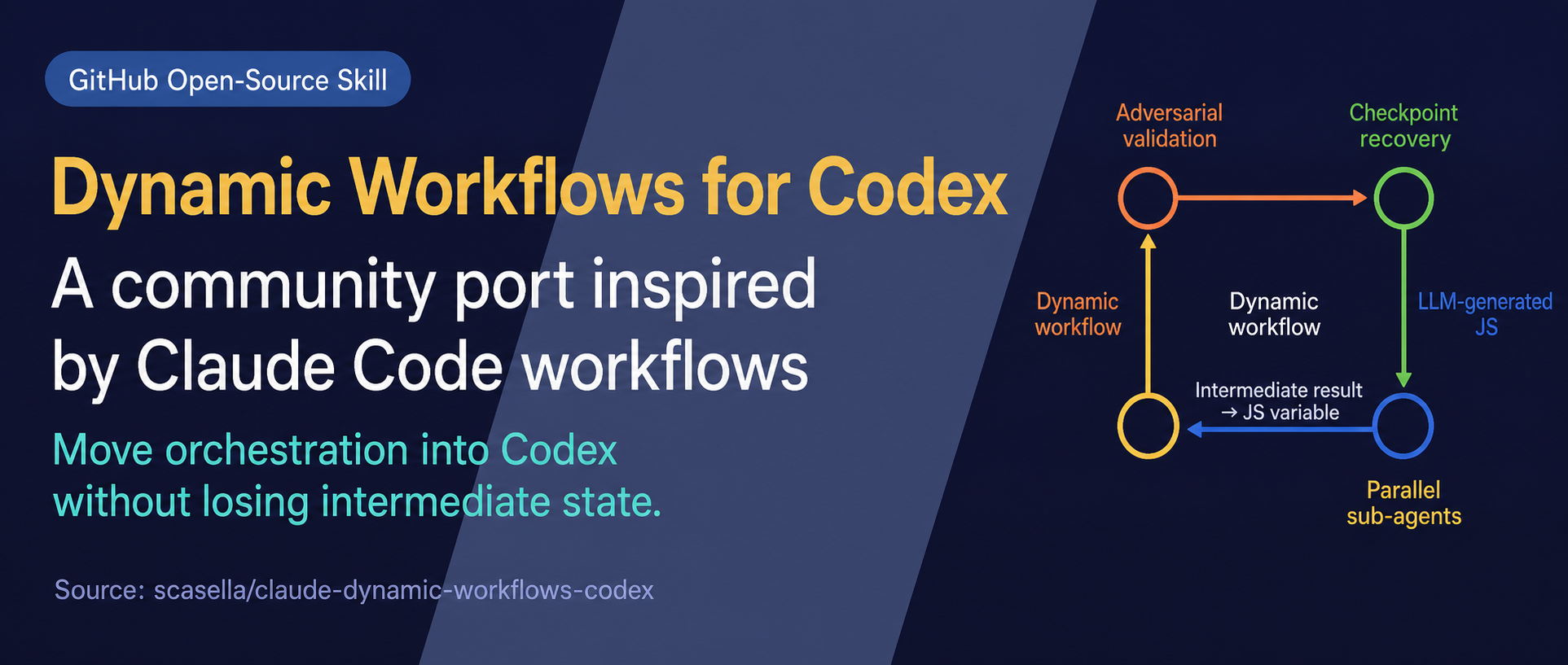
    The open-source project claude-dynamic-workflows-codex connects two systems that are usually discussed separately: Claude Code writes a JavaScript orchestration workflow, while local Codex agents execute the work through Codex app-server. That distinction matters. This is not a native Codex /dynamic command, and it is not an official OpenAI or Anthropic integration. It is a community-built Claude Code plugin and standalone runner that uses Codex as its agent backend.

    A Chinese WeChat article from Ai 这个时代 introduced the project as a way to reduce context pressure in multi-agent work. The underlying idea is sound, but the current repository differs from several operational details in that account. The repository’s documented command is /codex-workflows, installation happens from Claude Code’s plugin marketplace or a Claude skills directory, and the project explicitly describes itself as unofficial.

    The architecture: orchestration in code, execution in Codex

    Architecture diagram showing a Claude-inspired workflow definition orchestrating Codex execution and reusable state
    The community plugin routes a generated workflow through Codex app-server and stores reusable workflow state; it is not a Codex-native skill.

    Dynamic workflows move coordination logic out of the conversational loop and into a JavaScript program. The script can express parallel phases, pipelines, budgets, races, review gates, and stopping conditions. Intermediate results can remain in runtime variables rather than being pasted wholesale into the top-level conversation.

    In this project, Claude Code turns a rough request into that workflow script. The runner then connects to the local codex app-server, starts Codex threads, streams events, records progress in a journal, and renders the run as either a terminal map or an interactive browser view. OpenAI’s documentation describes app-server as the interface for deep client integrations that need authentication, conversation history, approvals, and streamed agent events. The community project is therefore building on a real, documented Codex integration surface rather than scraping a terminal UI.

    The practical result is a separation of responsibilities:

    • Claude Code acts as the workflow author and operator.
    • JavaScript holds the execution graph, branching, and intermediate state.
    • Codex app-server supplies the agent threads and streamed execution events.
    • A journal supports replay, inspection, and resuming unfinished work.
    • The viewer exposes phases, workers, token counts, timing, and final results.

    This is more than a cosmetic wrapper around subagents. The repository adds sessionful workers that can receive follow-up instructions on an existing thread, races that cancel losing approaches, human gates, run summaries, and a multi-workflow fleet mode. Those features are implemented by this repository; they should not be mistaken for guarantees attached to every Codex client.

    What problem does it solve?

    Standard subagent delegation is useful when several bounded tasks can run independently. Current Codex documentation says subagents can keep noisy exploration and test output away from the main thread, but it also warns that every worker performs its own model and tool work, so multi-agent runs generally consume more tokens than comparable single-agent work.

    A scripted workflow becomes attractive when the coordination pattern itself needs to be durable. Examples include:

    • scanning many independent areas and then adversarially verifying the findings;
    • racing several root-cause hypotheses and stopping the losing workers;
    • loading a large corpus once and asking repeated questions on the same warm thread;
    • pausing at a human decision before a risky phase;
    • resuming a long run without repeating every completed step;
    • comparing structured run journals over time.

    The benefit is not simply “more agents.” It is the ability to make fan-out, review, cancellation, and convergence explicit and repeatable. For a one-off question or a small edit, that machinery is unnecessary overhead.

    The token claim needs a narrower reading

    Evidence boundary for the repository's warm-versus-cold workflow benchmark
    The repository benchmark is directional evidence for one repeated-context workload, not proof of universal savings or production reliability.

    The source article says the port uses fewer tokens than Claude Code’s native dynamic workflow. The repository does publish evidence, but it supports a more limited conclusion.

    Its warm-versus-cold benchmark used Codex 0.137.0, GPT-5.5 at medium effort, a roughly 3,300-line corpus, and three follow-up questions. A warm worker spent 329,000 tokens on initial ingestion and about 69,000 tokens per follow-up. Fresh workers that reread the corpus used about 219,000 tokens per question. Across all three questions, the warm arm reported 535,000 tokens versus 656,000 for the cold arm, with substantially lower marginal latency.

    That is useful evidence for repeated interrogation of the same material. It is not a general comparison between this project and every native Claude Code workflow. The repository itself notes that the warm approach loses for a single question because the initial ingestion dominates. Results will also vary with corpus size, model, cache behavior, effort, prompt design, and the workflow graph. Anyone making cost decisions should rerun the included benchmark on their own workload and compare total billed cost, not token count alone.

    Accurate setup and a low-risk first test

    The repository currently requires Node.js 18 or newer and a logged-in codex CLI on the local path. Its recommended Claude Code installation is:

    /plugin marketplace add scasella/claude-dynamic-workflows-codex
    /plugin install codex-workflows@codex-workflows

    After installation, a task is invoked from Claude Code with a command such as:

    /codex-workflows Audit every route under src/ for missing authorization, read-only

    Before spending model tokens, the repository also includes an offline viewer demo:

    git clone https://github.com/scasella/claude-dynamic-workflows-codex
    cd claude-dynamic-workflows-codex
    node runner/bin/view-run.js examples/incident-demo --open

    That demo is the safest way to inspect the execution map without launching agents. For a live first run, use a small read-only task, inspect the generated workflow script, set a hard budget, and confirm that the Codex version and permissions match the repository’s expectations.

    Where it fits—and where it does not

    This project is a credible option for developers who already use Claude Code as their control surface but want Codex agents underneath a repeatable orchestration layer. It is especially interesting for research, large audits, migrations, incident analysis, and workloads where the same warm context will answer several questions.

    It is a weaker fit when:

    • one capable agent can finish the task directly;
    • the work is dominated by a single sequential dependency;
    • concurrent edits would create merge conflicts;
    • the organization cannot accept a community integration spanning two vendors’ tools;
    • reproducibility, audit, and version pinning have not been established;
    • a CI job would be better served by OpenAI’s supported SDK or GitHub Action.

    There are also operational costs. More agents can mean more token usage, more local processes, more permission decisions, and a larger failure surface. The generated script is executable orchestration and deserves review. Sandboxing should reflect the task, secrets should stay out of prompts and journals, and model or protocol changes can break an unofficial integration even when both underlying products continue to work independently.

    Bottom line

    claude-dynamic-workflows-codex is best understood as an experimental orchestration bridge: Claude Code authors the plan, a JavaScript runtime manages it, and Codex app-server executes agent threads. Its strongest contribution is not a universal promise of cheaper agents. It is a concrete, inspectable way to encode multi-agent control flow, preserve run state, and reuse warm workers.

    That can materially improve the economics of the right repeated-context workload. It does not remove the need to size the workflow, review permissions, validate outputs, and measure the actual bill. Start with the offline demo, then a small read-only run, and promote the pattern only after its journal shows that the extra orchestration is buying something a simpler approach cannot.

    Sources

  • GPT-5.6 Sol in Claude Code: Proxy Hack vs. OpenAI’s Official Plugin

    GPT-5.6 Sol in Claude Code: Proxy Hack vs. OpenAI’s Official Plugin

    GPT-5.6 Sol can now sit inside a Claude Code workflow—but “inside” hides two very different architectures. One replaces the model behind Claude Code through a compatibility gateway. The other, OpenAI’s official codex-plugin-cc, keeps Claude Code intact and delegates selected work to a local Codex process.

    That distinction matters. The two paths have different credentials, failure modes, support boundaries, and user experiences. A viral five-minute setup may prove that agent interfaces and models are becoming more modular, but it does not make every combination equally supported or safe to operate.

    What the viral setup actually demonstrated

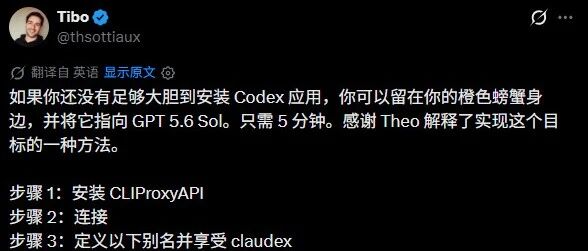
    A Chinese WeChat report from 智猩猩AI collected a short exchange between developer Theo and OpenAI product leader Thibault Sottiaux. Theo said GPT-5.6 Sol felt better in Claude Code than in Codex for his use case. Sottiaux then shared a compact setup built around CLIProxyAPI and a claudex alias.

    That is an interesting practitioner report, not a controlled comparison. It tells us that one developer preferred a particular model-and-harness pairing; it does not establish that Claude Code is universally a better host for GPT-5.6 Sol or that a proxy preserves every Codex capability.

    Chinese-localized social post in which Theo says GPT-5.6 Sol felt better in Claude Code than in Codex
    The source screenshot translates Theo’s claim that GPT-5.6 Sol performed “meaningfully better” for him in Claude Code. Treat this as an anecdotal workflow preference, not a benchmark.

    The key distinction: model replacement versus task delegation

    An agentic coding product has at least three layers:

    1. The model generates reasoning and tool requests.
    2. The harness manages context, permissions, tools, subagents, and the terminal interface.
    3. The provider adapter translates the harness’s requests into the upstream model API and converts responses back.

    The community proxy setup keeps Claude Code as the harness but changes the provider path. Claude Code sends Anthropic-format requests to a local or remote compatibility layer; that layer translates them for OpenAI and routes them to GPT-5.6 Sol.

    The official OpenAI plugin uses a different boundary. Claude Code remains connected to its normal model, while plugin commands launch or communicate with the local Codex CLI/app server for a review, rescue, handoff, or background task. The plugin is an interoperability bridge between two agents, not a main-model replacement switch.

    Path one: running GPT-5.6 Sol through a compatibility gateway

    The screenshots show a shell alias that starts Claude Code with gpt-5.6-sol as the requested model and several implementation-specific environment variables. A second screenshot makes the hidden prerequisite explicit: the alias only works when Claude Code is already pointed at an Anthropic-compatible proxy.

    Claude Code terminal explaining a claudex alias and its model and tool-control variables
    The first setup screenshot explains the claudex alias. Several variables shown are specific to this setup; they should not be assumed to be stable Claude Code configuration keys.
    Claude Code terminal showing that the alias also requires an Anthropic-compatible proxy base URL and gateway token
    The follow-up screenshot adds the missing architecture: Claude Code must connect to a gateway that accepts Anthropic-format traffic and routes the requested model to the correct provider. Copying the alias alone is insufficient.

    Anthropic officially documents ANTHROPIC_BASE_URL and gateway credentials for routing Claude Code through an organization-operated LLM gateway. Its documentation also states two important limitations: Anthropic does not endorse or audit third-party gateways, and it does not support routing Claude Code to non-Claude models through a gateway.

    That does not mean a compatibility proxy cannot work. It means the operator owns the integration risk. A translator must preserve more than plain text. It may need to map system prompts, tool schemas, streaming events, reasoning controls, usage accounting, error objects, image inputs, prompt caching, and evolving beta headers. A basic conversation can succeed while a subagent, tool call, or long-running session fails later.

    The proxy route is therefore best treated as an experiment for developers who can inspect traffic and recover from breakage—not as a zero-maintenance product feature.

    Chinese-localized post from Thibault Sottiaux describing CLIProxyAPI, connecting Claude Code, and defining a claudex alias
    The source screenshot summarizes three steps in Chinese: install CLIProxyAPI, connect it to Claude Code, and define a claudex alias. It is evidence of the shared experiment, not an official support guarantee for model substitution.

    Credential policy is separate from technical compatibility

    The easiest mistake is to assume that any credential already stored by either CLI can safely be reused by a bridge. Technical access and permitted access are different questions.

    Anthropic’s current legal-and-compliance documentation says subscription OAuth is intended for ordinary use in Claude Code and other native Anthropic applications. It prohibits third-party developers from offering Claude.ai login or routing requests through Free, Pro, or Max plan credentials on behalf of users. For products and services, Anthropic directs developers to API keys or supported cloud providers.

    For a gateway experiment, use credentials deliberately issued for the traffic being sent. Do not copy consumer OAuth tokens out of credential stores, expose them to an unreviewed proxy, or assume a saved Claude subscription becomes an OpenAI entitlement. On the OpenAI side, use the authentication method documented for Codex or the API, and keep provider keys server-side when a gateway is shared.

    There is also a data boundary to review. A gateway can observe prompts, source snippets, tool results, and metadata unless designed otherwise. Before using one with proprietary code, verify its source, deployment location, logging defaults, update path, access controls, and retention policy.

    CLIProxyAPI deserves an additional network check before use. Its example configuration documents an empty bind host as listening on all IPv4 and IPv6 interfaces and leaves TLS disabled by default. A local experiment should be bound to loopback, protected with a strong proxy key, and kept off untrusted networks. The same example also exposes options described as Claude “cloak” and identity-confuse; avoid any identity-obscuring mode unless the relevant providers explicitly permit it.

    Screenshot of an article titled How I Got GPT-5.6 Sol Working Inside Claude Code with the phrase One harness. Any model
    This source screenshot promotes the “one harness, any model” idea. The useful caveat is that protocol compatibility, provider terms, and credential handling must each be evaluated separately.

    Path two: OpenAI’s official Codex plugin for Claude Code

    OpenAI’s official codex-plugin-cc offers the lower-risk route when the real goal is to use Codex capabilities without abandoning a Claude Code workflow. The project’s documented installation is:

    /plugin marketplace add openai/codex-plugin-cc
    /plugin install codex@openai-codex
    /reload-plugins
    /codex:setup

    The plugin then exposes commands such as /codex:review, /codex:adversarial-review, /codex:rescue, /codex:status, and /codex:result. It uses the globally installed Codex binary, the Codex app server, existing Codex configuration, and local Codex authentication.

    This architecture has a clean trust boundary: Claude Code orchestrates the current interaction, and Codex performs explicitly delegated work. It also makes provenance easier to understand. A Codex review is a Codex task with Codex usage limits and configuration; it is not Claude Code secretly running on an OpenAI model.

    The trade-off is experience. If you want every Claude Code turn to be generated by GPT-5.6 Sol, the official plugin does not provide that. If you want to stay in Claude Code while sending selected reviews or difficult tasks to Codex, it is the purpose-built option.

    Side-by-side decision guide

    Question Compatibility gateway Official Codex plugin
    What changes? The model/provider path behind Claude Code Selected tasks are delegated to Codex
    Main interface Claude Code for the whole session Claude Code plus /codex:* commands
    Authentication Gateway credential plus upstream provider credential Existing local Codex login or OpenAI API key
    Official support Anthropic does not support non-Claude models through gateways Maintained by OpenAI for Codex delegation
    Main risk Protocol drift, credential mistakes, incomplete feature translation Added orchestration complexity and separate usage limits
    Best fit Controlled interoperability experiments Reviews, rescues, and background Codex tasks from Claude Code

    What GPT-5.6 Sol contributes

    OpenAI describes GPT-5.6 Sol as the flagship GPT-5.6 model for complex professional work. The current model page lists a 1,050,000-token context window, up to 128,000 output tokens, and support for tools including web search, file search, hosted shell, computer use, MCP, and tool search. The gpt-5.6 alias routes to Sol. API pricing is listed at $5 per million input tokens and $30 per million output tokens, with separate cache and long-context rules.

    Those specifications explain the interest in pairing Sol with a familiar harness, but they do not predict end-to-end agent quality. The harness determines what context reaches the model, how tools are described, when permission is requested, how failures are retried, and how long sessions are compressed. A strong model can underperform through a lossy adapter; a well-integrated model can feel better even when raw benchmark differences are small.

    A practical recommendation

    Choose the official plugin if your objective is “use Codex from Claude Code.” It has a documented install path, keeps authentication scoped to Codex, and makes delegation explicit.

    Consider a compatibility gateway only if your objective is specifically “evaluate GPT-5.6 Sol as Claude Code’s main model” and you can accept an unsupported combination. Use a disposable test repository first. Pin versions, use purpose-issued credentials, disable gateway logging where possible, test tool calls and cancellation—not just chat—and keep a direct Codex baseline for comparison.

    The larger lesson is real: models and agent harnesses are becoming more composable. But composability is a spectrum. A working demo proves that protocol translation is possible; production readiness requires supported authentication, faithful tool semantics, predictable upgrades, and clear ownership when something breaks.

    Sources

  • Databricks AI Coding Agent Benchmark: Why Token Prices Mislead

    Databricks AI Coding Agent Benchmark: Why Token Prices Mislead

    When companies evaluate AI coding tools, they often start with a public leaderboard and a price-per-million-tokens table. Both are useful, but neither tells you what it actually costs to finish work in your own codebase. A benchmark may not represent your languages, build system, or engineering conventions. A cheap token can also become expensive when an agent reads too much context, retries repeatedly, or fails often enough to require human rescue.

    In July 2026, Databricks published an internal benchmark built from real pull requests against its multi-million-line codebase. The tasks span Python, Go, TypeScript, Scala, Rust, Java, Protobuf, gRPC, Bazel, and other technologies. Instead of answering isolated coding questions, agents had to inspect a repository, use tools, modify files, and pass held-out tests.

    The official findings are valuable on their own. The more important question for engineering leaders is what happens after pass rate, retry cost, harness behavior, and human rework are included. This article extends the Databricks benchmark with success-adjusted cost calculations, a closer look at context overhead, and a practical enterprise evaluation framework.

    Bottom line: The correct procurement unit is not “one model” or “one million tokens.” It is a complete configuration: model × harness × reasoning effort × tool permissions × version. The metric that matters is the cost of work that clears your quality bar.

    Alternate GLM 5.2 banner from the original WeChat article
    Alternate GLM 5.2 banner from the original WeChat article.
    Chinese-localized screenshot of a social post by Databricks CEO Ali Ghodsi about AI coding costs and model routing
    A Chinese-localized screenshot of a post by Ali Ghodsi on X, reproduced from the source article. The benchmark itself was documented by Databricks engineering leaders.

    Databricks Measured Real Engineering Work, Not Coding Puzzles

    Public benchmarks are useful for tracking the frontier, but they cannot fully represent a private codebase. A dataset built mostly from public GitHub issues will not capture internal APIs, build tools, framework conventions, and years of architectural decisions. Once tasks and solutions are public, benchmark answers may also enter future training data.

    Databricks therefore selected candidate tasks from recent internal pull requests and applied several filters:

    • Bot commits, service accounts, fully AI-generated changes, and generated files were excluded.
    • Tasks needed high-quality tests that could validate behavior.
    • Changes were kept relatively self-contained across a small number of modules.
    • The sample covered frontend, backend, systems code, interface definitions, and build configuration.
    • Reviewers extracted the real goal and constraints from each pull request while removing solution clues.
    Databricks benchmark task pipeline showing filtering, task construction, and human vetting
    Databricks filtered recent human-authored pull requests, reconstructed blind coding tasks, and manually vetted the resulting benchmark samples. Source: Databricks.

    During evaluation, the agent had to reconstruct the non-test changes from a clean benchmark state. Relevant tests were held back and applied only after the agent declared the task complete. The result was scored with executable tests rather than an LLM judge.

    That approach is more objective than asking another model whether the answer “looks right,” but the tests themselves still required engineering. Databricks found cases where an exact-string assertion rejected a valid alternative implementation, so reviewers rewrote tests to validate behavior instead of one developer's precise wording.

    Before and after example of replacing a brittle exact-string assertion with a behavioral benchmark test
    Some tests were rewritten to check behavior rather than an exact string or implementation detail. Source: Databricks.
    Held-out test workflow for evaluating an AI coding agent against a rewound repository
    The repository was rewound, the agent worked without the original patch or tests, and held-out tests produced an objective pass-or-fail result. Source: Databricks.

    The team also discovered a classic benchmark leak: an agent could walk through Git history and recover the original implementation. Databricks fixed this by isolating the working copy from repository history during each run.

    Example of a coding agent recovering an original solution from Git history during a benchmark
    A coding agent can recover the original patch from Git history, so the benchmark isolated history to prevent answer leakage. Source: Databricks.

    The lesson is broader than this benchmark: building a credible private evaluation set requires task design, held-out verification, environment isolation, and leak prevention. It is not enough to sample a few historical tickets and run an agent against them.

    Four Findings That Change How Coding Agents Should Be Compared

    1. The Efficient Frontier Does Not Belong to One Vendor

    The benchmark's quality-cost Pareto frontier includes OpenAI, Anthropic, and open-weight models. On this workload, no single supplier dominated every useful price-quality point.

    Databricks coding-agent benchmark chart plotting pass rate against mean task cost
    The Pareto frontier spans proprietary and open-weight models, showing that no vendor dominates every cost and quality point. Source: Databricks.

    The charts compare complete model-harness-effort configurations, not isolated models. Databricks found substantial cost differences even inside the same capability band:

    • In the top band, with pass rates around 82%–90%, GPT-5.5 with Pi at medium effort was about 2.2× cheaper than Opus 4.8 with Claude Code at high effort.
    • In the middle band, around 71%–82%, Sonnet 4.6 with Claude Code was about 1.8× cheaper than Sonnet 5 with Claude Code.
    • In the lower band, around 51%–60%, GPT-5.4 Mini with Codex was about 1.3× cheaper than Haiku 4.5 with Claude Code.
    Three capability bands for model and harness combinations in the Databricks benchmark
    Model-harness combinations cluster into capability bands, with large cost differences among configurations delivering similar pass rates. Source: Databricks.

    The practical question is therefore not “Which model is best?” It is: Which complete configuration meets the quality threshold for this task class, under these permissions and this failure budget?

    2. Open-Weight Models Have Entered the High-Capability Tier

    GLM 5.2 landed in the benchmark's top capability tier and was statistically tied with Opus 4.8 on quality. Databricks reported a mean task cost of $1.28 for GLM 5.2 versus $1.94 for Opus 4.8.

    This result aligns with the direction described in Z.ai's GLM 5.2 release. The model targets long-horizon work, provides a one-million-token context option and adjustable reasoning effort, and releases its weights under the MIT License. Z.ai also describes architectural changes such as IndexShare and speculative decoding optimizations intended to reduce long-context serving cost.

    The two sources must still be separated. Z.ai reports vendor benchmarks, while Databricks reports a private benchmark from one company's codebase. Neither proves that GLM 5.2 can replace a closed frontier model across every language and repository. The defensible conclusion is that it deserves a place in an internal candidate pool, not that every team should switch by default.

    3. A Lower Token Price Can Produce a Higher Task Cost

    Sonnet 5 was about 1.7× cheaper per token than Opus 4.8, yet Databricks measured the following task-level results:

    Configuration Mean cost per attempt Task completion rate Relative token usage
    Opus 4.8 $1.94 87% 1.0×
    Sonnet 5 $2.09 81% 1.9×

    Sonnet 5 worked longer and read more context, erasing its unit-price advantage. We can extend the published data with a simple success-adjusted calculation:

    • Opus 4.8: $1.94 ÷ 87% = about $2.23 per first-pass success.
    • Sonnet 5: $2.09 ÷ 81% = about $2.58 per first-pass success.

    On this benchmark, Sonnet 5 cost roughly 16% more for each first-pass success despite its cheaper tokens. The estimate excludes retries, developer waiting time, and rework, so it is not a full total-cost model. It is still enough to show why a pricing table is not a procurement model.

    4. The Harness Can Multiply Context Cost

    A harness is the execution layer that turns a model into a coding agent. It decides how files are discovered, how the working set is maintained, which tools are called, when the agent retries, how context is compacted, how results are verified, and when the run stops.

    Databricks compared Pi with Claude Code or Codex while holding the model and reasoning effort constant. Some paired configurations differed by more than 2× in cost.

    Cost comparison between Pi and native coding-agent harnesses using the same underlying models
    For the same model, Pi was 1.20×–2.08× cheaper across the tested configurations, while pass-rate differences ranged from −7 to +3 percentage points. Source: Databricks.

    The context chart explains much of the gap:

    • With Opus 4.8, Claude Code re-fed a median of roughly 742k context tokens per task, versus 236k for Pi—a 3.2× difference.
    • With GPT-5.5, Codex re-fed roughly 1,235k tokens, versus 665k for Pi—a 1.9× difference.
    Median context tokens re-fed per task by Claude Code, Codex, and Pi
    Repeated context, not only model pricing, drives harness-level cost. Pi re-fed substantially less context in these comparisons. Source: Databricks.

    Less context does not automatically mean equal quality. In the Opus 4.8 max-effort pairing, Pi was cheaper but passed 82% of tasks versus 89% for Claude Code. In other pairings, Pi was similar or slightly better. Harness optimization therefore needs a quality floor: the goal is to reduce repeated context and unnecessary turns without crossing the organization's failure threshold.

    From Model Price to Expected Business Cost

    A more useful comparison starts with a simple equation:

    Expected business cost = agent attempt cost + (1 − success rate) × failure impact

    Failure impact includes far more than a second API call:

    • Developer time spent reconstructing context and taking over the task.
    • Additional CI runs, test-environment usage, and reviewer time.
    • Delivery delay and requirement rework.
    • Rollbacks, security incidents, and technical debt when a defect reaches the main branch.
    • Interactive latency from long-running agent sessions.

    For a low-risk configuration change, failure impact may be small enough to justify a cheaper configuration. For authentication logic, database migrations, security fixes, or cross-service refactors, the failure impact may dwarf the model-price difference. A more expensive but more reliable configuration can therefore have the lower business cost.

    Routing should not be based only on task complexity. It must also account for risk and verifiability.

    The Task Distribution Supports Tiered Routing

    Databricks used Unity AI Gateway logs to classify its internal coding-agent sessions:

    • Trivial: 7.6%
    • Low: 19.3%
    • Medium: 61.1%
    • High: 12.1%

    In other words, 26.9% of work was below medium complexity, while only about one in eight tasks was high complexity. Making the most expensive model the default for every task creates a structurally inefficient cost profile.

    Databricks internal coding-agent task complexity distribution
    Most sessions were medium-complexity tasks; only 12.1% were classified as high complexity. Source: Databricks.

    A safer three-tier routing design looks like this:

    Low-Risk Tasks With Strong Verification

    Examples include configuration changes, dependency updates, and local styling fixes. Start with a lower-cost model and lightweight harness, restrict writable directories, and require deterministic tests. Escalate automatically when verification fails or confidence is low.

    Medium-Complexity Tasks

    Examples include routine feature work and single-service debugging. Use the primary coding configuration, provide module-level context and repository rules, and enforce token, turn, and time budgets.

    High-Risk or Cross-System Tasks

    Examples include authorization, data migrations, performance-critical paths, and cross-service refactors. Use a stronger model, require plan review, execute in stages, and add independent verification, security checks, and human approval.

    Routing keys should include complexity, risk, test coverage, language, repository area, and escalation conditions—not merely the title or prompt length.

    Enterprises Also Need a Control Plane Above the Harness

    Databricks extends model and harness portability through Omnigent. According to the Omnigent documentation, it provides a common layer across Claude Code, Codex, Cursor, Pi, and custom agents. Teams can preserve tools, prompts, skills, and policies while changing the underlying harness or model.

    The related Unity AI Gateway addresses platform concerns such as identity, permissions, rate limits, budgets, usage tracking, model access, MCP access, and policies that can allow, deny, or require approval for a request.

    This direction shows how AI coding is moving from “buy an assistant for each developer” toward “operate a probabilistic software-delivery system.” Omnigent and the current Unity AI Gateway experience are still early-stage or beta products, and some policy and budget features have coverage limits. Intelligent routing should not be presented as a fully solved enterprise capability.

    A Practical 30-Day Internal Benchmark Pilot

    The following plan is a Graphify recommendation derived from the Databricks method, not an official Databricks prescription.

    Week 1: Build a Minimum Task Set

    Select 30–50 merged pull requests from the last three months and stratify them by language, module, complexity, and risk. Exclude generated changes and tasks without meaningful verification. Hide the original implementation and Git history.

    Thirty to fifty tasks can reveal obvious cost and failure patterns. Do not treat a one-to-three-point pass-rate difference as significant without repeated runs and a power analysis. The pilot should eliminate clearly unsuitable configurations, not produce a universal leaderboard.

    Week 2: Standardize the Run Protocol

    Pin the model version, harness version, reasoning effort, tool permissions, network policy, system instructions, time budget, and stopping rule. Preserve the full trajectory, patch, test result, token usage, latency, and failure category for every run.

    Week 3: Measure Quality and Cost

    Track more than pass rate:

    Metric Why it matters
    Model cost per successful task Prevents token-price bias
    First-pass and post-escalation success Measures routing value
    Total and repeated context Identifies harness waste
    Median and P95 latency Tests suitability for interactive work
    Human review and rework minutes Approximates real TCO
    Rollbacks, security defects, regressions Prevents over-optimization for tests
    Results by language and task type Stops averages from hiding weak segments

    Week 4: Shadow and Canary

    Run candidates in shadow mode before they affect a developer's primary workflow. Then roll out the best configurations as canaries on low-risk tasks. Expand default routing only after quality floors, cost ceilings, and security policies remain stable.

    What This Benchmark Still Cannot Tell Us

    The method is more production-relevant than a generic leaderboard, but it has important limits:

    1. Databricks did not publish the full sample size, tasks per language, repeated-run count, random seeds, confidence intervals, or the statistical test behind “statistically tied.”
    2. Requiring strong tests and relatively self-contained changes creates selection bias against ambiguous requirements, multi-service migrations, greenfield architecture, and long-running refactors.
    3. Passing held-out tests does not guarantee security, performance, maintainability, architectural consistency, or low technical debt.
    4. Reported cost is primarily a token-cost proxy. It does not fully include open-model infrastructure, latency, developer waiting time, review, and failure recovery.
    5. The private code, tasks, prompts, tool configuration, and trajectories are not public, which limits reproducibility.
    6. Models, default prompts, prices, and harness behavior change quickly. The results are a point-in-time snapshot, not a permanent ranking.

    Benchmark contamination is not hypothetical. The SWE-rebench paper continuously collects fresh tasks for decontaminated evaluation and reports evidence that some model performance on SWE-bench Verified may be inflated by contamination. Recent private tasks reduce that risk, but teams must still isolate Git history, caches, logs, and internal knowledge systems that might expose answers.

    Procurement and Rollout Checklist

    • Does the comparison unit include model, harness, reasoning effort, permissions, and version?
    • Are results segmented by language, task type, complexity, and risk?
    • Are tests hidden, non-vacuous, behavior-focused, and capable of distinguishing configurations?
    • Are Git history, networks, caches, and other answer-leak paths isolated?
    • Is cost measured per successful task rather than per token?
    • Are latency, human rework, security defects, and rollbacks included?
    • Do cheaper routes have a quality floor and automatic escalation?
    • Are new models and harnesses introduced through shadow and canary stages?
    • Can the organization switch vendors and harnesses without rewriting the entire workflow?
    • Is the benchmark rerun regularly as models and tools change?

    Conclusion: Optimize the Delivery System, Not the Model Score

    The most valuable part of the Databricks benchmark is not that one model “won.” It is the shift from token economics to delivery-system economics.

    The model sets the capability ceiling. The harness determines how context and tools are used. Routing decides which capability is assigned to which task. Tests and governance decide whether the output can safely enter production. A failure in any layer can make a cheap model expensive—or turn an expensive model into waste.

    Engineering teams should stop searching for one default model that solves everything. The better approach is to use their own code, tests, failure costs, and security boundaries to build a continuously updated evaluation and routing system.

    Sources