Tag: Open Source

Articles about open-source AI coding tools, coding agents, models, frameworks, and developer infrastructure.

  • Orca Multi-Agent Coding: Run Claude Code and Codex Together

    Orca Multi-Agent Coding: Run Claude Code and Codex Together

    Orca multi-agent coding turns a collection of terminal-based coding assistants into a coordinated desktop workspace. Instead of opening Claude Code, Codex, OpenCode, or another CLI agent in unrelated terminals, Orca gives each task a visible workspace, an isolated Git worktree, file and diff context, and a path for handing work between agents.

    That makes Orca more than a launcher. It is an Agent Development Environment—or ADE—designed around the operational problems that appear after a team starts running several coding agents at once: branch isolation, terminal sprawl, review, remote access, task dispatch, and human approval.

    The original Chinese tutorial from ITPostman provides an extensive Windows walkthrough. This English guide takes a different approach: it explains the current product model, verifies features against Orca's official repository and documentation, updates version-sensitive setup instructions, and adds the security and workflow limitations that a production team should understand before adopting it.

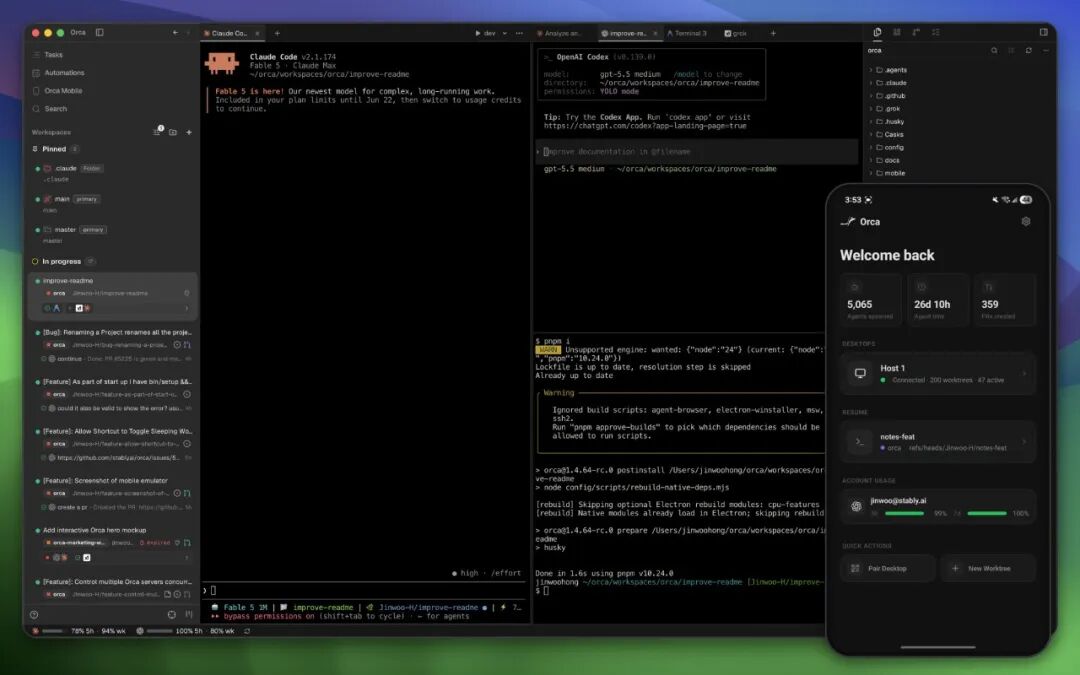
    Orca desktop workspace running several coding-agent terminals alongside a mobile companion
    Orca brings agent terminals, worktrees, project context, and mobile monitoring into one workspace. Source image from the original ITPostman tutorial.

    What Is Orca Multi-Agent Coding?

    Orca is an open-source desktop application from Stably AI for running CLI coding agents side by side. Its official repository describes it as an orchestrator for agents such as Claude Code, OpenAI Codex, OpenCode, Pi, Hermes, Grok, Cursor CLI, GitHub Copilot CLI, and many others. The general compatibility rule is simple: if an agent runs interactively in a terminal, Orca can usually host it.

    Orca does not replace those agents or bundle their models. You bring your own subscriptions, accounts, and command-line installations. Orca provides the surrounding environment:

    • projects and isolated Git worktrees;
    • persistent terminal sessions and split panes;
    • source files, diffs, annotations, and Git operations;
    • GitHub, GitLab, and Linear workflow surfaces;
    • an embedded Chromium browser with Design Mode;
    • SSH workspaces and port forwarding;
    • automation, orchestration, and Computer Use commands;
    • a mobile companion for monitoring and steering the desktop app.

    As of July 16, 2026, the GitHub repository had about 20.4K stars and used the MIT License. That popularity is notable for a project created only in March 2026, but stars are not evidence of reliability or security. Orca ships frequently, which makes its release notes and current documentation more dependable than screenshots of a particular version.

    Orca mobile companion monitoring and steering a desktop coding-agent session
    The Mobile Companion can monitor and steer agents running through the desktop app; it is distinct from emulator and device automation.

    The Core Idea: One Task, One Worktree, One Agent

    The strongest Orca workflow is not simply “run more agents.” It is to create explicit task boundaries.

    A Git worktree is a separate working directory connected to the same repository object database. Each worktree can use its own branch, files, agent session, and terminal state. That is more efficient than cloning an entire repository for every task, while still isolating filesystem changes.

    For example, a team could create:

    • ui-shell-claude for interface and responsive-layout work;
    • split-engine-codex for business logic and tests;
    • export-opencode for CSV and Markdown export.

    Each agent operates in a different branch and working directory. The main workspace can review their diffs and merge selected work.

    Isolation is not absolute. Agents can still collide on shared databases, network ports, caches, external APIs, generated resources, or assumptions about the same interface. Parallel development also creates ordinary merge conflicts when two branches change the same code. The worktree model reduces accidental file overlap; it does not eliminate coordination.

    Orca displaying several parallel Git worktrees for coding agents
    Parallel worktrees let agents explore or implement separate tasks without sharing one mutable working directory.

    Supported Platforms and Installation

    Orca currently provides desktop builds for:

    • macOS on Apple Silicon and Intel;
    • Windows 10 and 11 on x64;
    • Linux through AppImage, with additional release assets such as Debian and RPM packages.

    The official download page is the simplest starting point. The GitHub Releases page provides explicit platform files, while macOS users can also install the Homebrew cask:

    brew install --cask stablyai/orca/orca
    

    Installing Orca does not automatically install or authenticate every coding agent. Before creating a workflow, verify the CLI tools you intend to use:

    claude --version
    codex --version
    opencode --version
    gh --version
    

    Only the relevant commands need to be present. GitHub CLI can be useful for GitHub authentication and operations, but it should not be described as a universal Orca dependency. Linear integration requires a personal API token, which should be scoped and stored carefully.

    The onboarding UI can detect installed agents and offers defaults for terminal, theme, notifications, and project setup. Counts such as “32 available agents” are version-dependent. The durable claim is that Orca ships many presets and can run other terminal agents through custom setup.

    Parallel Terminals Without Losing Context

    Agentic coding creates a new kind of terminal problem. A conventional terminal is organized around processes and tabs, while the user thinks in terms of tasks, branches, agents, reviews, and decisions.

    Orca associates terminals with a project and worktree. It supports split panes, persistent scrollback, and multiple sessions inside the same workspace. Its documentation describes the terminal as using xterm.js—the same terminal foundation used by VS Code—with themes and settings that can be imported from Ghostty.

    The advantage is contextual persistence. When a user returns to a worktree, the associated terminals and agent history remain connected to the task. This is particularly useful when one agent is waiting for input, another is running tests, and a third is investigating a failure.

    More terminals still create cognitive load. A useful operating rule is to assign each worktree one clear objective, define a verification command, and close or archive sessions once the task is complete. Unlimited panes should not become unlimited unfinished work.

    Orca terminal workspace using several resizable split panes
    Split terminals are most effective when every pane belongs to a named task and a defined worktree.

    Design Mode: Send UI Context to an Agent

    Orca's embedded Chromium browser includes Design Mode. A user can select an element on a running page and send structured context to the active agent. According to Orca's documentation, that context can include:

    • the selected HTML and nearby DOM;
    • computed CSS;
    • a cropped screenshot;
    • source location when a source map is available;
    • a human annotation describing the desired change.

    This is more useful than sending only a screenshot because the agent receives both visual evidence and implementation context. A designer or reviewer can point at a spacing problem, label it, and let the agent trace the relevant component and styles.

    Design Mode does not remove the need for review. The agent may identify the wrong source file, overgeneralize a local change, or create a layout that works at one viewport and fails elsewhere. Pair visual instructions with responsive checks, accessibility requirements, and regression tests.

    Orca Design Mode selecting an element in the embedded browser for an agent
    Design Mode packages selected browser context so an agent can act on a specific visible issue.

    GitHub, Linear, Diffs, and Review

    Orca includes native workflow surfaces for code review and task systems. Official documentation covers GitHub pull requests, issues, projects and Actions, as well as Linear tasks through a personal API token. The application also exposes Git and diff tools inside each workspace.

    One of the more practical features is diff annotation. A reviewer can attach a comment to a changed line and send that feedback back to the agent. The result is a tighter loop:

    1. the agent makes a change;
    2. the human reviews the actual diff;
    3. the human attaches precise feedback;
    4. the agent revises the branch;
    5. tests run again before merge.

    This is a safer pattern than asking an agent to “fix everything” in an unbounded session. The review artifact stays connected to a branch and a visible patch.

    Access scope matters. GitHub, GitLab, and Linear credentials can expose private repositories, issues, customer information, and internal plans. Use the smallest permissions that support the workflow, and avoid pasting long-lived tokens into an agent prompt or terminal history.

    Orca browsing GitHub and Linear work items inside the desktop application
    Integrated work items reduce context switching, but their tokens and repository permissions still need deliberate scoping.

    SSH Worktrees for Remote Development

    Orca can create worktrees on a remote machine over SSH while retaining file editing, Git operations, terminals, agent sessions, reconnection, and port forwarding.

    This is useful when the project needs:

    • a Linux environment unavailable on the local machine;
    • more CPU, RAM, or GPU capacity;
    • access to an internal development network;
    • a long-running agent session that should survive a laptop interruption.

    Official documentation says remote PTYs can remain alive through a relay on the remote host, with a default grace period after the desktop app closes. Orca can also remember an SSH passphrase in memory for a configurable period.

    Those conveniences increase the trust boundary. Review remote-host ownership, SSH keys, passphrase retention, port-forward bindings, and the processes left running after disconnection. A forwarded development server should not accidentally bind to a public interface or expose an unauthenticated tool.

    Orca connecting to a remote SSH worktree with terminal and file access
    SSH worktrees extend the same agent workflow to remote development hosts, including reconnect and port-forwarding support.
    Reviewer adding a line comment to an AI-generated code diff in Orca
    Line-level annotations create a concrete human-review loop before agent changes are accepted.

    Dragging Files and Using the Orca CLI

    Files and images can be dragged from the file explorer into an agent session. That is helpful for design references, logs, test fixtures, screenshots, and documents that would be awkward to describe in a prompt.

    Treat dragged files as data disclosure. The terminal agent—not Orca alone—may send the attachment or extracted content to its model provider. Provider privacy policies, enterprise controls, and data-retention terms still apply.

    Orca also exposes a CLI so agents and scripts can interact with the application. Current documentation includes commands for worktrees, browser interaction, snapshots, orchestration, automation, and Computer Use. The CLI makes Orca programmable, but it also means a coding agent can affect more than the repository if given broad permissions.

    Keep command scopes explicit. A task that needs to inspect a page should not automatically receive permission to submit forms, send messages, delete resources, push code, or modify accounts.

    Dragging a file into an Orca coding-agent session
    File drag-and-drop is convenient, but the destination agent’s data policy governs what happens after the content enters its context.
    Orca command-line interface controlling a desktop workflow
    The Orca CLI turns workspace operations into a programmable interface for scripts and agents.

    Orchestration: Hand Work Between Claude Code and Codex

    The original tutorial demonstrates a common pattern: one agent analyzes a task and another implements it. For example, Claude Code may inspect the repository and prepare a plan, then dispatch the implementation to Codex in a dedicated worktree.

    Current Orca documentation describes a native orca orchestration command surface with persistent messages, tasks, dispatches, heartbeats, completion signals, decision gates, and a coordinator loop. This is more structured than copying a long prompt between terminal windows.

    A safe handoff should include:

    • the objective and acceptance criteria;
    • verified file paths and current behavior;
    • files or modules that must not change;
    • required tests and build commands;
    • the target worktree and branch;
    • permission boundaries;
    • the expected completion report.

    The receiving agent should independently inspect the repository rather than trusting every assumption in the handoff. The coordinator should verify the resulting diff and tests before merging.

    For a deeper comparison of the underlying assistants, see Claude Code vs Codex CLI. The Orca layer coordinates those tools; it does not make their capabilities identical.

    Scheduled Automation

    Orca can schedule recurring agent tasks by time and workspace. Official documentation covers hourly, daily, weekday, weekly, cron, and RRULE schedules, along with timezone, repository, provider, session-reuse, and fresh-session settings.

    Useful jobs include:

    • daily test and production-build verification;
    • dependency or security-report generation;
    • review of commits from the preceding 24 hours;
    • repository health summaries;
    • non-mutating checks of a staging environment.

    Start automations disabled, run them manually, inspect their permissions, and only then enable the schedule. A scheduled agent that can modify code, push branches, access browsers, or use external integrations can repeat a mistake without a human present.

    The best default is reporting rather than repair: inspect, test, summarize, and ask for approval before making consequential changes.

    Computer Use and Mobile Control Are Different Features

    Two Orca capabilities are easy to conflate.

    The Mobile Companion lets a phone monitor and steer agents running through the desktop application. It can show terminal scrollback and files, send replies and attachments, review source-control changes, and receive notifications. Orca documentation says the desktop remains the source of truth and that the connection does not rely on a cloud relay. If the desktop app is closed, the mobile connection ends.

    Device automation is separate. Orca includes skills and commands for Android environments visible through ADB, including emulators and configured physical Android devices. iOS automation targets Apple Simulator on macOS with Xcode; the cited documentation does not establish equivalent control of a physical iPhone.

    Computer Use allows an agent to operate local desktop applications through accessibility trees, screenshots, keyboard input, and visible UI actions. macOS requires Accessibility and Screen Recording permissions, and other operating systems have their own native providers.

    These are powerful permissions. Orca's own safety guidance warns against automatically pushing code, submitting forms, sending messages, purchasing, deleting, changing account settings, or exposing secrets without explicit permission. Read the current state before every action, keep personal tabs and accounts out of scope, and require human confirmation for destructive or externally visible operations.

    Privacy and Telemetry

    Packaged Orca builds collect anonymous product telemetry through PostHog Cloud in the United States. Orca's telemetry documentation says it records application version, platform, lifecycle events, coarse feature use, and agent kind, but not prompts, model output, file content, repository paths, URLs, commit text, usernames, or email addresses.

    Users can opt out in Settings or through environment variables such as:

    DO_NOT_TRACK=1
    ORCA_TELEMETRY_DISABLED=1
    

    That is only one part of the data path. Claude Code, Codex, OpenCode, and other agents have their own providers, privacy terms, authentication, retention, and enterprise settings. Files dragged into a session, terminal prompts, repository content, and Computer Use observations may be processed under those separate terms.

    Mobile pairing, SSH access, API tokens, and browser permissions also deserve threat modeling. The application is open source, but open source is not a substitute for reviewing permissions, releases, dependencies, and operational controls.

    Where Orca Fits—and Where It Does Not

    Orca is a strong fit when a developer or small team:

    • regularly uses more than one CLI coding agent;
    • needs parallel branches or implementation experiments;
    • wants a single place for terminals, files, diffs, and review;
    • works across local and remote machines;
    • values programmable orchestration and scheduled checks.

    It may be unnecessary when the task is a quick one-off command, when a single IDE agent already covers the workflow, or when the team is not prepared to review several concurrent branches. The original author makes a similar practical point: for a temporary filesystem task, the operating system terminal can be faster than creating a full managed workspace.

    Orca should also be evaluated carefully in high-compliance environments. Its value comes from connecting agents to repositories, terminals, issue systems, browsers, remote machines, and possibly desktop applications. Every connection improves capability while expanding the security boundary.

    Readers comparing the broader market can review multi-agent coding alternatives and the best AI coding agents. The operating lesson is also consistent with how the OpenAI Codex team works: faster agent execution increases the importance of task boundaries, review, and ownership.

    A Practical Orca Multi-Agent Coding Workflow

    A production-minded first experiment can be small:

    1. Install Orca from the official download or release page.
    2. Verify Git and one or two agent CLIs independently.
    3. Open a non-sensitive repository with reliable tests.
    4. Create one worktree for a bounded change.
    5. Give the agent acceptance criteria and explicit prohibited actions.
    6. Review the diff and annotate problems inside Orca.
    7. Run tests and the production build.
    8. Merge manually only after the result is understood.
    9. Add a second agent or orchestration handoff after the single-agent loop is dependable.
    10. Enable mobile, SSH, automation, or Computer Use only when the workflow genuinely requires them.

    This sequence measures whether the environment improves delivery rather than merely increasing the number of active agents.

    GitHub star history chart showing rapid early growth for the Orca repository
    Orca’s repository grew rapidly after its March 2026 launch. Popularity is a useful adoption signal, but not a substitute for release and security review.
    Orca official website with desktop download controls
    Use the official Orca download page or GitHub Releases rather than relying on a third-party installer mirror.
    Orca GitHub repository showing its open-source skill directories including Computer Use and orchestration
    Orca publishes skills for Computer Use, orchestration, Linear workflows, emulators, and workspace configuration in its open-source repository.

    Conclusion

    Orca multi-agent coding addresses a real transition in software development. Once developers use several coding agents, the limiting problem is no longer opening another terminal. It is defining isolated tasks, tracking active work, handing context between agents, reviewing patches, and controlling what automation is allowed to do.

    Orca combines those concerns in an ambitious open-source desktop environment. Its worktrees, persistent terminals, Design Mode, diff annotations, SSH workflow, orchestration CLI, mobile companion, and Computer Use integration can create a productive control plane for agentic development.

    The same breadth creates the main caveat. Orca can sit between valuable source code and multiple model providers, remote machines, issue systems, browsers, and local applications. Adopt it progressively, scope credentials and permissions, keep a human responsible for every merged result, and treat the current documentation—not a version-specific screenshot—as the authority for setup.

    This article is a substantially rewritten English guide based on ITPostman's original WeChat tutorial, “A Desktop Tool for Running Claude Code, Codex, and Multiple Coding Agents: Orca Guide”, together with the official sources below.

    Primary Sources

    Frequently Asked Questions

    Is Orca an AI coding model?

    No. Orca is a desktop environment and orchestration layer for CLI agents. Claude Code, Codex, OpenCode, and other tools keep their own models, subscriptions, authentication, and data policies.

    Can Orca run Claude Code and Codex at the same time?

    Yes. Each can run in its own terminal or worktree, and Orca's orchestration tools can dispatch structured tasks between agents.

    Is Orca free and open source?

    The desktop repository is published under the MIT License. Users still need any paid subscriptions or API access required by the agents they choose to run.

    Does Orca support Windows, macOS, and Linux?

    Yes. Current downloads cover macOS on Apple Silicon and Intel, Windows 10/11 x64, and Linux packages including AppImage.

    Does Orca control a physical phone?

    The Mobile Companion controls and monitors the Orca desktop workflow from a phone. Separate Android tooling can automate ADB-connected emulators or configured devices. Official iOS automation documentation covers Apple Simulator on macOS, not general physical-iPhone control.

    What is the biggest risk of using Orca?

    Permission sprawl. Orca can connect agents to code, terminals, Git hosts, issue systems, SSH machines, browsers, files, and desktop UI. Use least-privilege credentials and require human confirmation for destructive or externally visible actions.
  • Comet 0.4 Guide: Classic Spec Workflows, /comet-any and Skill Evaluation

    Comet 0.4 Guide: Classic Spec Workflows, /comet-any and Skill Evaluation

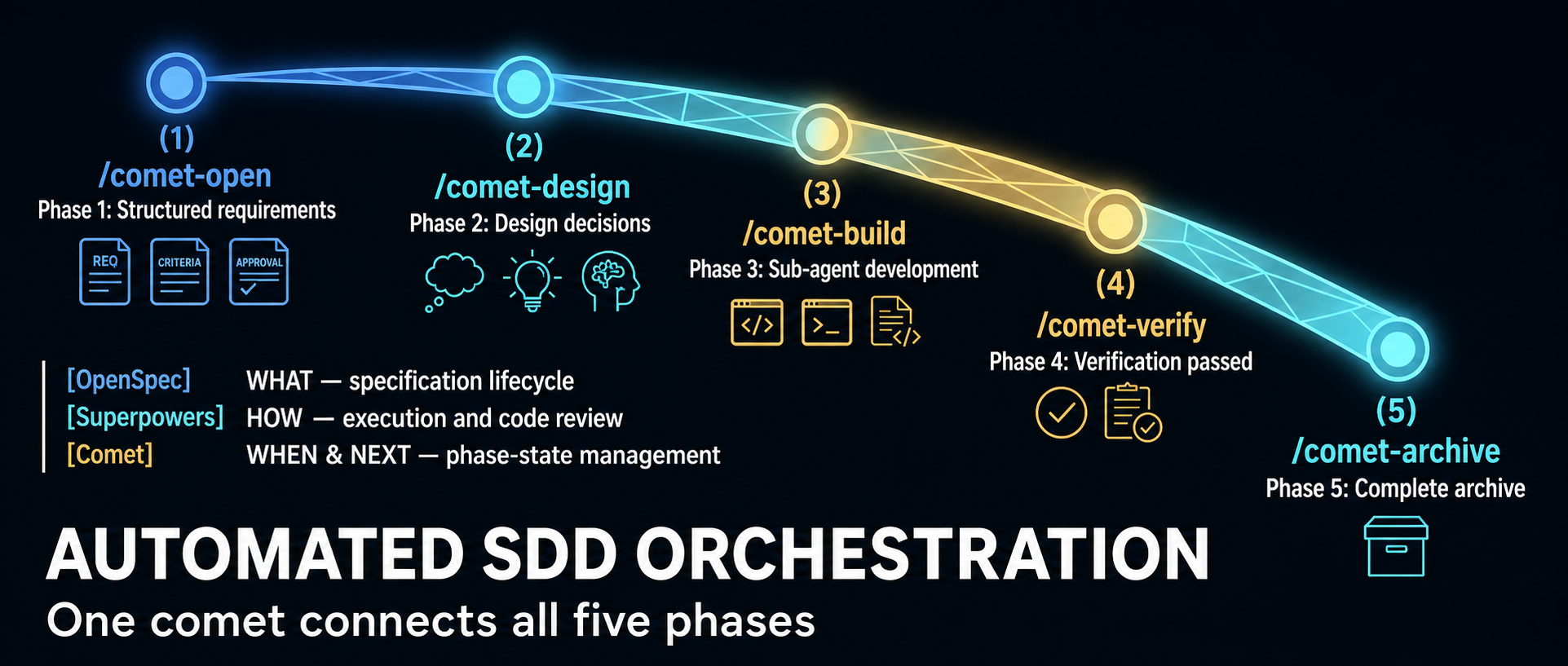
    Comet began as an orchestration layer for combining OpenSpec’s specification lifecycle with Superpowers-style planning and execution. The project now describes itself more broadly: a resumable workflow and Skill platform for coding. That shift matters because current Comet has three distinct jobs, not one:

    1. /comet runs a guarded software-change workflow.
    2. /comet-any turns existing Skills into a reusable workflow package.
    3. comet eval tests whether a Skill behaves reliably enough to advance toward publication.

    A June 2026 WeChat article from 职场向上生长力 explains the original five-phase design well. It is now a historical snapshot of the 0.3.x line: its central state-machine model remains relevant, but several counts, scripts and product boundaries changed in the 0.4 beta series. This guide uses the current official rpamis/comet repository and release metadata as the authority.

    Version reality: current does not mean stable

    Release channel map distinguishing Comet 0.3.9 from the current 0.4 beta and the stable Classic core
    Classic is the established architectural core, but the current npm default remains a semantic prerelease; pin the exact package version.

    As of July 16, 2026, npm’s latest tag for @rpamis/comet points to 0.4.0-beta.4, published July 12. It is the current default install, but the beta identifier still makes it a semantic prerelease. The last version without a prerelease suffix is 0.3.9, published June 18.

    Choice What it means Best fit
    @rpamis/comet@0.3.9 Last non-beta release; mature Classic workflow built around the 0.3 architecture Teams prioritizing a fixed, non-prerelease baseline
    @rpamis/comet@0.4.0-beta.4 Current npm default; pure Node runtime plus the expanded Skill and eval platform Evaluation, new integrations and teams willing to absorb beta changes
    Unpinned @rpamis/comet Currently resolves to beta.4 because npm latest points there Only when your update policy intentionally follows the current channel

    The repository calls Classic Spec “the stable core for long-running tasks.” Read that as a product-architecture claim: the five-phase lifecycle is the established center of Comet. It does not turn the 0.4.0-beta.4 package into a generally available 0.4 release. Likewise, beta.4’s release notes call several top-level commands “Stable Classic commands”; that describes their supported interface inside the beta, not the maturity label of the entire package.

    Pin the version in team setup documentation and automation. Otherwise, the same installation command can resolve to a materially different runtime over time.

    What changed in the 0.4 beta line

    The most visible engineering change is a pure Node runtime. The 0.4 README says Comet no longer depends on Bash or WSL; the package declares Node.js 20 or newer. This is especially meaningful for Windows users and for cross-platform workflow bundles, because state and guard logic no longer depend on a shell environment that behaves differently across machines.

    The product surface also expanded:

    • Classic Spec remains the requirements-to-archive workflow.
    • /comet-any authors composed Skill Bundles with workflow nodes, schemas, guards and handoffs.
    • comet eval supplies local or LangSmith-connected evaluation evidence.
    • comet dashboard provides a read-only browser view of active changes and archive history.

    Beta.4 adds or hardens ambient resume, a registry of project-scope installations, direct comet state, comet guard, comet handoff and comet archive commands, custom build evidence, multi-change guards, archive confirmation and Codex Skill discovery. Those details come from the official 0.4.0-beta.4 release, not from the older WeChat walkthrough.

    Surface 1: Classic Spec with /comet

    Classic Spec is for a software change that should move through a controlled lifecycle. Its conceptual phases remain:

    1. Open — turn an idea into an OpenSpec change and obtain human agreement on scope.
    2. Design — record architectural decisions and resolve ambiguity before implementation.
    3. Build — create an execution plan, choose isolation and implement under review rules.
    4. Verify — collect test, task and design-conformance evidence.
    5. Archive — synchronize the accepted delta into the main specification and close the change.

    The important mechanism is not the command sequence. It is durable external state. Each managed change stores workflow facts in .comet.yaml: phase, mode, artifact references, verification outcome and archive status. /comet can inspect that state and recommend the next legal action after a terminal restart or context reset.

    Guards are equally important. A useful workflow must reject illegal transitions, not merely remind the agent what it should do. Comet’s Classic runtime checks prerequisites before phase advancement and can restrict source writes while a change is still in requirements or design. Beta.4 also requires final archive confirmation to be represented in machine-owned state, so calling an internal path cannot silently bypass the human decision.

    A practical Classic setup

    Requirements are Node.js 20+, npm or npx, and Git. Choose a version deliberately:

    # Last non-beta release
    npm install -g @rpamis/comet@0.3.9
    
    # Current beta evaluated in this guide
    npm install -g @rpamis/comet@0.4.0-beta.4
    

    Then initialize inside the target repository:

    cd your-project
    comet init
    comet doctor --json
    comet status --json
    

    Use /comet from the supported coding agent to start or resume a change. Do not begin with automatic transitions enabled on a high-risk repository. First learn which points request scope, isolation, review and archive decisions. After the team trusts its checks, automation can reduce ceremony without hiding governance.

    Surface 2: /comet-any for workflow authoring

    /comet-any addresses a different problem: turning Skills into a distributable workflow rather than implementing a product feature. The current Skill defines a workflow contract in terms of:

    • Workflow Nodes that own resumable responsibilities;
    • Skill Bindings and required Skill calls;
    • Output Schemas attached to specific nodes;
    • Guardrails that permit or block advancement;
    • Handoffs containing cross-node or subagent evidence;
    • a workflow-protocol.json source of truth.

    This is more rigorous than placing several Skill names in a prompt. A bound Skill does not automatically replace a workflow node, and a schema declared globally does not enforce anything until it is attached to a concrete node. The authoring flow requires a proposal and human confirmation before generation, then creates scripts, rules, hooks, references and an eval manifest.

    There are two broad modes. A comet-five-phase-overlay customizes parts of Classic Spec while preserving .comet.yaml semantics and protected control nodes. A workflow-kernel is for a genuinely different lifecycle with its own state model and guard design. If a team wants to replace fundamental control nodes such as open, execute, verify or archive, it should treat that as a new kernel rather than quietly weakening Classic’s guarantees.

    Use /comet-any when the deliverable is a reusable workflow package. Use /comet when the deliverable is a software change. Mixing those intents produces confusing state and weak acceptance criteria.

    Surface 3: comet eval as evidence

    Comet product map linking guarded development, reusable workflow composition, and skill evaluation
    Comet separates guarded software changes, reusable workflow bundles, and evaluation evidence into three connected surfaces.

    comet eval asks whether a Skill can be discovered, executed and scored on defined tasks. For a bundle generated by /comet-any, the recommended sequence is:

    comet eval ./generated-skill/comet/eval.yaml --collect
    comet eval ./generated-skill/comet/eval.yaml --html
    

    --collect is a low-cost preflight: it checks the manifest, task discovery and dependency paths without starting the expensive evaluation. --html performs the run and creates a browsable report. The official documentation distinguishes raw runs from the clean analysis set and attributes failures to harness, workflow, task, model or environment instead of folding every infrastructure error into a Skill-quality score.

    For an early local Skill without an eval manifest, comet eval ./my-skill --quick --html is a smoke test. It is not final release evidence. Publish readiness expects evaluation tied to the current draft hash; failed, missing or stale-hash evidence blocks progression.

    The README discusses Rubric, Pass@k and Pass^k scoring and shows repository-generated benchmark charts. Treat those results as project evidence for its published tasks and treatments, not proof that every team’s custom workflow will improve by the same amount. Your tasks, model, environment and validators determine whether the measurement transfers.

    Choosing the right Comet path

    Start with the outcome:

    • For a feature, bug fix or refactor that needs traceable requirements and verification, use Classic /comet.
    • For a repeatable organizational process assembled from multiple Skills, use /comet-any.
    • For evidence that a Skill works across runs, use comet eval.
    • For a conservative rollout, pin 0.3.9 and test the beta in a separate repository.
    • For 0.4 capabilities, pin beta.4, record the version in artifacts and rerun evaluation when upgrading.

    Comet’s most valuable idea is not that an agent can execute five commands. It is that workflow control can be represented as files, state transitions, deterministic checks and review evidence. That architecture survives a context window. The 0.4 beta extends the same principle from one software-development workflow to a broader platform for composing and evaluating Skills.

    Sources

  • Trellis Agent Harness Guide: Specs, Tasks, Memory, and the Four-Phase Loop

    Trellis Agent Harness Guide: Specs, Tasks, Memory, and the Four-Phase Loop

    AI coding agents are fast at local execution and unreliable at remembering why a project works the way it does. Trellis addresses that gap by putting durable engineering context inside the repository: scoped specifications, task artifacts, per-developer journals, workflow state, and platform-specific agent configuration.

    That makes Trellis less like a model or code generator and more like an agent harness. It does not replace Claude Code, Codex, Cursor, or another coding agent. It gives those agents a shared project layer and a repeatable delivery loop.

    At the time of this review, the mindfold-ai/Trellis repository had roughly 12.7k GitHub stars—12,662 when checked—and the npm package was version 0.6.7. The project uses the AGPL-3.0-only license. Its current prerequisites are Node.js 18.17 or newer for the CLI and Python 3.9 or newer for the scripts and hooks.

    What Trellis stores in the repository

    Trellis repository map showing specifications, task artifacts, developer journals, workflow state, and host-specific integrations
    The .trellis/ directory holds the stable project context; generated skills, hooks, and host entry files adapt that core to each coding environment.

    The .trellis/ directory is the stable core across supported coding tools. Four areas matter most:

    • spec/ stores team conventions: directory structure, error handling, testing, component patterns, and other rules that should survive a chat session.
    • tasks/ stores active and archived work, including a PRD and separate context manifests for implementation and review.
    • workspace/ stores per-developer journals so a later session can recover what happened without reconstructing the entire conversation.
    • workflow.md and runtime state tell the agent which phase is active and what evidence it should produce next.

    Trellis also generates platform-specific skills, subagent definitions, commands, hooks, and entry files such as AGENTS.md. The core artifacts stay the same, but their delivery varies by host. Claude Code, Cursor, and OpenCode expose richer hook and subagent integration; other tools may rely on pull-based context, a prompt file, or an inline main-agent path.

    This distinction is important. “Supports 17 platforms” means Trellis ships configurators for 17 environments. It does not mean every environment provides identical session-start events, pre-tool hooks, slash commands, or subagent context injection. The official capability matrix should be reviewed for the exact tools a team uses.

    The current four-phase loop

    Trellis four-phase loop from planning and implementation through verification, archival, and project memory
    Plan selects context, Implement produces the change, Verify collects evidence, and Finish archives the task while promoting durable lessons.

    The current Trellis README describes a four-phase workflow:

    1. Plantrellis-brainstorm clarifies the task one question at a time and writes prd.md. Research-heavy questions can be delegated to trellis-research. The plan curates which specs and research artifacts belong in implement.jsonl and check.jsonl.
    2. Implementtrellis-implement works from the PRD and the selected implementation context. It is instructed not to commit the change.
    3. Verifytrellis-check reviews the diff against the task and specs, then runs the relevant lint, type-check, and test commands. It can self-fix small mechanical issues.
    4. Finish — a final check runs, trellis-update-spec promotes durable lessons into the spec library, and finishing the work archives the task and updates the developer journal.

    An older source described spec update as a separate third stage and finish as a fourth. The current documentation folds spec promotion into Finish, after Plan, Implement, and Verify. That is more than naming: the knowledge update is part of closure, not an optional cleanup step detached from verification.

    Specs are bootstrapped, then curated

    The most consequential correction to older Trellis reviews concerns specification authoring. Trellis no longer expects every team to fill every placeholder entirely by hand. The official README says many teams let AI draft specifications from the existing codebase, then tighten important rules manually. The quick-start documentation also includes a bundled spec-bootstrap skill and an optional template marketplace.

    The right mental model is AI draft, team curate:

    • Use the codebase to produce a first-pass description of actual patterns.
    • Delete generic advice that does not constrain a decision.
    • Add concrete examples and counterexamples from the repository.
    • Review high-impact rules—security, migrations, API compatibility, testing, error handling—like code.
    • Keep the specs versioned and update them when a verified task establishes a better convention.

    AI-generated specs are not automatically trustworthy. A model can faithfully document an accidental pattern, copy an anti-pattern that happens to be common, or turn preferences into false absolutes. Trellis provides the structure and update path; the team remains responsible for the standard.

    Why context manifests are useful

    Large instruction files often fail in two ways: they consume context on every turn, and unrelated rules distract the agent from the current task. Trellis instead uses task-specific JSONL context manifests.

    The planning phase selects the relevant material for implementation and checking. An implementation worker might need API conventions, database rules, and the PRD. A reviewer may need those plus testing and error-handling guidance. The two manifests can differ, which helps keep each agent’s context bounded and makes the selection inspectable.

    This mechanism does not guarantee lower total token use. Hooks, planning, subagents, checks, and spec updates all cost time and model work. Its value is context precision and repeatability, not free context. Teams should compare end-to-end latency and usage against their current workflow on representative tasks.

    Project memory without one giant chat history

    Trellis journals record what a developer completed, while task state records what remains active. On hook-backed platforms, session startup can inject identity, Git status, active tasks, spec indexes, and recent journal context. On tools without the same hook surface, an entry skill or generated prelude supplies a fallback.

    This is durable memory in the engineering sense: versioned project knowledge plus developer-specific work summaries. It is not a claim that every past conversation is automatically correct or that journal context should override the repository. The current code, tests, and reviewed specs remain the source of truth.

    Per-developer workspace directories reduce journal conflicts, while shared specs and tasks remain reviewable through normal pull requests. Teams should still define ownership for spec changes; otherwise, the knowledge base can accumulate contradictions as quickly as a monolithic AGENTS.md file.

    Installation and a safe first pilot

    Install the current CLI and initialize only the platforms you actually use:

    npm install -g @mindfoldhq/trellis@0.6.7
    trellis init -u your-name --claude --codex

    The generic trellis init -u your-name flow can auto-detect installed platforms. Pinning the npm version makes a team trial reproducible; @latest is convenient for exploration but can change generated templates between machines.

    For an existing codebase, use this pilot sequence:

    1. Initialize Trellis on a disposable branch.
    2. Let the bootstrap workflow draft a narrow set of specs from real code.
    3. Have maintainers review and reduce those specs to high-signal rules.
    4. Choose one medium-sized, reversible feature with clear acceptance criteria.
    5. Run the complete Plan → Implement → Verify → Finish loop.
    6. Inspect which files each JSONL manifest selected.
    7. Intentionally violate one rule and confirm the review phase catches it.
    8. Start a new session and verify that task and journal recovery are accurate.
    9. Measure repository footprint, merge noise, runtime, and model usage before expanding adoption.

    Codex users need an additional platform check. Current Trellis documentation says Codex uses an AGENTS.md prelude, skills and agent files, and a UserPromptSubmit hook; hook support must be enabled and reviewed in compatible Codex releases. Subagent context injection is not identical to Claude Code’s PreToolUse path, so parity should be tested rather than assumed.

    Trade-offs teams should evaluate

    Repository weight

    Trellis generates more than a single instruction file. Exact file counts vary by version and selected platforms, so an old “152 files” result should not be treated as a fixed product property. The meaningful question is whether those generated files stay stable, reviewable, and useful enough to justify their maintenance cost.

    Platform variance

    The same .trellis/ core can be shared broadly, but automation depth varies. Some platforms have full session and subagent hooks; others use skills or inline execution. A mixed-tool team should test its least-capable required platform first.

    Spec quality and governance

    Poor specs scale poor decisions. Teams need reviewers, ownership, deprecation rules, and a way to resolve conflicts between written standards and working code.

    Workflow overhead

    Planning, isolated implementation, independent checking, and spec promotion are valuable for consequential work. They can be excessive for a one-line fix or disposable prototype. Trellis’s current quick-start says small inline tasks do not have to become Trellis tasks; use that escape hatch deliberately.

    License

    Trellis is licensed AGPL-3.0-only, not MIT or Apache-2.0. Organizations with distribution, modification, hosted-service, or proprietary integration concerns should have the intended use reviewed against the license before standardizing the tool. This is a governance check, not a reason to avoid the project automatically.

    Who should adopt Trellis?

    Trellis is most compelling for a long-lived repository where multiple people or coding agents repeatedly need the same architectural knowledge. It is particularly relevant when the team has already outgrown one large AGENTS.md or CLAUDE.md, when task context needs to be reviewable, or when sessions frequently lose the reasoning behind local conventions.

    It is less compelling for a small prototype, a one-person script, or a repository whose conventions are still changing faster than anyone can curate them. In those cases, a concise instruction file plus normal tests may be the simpler and more reliable harness.

    The core Trellis proposition is not “AI remembers everything.” It is “the repository carries the right memory forward.” That proposition succeeds only when specs are curated, tasks are closed honestly, checks are meaningful, and each platform’s integration is verified in practice.

    Sources

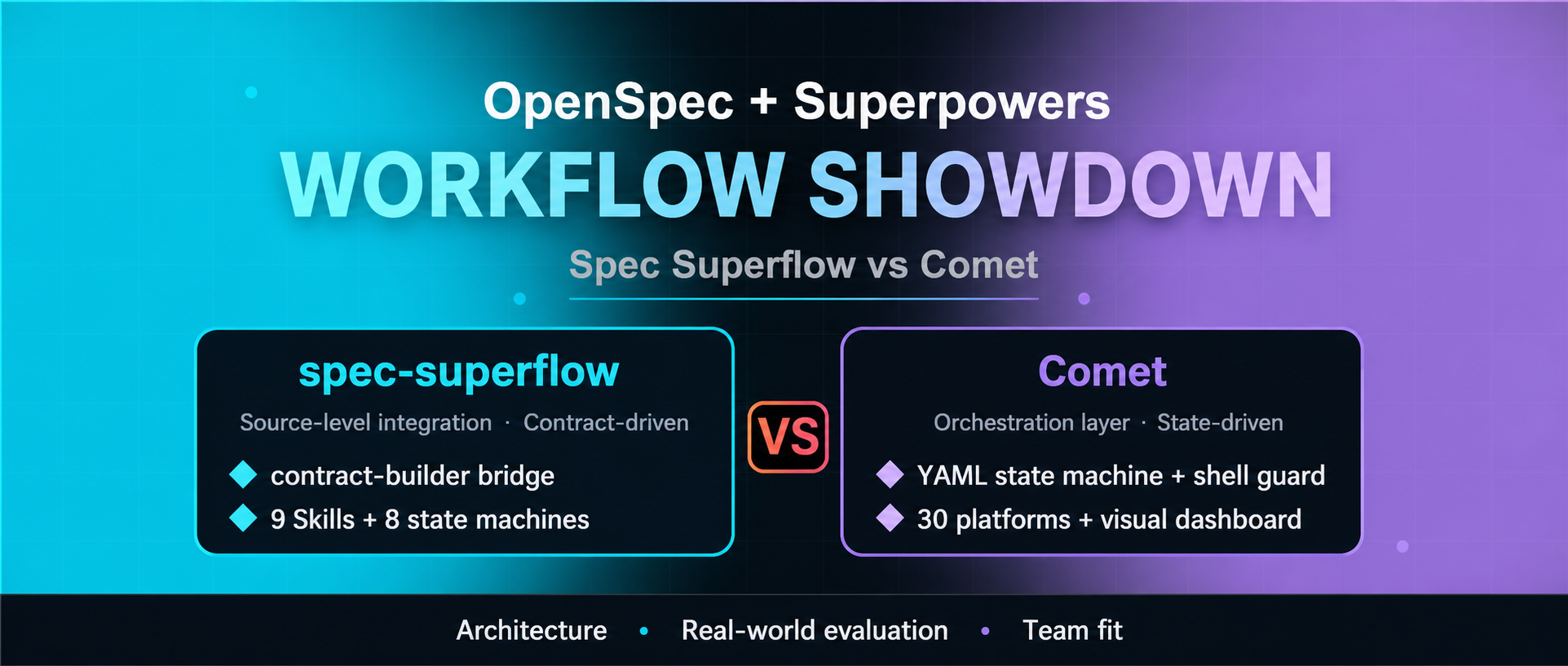
  • Spec Superflow vs Comet: Which OpenSpec–Superpowers Workflow Fits Your Team?

    Spec Superflow vs Comet: Which OpenSpec–Superpowers Workflow Fits Your Team?

    OpenSpec and Superpowers solve different parts of AI-assisted software delivery. OpenSpec emphasizes explicit change artifacts and a maintained specification lifecycle; Superpowers emphasizes disciplined implementation practices such as design, testing, review, and verification. Spec Superflow and Comet both try to connect those layers—but the two projects now serve noticeably different buyers.

    This comparison updates a Chinese WeChat article that examined earlier releases. As of July 16, 2026, the current published versions are Spec Superflow v0.9.1 and Comet 0.4.0-beta.4. That matters because the source compared v0.8.10 with v0.3.9. Since then, Spec Superflow has expanded its portable runtime and execution controls, while Comet has moved its Classic workflow from shell scripts to Node.js and broadened into skill composition and evaluation.

    The short answer: choose Spec Superflow when you want a self-contained, prescriptive spec-to-execution contract. Choose Comet when you want a broader workflow platform with cross-tool installation, a dashboard, reusable skill composition, and evaluation. Neither is automatically the right answer for a small change that one agent can safely complete and verify.

    Current comparison at a glance

    Decision matrix comparing Spec Superflow and Comet across integration, state, lifecycle, platform breadth, evaluation, and adoption cost
    A concise decision matrix for the two projects’ current architectural trade-offs.
    Dimension Spec Superflow v0.9.1 Comet 0.4.0-beta.4
    Primary design Self-contained spec-first workflow Cross-platform skill harness with a Classic spec workflow
    OpenSpec/Superpowers relationship Incorporates their planning and execution ideas without requiring either at runtime Connects OpenSpec artifacts, Superpowers methods, and Comet’s own runtime
    Core control model Eight-state flow, execution contract, decision points, guards, execution plan and review receipts Five-phase Classic flow, .comet.yaml, Node guard/state/handoff tools, configurable review/TDD
    Installed skills Nine core skills Nine English skills plus matching Chinese variants in the release tree, including comet-any
    Platform support claimed by project 17 platforms 33 platforms
    Runtime Node.js 20+; self-contained package Node.js 20+; pure Node runtime; OpenSpec is a package dependency
    Visibility CLI validation, doctor, audit, state and execution-plan commands CLI status/doctor plus a local read-only web dashboard
    Extension path Fixed workflow with controlled execution modes and handoffs /comet-any, skill creation/publishing, local and LangSmith-oriented evaluation
    Release posture v0.9.1 0.4.0 beta series

    The platform and skill counts above are project claims, not independent compatibility certifications. A listed installer does not guarantee that every host exposes identical hooks, subagents, permissions, or skill-discovery behavior.

    Spec Superflow: make the handoff a contract

    Spec Superflow’s defining choice is to make planning-to-implementation handoff explicit and difficult to bypass. Its nine skills cover discovery, specification, contract building, execution, debugging, review, release, and spec merging. A workflow starts by inspecting the content of existing artifacts, rather than relying only on timestamps, and routes the change through an eight-state model.

    The centerpiece is execution-contract.md. The contract condenses the planning artifacts into an implementation boundary, with an intent lock, constraints, and freshness checks. Guards can refuse implementation when the contract is absent, stale, or unapproved. The workflow also enforces TDD, review, and spec synchronization in its full path.

    Version 0.9.1 goes beyond the older “nine skills and a guard” summary. For full and hotfix changes, it can generate a guarded execution recommendation, ask the user to confirm an execution mode, persist an execution plan, and require passing review receipts for each wave. The available modes include inline work, serial batch-inline work, and subagent-driven development. A plan can be upgraded to a more structured mode, but the tooling intentionally prevents silent downgrade of an approved plan.

    This design favors auditability and constraint retention. It also creates ceremony. A team must be willing to maintain the artifacts, honor decision points, and understand why a guard blocked progress. Spec Superflow includes hotfix and tweak routes, but its core value appears when a change is important enough to justify a durable contract.

    Spec Superflow is the stronger fit when

    • you want one self-contained package instead of runtime coordination across separately installed frameworks;
    • the planning-to-build boundary is the main source of risk;
    • TDD, review receipts, and spec synchronization should be enforced rather than suggested;
    • a controlled set of execution modes is preferable to an open-ended workflow platform;
    • CLI audit evidence matters more than a graphical dashboard;
    • Chinese-first workflow instructions are useful to the team.

    Comet: make the workflow a platform

    Comet still offers a five-phase Classic workflow—open, design, build, verify, archive—but the current project is broader than the “YAML plus shell glue” description in the older source. Beginning with the 0.4 beta line, its runtime is pure Node.js. The installed Classic skills use JavaScript modules such as comet-guard.mjs, comet-state.mjs, and comet-handoff.mjs, while .comet.yaml remains the per-change state record.

    That state file allows the main /comet entry point to determine the active phase and resume work. The 0.4.0-beta.4 release also adds an ambient resume probe, stable top-level state/guard/handoff/archive commands, stronger evidence handling for custom builds, and archive-confirmation enforcement. The dashboard provides a read-only browser view of active changes, phase status, task progress, artifacts, and archive history.

    Comet’s larger strategic difference is /comet-any and its evaluation tooling. The project now positions itself as a harness for composing arbitrary skills into distributable workflows, then measuring them with rubrics and Pass@k/Pass^k-style experiments. comet eval can run local checks and produce HTML reports; the repository also documents a LangSmith path for teams that want centrally inspectable evaluation traces.

    This breadth increases the number of moving parts. Comet declares OpenSpec as a package dependency and its initializer manages OpenSpec, Superpowers, Comet skills, platform-specific directories, language variants, updates, and uninstall behavior. Its published release is still named 0.4.0-beta.4, so teams should treat version pinning and upgrade tests as part of adoption, even though GitHub marks the release itself as non-prerelease metadata.

    Comet is the stronger fit when

    • the team already uses OpenSpec or Superpowers and wants an orchestration layer around them;
    • one workflow must be installed across a heterogeneous set of coding tools;
    • a visual status dashboard will help reviewers or project leads;
    • TDD and review strictness need to be configurable by project;
    • the organization wants to create, package, evaluate, and distribute skills beyond the Classic spec workflow;
    • resumability and cross-device recovery are higher priorities than minimizing the framework surface.

    The real trade-off: controlled depth versus platform breadth

    It is tempting to reduce the choice to “discipline versus flexibility,” but that misses the engineering boundary.

    Spec Superflow internalizes more of the workflow contract. Its guards, decision points, execution plans, and review receipts form one opinionated control system. That reduces runtime dependency on upstream frameworks and makes the intended path easier to audit. The cost is tighter coupling to Spec Superflow’s own artifact model and release cadence.

    Comet externalizes and composes more capabilities. Its Classic mode coordinates OpenSpec and Superpowers concepts, while the wider platform adds installation adapters, a dashboard, skill creation, and evaluations. That provides more extension points, but each extension point is another compatibility surface to test.

    Neither architecture guarantees better code. Both can enforce that evidence exists; neither can ensure that a generated test is meaningful, that a review caught the right risk, or that a specification captured the user’s actual intent. Human approval remains most valuable at irreversible decisions: scope, architecture, data migration, security boundaries, and release.

    A practical pilot before standardizing either tool

    Two-branch pilot scorecard for evaluating Spec Superflow and Comet on the same software change
    Use the same change and score both branches on repeatability, evidence quality, recovery, review effort, overhead, and exit cost.

    Run the same medium-sized change through both systems in disposable branches. Avoid using a tiny edit, because both workflows will look artificially expensive, and avoid a mission-critical migration, because a first trial should be reversible.

    Score each run on evidence rather than impressions:

    1. Setup repeatability: Can a second developer install the pinned release and reproduce the environment?
    2. Artifact quality: Do proposal, design, tasks, contract/state, verification, and archive records agree?
    3. Guard behavior: Does an intentionally missing approval, stale artifact, or failing test actually stop progression?
    4. Resume behavior: Can a new session recover the correct change and next action without guessing?
    5. Review usefulness: Do review receipts or reports contain actionable evidence rather than a ceremonial “pass”?
    6. Change overhead: How much time and model usage go to coordination compared with implementation?
    7. Portability: Do the specific coding tools your team uses support the required hooks, skills, and permissions?
    8. Exit cost: Can you uninstall or stop using the framework while preserving useful specifications and history?

    Pin exact versions during the pilot. Both repositories are young and actively changing: Spec Superflow was created in late June 2026, and Comet in May 2026. Release notes, not old tutorials, should be the first stop before every upgrade.

    Recommendation

    For a team whose main failure mode is “the implementation drifted away from an approved design,” start with Spec Superflow v0.9.1. Its contract-builder, guarded execution plan, and review receipts directly target that boundary.

    For a team whose main problem is “we need one resumable workflow and skill platform across many coding environments,” start with Comet 0.4.0-beta.4. Its installer breadth, dashboard, skill composition, and evaluation surface are the differentiators—not merely its five-phase Classic flow.

    If the work is a one-file fix, a configuration adjustment, or a question that does not need a durable spec, start with neither. The best workflow is the smallest one that preserves the evidence and control the change actually requires.

    Sources