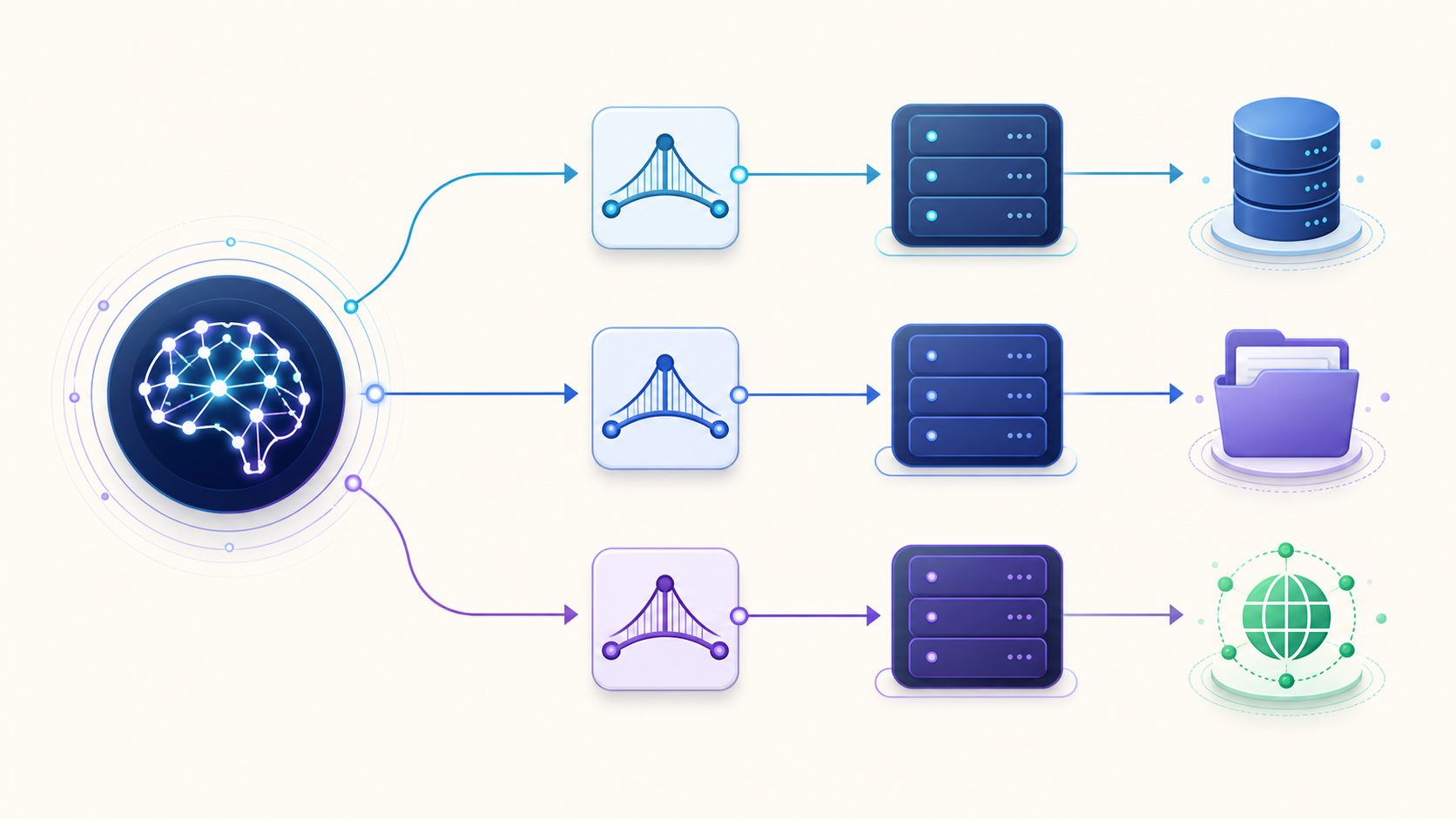
MCP (Model Context Protocol) is an open protocol that lets an AI application connect to external tools and data through a standard client–server interface. An MCP server can expose actions, readable context, and reusable workflows. An MCP host such as an AI editor manages the connections, permissions, and model interaction.
The short version: MCP standardizes the connection. It does not make an untrusted server safe, guarantee that every client supports every feature, or make the model understand your system automatically.
MCP at a glance
MCP separates an AI application from the systems it needs to use. That boundary lets one host connect to many servers without inventing a new integration format for each service.
| Entity | What it is | What it controls | Simple example |
|---|---|---|---|
| MCP host | The AI application | User experience, permissions, model access, client lifecycle | An AI coding editor |
| MCP client | A connection component inside the host | One session with one server | The editor’s connection to a repository server |
| MCP server | A program that exposes capabilities | Tools, resources, prompts, and server-side policy | A server that reads issues and creates pull requests |
| Tool | A callable operation | An action with typed inputs and results | create_issue |
| Resource | Addressable context | Data the application can read | A repository README or database schema |
| Prompt | A reusable interaction template | A guided workflow with arguments | A code-review checklist |
This table reflects the current official MCP architecture. The protocol uses JSON-RPC 2.0 messages and separates its data layer from its transport layer.
Original Graphify illustration: one host creates a separate client connection for each server, while servers bridge to external systems.
What does “MCP” mean in software and AI?
In software, Model Context Protocol is a contract for exchanging context and capabilities between AI applications and external systems. “Context” includes more than text. It can include structured tool schemas, files, database metadata, images, and results returned by an operation.
MCP is not an AI model. The phrase MCP model is common in search, but the protocol does not replace an LLM. The model reasons over information that the host provides; the host and MCP client mediate server access.
MCP is also not a universal plugin runtime. A server can advertise a capability, but a host may not implement that capability. Always check the client’s support matrix before designing around resources, prompts, sampling, elicitation, or experimental features.
What is an MCP server?
An MCP server is a program that provides context or capabilities to an MCP client through the Model Context Protocol. The word “server” describes its protocol role, not its physical location. A server may run as a local child process or as a remote service.
A useful server has a narrow contract:
- It declares its identity and supported capabilities during initialization.
- It publishes typed descriptions of the tools, resources, or prompts it offers.
- It validates requests before touching an external system.
- It returns structured results or protocol errors.
- It enforces authorization at the system boundary, not only in natural-language instructions.
For example, an MCP server for API documentation could expose versioned OpenAPI documents as resources, a search_endpoint tool, and a prompt that guides an API migration. A local file MCP server could expose approved directories while blocking paths outside configured roots.
How do MCP servers work?
An MCP connection progresses through a predictable sequence:
- The host starts or contacts the server. Local servers commonly use standard input/output. Remote servers commonly use Streamable HTTP.
- The client initializes the session. Client and server exchange protocol versions, identities, and capabilities.
- The client discovers capabilities. It can request tool, resource, or prompt lists when the relevant capability exists.
- The host chooses what to expose. The application may filter tools, request user approval, or attach a resource to the conversation.
- The model or user initiates work. The host routes a tool call, resource read, or prompt retrieval through the client.
- The server validates and executes. It talks to the file system, API, database, or other backing service.
- The result returns to the host. The host presents it to the model and user, records it, or asks for confirmation before the next action.
The client and server must negotiate a compatible protocol version. If they cannot, the connection should end rather than continue with ambiguous behavior. See the current MCP specification overview for normative requirements.
What messages does MCP use?
MCP uses JSON-RPC 2.0 requests, responses, errors, and notifications. A request has an identifier because it expects a response. A notification has no identifier because it does not.
This distinction matters during debugging. A connection can be alive while a capability request fails. Check the lifecycle in order: transport, initialization, capability negotiation, discovery, then execution.
Which transports does MCP support?
The architecture currently documents two primary transports:
| Transport | Best fit | Process boundary | Key concern |
|---|---|---|---|
| stdio | Local tools and scripts | The host launches a child process | Environment, executable path, and local permissions |
| Streamable HTTP | Remote and shared services | The client contacts an HTTP endpoint | Authentication, authorization, TLS, and tenancy |
Legacy SSE configurations still exist in clients and server documentation, but new remote integrations should prefer Streamable HTTP where the client and server support it. Transport selection changes deployment and trust boundaries; it does not change the meaning of tools, resources, or prompts.
What are MCP tools, resources, and prompts?
Tools perform operations, resources provide addressable context, and prompts package reusable interaction templates. They are complementary primitives, not three names for the same thing.

Original Graphify illustration: an operation control, a data surface, and a conversation template represent the three server primitives.
| Primitive | Control pattern | Use it when | Avoid using it when |
|---|---|---|---|
| Tool | Usually model-controlled through host policy | The system must calculate, search, create, update, or delete | Static data can be read as a resource |
| Resource | Usually application-controlled | The host needs files, schemas, docs, or other context with a URI | The operation has side effects |
| Prompt | Usually user-controlled | A repeatable, parameterized workflow improves consistency | Enforcement or authorization is required |
The official server concepts guide describes resources as passive data sources, tools as executable functions, and prompts as reusable templates. Host behavior still varies, so test the exact client you plan to support.
What is an MCP tool?
An MCP tool is a named operation with a description and an input schema that a server exposes to a client. The client discovers tools with tools/list and invokes one with tools/call.
A strong tool definition makes five things explicit:
- the operation and its side effects;
- required and optional inputs;
- input constraints;
- the shape of a successful result;
- failure conditions the caller can act on.
Tool descriptions influence model selection, but descriptions are not a security control. The server must validate inputs and permissions again when the tool is called.
What is an MCP resource?
An MCP resource is content identified by a URI that a client can discover or read. Typical resources include file contents, a database schema, API documentation, Git history, or an application record.
Resources work well when context has identity and structure. A URI such as repo://team/service/readme is easier to govern and cache than a large block copied into every prompt.
What is an MCP prompt?
An MCP prompt is a server-provided, parameterized message template for a repeatable interaction. A prompt might ask for a target branch and produce a structured code-review conversation.
Prompts improve usability. They do not enforce policy. If an operation must be blocked, enforce that decision in the host, gateway, server, or backing API.
What can clients provide to servers?
MCP is not one-way. Depending on negotiated capabilities, a server can ask the client to perform functions such as model sampling, collect structured user input through elicitation, or report roots that define relevant filesystem boundaries. The protocol also supports logging, progress, cancellation, and change notifications.
These features require careful consent design. A server asking a client to sample from a model creates a different cost and data boundary than a server returning a resource. Treat every negotiated capability as an explicit contract.
What is the MCP specification?
The MCP specification defines protocol messages, lifecycle rules, capabilities, transports, and security requirements for interoperable clients and servers. The authoritative source is the versioned documentation on modelcontextprotocol.io.
Use the versioned specification rather than a screenshot, logo, or unversioned tutorial when implementing protocol behavior. A Model Context Protocol logo can help readers recognize the project, but it does not prove compatibility or endorsement. Verify the protocol version and feature support instead.
The ecosystem also provides SDKs that implement protocol mechanics. Frameworks such as FastMCP reduce boilerplate, but what is FastMCP? It is an implementation framework, not a different protocol. An SDK can simplify server development while the wire contract remains MCP.
How do you get started with MCP?
Start with one low-risk job, not a large server collection:
- Define the task: for example, read versioned API documentation.
- Choose a host that supports the required primitive and transport.
- Select a server from the Graphify MCP server directory or the official MCP Registry.
- Verify the publisher, source repository, requested permissions, and installation command.
- Install it in a test project with the smallest possible scope.
- Confirm discovery before execution: list the server and inspect its published tools.
- Run a read-only task with non-sensitive data.
- Add write access only after reviewing an audit trail and approval flow.
An MCP installer or MCP server installer can reduce setup friction. It cannot decide whether a server deserves access. Keep the verification step even when installation takes one click.
How should you evaluate MCP safety?
MCP standardizes messages; safety comes from architecture and operations. Review these boundaries before connecting a server:
- Provenance: Is the endpoint or package linked from the publisher’s official domain or repository?
- Scope: Can the server access only the directories, accounts, and records required for the job?
- Side effects: Which tools create, update, delete, publish, or send data?
- Credentials: Are secrets stored outside shared configuration and process arguments?
- Transport: Is a remote connection authenticated and encrypted? Is a local executable pinned and reviewed?
- Tool change: Can the server change its advertised tools after connection? How will the host notify the user?
- Output trust: Could a file, web page, issue, or tool result contain instructions intended to manipulate the model?
- Recovery: Can you revoke tokens, stop the process, inspect logs, and undo actions?
The official reference-server repository warns that its examples are educational rather than production-ready. “Official,” “open source,” and “listed” are useful signals, but none replaces a threat model.
Where does Graphify fit?
MCP connects an AI assistant to capabilities. Graphify addresses a different problem: representing relationships across code, documents, and design artifacts as a queryable knowledge graph.
That distinction matters in complex repositories. A generic file tool can retrieve a file. A structured code-understanding layer can help an assistant relate symbols, modules, dependencies, and supporting documents before it edits. Graphify can therefore complement MCP-based workflows instead of replacing the protocol.
If your immediate need is a product-specific integration, use the dedicated profile or guide. Do not force product names such as Continue, Lovable, Emacs, or Google Analytics into a protocol definition page; link them from the relevant client or integration hub so each page owns a clear intent.
Frequently asked questions
Is MCP the same as an API?
No. An API defines how software interacts with a particular system. MCP defines how an AI host discovers and uses context or capabilities exposed by servers. An MCP server often wraps one or more APIs.
Is an MCP server always remote?
No. A server can run locally through stdio or remotely through Streamable HTTP. “Server” describes the role in the protocol.
Is MCP open source and free?
The specification and official SDK projects are openly available. Individual servers and the external services they access can use different licenses, prices, or account requirements. Check each package and service separately.
What is the official Model Context Protocol site?
The official documentation and specification are at modelcontextprotocol.io. The official server registry is at registry.modelcontextprotocol.io.
Do all MCP clients support the same features?
No. Clients differ in transports, primitives, authentication, approval UI, roots, sampling, and experimental-feature support. Capability negotiation prevents some mismatches, but you should still test the target host.
Can MCP reduce model context usage?
It can. A client can discover tools or load resources when needed instead of placing all integration instructions and data into every request. Actual savings depend on the host’s tool-discovery and context strategy.
Does MCP prevent prompt injection?
No. External content and tool results can contain hostile instructions. Hosts and servers need permission gates, input and output handling, isolation, and least-privilege access.
The practical takeaway
MCP gives AI applications a shared protocol for tools and context. The host manages the user experience, a client maintains each server connection, and the server exposes typed capabilities. Use tools for actions, resources for addressable data, and prompts for reusable workflows. Then add the controls the protocol cannot supply for you: provenance checks, least privilege, approvals, logging, and recovery.
For the next step, browse the curated MCP servers directory or read the deployment guide for local and remote MCP servers.
Leave a Reply