Evan here. I usually judge an AI coding CLI by the moment it stops being cute. A one-file change is easy. The real test is a repo with old decisions, generated code, half-true docs, and a failing test that depends on three modules. That is where an AI coding CLI either reduces guessing or quietly makes review harder.
This ranking is written for developers who already live in the terminal. It is not an install tutorial. It is a workflow judgment for choosing between terminal AI coding tools in 2026: Claude Code, Codex CLI, Gemini CLI, Aider, and the other tools worth re-checking before a team rollout.
How We Ranked AI Coding CLIs
I would not rank these tools by demo quality alone. For a DR30, growth-stage technical site, the useful angle is trust: which tools deserve attention from developers who already know how to use a shell, Git, local tests, and repo-level context.
The criteria:
- Context handling: can it find the right files, not just plausible files?
- Edit safety: can you inspect, constrain, and reverse changes?
- Model access: which models are supported, and how predictable is routing?
- Pricing and limits: subscription pool, API billing, free quota, or bring-your-own-key?
- Platform fit: macOS, Linux, Windows, WSL, IDE companion, CI, or cloud handoff.
- Team control: permissions, spend limits, auditability, and policy ownership.
- Active status: recent docs, releases, package updates, or visible repository activity.
I also weighted “review cost” heavily. A fast agent that leaves vague diffs is not a productivity tool. It is deferred work.
Quick Comparison Table
| Tool | Best fit | Model access | Pricing shape | Platform notes | Main trade-off |
| Claude Code | Deep repo work, agent workflows, multi-file tasks | Claude models, subscription or API/cloud-provider paths | Pro/Max/Team/Enterprise usage pools or token billing | Terminal, IDEs, desktop, web; strong macOS/Linux/Windows coverage | Can burn usage quickly on large contexts |
| Codex CLI | Terminal-first OpenAI workflow, review, local automation, cloud handoff | GPT-5.6 family and plan/API-dependent models | Included in ChatGPT plans; API key option for token billing | CLI, IDE extension, cloud, desktop/web surfaces | Best when your team already uses OpenAI/Codex |
| Gemini CLI | Free or Google-native terminal agent, large-context exploration | Gemini models, Google OAuth/API key/Vertex AI | Generous free quota, then API or enterprise billing | npm, Homebrew, MacPorts, Anaconda; GitHub workflow support | Model routing and enterprise policy need careful verification |
| Aider | Git-native pair programming with many model providers | OpenAI, Anthropic, DeepSeek, Gemini, local and compatible APIs | Open-source tool; pay the model provider | Python package, terminal-first, IDE-adjacent | Less managed than first-party CLIs |
| Other tools | Specialized workflows or org-standard stacks | Varies | Varies | Verify per tool | Do not rank without fresh checks |
The Best AI Coding CLIs in 2026
Claude Code
Claude Code is still the tool I would test first for serious multi-file work. The official Claude Code documentation describes a coding agent that can read a codebase, edit files, run commands, and work across terminal, IDE, desktop, and browser surfaces. That matters because the CLI is no longer just a prompt box. It is a development surface.
The strongest part of Claude Code is workflow depth. It has project instructions, permission modes, MCP, hooks, skills, memory, IDE support, and team-oriented controls. In a real repo, those are not decorations. They decide whether the agent keeps reading the same stale file or learns the structure of the project.
Pricing is the part to watch. Anthropic’s help article on using Claude Code with Pro or Max says Claude Code can draw from subscription usage, while API credits or Console authentication can shift you into token billing. For teams, that means “Claude Code access” is not one policy. It is subscription seats, usage credits, API keys, and cloud-provider routes.
Platform support is broad: macOS, Windows, Linux variants, WSL, VS Code, Cursor-style VS Code forks, and JetBrains. The practical limit is not installation. It is usage governance. Large repos, multiple subagents, verbose MCP servers, and long sessions can turn into invisible spend unless someone owns the budget.
Use Claude Code when the task crosses file boundaries and you need the assistant to reason through structure.Be more cautious when your team has not decided who can approve shell commands, connect MCP servers, or continue past usage limits.
Codex CLI
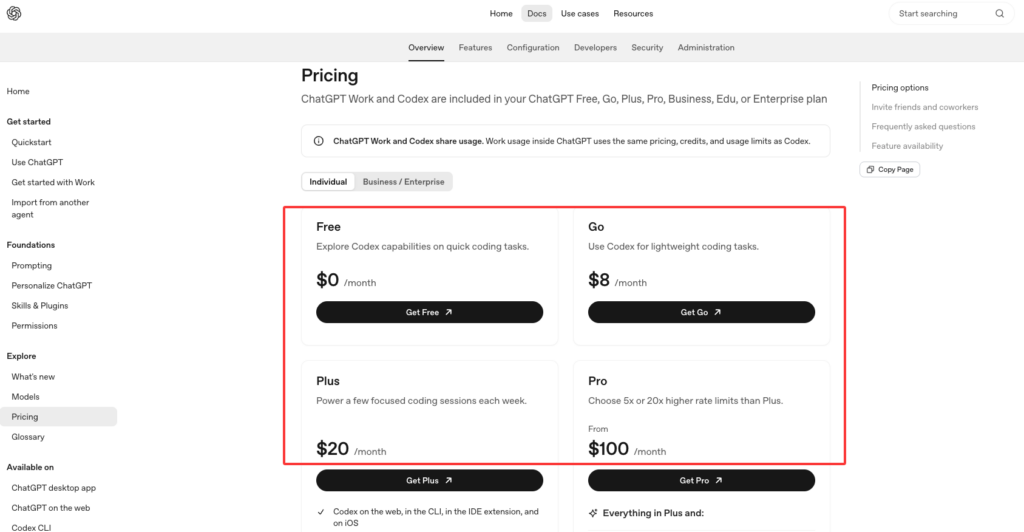
Codex CLI is the best choice when you want an OpenAI-native coding loop in the terminal, especially if your team already uses ChatGPT, Codex cloud, or OpenAI’s model stack. The Codex pricing page currently lists Codex across Free, Go, Plus, Pro, Business, Edu, and Enterprise plans, with Plus including CLI, web, IDE, and iOS access, and Pro adding higher usage plus a research-preview fast Codex model.
The interesting thing about Codex CLI is control. It is built around inspecting code, editing locally, running commands, choosing permissions, changing model and reasoning effort, and using non-interactive codex exec for repeatable workflows. That makes it strong for developers who want the agent close to their existing shell habits.
I also like Codex CLI for review workflows. A local review command is not a replacement for human review, but it catches a useful class of boring mistakes before a PR. That matters more than people admit. The first answer is less important than the next diff.
The model story is plan-dependent. In the current docs, Codex surfaces use the GPT-5.6 family on paid plans, while API-key mode follows the models available to that API key. That is good flexibility, but it also means teams should document which auth mode is allowed. A developer using a personal ChatGPT plan, an API key, and a managed workspace may not be operating under the same cost or data policy.
Use Codex CLI when you want a terminal AI coding workflow that can stay local, move to cloud when needed, and fit into OpenAI governance.
Gemini CLI
Gemini CLI is the value pick. Google’s Gemini CLI repository describes an open-source terminal agent with built-in file operations, shell commands, web fetching, Google Search grounding, MCP support, GitHub workflows, and a free tier listed at 60 requests per minute and 1,000 requests per day for personal Google accounts.
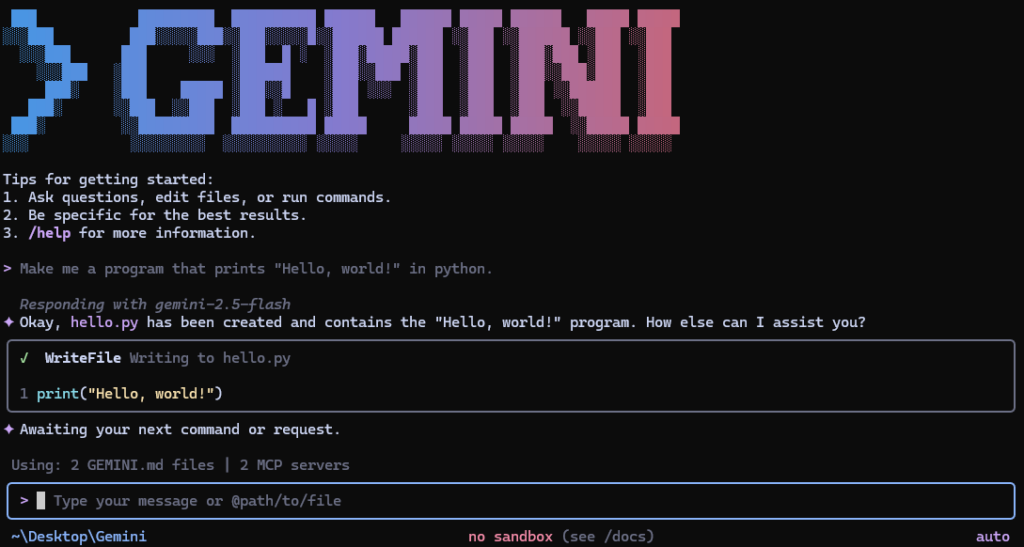
That is unusually generous for developers who want to test terminal agents without starting with a procurement conversation. It also makes Gemini CLI a good candidate for repo exploration, documentation questions, and large-context experiments. The repository currently points to Gemini 3 models and a 1M token context window, which is attractive when your failure mode is “the assistant cannot see enough of the system.”
But I would still treat it as a tool to validate, not blindly standardize. Google authentication options include OAuth, API key, and Vertex AI. That is useful, but it creates different policy paths. A personal Google account is not the same as a managed Vertex AI deployment.
The platform story is friendly:npx, npm global install, Homebrew, MacPorts, and Anaconda. For teams, the better question is not “can we install it?” It is “which identity, model route, telemetry setting, and billing account are allowed?”
Use Gemini CLI when you want a low-friction terminal agent, large-context exploration, and Google-native workflows. Do not use the free quota as your team policy.
Aider
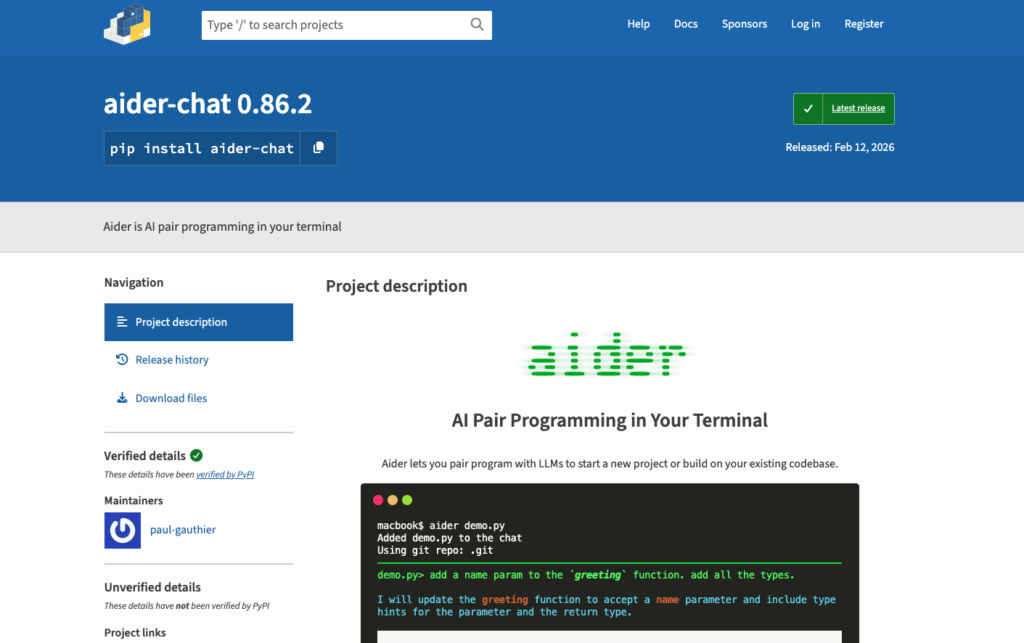
Aider is different from the first-party CLIs. It is not trying to be one vendor’s managed coding surface. It is an open-source, Git-aware pair programmer that can connect to many LLMs. The aider-chat PyPI page shows version 0.86.2 released on February 12, 2026, Python support from 3.10 to below 3.13, and features such as codebase maps, Git integration, linting/testing loops, image and web context, and broad model-provider support.
That makes Aider useful when you care about portability. You can pair it with OpenAI, Anthropic, DeepSeek, Gemini, local models, or OpenAI-compatible endpoints. If your team does not want one vendor to define the whole workflow, Aider is still worth keeping on the shortlist.
Its strength is also its burden. You own more of the setup. You choose models. You manage keys. You decide how much context to add. You decide whether the code map is enough for your repo. For experienced developers, that control can be a feature. For a team rollout, it can become fragmentation.
Aider is strongest for developers who want Git-native edits, explicit diffs, and model flexibility. It is weaker when your organization needs centralized seat management, admin analytics, managed policy, and support contracts.
Other Tools to Verify
I would not freeze a 2026 ranking without a verification lane. Tools such as Cline, OpenCode, Qwen Code, Goose, GitHub Copilot CLI-style workflows, Cursor terminal features, and vendor-specific agents may be the right answer for a specific team.
But I would not rank them unless the current public evidence is checked the same way: active releases, pricing, supported models, platform limits, enterprise controls, and security posture. This is where many “best AI coding CLI 2026” posts get lazy. They copy a tool list and call it research.
How to Choose the Right CLI
Start with the failure mode, not the brand.
If your failure mode is cross-file reasoning, test Claude Code and Codex CLI first. Give each one the same repo, the same unclear bug, and the same review standard. Watch which files it opens, which assumptions it makes, and whether it can explain the change path.
If your failure mode is cost-sensitive exploration, test Gemini CLI. The free quota makes it easy to run lightweight repo-reading sessions before deciding whether a managed Google path is worth it.
If your failure mode is vendor lock-in, test Aider. It gives you more control over model routing and local workflow. You pay for that control with more setup and less centralized governance.
For complex repos, I would also connect the decision to codebase context. A CLI alone does not fix missing structure. Sometimes the better move is to give the agent a stronger map of the system.
Limits and Trade-Offs
The model is not always the bottleneck. The context often is.
A stronger model can still choose the wrong file. A bigger context window can still include the wrong history. A faster agent can still create a diff that takes longer to review than writing the fix manually.
The main trade-offs:
- Subscription CLIs are easier to adopt but can hide real usage pressure.
- API-key workflows are easier to meter but harder for individual developers to manage.
- Free tiers are great for evaluation but weak as policy.
- Multi-agent and cloud workflows increase throughput, but also increase review and spend complexity.
- Local terminal tools fit developer habits, but they still need security boundaries.
- Codebase maps, memories, and instructions help only if they stay current.
For a team, the right tool is the one that reduces guessing in the messy repo, not the one that looks best in a launch video.
FAQ
Who should own CLI access policies in a team?
Platform engineering should usually own the policy, with security and engineering managers involved. Individual developers should not be left to decide which API keys, MCP servers, shell permissions, cloud handoffs, and spend limits are acceptable.
A good policy covers allowed tools, allowed auth methods, command approval rules, repo access, data boundaries, logging, and cost ownership. The details can be lightweight. The ownership cannot be vague.
What should be documented before switching CLIs?
Document the current model route, pricing path, supported platforms, permission settings, approval mode, local sandbox behavior, CI usage, secrets policy, and rollback workflow.
Also document project context files. If one tool uses CLAUDE.md, another uses AGENTS.md, and another uses its own config, the migration is not just a CLI switch. It is a context migration. That is where teams quietly lose quality.
When should this ranking be refreshed?
Refresh it quarterly, and immediately after any major model, pricing, platform, or policy change. For terminal ai coding tools, a six-month-old ranking can be stale.
At minimum, re-check active releases, plan limits, model availability, enterprise controls, and whether the tool still fits your repo size and review process.
Conclusion
The best AI coding CLI 2026 choice depends on what you are trying to reduce.
Pick Claude Code when deep repo workflow and agent features matter most. Pick Codex CLI when you want an OpenAI-native terminal loop with strong review, automation, and cloud handoff. Pick Gemini CLI when free exploration, Google-native routing, and large context are the draw. Pick Aider when model flexibility and Git-native control matter more than managed admin surfaces.
I would not standardize on any of them from a feature table alone. Put each tool in the same messy repo, give it the same cross-file task, and measure the thing that matters: did it reduce guessing, or did it just make the answer sound more confident?
Leave a Reply