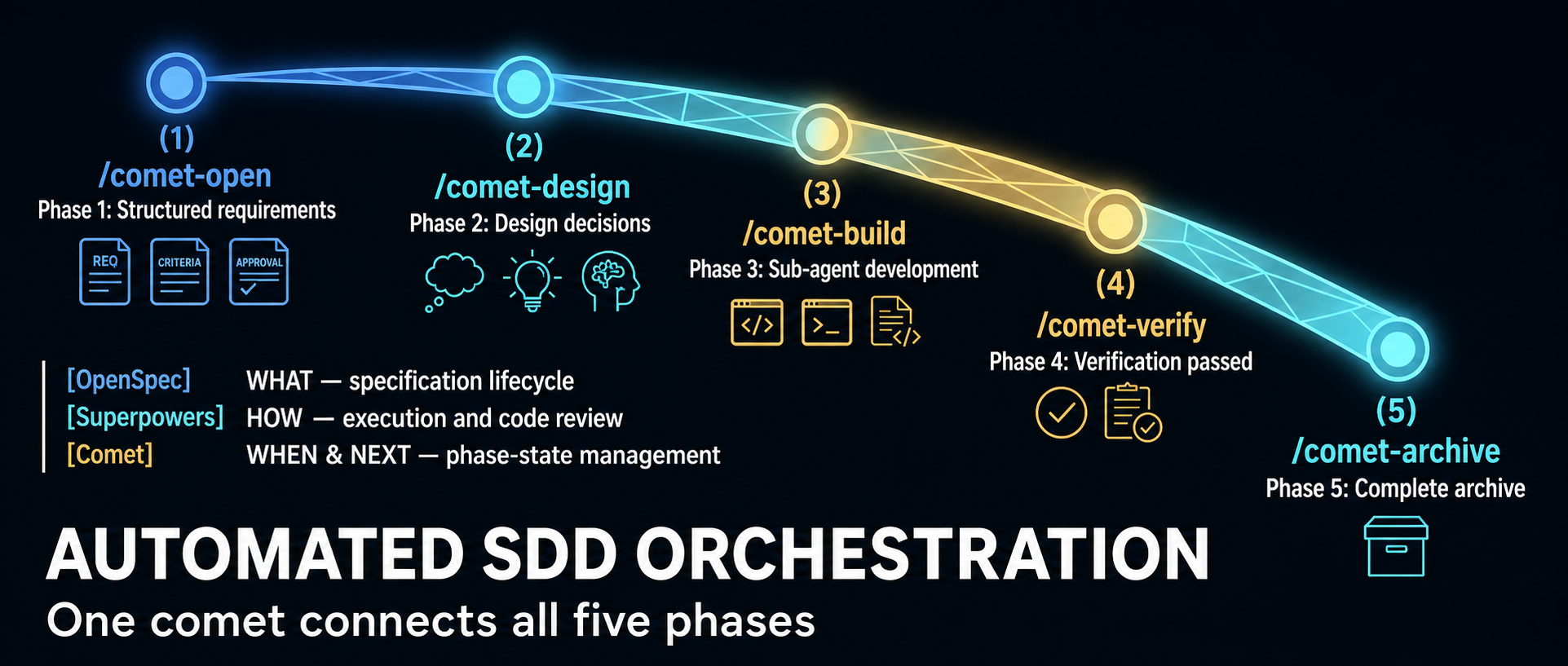
Comet began as an orchestration layer for combining OpenSpec’s specification lifecycle with Superpowers-style planning and execution. The project now describes itself more broadly: a resumable workflow and Skill platform for coding. That shift matters because current Comet has three distinct jobs, not one:
/cometruns a guarded software-change workflow./comet-anyturns existing Skills into a reusable workflow package.comet evaltests whether a Skill behaves reliably enough to advance toward publication.
A June 2026 WeChat article from 职场向上生长力 explains the original five-phase design well. It is now a historical snapshot of the 0.3.x line: its central state-machine model remains relevant, but several counts, scripts and product boundaries changed in the 0.4 beta series. This guide uses the current official rpamis/comet repository and release metadata as the authority.
Version reality: current does not mean stable

As of July 16, 2026, npm’s latest tag for @rpamis/comet points to 0.4.0-beta.4, published July 12. It is the current default install, but the beta identifier still makes it a semantic prerelease. The last version without a prerelease suffix is 0.3.9, published June 18.
| Choice | What it means | Best fit |
|---|---|---|
@rpamis/comet@0.3.9 |
Last non-beta release; mature Classic workflow built around the 0.3 architecture | Teams prioritizing a fixed, non-prerelease baseline |
@rpamis/comet@0.4.0-beta.4 |
Current npm default; pure Node runtime plus the expanded Skill and eval platform | Evaluation, new integrations and teams willing to absorb beta changes |
Unpinned @rpamis/comet |
Currently resolves to beta.4 because npm latest points there |
Only when your update policy intentionally follows the current channel |
The repository calls Classic Spec “the stable core for long-running tasks.” Read that as a product-architecture claim: the five-phase lifecycle is the established center of Comet. It does not turn the 0.4.0-beta.4 package into a generally available 0.4 release. Likewise, beta.4’s release notes call several top-level commands “Stable Classic commands”; that describes their supported interface inside the beta, not the maturity label of the entire package.
Pin the version in team setup documentation and automation. Otherwise, the same installation command can resolve to a materially different runtime over time.
What changed in the 0.4 beta line
The most visible engineering change is a pure Node runtime. The 0.4 README says Comet no longer depends on Bash or WSL; the package declares Node.js 20 or newer. This is especially meaningful for Windows users and for cross-platform workflow bundles, because state and guard logic no longer depend on a shell environment that behaves differently across machines.
The product surface also expanded:
- Classic Spec remains the requirements-to-archive workflow.
/comet-anyauthors composed Skill Bundles with workflow nodes, schemas, guards and handoffs.comet evalsupplies local or LangSmith-connected evaluation evidence.comet dashboardprovides a read-only browser view of active changes and archive history.
Beta.4 adds or hardens ambient resume, a registry of project-scope installations, direct comet state, comet guard, comet handoff and comet archive commands, custom build evidence, multi-change guards, archive confirmation and Codex Skill discovery. Those details come from the official 0.4.0-beta.4 release, not from the older WeChat walkthrough.
Surface 1: Classic Spec with /comet
Classic Spec is for a software change that should move through a controlled lifecycle. Its conceptual phases remain:
- Open — turn an idea into an OpenSpec change and obtain human agreement on scope.
- Design — record architectural decisions and resolve ambiguity before implementation.
- Build — create an execution plan, choose isolation and implement under review rules.
- Verify — collect test, task and design-conformance evidence.
- Archive — synchronize the accepted delta into the main specification and close the change.
The important mechanism is not the command sequence. It is durable external state. Each managed change stores workflow facts in .comet.yaml: phase, mode, artifact references, verification outcome and archive status. /comet can inspect that state and recommend the next legal action after a terminal restart or context reset.
Guards are equally important. A useful workflow must reject illegal transitions, not merely remind the agent what it should do. Comet’s Classic runtime checks prerequisites before phase advancement and can restrict source writes while a change is still in requirements or design. Beta.4 also requires final archive confirmation to be represented in machine-owned state, so calling an internal path cannot silently bypass the human decision.
A practical Classic setup
Requirements are Node.js 20+, npm or npx, and Git. Choose a version deliberately:
# Last non-beta release
npm install -g @rpamis/comet@0.3.9

# Current beta evaluated in this guide
npm install -g @rpamis/comet@0.4.0-beta.4
Then initialize inside the target repository:
cd your-project
comet init
comet doctor --json
comet status --json
Use /comet from the supported coding agent to start or resume a change. Do not begin with automatic transitions enabled on a high-risk repository. First learn which points request scope, isolation, review and archive decisions. After the team trusts its checks, automation can reduce ceremony without hiding governance.
Surface 2: /comet-any for workflow authoring
/comet-any addresses a different problem: turning Skills into a distributable workflow rather than implementing a product feature. The current Skill defines a workflow contract in terms of:
- Workflow Nodes that own resumable responsibilities;
- Skill Bindings and required Skill calls;
- Output Schemas attached to specific nodes;
- Guardrails that permit or block advancement;
- Handoffs containing cross-node or subagent evidence;
- a
workflow-protocol.jsonsource of truth.
This is more rigorous than placing several Skill names in a prompt. A bound Skill does not automatically replace a workflow node, and a schema declared globally does not enforce anything until it is attached to a concrete node. The authoring flow requires a proposal and human confirmation before generation, then creates scripts, rules, hooks, references and an eval manifest.
There are two broad modes. A comet-five-phase-overlay customizes parts of Classic Spec while preserving .comet.yaml semantics and protected control nodes. A workflow-kernel is for a genuinely different lifecycle with its own state model and guard design. If a team wants to replace fundamental control nodes such as open, execute, verify or archive, it should treat that as a new kernel rather than quietly weakening Classic’s guarantees.
Use /comet-any when the deliverable is a reusable workflow package. Use /comet when the deliverable is a software change. Mixing those intents produces confusing state and weak acceptance criteria.
Surface 3: comet eval as evidence

comet eval asks whether a Skill can be discovered, executed and scored on defined tasks. For a bundle generated by /comet-any, the recommended sequence is:
comet eval ./generated-skill/comet/eval.yaml --collect
comet eval ./generated-skill/comet/eval.yaml --html
--collect is a low-cost preflight: it checks the manifest, task discovery and dependency paths without starting the expensive evaluation. --html performs the run and creates a browsable report. The official documentation distinguishes raw runs from the clean analysis set and attributes failures to harness, workflow, task, model or environment instead of folding every infrastructure error into a Skill-quality score.
For an early local Skill without an eval manifest, comet eval ./my-skill --quick --html is a smoke test. It is not final release evidence. Publish readiness expects evaluation tied to the current draft hash; failed, missing or stale-hash evidence blocks progression.
The README discusses Rubric, Pass@k and Pass^k scoring and shows repository-generated benchmark charts. Treat those results as project evidence for its published tasks and treatments, not proof that every team’s custom workflow will improve by the same amount. Your tasks, model, environment and validators determine whether the measurement transfers.
Choosing the right Comet path
Start with the outcome:
- For a feature, bug fix or refactor that needs traceable requirements and verification, use Classic
/comet. - For a repeatable organizational process assembled from multiple Skills, use
/comet-any. - For evidence that a Skill works across runs, use
comet eval. - For a conservative rollout, pin 0.3.9 and test the beta in a separate repository.
- For 0.4 capabilities, pin beta.4, record the version in artifacts and rerun evaluation when upgrading.
Comet’s most valuable idea is not that an agent can execute five commands. It is that workflow control can be represented as files, state transitions, deterministic checks and review evidence. That architecture survives a context window. The 0.4 beta extends the same principle from one software-development workflow to a broader platform for composing and evaluating Skills.
Leave a Reply