Category: AI Coding CLIs

  • Help Claude Code Understand a Complex Repo

    Help Claude Code Understand a Complex Repo


    To help Claude Code understand a codebase, organize context into four layers: concise project rules, maintained architecture documents, task-specific source evidence, and a refreshable dependency or code-graph layer. Do not solve the problem by loading the entire repository into every prompt.

    This structure also makes failures diagnosable: reviewers can tell whether a bad change came from an incorrect rule, stale architecture record, incomplete source selection, or unsupported inference.

    Why Claude Code Struggles With Complex Repos

    Claude Code can search files, run commands, edit code, and use project instructions. A complex repository still creates an information-selection problem.

    The relevant implementation may be spread across packages, generated clients, schemas, build configuration, tests, and architecture decisions. File names rarely express all of those relationships. An agent can therefore perform each local step competently while starting from the wrong system model.

    Typical failure modes include:

    • editing a generated file instead of its source;
    • changing a public interface without finding downstream consumers;
    • reading a stale design document as current authority;
    • running the broad test suite while missing the focused contract test;
    • treating two similarly named packages as interchangeable;
    • repeating repository discovery after context compaction or in a new session.

    The problem is not that Claude needs every file. It needs the smallest authoritative set of facts for the current decision.

    Claude Code's official documentation separates persistent project memory from on-demand skills. CLAUDE.md and related rules are suitable for stable guidance that should influence work throughout a repository. Skills package procedures that load when relevant. Current code and command output remain task evidence. Keeping these roles separate reduces both context noise and stale instructions.

    Before improving context, measure the failure. Give Claude a repository question that crosses at least three modules and ask it to explain the execution path without editing. Record which files it opens, how many searches it runs, whether it finds the correct tests, and where its explanation becomes uncertain. That baseline will show whether the missing layer is rules, documentation, retrieval, or model capability.

    Prepare Project Rules and AGENTS.md

    Start with the instruction file Claude Code actually reads.

    For Claude Code, the canonical project file is CLAUDE.md. Some teams also maintain AGENTS.md because it is shared across other coding agents. If both are used, avoid maintaining two conflicting copies. Keep one source of truth and generate, link, or explicitly reference the other according to the clients in your workflow.

    Project rules should contain stable, high-value constraints:

    • build, lint, and focused test commands;
    • package-manager and workspace conventions;
    • generated or vendored paths that must not be edited;
    • required approval points;
    • branch, migration, and rollback rules;
    • the location of architecture and operational documentation;
    • the expected verification order for common changes.

    Do not turn the rules file into a repository encyclopedia. A long instruction file consumes context on every relevant turn and becomes hard to maintain. Prefer directives that help Claude retrieve evidence:

    Before changing a public API:
    - Identify all direct consumers.
    - Check generated clients and schema sources.
    - Read the relevant ADR in docs/architecture/.
    - Run the contract test before the full suite.
    

    That rule is more durable than a pasted list of today's consumers.

    Assign ownership. A platform or developer-experience team can maintain global workflow rules, while package owners review local constraints. Add a review date or source link for statements that can become stale. Remove obsolete instructions instead of appending exceptions indefinitely.

    Add Architecture and Dependency Context

    Architecture context should explain boundaries the code alone does not make obvious.

    A useful repository context set includes:

    • a current system overview;
    • package or service responsibilities;
    • request and data-flow diagrams;
    • schemas and generated-code paths;
    • architecture decision records;
    • ownership and escalation boundaries;
    • deployment and rollback paths.

    Each document needs authority metadata. State its owner, source revision, and whether it is descriptive or normative. A stale diagram with no date can mislead an agent more effectively than an absent diagram because it appears deliberate.

    Use links and progressive disclosure. The root CLAUDE.md can point Claude toward the relevant architecture index. Package-local instructions or skills can describe when a deeper document is needed. The agent should not load every ADR for a small test fix.

    Dependency context must also be testable. If a diagram says that package A calls service B, the source graph, imports, API schema, or deployment config should provide confirming evidence. Ask Claude to cite those current files in its plan.

    A practical pre-edit report has five fields:

    Field Required answer
    Entry point Where does the behavior begin?
    Dependency path Which modules or services carry it?
    Source of truth Which file or schema owns the change?
    Validation path Which tests and commands prove it?
    Uncertainty What remains inferred or stale?

    This makes repository understanding reviewable before code changes increase the cost of being wrong.

    Use Code Knowledge Graphs for Navigation

    A code knowledge graph helps when repository relationships are too numerous or indirect for a static overview.

    The graph can represent files, symbols, packages, tests, schemas, and documents as nodes. Typed edges can capture calls, imports, ownership, generation, coverage, and rationale. Claude can query that structure to choose a narrow set of source files, then verify them directly.
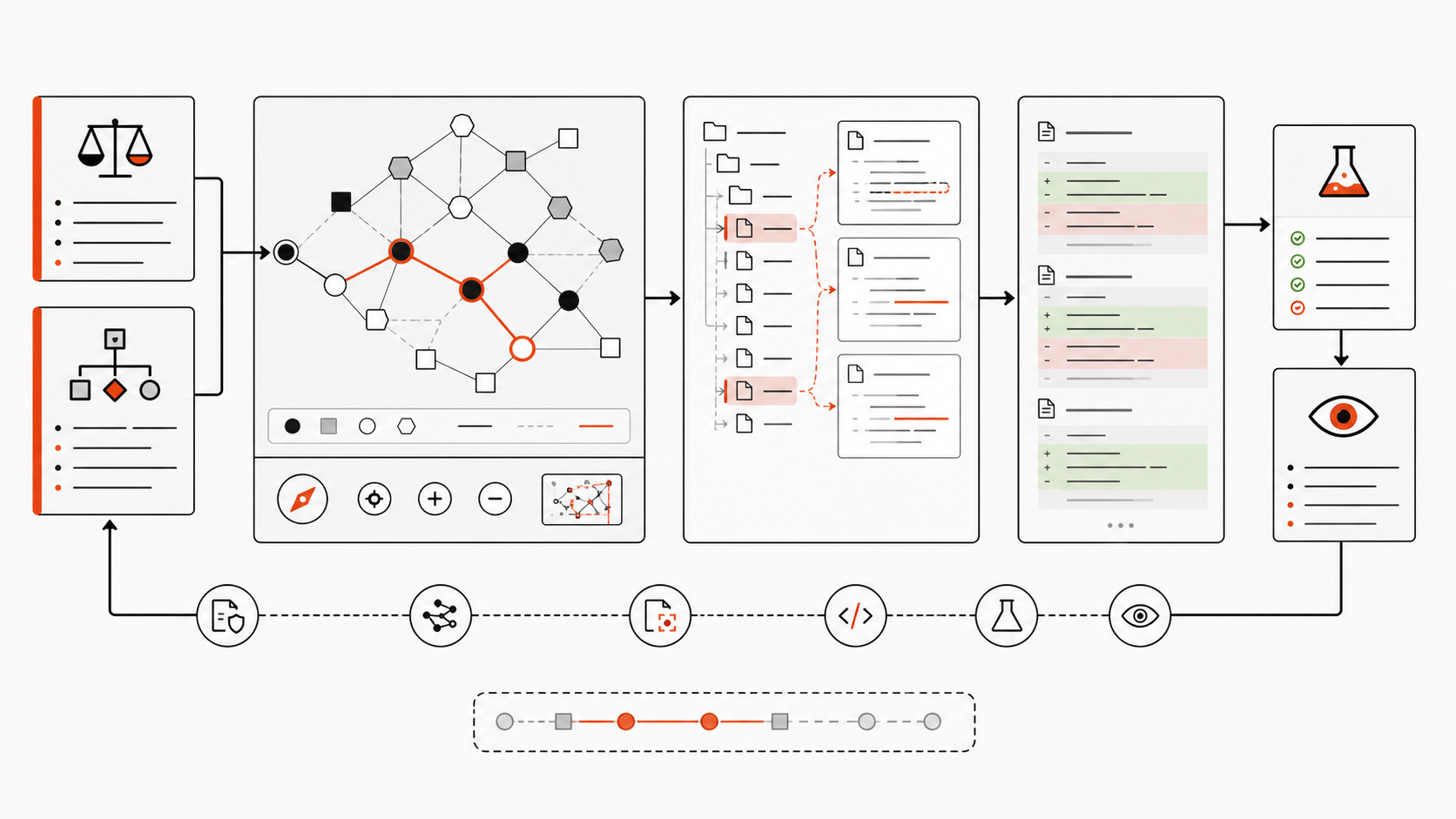
    Workflow in which Claude Code queries a repository graph, verifies source files, then edits and tests

    The graph guides navigation; current source and tests remain the approval evidence.

    Graphify provides this kind of query layer. Its Claude Code integration guide documents a CLAUDE.md directive and a pre-tool-use hook that tells Claude to consult a generated repository report before broad file searches. Its CLI reference includes query, path, explain, update, and watch commands.

    Use a graph for questions such as:

    • What connects this route to the database policy?
    • Which packages depend on this shared type?
    • Which tests cover the affected symbol?
    • Which architecture document explains this boundary?
    • What changed structurally since the graph was built?

    Do not treat graph output as self-authenticating. Record the source commit, generation time, extraction method, and inferred relationships. If the graph is older than the code under review, refresh it or fall back to direct inspection.

    The graph is particularly useful across agents. A maintained structural artifact can provide Claude Code, Codex CLI, OpenCode, and other clients with a shared starting map even when their instruction systems differ.

    Risks and Maintenance Notes

    Repository context creates a new maintenance surface.

    The first risk is staleness. Review project rules when commands, package boundaries, CI, or deployment behavior changes. Refresh structural graphs after merges that alter imports, routes, schemas, generated code, or architecture documents. Archive superseded decisions rather than leaving contradictory files in the main context path.

    The second risk is instruction injection. Treat repository instructions, downloaded skills, remote references, and generated artifacts as code-review inputs. Do not let an unreviewed file silently grant broader command, network, or secret access.

    The third risk is authority confusion. A comment, graph edge, ADR, and current type definition do not have equal weight. Define the precedence: current source and tests usually control implementation facts; approved architecture decisions control intended boundaries; generated summaries guide discovery.

    The fourth risk is excessive context. More instructions can make the agent follow rules less consistently. Keep global rules short, load procedures as skills, and retrieve architecture on demand.

    Finally, require human review for repository-wide changes. The reviewer should inspect the dependency path, generated artifacts, migration impact, permissions, and rollback plan—not only the final diff.

    FAQ

    Who should maintain repository context docs?

    Assign owners by layer. Platform or developer-experience teams can own shared commands and workflow rules. Architecture owners maintain system decisions and diagrams. Package teams maintain local constraints. Every document should have a review trigger and a clear source of truth.

    What should stay out of agent instructions?

    Keep out secrets, customer data, large copied source trees, temporary incident details, volatile dependency inventories, and conflicting historical rules. Put current facts in source-backed documents or generated artifacts and load them only when relevant.

    How often should context files be reviewed?

    Review them when the facts they describe change. Trigger reviews after build-system changes, package moves, schema migrations, generated-code changes, deployment updates, and revised architecture decisions. A scheduled quarterly check can catch neglect, but event-driven review is the primary control.

    Conclusion

    Helping Claude Code understand a complex repository is a context-design problem, not a prompt-length contest.

    Put stable constraints in concise project rules. Maintain architecture documents that explain intent. Require current source and tests for task evidence. Add a code graph when dependency and rationale paths exceed what static documentation can express.

    The decision rule is simple: if Claude repeatedly searches the same files yet still chooses the wrong system path, improve the repository map and its maintenance policy before changing the model.
  • Claude Code vs Codex CLI: 2026 Comparison

    Claude Code vs Codex CLI: 2026 Comparison


    The Claude Code vs Codex CLI decision is about workflow and control, not a permanent model winner. Choose Claude Code when its agent teams, Claude-specific extensions, or provider options fit your environment. Choose Codex CLI when an Apache-2.0 local client, OpenAI’s coding models, and Codex automation fit better. Keep both when independent implementation and review improve your delivery process.

    This comparison covers the local command-line tools. It does not compare Claude Code CLI with Codex Cloud. Models, prices, limits, and policies were verified on July 15, 2026 and can change after publication.

    Quick Verdict

    Neither tool is best for every developer. The practical verdict depends on the job, the repository’s risk, and the surrounding platform.

    If your priority is… Start with Why
    Claude-native planning, extensions, and coordinated agent teams Claude Code CLAUDE.md, skills, hooks, MCP, subagents, and agent teams form one integrated extension system
    An inspectable open-source CLI and OpenAI model routing Codex CLI The Rust-based client is Apache 2.0 and supports AGENTS.md, skills, MCP, subagents, hooks, and scripted runs
    A managed model path through Anthropic, Bedrock, Vertex AI, or Microsoft Foundry Claude Code Claude Code documents first- and third-party model-provider configurations
    A ChatGPT-linked local, IDE, cloud, and code-review ecosystem Codex CLI One Codex account can span multiple surfaces, subject to plan and workspace controls
    A high-confidence team decision Run an internal pilot The same task, repository commit, tests, permissions, and budget reveal more than mixed public benchmarks

    For the broader market, compare Graphify’s best AI coding CLIs and best AI coding agents.

    What Each Tool Is Best For

    Where Claude Code fits best

    Claude Code suits developers who want a conversational terminal agent with a deep, Claude-specific customization layer. A project can supply persistent instructions through CLAUDE.md, reusable skills, lifecycle hooks, MCP tools, restricted subagents, and plugins. Experimental or evolving agent-team features can give separate workers independent context plus a shared task and messaging layer.

    That makes Claude Code a strong candidate for exploratory debugging, architecture work, large migrations, and parallel investigations. The advantage is not “Claude always reasons better.” It is that the complete Claude Code workflow may match how a team plans, delegates, and supervises ambiguous work.

    Claude Code also documents model routing through the Anthropic API, Amazon Bedrock, Google Vertex AI, and Microsoft Foundry.

    Where Codex CLI fits best

    Codex CLI suits developers who want a local, scriptable coding agent whose client source can be inspected and extended under Apache 2.0. The CLI supports interactive work, non-interactive codex exec runs, AGENTS.md instructions, skills, MCP, subagents, hooks, permission profiles, and a software-development kit.

    It is a natural candidate for scoped changes, repeatable maintenance, repository review, and automation built around OpenAI models. Codex also connects to a wider product family, but that creates an important boundary: a local CLI turn, a Codex Cloud task, and a hosted pull-request review do not share the same execution environment or access path.

    Graphify’s planned Codex CLI setup and limits guide covers installation and configuration in more depth.

    Workflow Comparison

    Both tools follow the same high-level loop: read relevant files, form a plan, edit code, run commands, inspect results, and report what changed. The differences appear in defaults, configuration language, orchestration, and the surrounding service.

    Workflow element Claude Code Codex CLI
    Shared project instructions CLAUDE.md and .claude/rules/ AGENTS.md and repository configuration
    Reusable workflows Skills and plugins Skills and plugins
    External tools MCP plus built-in tools MCP plus built-in tools
    Delegation Subagents and agent teams Subagents and parallel task workflows
    Deterministic checks Lifecycle hooks Hooks, rules, and scripted execution
    Local isolation Permissions plus optional OS-level sandbox Permission profiles or sandbox modes plus approvals
    Non-interactive work Print mode and automation patterns codex exec and SDK workflows

    Do not choose by feature count. Test the exact behavior you need. For example, agent-team communication is not equivalent to launching several independent workers, and a hook that blocks a command is different from a natural-language instruction asking the model not to run it.

    A migration does not require two copies of project rules. Anthropic’s project-memory documentation recommends keeping AGENTS.md as the shared source and importing it from CLAUDE.md:

    @AGENTS.md
    
    ## Claude Code
    
    Use plan mode before changing the billing service.
    

    Tool-specific files should contain only genuine differences. This reduces drift when test commands, repository structure, or security rules change.

    Context and Large Codebase Fit

    Current context numbers look similar but are not directly interchangeable. Anthropic’s current model table lists Claude Fable 5, Sonnet 5, and Opus 4.8 with 1 million-token context windows and 128,000-token maximum output. OpenAI lists GPT-5.6 Sol, Terra, and Luna with 1.05 million-token context windows and the same 128,000-token maximum output.

    Those figures describe models, not a promise that either CLI will load an entire repository or recall every token equally. System instructions, tool schemas, command output, images, conversation history, and compaction all consume context. Retrieval choices still determine which files the model sees.

    Tokenizers also differ. Anthropic’s Sonnet 5 migration notes say the same text produces about 30% more tokens than with Sonnet 4.6. A nominal 1M-versus-1.05M comparison therefore says little about how much useful source code fits or how much the task costs.

    Test large-codebase fit with repository tasks, not a synthetic paste. Use a cross-module bug, a dependency migration, an architecture question, and a change that requires finding an undocumented convention. Record files inspected, unnecessary reads, compaction events, accepted patches, and review edits. The better tool is the one that retrieves the right evidence and preserves constraints through the full task.

    Pricing and Access Points to Verify

    At the entry tier, both ecosystems list a $20 monthly individual plan: Claude Pro and ChatGPT Plus with Codex. That does not make task cost equal. Subscription usage varies with the active model, context size, reasoning effort, tool calls, and provider limits.

    As of the verification date:

    • Claude Pro is $20 monthly, or $17 per month when billed annually. Claude Max starts at $100 monthly. Team standard seats are $20 per month when billed annually or $25 monthly; premium seats cost more. Enterprise combines a seat charge with usage at API rates.
    • Codex is included in ChatGPT Plus at $20 monthly. ChatGPT Pro starts at $100 monthly with higher Codex limits. API-key use is billed by tokens and does not include every cloud integration.
    • Anthropic lists Fable 5 at $10 input and $50 output per million tokens. Sonnet 5 has introductory $2 input and $10 output pricing through August 31, 2026, then $3 and $15; Opus 4.8 is $5 and $25.
    • OpenAI lists GPT-5.6 Luna at $1 and $6, Terra at $2.50 and $15, and Sol at $5 and $30 per million input and output tokens. Requests above 272K input tokens receive higher rates for the full request.

    These API prices still exclude retries, tool output, cache behavior, human review, and failed runs. Compare cost per accepted patch, not cost per token. For subscription trials, also record how often work pauses at a plan limit and whether the team must buy credits or move to a higher tier.

    Limitations and Trade-Offs

    The largest comparison mistake is treating one tool as safe because it is “local.” Both local CLIs read files and run commands on the developer’s machine, but both send prompts and selected code context to a model endpoint. MCP servers, plugins, shell commands, and web tools add more data paths.

    Claude Code permissions start with read access and ask before file changes or shell commands under the default flow. Its sandbox can enforce filesystem and network boundaries with Seatbelt on macOS or bubblewrap on Linux. Codex sandboxing recommends workspace-write plus on-request approvals in version-controlled folders, protects .git, .agents, and .codex inside writable roots, and uses Seatbelt on macOS or bubblewrap with seccomp on Linux.

    Both tools provide dangerous bypasses. Claude Code has bypassPermissions; Codex has danger-full-access and --yolo. Neither should be a workstation default. Use them only inside a disposable, externally isolated environment with no valuable credentials.

    Anthropic’s Claude Code data policy and OpenAI’s business-data commitments also depend on account type:

    Policy question Anthropic OpenAI
    Business data used for model training by default? No for Team, Enterprise, API, and covered commercial use No for Business, Enterprise, Edu, and API
    Personal-plan data User setting determines model-improvement use May be used unless the user disables training in data controls
    Standard retention Claude Code commercial data: 30 days Varies by product and contract; qualifying organizations receive retention controls
    Zero-data-retention path Available for eligible Claude Enterprise/API arrangements, with feature limits Available to qualifying API organizations, with eligibility and endpoint limits
    Local records Claude Code stores local transcripts in plaintext by default for 30 days Review local client storage and organizational logging settings during the pilot

    Security teams should approve allowed repositories, model endpoints, network domains, MCP servers, local transcript policy, telemetry, and audit retention. A permission prompt is not proof against prompt injection; deny secrets by default and review every production-bound diff.

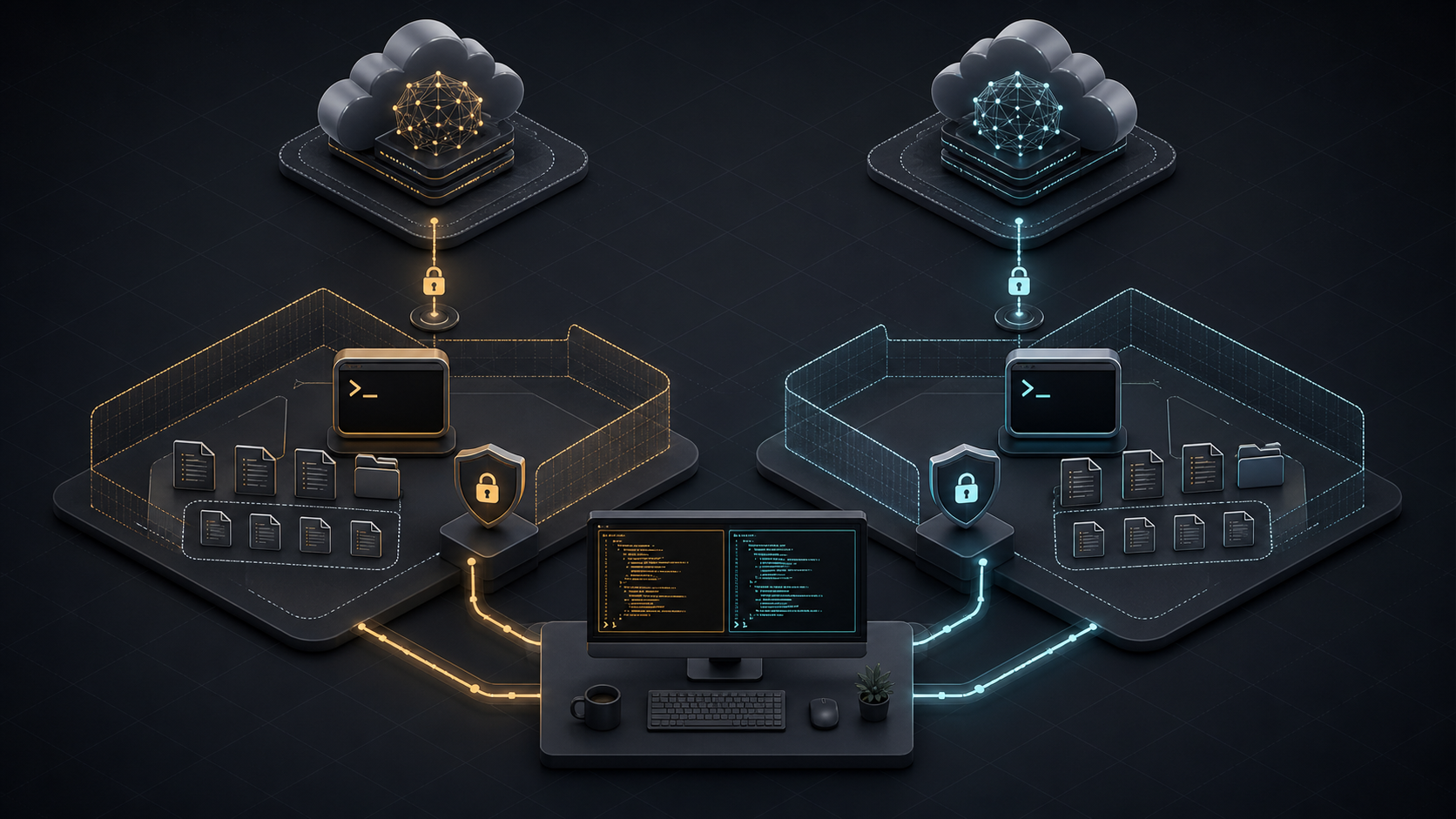
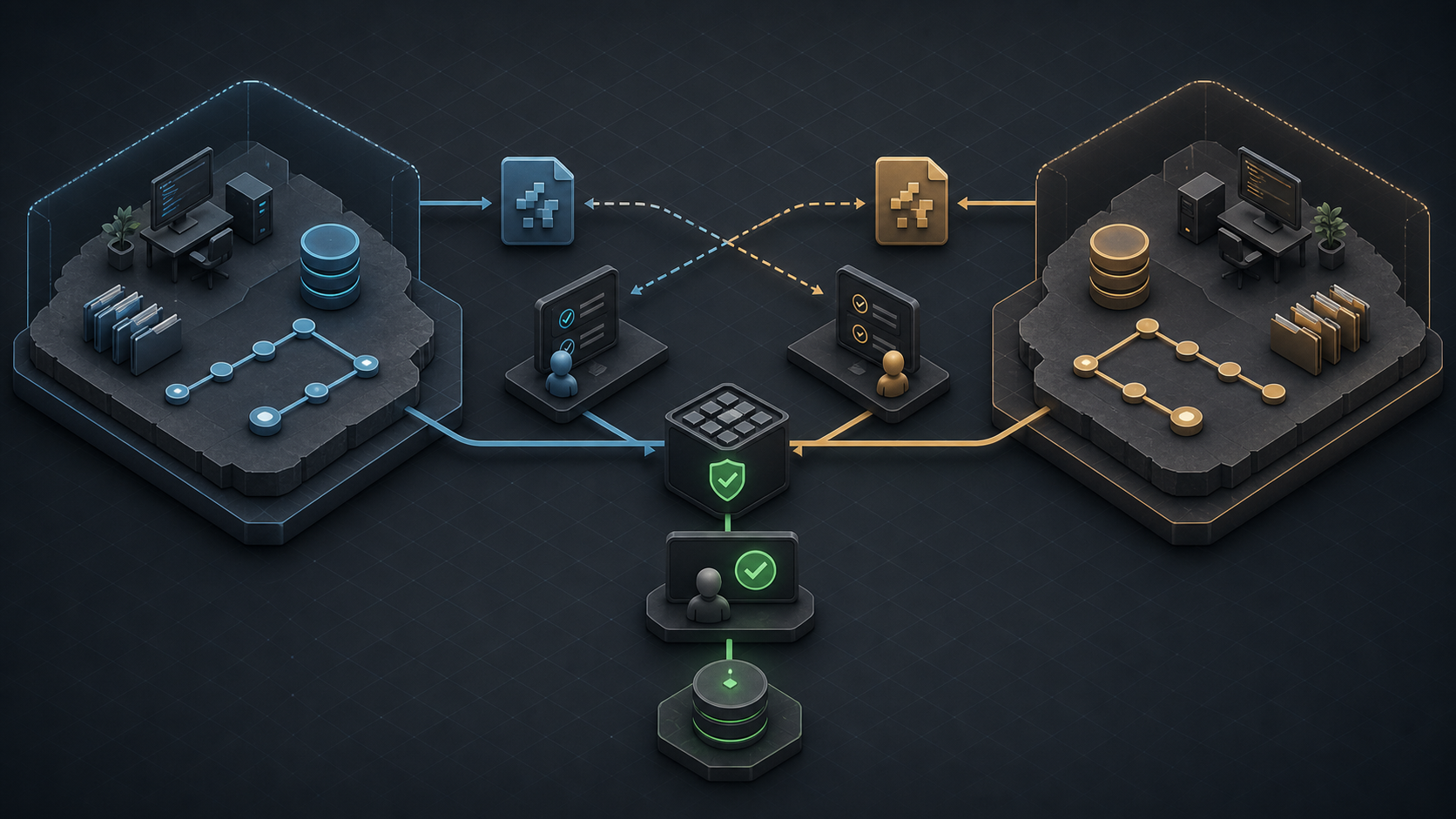
    For teams that keep both tools, use separate branches or worktrees. Let one agent implement and the other review the resulting diff, then reverse roles on another task. Never let both edit the same working tree at once.

    Two isolated coding worktrees exchanging patches for cross-review before a central test and human approval gate

    Isolation makes attribution and rollback clear. A shared test and human approval gate remains the source of truth.

    FAQ

    Who should decide the default CLI for a team?

    The engineering owner should approve workflow and quality fit. Security or platform owners should approve permissions, data paths, model endpoints, and audit controls. Procurement should review material pricing or contract changes. Name one rollback owner before changing the default.

    What migration notes should teams keep?

    Record the source and target CLI versions, exact model, authentication method, repository commit, instruction files, permission profile, network allowlist, MCP servers, environment variables, pilot tasks, test results, accepted patches, review edits, cost, and rollback steps. Store logs under the same access policy as source code.

    When should teams allow both tools in one repo?

    Allow both when independent review, different model families, or separate workflow strengths improve measurable outcomes. Require isolated worktrees, shared tests, common AGENTS.md rules, and clear ownership. Keep one tool when duplication adds cost without raising accepted-patch rate or catching more defects.

    Conclusion

    The Codex CLI vs Claude Code choice should follow your repository, governance, and task mix. Claude Code is compelling for its Claude-native extension and coordinated-agent workflow. Codex CLI is compelling for its open-source local client, OpenAI integration, and automation surface. Neither product earns a universal 2026 crown from model context or public benchmark numbers.

    Pilot both on the same 8–12 internal tasks. Freeze the commit, prompt, permissions, tests, time budget, and review rubric. Then choose a default, document an escalation path, or keep both in isolated cross-review roles. Explore more evidence-led AI coding comparisons at Graphify.

  • Codex CLI Guide 2026: Setup and Limits

    Codex CLI Guide 2026: Setup and Limits


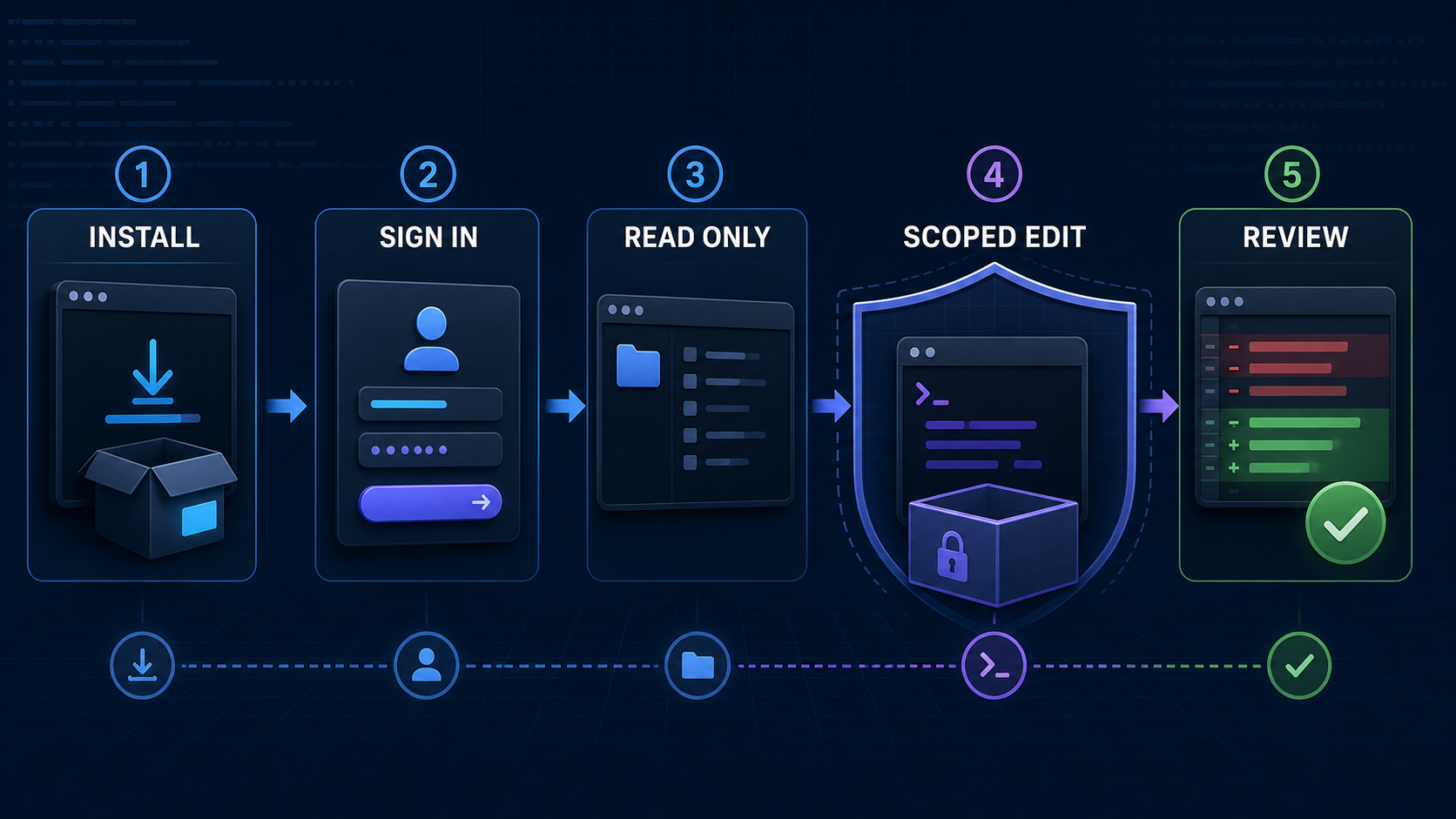
    Codex CLI is OpenAI's local terminal coding agent. The safest way to start is to install the current official build, sign in, open a Git repository, begin with read-only exploration, and expand permissions only for a narrowly defined task. This guide covers that workflow, not every command in the product.

    Commands, models, access, and pricing were verified on July 15, 2026. Codex changes quickly, so confirm the linked official pages before a team rollout.

    What Codex CLI Is

    Codex CLI is an AI coding CLI that runs its tools in your local environment. It can inspect a repository, edit files, execute installed commands, review changes, and return results in the terminal. It also exposes codex exec for scripts and CI.

    “Local” describes where commands run; it does not mean the model runs offline or that all repository context remains on the device. Authentication and data policies still govern content processed by OpenAI. Codex CLI is also distinct from Codex cloud, the IDE extension, and the ChatGPT desktop experience. Choose the CLI when terminal context, existing shell tools, and explicit permission boundaries matter to your workflow.

    For a broader market view, compare Graphify's best AI coding CLIs. If you are choosing between model families rather than clients, start with the best LLMs for coding in 2026.

    Before You Start

    A productive pilot needs more than an account. Prepare these five items first:

    • A clean Git repository: Commit or stash existing work so the agent's changes are easy to isolate and reverse.
    • One bounded task: Pick a 10–20 minute bug, test repair, or small refactor with an objective finish condition.
    • Known verification commands: Record the exact test, lint, type-check, or build commands that prove the change works.
    • A sign-in decision: ChatGPT access uses plan entitlements and workspace policy; an API key uses standard API billing and organization policy.
    • A permission ceiling: Decide whether the pilot may only read, may write inside the workspace, or genuinely needs limited network access.

    Check the operating system boundary too. macOS uses the built-in Seatbelt framework. Native Windows and WSL2 use different sandbox implementations. On Linux and WSL2, OpenAI recommends installing bubblewrap; otherwise the fallback depends on unprivileged user namespaces and can trigger a warning.

    Do not start with production credentials, deployment access, destructive database work, or an unreviewable repository-wide migration. Those tasks test organizational risk tolerance, not basic CLI fit.

    Setup Steps to Verify

    The current official installer is the shortest path on macOS and Linux:

    curl -fsSL https://chatgpt.com/codex/install.sh | sh
    

    OpenAI also supports npm, Homebrew, Windows PowerShell, and platform binaries from GitHub Releases. Use one installation channel and record it so upgrades are repeatable.

    Step Command or action Evidence to keep Stop if
    Install Official script, npm install -g @openai/codex, or brew install --cask codex Installed version and source The binary did not come from an official channel
    Authenticate Run codex login and complete the browser flow Active account and workspace The wrong workspace or personal account appears
    Verify access Run codex login status ChatGPT, API key, or access-token method The method does not match team policy
    Inspect session Open the repo, run codex, then /status Model, directory, and active configuration The working directory or model is unexpected
    Set permissions Use /permissions and begin read-only Explicit permission profile The task asks for wider access without a reason
    Run a pilot Ask for a repository map, then one scoped edit Diff, commands, tests, reviewer decision The agent changes unrelated files or cannot verify

    API-key authentication should avoid shell history. Put the key in an environment variable and pipe it through standard input:

    printenv OPENAI_API_KEY | codex login --with-api-key
    

    API-key usage is billed through the OpenAI Platform account and may not include features that depend on ChatGPT workspace or cloud access. OpenAI recommends API keys for programmatic local workflows such as private CI, but warns against exposing Codex execution in untrusted or public environments.

    For the first prompt, ask: “Map the request flow for this endpoint. Do not modify files. List the files you inspected and the tests that protect it.” That prompt checks repository discovery, instruction loading, and communication before granting write access.

    Core Developer Workflows

    The strongest Codex CLI workflow is a controlled loop: understand, plan, edit, verify, review.

    Repository orientation works well in read-only mode. Ask Codex to identify entry points, trace a request, locate tests, and cite file paths. Reject an answer that infers architecture without inspecting the code.

    Scoped implementation should include the problem, affected boundary, non-goals, and definition of done. Let Codex edit inside the workspace, watch its commands, and steer immediately if it broadens scope. Afterward, inspect git diff and rerun the relevant checks yourself.

    Independent review uses /review against uncommitted changes, a commit, or a base branch. The review reports findings without modifying the working tree. It is useful before a commit, but it does not replace the code owner, security review, or CI.

    Repeatable automation uses codex exec. Non-interactive runs start in a read-only sandbox. Add --sandbox workspace-write only when the job must edit files. JSON Lines output (--json) and an output schema can make results easier to parse, while --ephemeral avoids persisting session rollout files.

    codex exec --json --ephemeral \
      "Review the current changes and report only actionable findings"
    

    Use danger-full-access only inside a controlled container or isolated runner. The older --full-auto flag is deprecated for new automation. If your evaluation includes another terminal agent, keep the repository commit, prompt, model effort, permissions, tools, and time budget fixed. Graphify's planned Claude Code vs Codex CLI comparison owns that head-to-head decision.

    Config, Project Rules, and AGENTS.md

    Codex configuration answers “what can this client do?” Project instructions answer “how should work be done here?” Keep those concerns separate.

    User defaults live in ~/.codex/config.toml. Trusted repositories can add .codex/config.toml overrides. Current precedence is: CLI flags and --config; project config from the repository root toward the working directory; a selected profile; user config; system config; then built-in defaults. Project files cannot override machine-local authentication, providers, or telemetry routing.

    An AGENTS.md file supplies durable project guidance. Codex first checks global instructions under CODEX_HOME, then walks from the project root toward the current directory. AGENTS.override.md wins over AGENTS.md at the same level, and nearer directory guidance overrides earlier root guidance. The combined project instruction limit defaults to 32 KiB.

    A useful shared file is short and operational:

    # Repository rules
    - Use pnpm; do not generate npm or yarn lockfiles.
    - Keep changes inside src/auth unless a test requires otherwise.
    - Run pnpm lint and pnpm test:auth before completion.
    - Never edit generated migrations or production secrets.
    - Report changed files, command results, and remaining risks.
    

    Put architecture links and long explanations in normal documentation, then point to them. Do not store secrets, personal preferences, or fast-changing model prices in repository instructions. A Tech Lead or repository owner should maintain root rules; package owners should review narrower overrides. Treat every rule change like code: use a pull request, name an owner, and verify that the instruction still matches CI.

    Limits, Pricing, and Safety Checks

    Codex has three different limits that teams often mix together: product usage, model billing, and technical permissions.

    Product usage depends on the ChatGPT plan and task. OpenAI currently includes Codex across Free, Go, Plus, Pro, Business, Edu, and Enterprise, but allowances and credit options differ. Large repositories, long sessions, multiple agents, and output-heavy tasks consume more than small fixes. Check the Codex Usage panel rather than promising a fixed number of tasks.

    API billing applies when you authenticate with an API key. It is separate from included ChatGPT usage. For example, GPT-5.6 Sol was listed at $5 per million input tokens, $0.50 cached input, and $30 output on July 15, 2026; requests above 272K input carry higher rates. Those API prices are not Codex subscription credits.

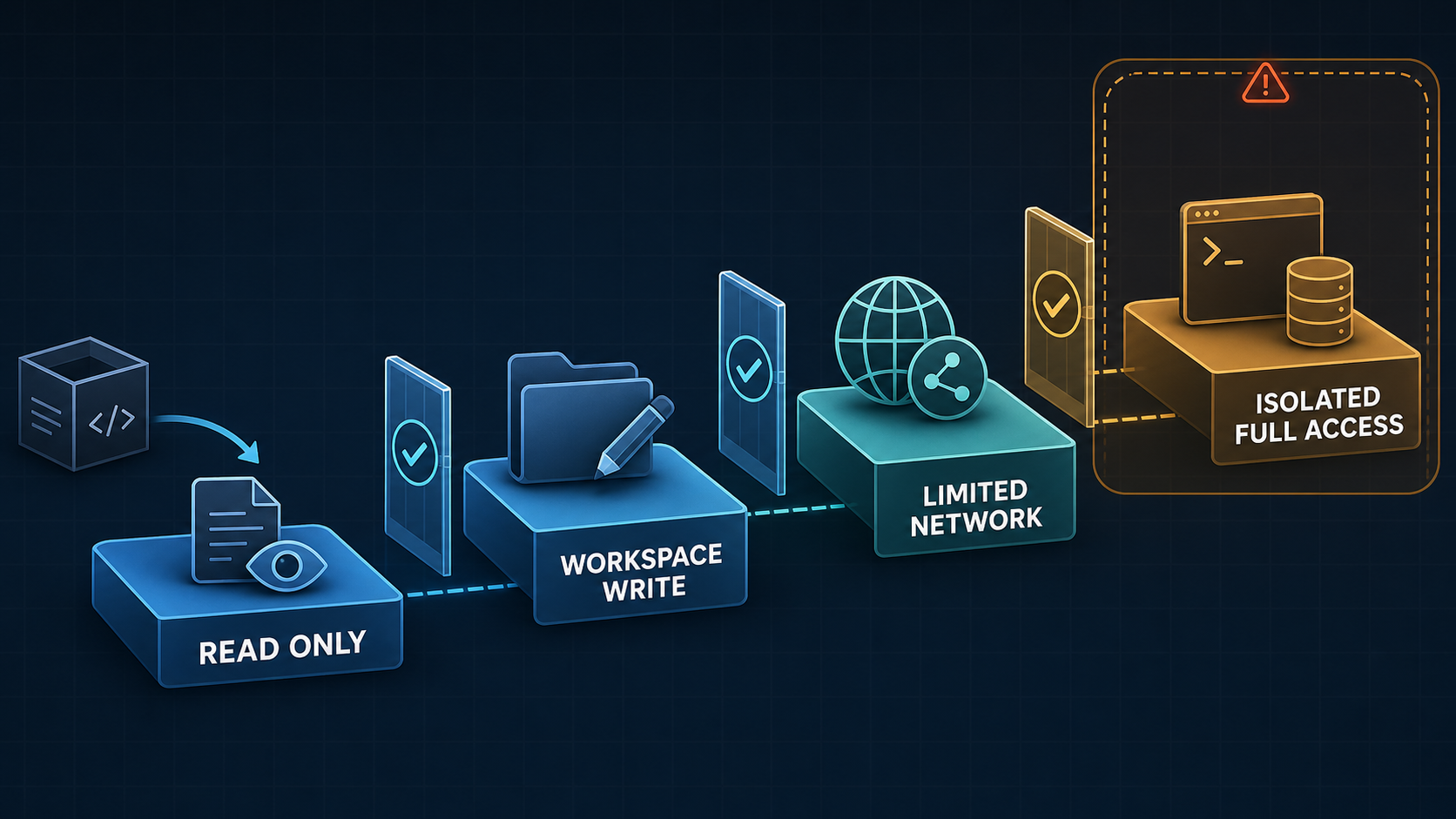
    Technical permissions come from sandbox mode and approval policy. The sandbox defines what commands can touch. The approval policy defines when Codex must stop and ask. In the usual workspace-write setup, command network access is off, writes stay inside the workspace, and network or outside-workspace operations require approval.

    Permission ladder from read-only access to isolated full access

    Enable network access only for the destination a task requires. A domain allowlist is safer than broad egress. Treat web results, dependency scripts, MCP servers, repository instructions, and issue text as untrusted inputs. A sandbox reduces blast radius; it does not prove that a patch is correct, secure, licensed, or ready to deploy.

    Data controls also depend on the account. OpenAI says Business, Enterprise, Edu, and API inputs and outputs are not used to improve models by default, subject to organization settings. Plus and Pro conversations may be used unless training is disabled in ChatGPT data controls. Confirm policy before opening a private repository.

    Keep manual review mandatory for authentication, payments, cryptography, permissions, infrastructure, production data, destructive migrations, and any change whose tests are missing or cannot be reproduced.

    FAQ

    Who should maintain shared AGENTS.md rules?

    The repository owner or Tech Lead should own root rules because they affect every Codex session. Package owners should maintain subdirectory overrides. Security and platform owners should approve rules about credentials, network, deployment, generated files, and destructive commands. Review the file through normal pull requests.

    What should be documented before team rollout?

    Record the CLI version and installation source, authentication method, approved models, permission profile, network policy, AGENTS.md owner, supported workflows, verification commands, data policy, usage owner, and rollback steps. Preserve pilot task results: repository commit, prompt, diff, tests, human edits, elapsed time, and security events.

    When should a project keep manual review first?

    Keep human approval before every write or command while instructions are untested, the repository contains sensitive data, or the team cannot reliably restore state. Continue mandatory review for high-impact domains and production changes even after routine test repairs earn a more autonomous workspace-write policy.

    Conclusion

    The OpenAI Codex CLI is most useful when terminal autonomy sits inside an engineering control loop. Install from an official source, choose the correct account, start read-only, encode concise project rules, grant only the permissions a task needs, and require a diff plus verification evidence. Then compare accepted patches—not demos—before making it a team default.

    Explore more evidence-based AI coding workflows on Graphify.