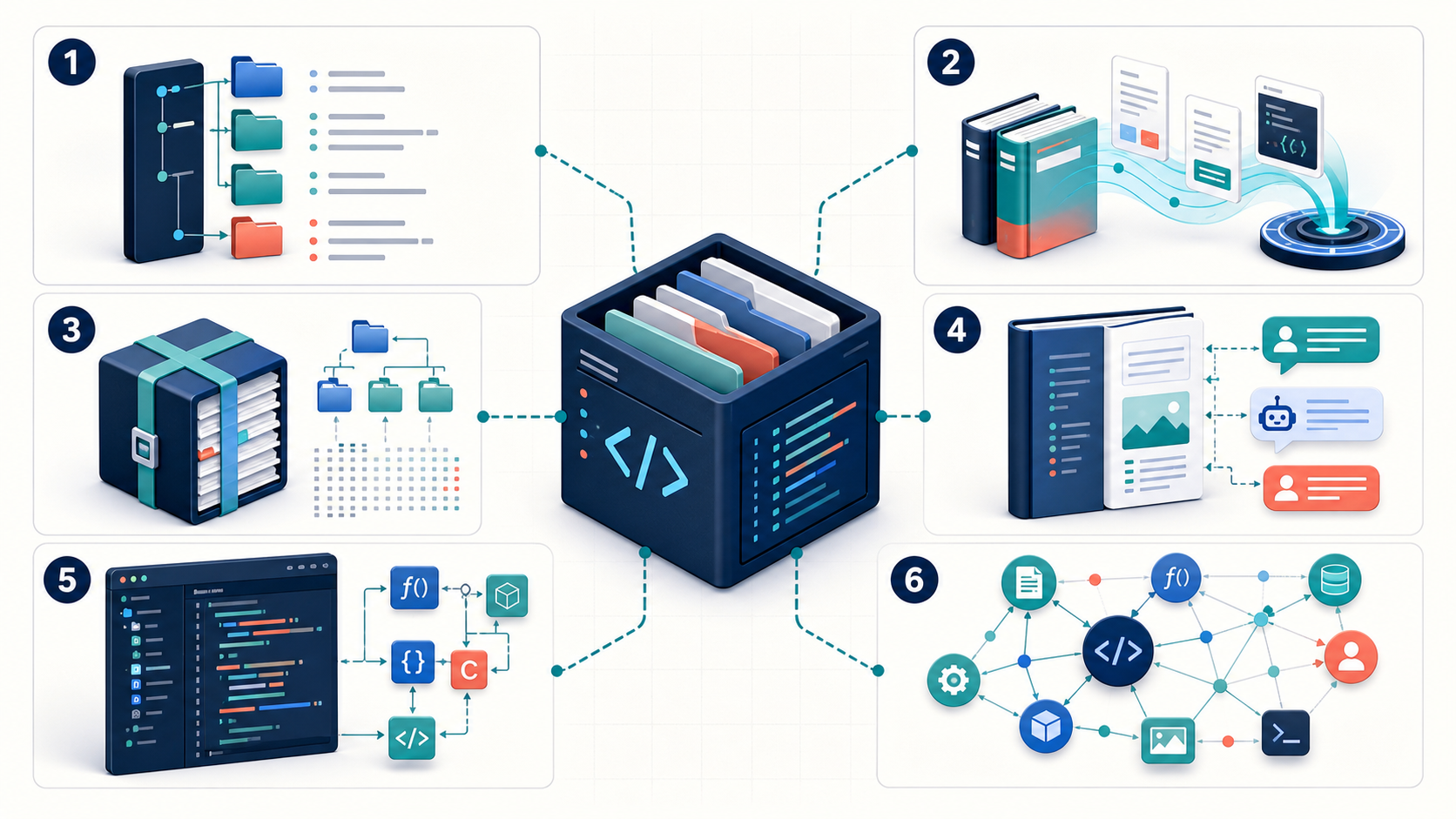
Graphify is the strongest fit when an AI coding workflow needs a persistent, queryable graph that connects code, architecture, documents, schemas, and other project evidence. It is not the best tool for every context problem. Choose Context7 for current library documentation, ToonDex for a compact folder map, Repomix for a portable repository bundle, DeepWiki for a conversational repository wiki, or Serena for symbol-aware retrieval and editing through MCP.
The right choice depends on the question you need the agent to answer. “What is the current Next.js API?” is a documentation-retrieval problem. “Where is this symbol defined and referenced?” is an IDE problem. “How does this service connect to a schema, deployment file, and design decision?” is a knowledge-graph problem.
Entity note: ToonDex in this comparison means the open-source ToonDex Claude Code skill at
cpoepke/Toon-Dex, not unrelated comic-reading sites that also appear for the bare query “toondex.” Serena means theoraios/serenacoding toolkit, not another product with the same name.
Original Graphify editorial visual. It abstracts six context models—folder index, documentation retrieval, repository bundle, conversational wiki, symbol tools, and a multimodal graph—without reproducing product logos or interfaces.
What is the short answer in Graphify vs its alternatives?
Use the smallest context model that can answer the real engineering question, then add a deeper layer only when the task requires it. The six products overlap because each helps an AI understand software, but they store different evidence and expose different operations.
| Tool | Primary context model | Best first use | Important boundary |
|---|---|---|---|
| Graphify | Persistent nodes and relationships across code and project artifacts | Architecture exploration, dependency paths, impact analysis, cross-source reasoning | A graph must be built and refreshed; inferred relationships still need verification |
| Context7 | Retrieved, version-aware library documentation and examples | Current framework and API questions | It retrieves library docs; it does not model your private repository architecture |
| ToonDex | Recursive ordered folder summaries in index.toon files |
Fast repository orientation for Claude Code | Folder summaries are not symbol references or a general knowledge graph |
| Repomix | One AI-friendly packed representation of selected repository files | Portable review, prompting, handoff, and remote-repository analysis | A bundle preserves content but does not automatically provide IDE semantics or graph traversal |
| DeepWiki | Generated, conversational documentation for a repository | Human-friendly system overview and follow-up questions | Generated explanations can lag or simplify the source; validate critical claims in code |
| Serena | Symbol-aware retrieval, editing, refactoring, and memory through MCP | Precise navigation and code changes | Language-server or JetBrains backend capabilities vary by language and configuration |
This table is a decision map, not a universal ranking. A small library may need only Repomix. A large monorepo may benefit from Serena for symbol work and Graphify for architecture. An unfamiliar framework may require Context7 before either tool can produce correct code.
What does Graphify actually build?
Graphify builds a reusable knowledge graph from software and supporting project material. Its official repository describes code parsing with Tree-sitter, graph relationships across functions, classes, imports, calls, inheritance, concepts, and supporting artifacts, plus query modes for finding nodes, paths, and explanations.
The key distinction is the stored model. Graphify does not only concatenate files or return a search result. It represents entities and their relationships so an agent can ask questions such as:
- Which components connect the public API to this database table?
- What path links an authentication concept to middleware and configuration?
- Which code, design notes, schema files, and infrastructure artifacts describe the same subsystem?
- Which entities become part of the impact surface if this service changes?
Graphify’s official repository distinguishes parser-derived EXTRACTED relationships from semantic INFERRED relationships. That distinction matters. Extracted code structure can be checked against syntax; inferred meaning is useful for discovery but should not be treated as proof.
When is Graphify the wrong first tool?
Graphify is excessive when the question needs only one exact source or a short-lived context artifact. If you need the current signature of a third-party API, Context7 is more direct. If you need to send one repository snapshot to a model, Repomix is simpler. If you need a safe cross-file rename, Serena’s symbol tools are closer to the operation.
A deeper data model creates maintenance work. Teams must choose inputs, build the graph, refresh it as the project changes, review inferred edges, and keep sensitive artifacts within an approved processing boundary.
What is Context7, and how is it different from Graphify?
Context7 retrieves current, version-aware documentation and code examples for libraries; Graphify models relationships inside a project. Context7 solves the “the model’s training data may be stale” problem. Graphify solves the “the agent cannot connect our project evidence” problem.
The current Context7 repository documents two use modes:
- CLI plus Skills, installed through
npx ctx7 setupand queried with commands such asctx7 docs. - MCP, connected through
https://mcp.context7.com/mcpor a client-specific configuration.
Context7 resolves a library identifier, then retrieves relevant documentation for a question. Supplying an exact library ID and version reduces ambiguity. That workflow is valuable when a coding agent might otherwise invent an API or use an obsolete example.
Graphify vs Context7: which questions belong to each tool?
| Question | Better first tool | Why |
|---|---|---|
| “How does Next.js 16 middleware work?” | Context7 | The answer belongs to current external library documentation |
| “Which of our routes still use the old middleware pattern?” | Graphify plus exact search | The answer depends on the project’s code and relationships |
| “What is the current Supabase auth method?” | Context7 | Version-aware vendor documentation is the source of truth |
| “How does our auth flow reach Supabase and the user table?” | Graphify | The answer crosses application code, configuration, and schema |
| “Can Context7 prove our implementation is correct?” | Neither alone | Documentation explains the contract; source review and tests prove behavior |
Context7’s own README warns that indexed projects are community-contributed and that accuracy, completeness, and security are not guaranteed. Retrieved documentation should guide implementation, while a developer still verifies the vendor source, installed version, code, and tests.
What is ToonDex, and when is a folder map enough?
ToonDex creates a recursive semantic folder index for Claude Code. Its index.toon files list direct child folders with short behavioral summaries, ordered by importance. The root index points an agent toward a likely subsystem, and child indexes provide the next hop.
The official ToonDex repository documents commands for creating and refreshing the index. It can use Git history to identify changed areas and can flag low-confidence summaries for human review.
This model is deliberately small. It answers “where should I look next?” without forcing the agent to read the whole repository.
Graphify vs ToonDex: folder map or relationship graph?
Choose ToonDex when repeated folder discovery is the bottleneck. Choose Graphify when the task depends on relationships that a folder tree cannot express.
- ToonDex can point the agent to
src/authbecause the folder summary describes sessions and access control. - Graphify can connect an authentication concept to middleware, handlers, configuration, schema entities, and supporting documents.
- ToonDex is easy to inspect as text and cheap to inject into a prompt.
- Graphify provides a richer query surface but requires a maintained graph.
For many small, well-organized repositories, ToonDex may be sufficient. For a complex system, a sensible layered workflow uses ToonDex for first-hop orientation and Graphify only for cross-file or cross-source questions.
What is Repomix?
Repomix packages selected repository files into a single AI-friendly output with file structure, content, token counts, filtering, security checks, and optional Tree-sitter compression. It is a context transport and packaging tool.
The fastest local invocation in the official Repomix repository is:
npx repomix@latest
That command produces a packed file for the current directory. Repomix also supports remote repositories, include and ignore patterns, multiple output formats, token counting, output splitting, Secretlint checks, and --compress for a structure-focused representation.
What does npx repomix give an AI assistant?
npx repomix gives the assistant a portable snapshot, not a live semantic IDE. The output is useful for one-off code review, architecture summaries, documentation generation, handoffs, and prompts sent to tools that cannot access the repository directly.
Its strength is interoperability. The same bundle can be inspected, archived, attached, or passed to different models. Its weakness is that the model must still reason over the packed representation. A file bundle does not automatically expose safe rename operations, reference graphs, or a persistent cross-source knowledge model.
Graphify vs Repomix: graph or packed repository?
| Decision factor | Repomix | Graphify |
|---|---|---|
| Output | AI-friendly packed file or files | Queryable graph and related artifacts |
| Best unit of work | Snapshot, handoff, review prompt | Repeated project exploration and relationship queries |
| Retrieval | Model reads or searches the bundle | Node, neighbor, path, and explanation-oriented queries |
| Structure | File tree plus selected content; optional compressed code structure | Explicit entities and relationships |
| Non-code evidence | Can include selected text files in the bundle | Designed to connect code with documents and other project artifacts |
| Maintenance | Re-run packaging when a new snapshot is needed | Refresh the graph when project evidence changes |
Use Repomix when the artifact itself is the product. Use Graphify when later queries and connected reasoning justify maintaining a graph. Teams can also store a Repomix snapshot as traceable evidence while using Graphify to explore relationships.
What is DeepWiki, and when is a generated wiki better?
DeepWiki generates up-to-date, conversational documentation for public repositories and lets readers ask follow-up questions. Its official site describes the product as documentation you can talk to and “Deep Research for GitHub.”
DeepWiki is valuable when a developer needs a broad, human-readable tour of an unfamiliar codebase. A wiki can surface modules, concepts, and flows faster than opening files at random. It also creates a shareable reading surface for onboarding or evaluation.
Graphify vs DeepWiki: explanation surface or evidence model?
Choose DeepWiki for a readable repository explanation; choose Graphify for a project-controlled relationship model that must support repeated queries across more than a public GitHub repository.
The distinction is not “documentation versus no documentation.” Both can explain a system. The distinction is what remains after generation:
- DeepWiki presents generated pages and a conversational interface.
- Graphify retains nodes, edges, evidence status, and graph query operations.
- DeepWiki reduces the reading cost for humans.
- Graphify reduces the traversal cost for relationship-oriented agent questions.
Generated documentation can be wrong or stale. Treat a wiki as a map, then open the referenced code and run tests before acting on a critical claim.
What is Serena AI?
Serena is an MCP coding toolkit that gives agents IDE-like, symbol-aware retrieval and editing operations. The official Serena GitHub repository describes tools for finding symbols and references, inspecting symbol overviews, replacing symbol bodies, inserting code around symbols, and performing supported refactorings.
Serena can use language servers by default or a JetBrains plugin backend. Capability depends on the selected backend, programming language, language server, and project configuration. The project explicitly warns users to follow its official quick start instead of stale marketplace instructions.
Searchers often use both “github serena” and “serena github.” The canonical project is oraios/serena; confirm the repository owner before copying installation commands.
Graphify vs Serena: architecture graph or IDE for the agent?
Choose Serena when the agent must locate, inspect, or edit concrete symbols. Choose Graphify when it must connect architecture across code and heterogeneous project evidence.
| Task | Serena | Graphify |
|---|---|---|
| Find a symbol definition | Strong fit | Useful for graph entities, but not a replacement for precise IDE navigation |
| Find references | Strong fit when the backend supports them | Useful when relationships were extracted into the graph |
| Rename or replace symbol code | Strong fit with supported backend/tool | Not the primary operation |
| Trace a concept across code, schema, docs, and infrastructure | Partial | Strong fit |
| Explore architecture paths and communities | Partial | Strong fit |
| Maintain task memory | Built-in memory system is available | Graph persists project relationships rather than conversational task memory |
These tools can complement each other. Graphify narrows an architecture-level impact surface; Serena opens the exact symbols and performs supported edits. Tests then validate the change.
Which Graphify alternative should you choose by task?
Choose by the evidence unit your task requires, not by feature count.
- Choose Context7 when correctness depends on current third-party library documentation or version-specific examples.
- Choose ToonDex when the agent wastes time navigating folders and needs a compact, inspectable map.
- Choose Repomix when you need a portable repository snapshot for a prompt, review, archive, or handoff.
- Choose DeepWiki when a human or agent needs a readable, conversational overview of a public repository.
- Choose Serena when work centers on symbols, references, refactoring, and code editing.
- Choose Graphify when work centers on relationships, architecture, impact paths, and mixed project evidence.
Do not treat installation convenience as the only selection factor. Also compare data exposure, update cadence, failure behavior, output inspectability, supported languages, and the cost of validating generated conclusions.
Can these tools work together?
Yes. A layered workflow often beats a forced single-tool choice because each layer solves a different evidence problem.
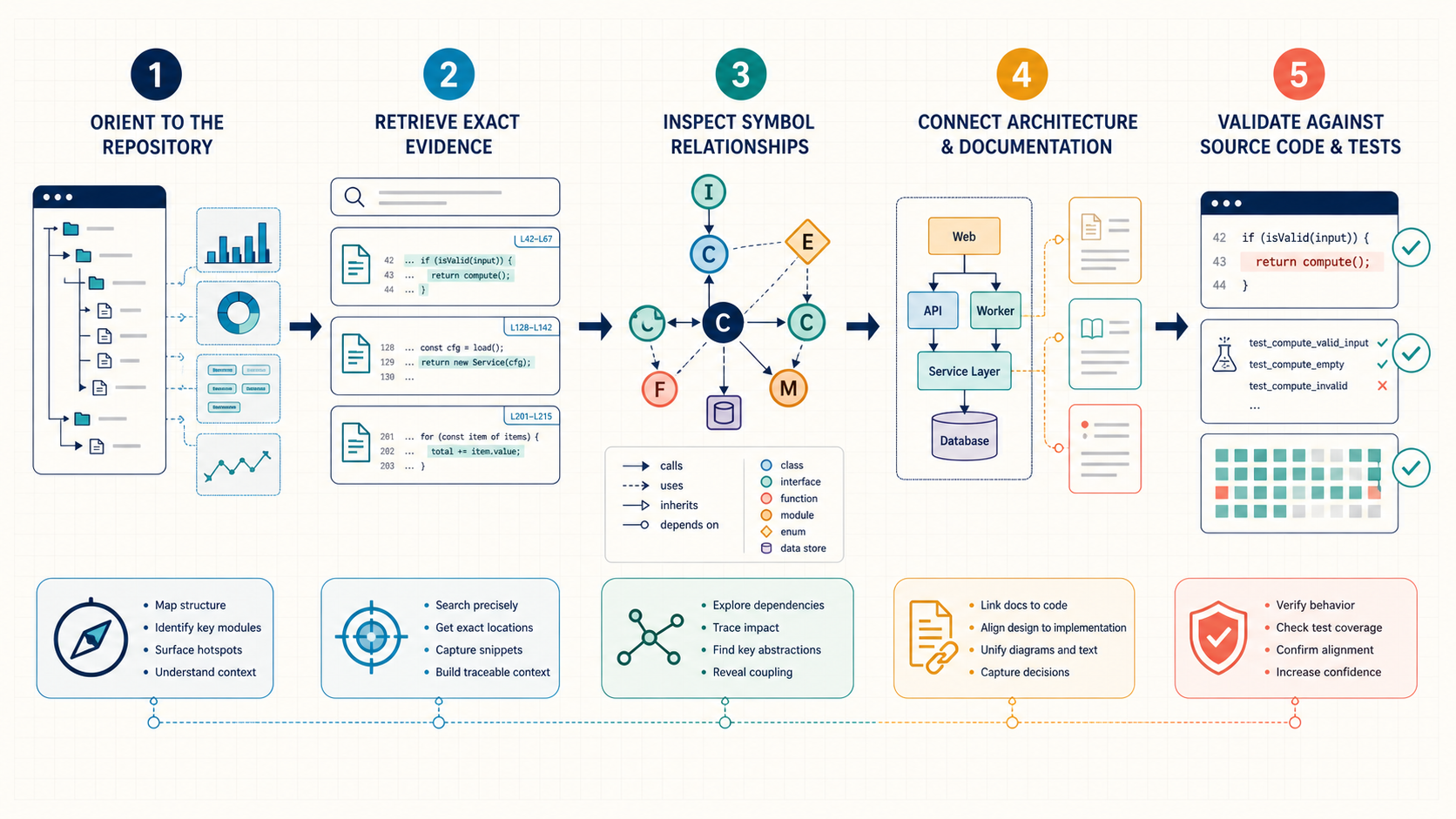
Original Graphify editorial workflow. The five stages separate orientation, retrieval, symbol semantics, architecture context, and verification so no generated context artifact is mistaken for proof.
- Orient. Use ToonDex or DeepWiki to identify the likely subsystem and vocabulary.
- Retrieve exact evidence. Use text search, Repomix, or Context7 to obtain relevant source and current external documentation.
- Inspect symbols. Use Serena or an IDE to find definitions, references, and safe edit points.
- Connect architecture. Use Graphify to trace relationships across code, schemas, infrastructure, and rationale documents.
- Validate. Open the source, review the diff, run tests, and confirm runtime behavior.
This workflow also limits context. An agent does not need every artifact at every stage. It starts with a cheap map, retrieves precise evidence, and expands to a graph only when the decision requires connected context.
How should you evaluate Graphify alternatives on your own repository?
Run the same task set against the same commit and record evidence quality, not just answer fluency. A polished explanation can still be wrong.
Use five representative tasks:
- Find the owner and dependencies of one user-facing feature.
- Trace a cross-file request or data flow.
- Locate all references before changing one symbol.
- Explain how a library API should be used in the installed version.
- Connect one implementation detail to a schema, deployment artifact, or design note.
Score each tool on:
| Metric | What to record |
|---|---|
| Evidence precision | How many claims point to the correct file, symbol, document, or vendor source? |
| Missing context | Which necessary relationships or files did the tool omit? |
| False context | Which statements were unsupported, stale, or inferred too strongly? |
| Time to verified answer | How long until a human confirms the answer in source and tests? |
| Refresh cost | What must be rebuilt or re-indexed after a change? |
| Exposure boundary | Which source content leaves the machine or reaches a hosted service/model? |
| Reusability | Can the result support later questions without rebuilding everything? |
No public benchmark proves one universal winner across these products. Repository size, language support, task type, privacy rules, model choice, and update frequency can reverse the result. A small pilot on your own code is more useful than star counts or marketing adjectives.
What privacy and security questions should you ask?
Map the complete data path before indexing private code. “Local,” “MCP,” and “open source” do not automatically mean that every processing step stays on the same machine.
Ask these questions for each deployment:
- Which files, Git history, schemas, documents, images, or logs are read?
- Does parsing happen locally, and does semantic processing call a hosted model or service?
- Where are indexes, packed outputs, wikis, memories, logs, and caches stored?
- Can ignore rules exclude secrets, generated files, customer data, and regulated material?
- Does the tool execute commands or write code, or is it read-only?
- How are MCP credentials, API keys, and remote endpoints scoped?
- What is the deletion and retention process?
Repomix includes Secretlint scanning, but a scanner cannot guarantee that a bundle contains no sensitive material. Serena can expose editing and shell-adjacent capabilities depending on configuration, so enable only the tools the workflow needs. Context7 retrieves external documentation but still requires careful handling of API keys and prompts. Graphify users should review both parser inputs and any configured semantic backend.
Final verdict: which code-context tool is best?
There is no single best code-context tool because “code context” contains at least six different jobs. Context7 retrieves current library knowledge. ToonDex routes an agent through folders. Repomix transports a repository snapshot. DeepWiki explains a repository. Serena gives an agent symbol-aware IDE operations. Graphify connects project evidence as a reusable graph.
Start with the narrowest tool that answers your recurring question. Add another layer only when it produces a measurable reduction in time to a verified answer. For many teams, the strongest stack is not one winner: it is exact documentation, precise source navigation, connected architecture context, and tests used together.
Frequently asked questions
Is Context7 a Graphify alternative?
Context7 overlaps with Graphify at “giving an AI better context,” but it solves a different problem. Context7 retrieves current external library documentation. Graphify models relationships in your project.
Is ToonDex a search engine?
ToonDex calls itself an experimental semantic index, but its documented core artifact is a recursive set of ordered folder summaries. It is best understood as a compact navigation map, not a general vector or symbol search engine.
What does npx repomix do?
npx repomix@latest packages the current repository into an AI-friendly output. You can filter files, choose formats, count tokens, process remote repositories, scan for secrets, and optionally compress code structure.
Is Serena available on GitHub?
Yes. The canonical Serena AI project is the MIT-licensed oraios/serena repository on GitHub. Use its official quick start because the maintainers warn that third-party marketplace instructions may be outdated.
Does Graphify replace normal code search or an IDE?
No. Graphify can narrow and explain connected context, but engineers should still use exact text or symbol search, open source files, review diffs, and run tests.
Can I use Graphify with Serena or Repomix?
Yes. Repomix can create a portable snapshot, Graphify can expose architecture relationships, and Serena can navigate or edit exact symbols. The tools address different layers and can share one verification workflow.
Primary sources
- Graphify official GitHub repository
- Context7 official GitHub repository
- ToonDex official GitHub repository
- Repomix official GitHub repository
- DeepWiki official site
- Serena official GitHub repository
Research and product behavior checked July 14, 2026. Features, commands, and hosted-service terms may change; verify the linked primary source before installation.
Leave a Reply